
A focused Google Ads strategy for B2B services then puts most of that budget behind high-intent search, while reserving spend for remarketing and experiments. The right allocation depends on whether your ads attract the decision-makers and qualified leads your business needs.
It makes sense to want a clear budget before investing. But spend alone won’t fix campaigns that target the wrong searches or send prospects to a landing page that doesn’t match the ad. This guide explains how to set goals, identify audiences, structure campaigns, and refine keywords and bidding. It also shows why persuasive ad copy and relevant landing pages matter: they help turn advertising spend into meaningful opportunities, not just clicks.
Key Takeaways
- Set campaign goals around qualified business outcomes, then target the roles, companies, and audiences most likely to influence a purchase.
- Use keyword research and search-term data to focus spend on relevant intent and exclude searches that attract poor-fit clicks.
- Match campaign messages and assets to each stage of the buyer journey, from early research to solution evaluation.
- Align ad copy, keywords, and landing-page content so prospects see a clear, relevant next step after clicking.
- Use expert PPC services and B2B marketing strategies to connect campaign execution with demand generation and long-term business growth goals.
B2B campaign goals and audience identification
Start with the business outcome, not the campaign setting. A clear goal helps connect Google Ads spend to the prospects and actions that can advance a B2B sale.
Campaign Goal Setting
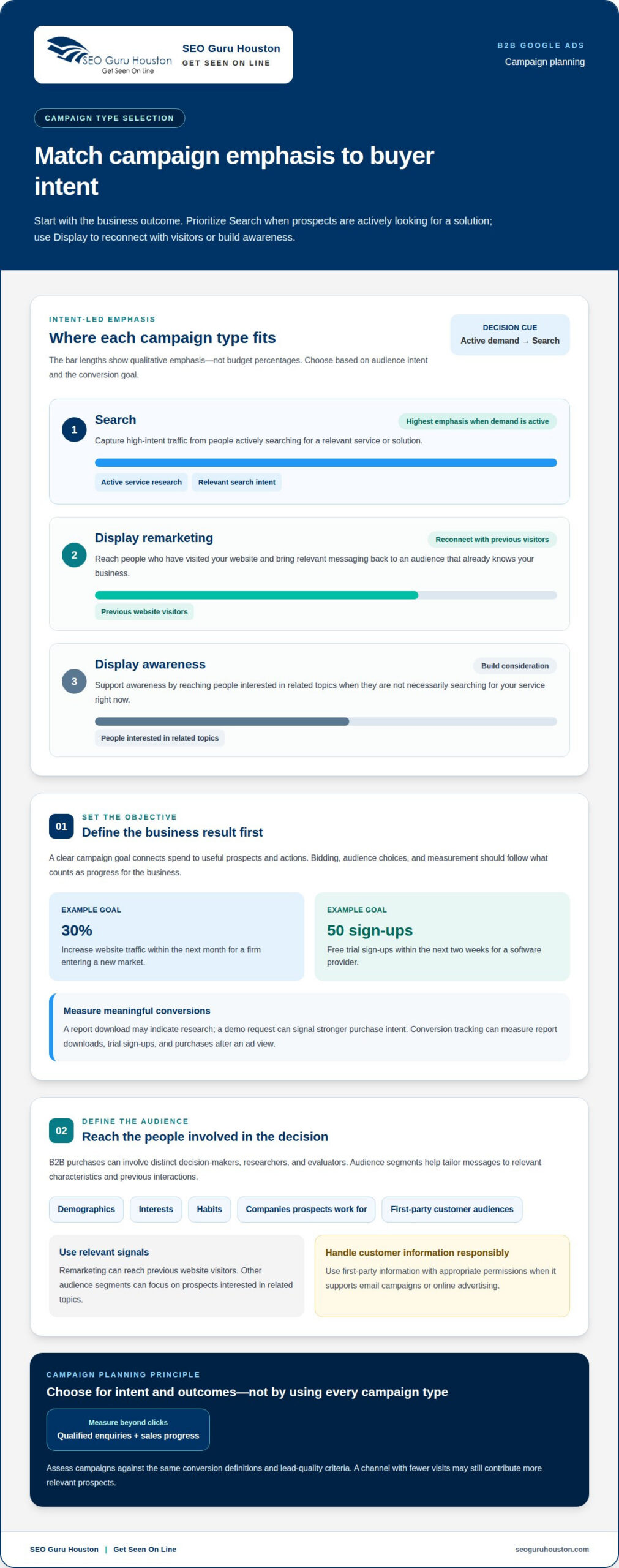
A campaign goal defines the business result advertising should support, such as qualified enquiries or relevant website visits. It matters because bidding, audience choices, and measurement all depend on what counts as progress. For example, a firm entering a new market might aim to increase website traffic by 30% within the next month. A software provider could instead aim for 50 free trial sign-ups within the next two weeks.
Choose a conversion that reflects genuine buyer interest, then distinguish it from lighter engagement. A report download may indicate research, while a demo request can signal stronger purchase intent. Google Ads conversion tracking can measure report downloads, trial sign-ups, and purchases after an ad view. Comparing these actions helps campaign managers assess keywords and ads against the outcomes that matter.
Audience Targeting Segments
Audience segments group potential buyers by relevant characteristics or prior interactions, including first-party audiences built from a business’s own customer information. This matters because B2B purchases often involve distinct decision-makers, researchers, and evaluators. Google Ads targeting can use demographics, interests, habits, and the companies potential customers work for, helping advertisers tailor messages to business audiences.
Use first-party information only with appropriate permissions when it supports email campaigns or online advertising. A company could offer a research report or invite-only webinar in exchange for customer details, then use those details to shape follow-up messaging. Remarketing can reach previous website visitors, while other audience segments can focus on prospects interested in related topics. Keep each message relevant to the audience’s demonstrated interest.
Campaign Type Selection
For B2B services, Search campaigns can capture high-intent traffic from people actively looking for a relevant solution. Display campaigns can support awareness or remarketing by reaching website visitors and people interested in related topics. Digital marketing agencies such as eastpioneers.com often combine these channels to help businesses attract leads and build a stronger online presence. The best fit depends on the goal: prioritize search when prospects are expressing demand, and use Display to reconnect or build consideration.
What Google Ads campaign types work best for B2B services? Search is suited to active service research, while Display can support remarketing and awareness. Select based on the audience’s intent and the conversion goal, rather than using every campaign type at once.
What Google Ads policies and compliance risks apply to B2B service advertisers? Follow Google Ads policies, describe services accurately, and handle customer information responsibly. If collected details will support email or advertising, use them with the appropriate permissions. Clear consent practices and truthful ad claims help reduce avoidable compliance risks.
Keyword research and competitor targeting
Keyword research connects B2B search intent with the services your campaigns promote. Use Keyword Planner, match types, and search-term reports to refine targeting and limit irrelevant clicks.
Keyword Discovery with Keyword Planner
Google Ads Keyword Planner is a research tool that shows keyword search frequency, competition, and bid costs. These signals help you compare phrases before assigning them to campaigns. For example, separate searches for “B2B payroll software” from broader phrases such as “payroll services” when your offer serves a specific business audience.
Start with the services you sell, then expand each into buyer-focused variations. A consultant might compare “supply chain consulting” with “supply chain audit services” to find language that better reflects a prospect’s need. Use the Planner’s estimates as research inputs, then assess whether each phrase matches your offer and landing page.
Search Match Types
Match types control how closely a person’s search must relate to a target keyword before an ad can appear. They matter because a narrow service phrase and a broad category phrase can attract different intent. Choose settings that balance reach and relevance, then review actual search queries to see how Google Ads interprets your keywords.
For example, a campaign targeting “commercial HVAC maintenance” should distinguish service-specific intent from searches about residential repairs or do-it-yourself advice. Broad targeting can surface related searches, while tighter matching focuses exposure on closer variations. Organize keywords by service theme so the ad copy and landing pages address the same need.
Negative Keywords and Search-Term Reports
Negative keywords prevent ads from appearing for searches that don’t fit your offer. Search-term reports show which queries triggered ads, giving you evidence to add exclusions or refine target keywords. This review matters because even a relevant keyword can attract poor-fit searches through related wording.
For instance, a B2B software provider might exclude “jobs” if employment seekers don’t represent prospective buyers. Review the report for queries about free templates, consumer products, or unrelated services, then add negatives where those searches don’t match the business. Search-term data can also reveal phrases worth testing in paid campaigns or considering for SEO content.
Competitor Targeting
Competitor targeting considers searches that mention competing brands or compare providers. It can reach prospects who know the category and are evaluating alternatives, but the ad and landing page should clearly explain your own offer. Group competitor-related terms separately from service keywords to see whether they attract qualified enquiries.
Review competitor names alongside comparison phrases, such as “alternatives to [brand]” or “[brand] versus [service type].” Assess each query for relevance before adding it, and use clear, factual messaging rather than implying an affiliation. Pair this analysis with a paid search campaign strategy that keeps keywords, ad copy, and landing-page content aligned.
Ad extensions and assets
Google Ads assets add useful details and actions to search ads. For B2B campaigns, choose assets that help decision-makers understand the offer and take a relevant next step.
Give Searchers More Relevant Options
Sitelinks and other Google Ads assets can provide extra information and options within search results. They can also increase an ad’s size, helping it stand out and giving prospects more reasons to click. A B2B consultancy, for example, could use sitelinks to direct different audiences toward relevant service information or a case study.
Keep each option aligned with the ad’s promise. If an ad promotes an operational audit, a sitelink to audit details supports that message better than a broad, unrelated page. Useful assets give prospects a clearer route to explore, while mismatched options can distract from the advertised service.
Use Lead Form Assets for Direct Enquiries
Google Ads lead form assets let potential customers submit their contact information directly within an ad. This can give a busy decision-maker a direct response path without first visiting a website. For example, a B2B provider promoting a consultation could use a lead form asset to capture interest from someone searching for that service.
Choose this format when an in-ad enquiry fits the campaign goal. Make the offer clear, and explain what the prospect is requesting. A lead form is not a substitute for useful service information: people should understand the next step before sharing their details. Compare its enquiries with other campaign actions to assess whether it attracts relevant prospects.
Match Assets to the Ad’s Message
Google Ads assets work best when their information reinforces the search ad and the prospect’s intent. For a software implementation campaign, relevant options might point to implementation details, a case study, or a contact path. Each asset should answer a useful follow-up question rather than repeat the same headline elsewhere.
Review the complete search result as a prospect would see it. Check that the ad, sitelinks, and other assets describe the same service and lead to coherent next steps. If the ad promises a specific business solution, an asset pointing to an unrelated offer breaks that connection.
Review Asset Performance
Use campaign reporting to assess which assets support meaningful actions. Compare lead form submissions with visits to relevant pages, then consider the quality of the enquiries each path generates. A larger ad may attract attention, but clicks alone don’t show whether the added information brought in suitable B2B prospects.
Update assets when their destination or message no longer reflects the campaign. For example, if a sitelink points to outdated service information, revise it to match the current offer. This keeps the experience consistent from search result to follow-up and makes each asset work toward the same business goal.
Buyer-journey campaign segmentation
B2B prospects need different information as they move from discovering a problem to assessing solutions and contacting a provider. Segment campaigns by that intent, then align the ad, offer, and next step. A research-focused visitor may value a case study, while an evaluator may be ready to compare solutions or request a demo.
Awareness: Reach Prospects Exploring a Problem
At the awareness stage, prospects may search for explanations rather than a specific provider. Search ads can connect relevant queries with useful resources, such as an industry report or case study. For example, a cybersecurity firm could promote a guide to common security challenges instead of pushing a sales meeting to every early-stage visitor.
Google Ads Search campaigns can generate micro-engagements, including resource downloads, case study exploration, and newsletter subscriptions. These actions offer ways to engage people who aren’t yet ready to become sales leads. Treat each as a distinct signal, and use relevant follow-up messaging to nurture interest over time.
Consideration: Help Buyers Evaluate Options
During consideration, prospects compare approaches and assess whether a solution fits their needs. Free trials, demos, testimonials, competitor analysis, and benchmarking can help them evaluate options. A B2B software company, for example, might use an ad leading to a product demo for active evaluators, while a comparison resource serves people still weighing alternatives.
Decision: Make the Next Step Clear
Decision-stage prospects are closer to contacting a provider or beginning a trial. Use focused Search ads for queries that indicate service or solution intent, and make the advertised action clear. For example, an ad promoting a software demo should lead directly to information about that demo, not a general company overview.
Tailor follow-up to the action taken. Someone who explored a case study may need a different prompt from someone who requested a demo. Keep campaign messages aligned with the prospect’s demonstrated interest, and make the path from ad to enquiry straightforward.
Connect Segments Without Blurring Intent
Buyer-journey segmentation works best when each campaign has a defined audience, message, and goal. Separate educational content from demo or trial campaigns so reporting shows which interactions support progress. A visitor who downloads a report can receive relevant nurturing, while a demo request should prompt a more direct sales follow-up.
Review campaign and conversion data together. If resource engagement rises but qualified enquiries don’t, examine the transition from content to the next offer. If demo campaigns attract mismatched prospects, revisit search intent and landing-page messaging. This keeps each stage accountable to the buying task it serves.
Landing pages, ad copy, and Quality Score
Ad relevance doesn’t stop at the click. Your B2B ad, landing page, and conversion path should tell one consistent story.
Landing Page and Ad Copy Alignment
Alignment means the ad promise, target keyword, and landing-page content all address the same buyer need. A decision-maker who clicks an ad for implementation support expects information about that service, not a broad company overview.
Build each page around the search intent and action you want. For example, an ad offering a software demo should lead to a page that explains the demo and makes the next step clear. Use matching language in the headline, supporting copy, and call to action. If the ad targets operations leaders, address their business problem rather than relying on generic claims.
Keep the page focused. A campaign for a specific B2B service can direct visitors to relevant proof, service details, and an enquiry form. Remove competing calls to action that send prospects toward unrelated offers. This creates a clearer route from search to conversion and helps your team understand which message brought the visitor in.
Quality Score
Quality Score is a Google Ads diagnostic that helps advertisers assess keyword, ad, and landing-page relevance. It can highlight where the experience feels disconnected to a searcher. Use it as a signal for investigation, not a substitute for measuring qualified leads and business outcomes.
For example, if a keyword about B2B consulting leads to an ad about general marketing, then a page about unrelated services, the message lacks continuity. Review the keyword, ad copy, and destination together. Make the page answer the question implied by the search, and ensure the ad describes the same offer accurately.
How do you set up conversion tracking and qualify leads from Google Ads? Track meaningful actions such as demo requests, report downloads, and purchases, then compare those conversions with lead quality. Connecting data sources can help campaign systems use relevant signals.
Lead qualification needs a clear definition shared by marketing and sales. For example, a demo request from a decision-maker at a target company may warrant different follow-up from an early-stage resource download. Record the actions and details that distinguish sales-ready enquiries, then assess campaign performance beyond form submissions.
Keep improving the full path, not just the ad. Test a focused headline against a service-specific page, review whether visitors complete the intended action, and refine the message when the page attracts the wrong enquiries. Improve your B2B landing pages by aligning each page with its ad promise and conversion goal.
SEO Guru Houston: Houston SEO Services
SEO Guru Houston helps B2B companies connect campaign strategy with broader search visibility and demand generation. Its Houston PPC Services support paid campaigns, while Houston B2B Marketing and Houston Inbound Marketing can align outreach with how business buyers research and evaluate solutions.
Turn to SEO Guru Houston when your ads need stronger alignment between audience targeting, landing pages, and qualified lead goals, or when paid search should work alongside organic visibility. Houston SEO Services can support that wider search strategy, while PPC focuses on reaching prospects through paid campaigns.
To discuss your B2B marketing goals, contact SEO Guru Houston or visit seoguruhouston.com.
Turn Campaign Learning Into Your Next Growth Move
Your next advantage comes from connecting advertising decisions to what happens after a prospect converts. Build a steady feedback loop between marketing and sales: review which enquiries progress, identify the needs behind qualified opportunities, and use those insights to sharpen future campaign decisions. That discipline makes a Google Ads strategy for B2B services more responsive to real buying signals, rather than simply optimizing for activity.
SEO Guru Houston offers Houston SEO Services, Houston PPC Services, and Houston B2B Marketing. These offerings can support businesses aligning paid search with broader visibility and B2B growth priorities. If your campaigns need a clearer path from ad engagement to business opportunities, consider discussing your goals and the challenges your team wants to address.
Contact SEO Guru Houston today to explore a practical next step for your marketing. Keep testing, keep learning, and build momentum around the prospects your business is ready to serve.
Frequently Asked Questions
How Much Should You Spend on B2B Google Ads?
Set spend according to the lead volume you can handle, your sales capacity, and the campaign data you need to learn. An initial allocation can direct 70% to high-intent search, 20% to remarketing, and 10% to experimental campaigns. Treat this as a starting distribution, then shift budget toward campaigns producing qualified enquiries. Review performance against sales outcomes, not just clicks, before increasing spend.
How to Build a B2B Google Ads Strategy?
Build the plan around a measurable business outcome, a defined buyer, and a clear conversion action. For example, a consulting firm could prioritize qualified assessment requests rather than general page visits. Connect that goal to relevant searches, campaign messages, and a dedicated landing page. Then review conversion and sales data together to distinguish useful leads from actions that show interest but don’t fit your market.
How should B2B service businesses structure Google Ads campaigns and ad groups?
Separate campaigns by service line, objective, or distinct audience need, then group closely related search terms together. A cybersecurity provider might create separate campaigns for incident response and security assessments, with ad groups reflecting specific search themes. This structure makes it easier to tailor ad language and landing pages, and to identify which service themes generate relevant enquiries without mixing results.
Which keywords and match types are most effective for B2B lead generation?
Prioritize keywords that clearly express a business need, such as “enterprise data migration services,” over broad terms like “data.” Choose match types based on how closely searches should relate to each phrase, then inspect actual queries. Add negative keywords for irrelevant intent, such as job searches when recruiting isn’t the goal. The best keyword set reflects your offer and the language prospective buyers use.
How do you target B2B decision-makers by location, industry, and company size in Google Ads?
What are typical Google Ads costs and cost per lead for B2B services in the US?
Costs vary with industry competition, keyword demand, audience intent, and deal size, so a single benchmark can mislead budget decisions. A highly specialized service may face a different auction from a broad business category. Track actual spend alongside qualified leads and sales progression. If leads are plentiful but poorly matched, refine targeting and landing-page expectations before treating a lower cost per lead as better performance.
How should B2B landing pages be designed to improve Google Ads conversion rates?
Give each page one clear purpose that matches the visitor’s search and the ad’s promise. For a technical assessment campaign, explain what the assessment covers, who it serves, and how to request it. Keep the enquiry form focused on information needed for follow-up, and make the next action easy to find. Review completed actions and lead relevance together, then improve the page where prospects drop off.
What bidding strategies and budgets should B2B advertisers use?
Choose bidding based on the campaign objective and the conversion data available. With only 5-6 conversions, automated bidding may underperform; consider Manual CPC until conversion volume builds. Once an advertiser has more than 30 conversions per month, the guidance recommends considering a switch from Maximize Conversions to Maximize Conversion Value. Pair the bid approach with a budget that supports the campaign’s target actions and sales capacity.

