
A cheaper click isn’t the goal; an affordable, qualified lead is. Calculate cost per lead by dividing Google Ads spend by the number of leads generated. To understand how to lower cost per lead in Google Ads, improve the traffic, ads, and landing pages that turn clicks into inquiries. CPL tells only part of the story if those leads aren’t a fit for your business.
Rising costs can make it tempting to cut bids or pause campaigns quickly. A better approach is to find where spend is leaking and strengthen the parts of the campaign that attract and convert suitable prospects. This guide explains how to calculate CPL, assess what a lead is worth, and refine bidding and conversion tracking without losing sight of lead quality.
You’ll also learn how to improve ad relevance, organize campaigns around services and intent, and use search-term reviews and negative keywords to reduce irrelevant clicks. With a clearer view of performance, you can focus on campaigns that generate valuable leads, not just more traffic.
Key Takeaways
- Compare cost per lead with lead quality so you can prioritize campaigns that generate prospects likely to become customers.
- Use reliable conversion tracking to see which ads and campaigns produce meaningful inquiries, then adjust bidding based on that evidence.
- Align keywords, ad copy, and landing-page messaging to attract relevant clicks and make the next step clear.
- Organize campaigns around distinct services, locations, and search intent to make performance easier to assess and optimize.
- Review search terms regularly and exclude irrelevant queries that spend budget without bringing in suitable leads.
1. Bidding strategy and conversion tracking
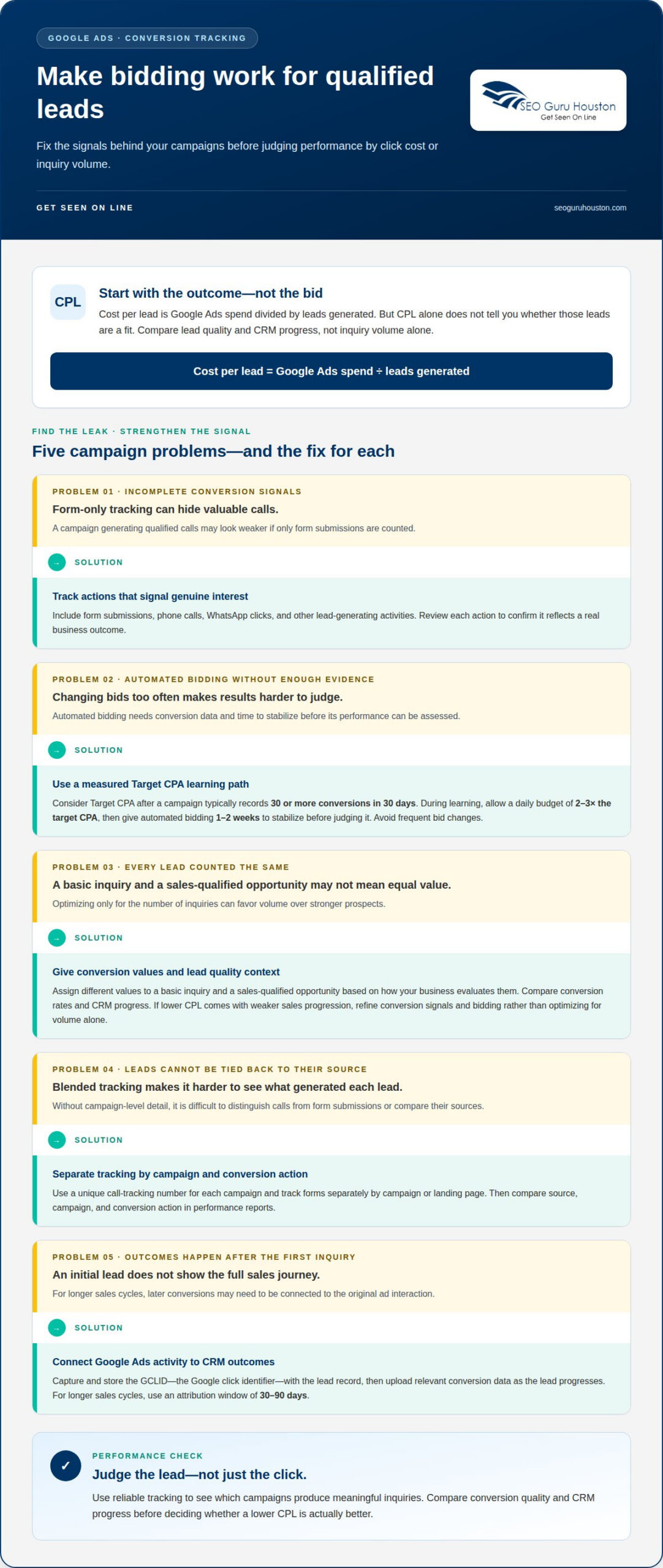
Start with the conversion, not the bid. In Google Ads, track actions that signal genuine interest, such as form submissions, phone calls, WhatsApp clicks, and other lead-generating activities. If you track only form submissions, a campaign generating qualified calls may look weaker than it is. Review each conversion action to ensure it reflects a real business outcome.
Choose a bidding strategy that matches the conversion data available. Target CPA can be considered after a campaign typically accumulates 30 or more conversions in 30 days. During a learning phase, allow a daily budget of 2-3 times the target CPA, then give automated bidding 1-2 weeks to stabilize before judging its performance. Frequent bid changes can make it harder to understand whether the strategy is improving. Advertisers wanting to streamline this process can also utilize AI advertising services like ELK Ads Engine to plan, launch, and optimize campaigns automatically.
Conversion values can help Smart Bidding distinguish leads with different potential. For example, assign different values to a basic inquiry and a sales-qualified opportunity, based on how your business evaluates them. That gives bidding signals more context than counting every form fill equally. For longer sales cycles, use an attribution window of 30-90 days so conversions that happen later can still be connected to the original ad interaction.
Make call tracking and form attribution specific enough to identify what generated each lead. Use a unique call-tracking number for each campaign, and track forms separately by campaign or landing page. Then compare the source, campaign, and conversion action in performance reports. Separate tracking makes it easier to distinguish campaigns that drive calls from those that generate form submissions.
For offline conversion tracking, connect Google Ads interactions with later CRM outcomes. Capture and store the GCLID, Google’s click identifier, with the lead record when someone submits a form or calls. As the lead progresses through the pipeline, upload the relevant conversion data to Google Ads. This connects campaign activity to milestones beyond the initial inquiry and helps bidding learn from outcomes closer to revenue.
Google Ads policies govern advertising and conversion tracking. Collect only the information needed to measure lead outcomes, and align notices and consent with the privacy requirements that apply to your audience. To assess lead quality, compare conversion rates and CRM progress, not just inquiry volume. If a lower CPL comes with fewer qualified opportunities or weaker sales progression, refine your conversion signals and bidding strategy instead of optimizing for volume alone.
2. Quality Score and ad-to-landing-page relevance
A relevant click is more valuable than a cheap click that leaves immediately. Quality Score is associated with how closely keywords, ads, and landing pages align. Improving those signals can strengthen campaign efficiency while bringing more suitable visitors to your offer. A Quality Score of 8-10 can reduce cost per click by as much as 50%, but the score isn’t a substitute for measuring actual leads.
Start by aligning the message. If a keyword targets emergency plumbing, the ad should promote emergency plumbing, and the landing page should explain that service. A visitor who lands on a broad company homepage has to search again for the offer. Match each ad group’s intent with a focused page, a clear service description, and one lead-generation call to action.
Optimize the page around the visitor’s decision. Put the service, location, and key benefit near the top so people can quickly confirm they’ve found the right page. Keep the form focused on essential qualifying details, and make the submit button easy to find. If the ad offers a quote request, make requesting a quote the obvious next step.
Mobile experience demands its own review. Open the landing page on a phone and test the full path: load, read, tap, and submit. Remove layout clutter, shorten unnecessary form fields, and make buttons easy to use on a small screen. A strong score won’t fix confusing copy or a broken form.
Use controlled tests to find which changes improve conversion rates. Change one meaningful element at a time, such as the headline, form length, or call-to-action wording. Compare completed leads, not just clicks. The recommended threshold is 100 conversions per variation for an A/B test, helping reduce the risk of acting on a small, unrepresentative sample. Keep the winning version only when it brings relevant prospects.
Review the whole journey together: search intent, keyword, ad promise, landing-page content, and completed conversion. If clicks rise but leads don’t, inspect the page’s message and form before changing bids. If the page needs a clearer structure or stronger conversion path, website development and landing pages can support that optimization work.
3. Campaign structure by service, location, and search intent
Give each service its own campaign to keep performance clear. For example, a roofing company can separate roof repairs from full replacements. Each campaign can then use relevant keywords, ads, and landing pages. This structure helps reveal which offer attracts qualified inquiries and prevents a strong service from being obscured by weaker results in blended reporting.
Separate campaigns by location when geography affects the offer or lead value. A business serving several communities can use focused geographic targeting instead of combining every area. Check location settings against the areas the business serves, then compare results. If one area brings clicks but few suitable leads, adjust its targeting or budget rather than changing every campaign.
Let search intent shape the ad groups within each service campaign. Someone searching for “roof repair company” may be ready to hire, while someone searching for “how roof repairs work” may be researching. Group closely related searches and tailor the ad to that intent. For e-commerce, organize campaigns around relevant product categories or shopping goals, then assess which categories generate valuable orders, not just traffic.
Scheduling can also sharpen targeting. Review when inquiries arrive and when your team can respond, then compare conversion quality across days and times. If a campaign receives inquiries outside operating hours, check whether those leads progress through the sales process. Use the results to refine ad schedules, rather than assuming every late or weekend click is wasted. Review location, device, and time segments together because one change can affect another.
Keep analysis ongoing, but base decisions on comparable periods and outcomes. Review campaign-level clicks, conversions, lead quality, and sales progression together. If a service campaign draws volume but few qualified prospects, inspect its search intent, geographic reach, and offer before shifting budget. Don’t merge campaigns just to simplify the account; that can hide which service or location needs attention.
Remarketing gives campaigns another way to reach people who showed interest but didn’t convert on their first visit. A visitor who viewed a service page can see a relevant follow-up ad, while someone who completed a lead form should be excluded from that audience. Remarketing campaigns typically achieve cost per lead 50-70% lower than cold-traffic campaigns. Treat this as a comparison to evaluate in your own account, and track lead quality alongside cost.
4. Negative keyword lists and search-term audits
Research keywords around the searches that signal a real need. In Google Ads, review the search-term report to see the queries that triggered your ads, then compare each query with the service or product advertised. Keep relevant terms, add promising high-intent phrases, and exclude searches that clearly don’t fit. Long-tail keywords can have average cost per click up to 70% lower than broad, head terms.
Negative keywords prevent ads from showing for selected irrelevant searches, reducing clicks that consume budget without a realistic path to conversion. For example, a company that sells services but isn’t hiring could exclude “jobs”; it might also exclude “free,” “courses,” or unrelated locations when those searches don’t match its offer. Adding negative keywords can reduce wasted Google Ads spend by up to 30% in some accounts.
Build your negative keyword list from actual search behavior, not assumptions alone. Check the search-term report regularly, group irrelevant queries by theme, and add negatives at the campaign or account level where appropriate. A “jobs” exclusion may suit several service campaigns, while an unrelated-location exclusion may apply to just one geographic campaign. Review each exclusion against the ads it affects to avoid blocking useful searches.
Refine keyword targeting by starting with specific terms closely tied to your offer, then expand when search-term data supports it. Phrase and exact match can give advertisers more control over when ads appear. For instance, a home remodeling company can distinguish searches for “kitchen remodeling company” from general searches about kitchen design. Match each term to the service, location, and intent represented in the ad.
Don’t let high click volume disguise weak performance. In Google Ads, compare each keyword’s clicks, conversions, and cost per acquisition; pause a keyword or ad group when it attracts many clicks, few conversions, and a higher CPA. Before pausing, inspect its search terms and landing-page match. A broad query may be wasting spend, while a specific query could need a better ad or page.
Keep a change log with the date, keyword, action, and reason. After each weekly audit, compare relevant traffic and lead outcomes against the previous period. Campaigns using 200 or more negative keywords can see CPA up to 67% lower, but a large list isn’t a goal by itself. Add exclusions based on evidence, then review whether they remove waste without suppressing qualified searches.
5. Calculating cost per lead
Calculate Google Ads cost per lead by dividing total ad spend by the number of leads received. Use the same reporting period for both figures, and count leads consistently. Comparing monthly spend with leads from a different period produces a misleading result.
Then separate raw CPL from qualified CPL. The second measure shows what it costs to attract a prospect who fits your offer, rather than simply generate a contact.
What is a good Google Ads CPL in the US? There’s no universal target because industries, competition, lead quality, and sales conversion rates differ.
Connect CPL to sales outcomes before deciding whether it’s too high. Consider the hypothetical examples of a $50 lead converting at 20% and a $15 lead converting at 2%. A lower CPL can therefore deliver worse economics when fewer leads become customers.
Track averages over consistent periods and compare campaigns with similar services, locations, and lead definitions. An account-wide average can hide a costly campaign or make a strong one look weaker. Record spend, total leads, qualified leads, and resulting sales together. Then calculate raw and qualified CPL for each campaign using the same formula and time period.
Use the figures to set a working target from your own sales economics. Estimate how many qualified leads become customers, then compare the resulting acquisition cost with the value of a sale. If CPL rises, identify whether spend increased, lead volume fell, or lead quality changed. That diagnosis points toward the right optimization, rather than an arbitrary budget cut. For a stronger conversion path, improve your lead-generation landing pages so the page supports the offer and captures suitable inquiries.
SEO Guru Houston: Houston SEO Services
SEO Guru Houston helps businesses connect paid search strategy with broader efforts to attract and convert qualified prospects. If your Google Ads campaigns need closer analysis, our PPC services can support improvements to targeting, campaign structure, and lead measurement. For businesses building longer-term visibility alongside paid acquisition, our comprehensive SEO services can complement that approach.
When leads involve longer B2B decisions, specialized B2B marketing and inbound marketing frameworks can help align demand generation with how prospects research and evaluate solutions. The right next step depends on where your funnel needs attention, whether that’s campaign performance, organic visibility, or the path from first visit to sales inquiry. Contact SEO Guru Houston to discuss your marketing goals and discover strategies to lower cost per lead in Google Ads.
Turn Campaign Insights Into Your Next Growth Move
Make optimization a repeatable habit, not a one-time cleanup. Set regular review points, record each adjustment, and connect campaign decisions to the leads your sales team values. This discipline helps you identify which tests deserve more investment and which assumptions need another look. A practical process for how to lower cost per lead in Google Ads gives your team a consistent way to turn campaign insights into its next growth move.
SEO Guru Houston offers Houston PPC Services, alongside Houston SEO Services and Houston B2B Marketing. If you’re ready to build a stronger approach to how to lower cost per lead in Google Ads, bring your campaign goals and lead-generation priorities into the conversation. Together, you can identify where focused strategy may help your business move forward. Contact SEO Guru Houston today to discuss your next step.
Frequently Asked Questions
How Do I Calculate the Cost-Per-Lead and Why Does It Matter?
Divide Google Ads spend for a reporting period by the leads attributed to that spend. The result helps compare campaign efficiency, but it isn’t a complete measure of profitability. A campaign may produce fewer leads yet create more sales opportunities. Compare CPL with qualification and sales outcomes, using the same lead definition and reporting period so one campaign doesn’t look stronger simply because it counts more actions.
How do you calculate cost per lead and conversion rate in Google Ads?
Calculate CPL by dividing ad spend by leads. Conversion rate can show how often ad clicks lead to the action you’re tracking, so define that action consistently before comparing campaigns. Keep the conversion action consistent: don’t mix submitted inquiries and phone calls unless both count as leads in your reporting. For a useful comparison, align the date range and campaign scope for spend, clicks, and conversions before interpreting either metric.
How can you improve Google Ads conversion tracking for lead generation?
Define which actions count as leads, then test that each action records correctly before using the data for optimization. A form confirmation should register after a successful submission, not just when someone opens the form. Review phone-call and form records for duplicate counting, and connect CRM outcomes to the original ad interaction where possible. This gives you a clearer view of which campaigns generate genuine inquiries and which merely trigger trackable events.
How can match types and search terms be optimized to lower cost per lead?
Use phrase and exact match to focus on searches closely related to your offer, then inspect actual queries in Google Ads search-term reports. Keep terms that show relevant intent, add useful specific phrases, and exclude queries that don’t fit. For example, a business seeking service customers could filter out research or employment searches when those visitors aren’t prospects. Recheck exclusions to avoid accidentally blocking useful variations.
How do landing page changes improve Google Ads lead conversion rates?
How should you adjust bids, budgets, and bidding strategies to reduce cost per lead?
Base bid and budget changes on qualified-lead outcomes, not click volume alone. Avoid cutting every campaign after a brief dip; first identify whether the cause is weak search intent, limited conversion volume, or a change in lead quality. Set an efficiency goal for each campaign, make a focused adjustment, and allow enough time to assess its effect before changing the strategy again.
How can ad copy and assets improve lead quality and lower cost per lead?
Use ad copy to make the offer and intended audience clear before someone clicks. A B2B provider, for instance, can name the business audience and the specific service, helping discourage unrelated consumer inquiries. Choose ad assets that reinforce useful details, such as a relevant service or contact option. Review the search query, ad engagement, and resulting lead quality together; a higher click-through rate alone doesn’t prove the campaign attracts better prospects.
How do location, device, and schedule targeting affect Google Ads lead costs?
These settings shape which searches can trigger ads, so compare performance by location, device, and time before changing targeting. Mobile visitors may behave differently from desktop visitors, while leads from one service area may qualify more often than others. Review completed leads and sales progression in each segment, not just clicks. Refine the specific underperforming segment, and preserve targeting that brings suitable prospects.

