
More reviews start with better service, not bigger incentives. To understand how to get more product reviews on Amazon, make the buying experience worth talking about, then use Amazon’s Request a Review feature 4-30 days after delivery. Keep every request neutral: don’t offer discounts, free products, or other rewards in exchange for a review.
It’s frustrating to earn a sale and hear nothing afterward, especially when shoppers rely on reviews to judge whether a product is right for them. A steady, policy-conscious review process can help build trust and give your listing more useful customer feedback. This guide explains how to improve the experience before and after purchase, use package inserts and customer communications appropriately, and make social media part of the conversation without pressuring buyers. You’ll also see why authentic reviews matter for shopper confidence, sales, and product visibility, and which common tactics can put that trust at risk.
Key Takeaways
- Make product quality, clear information, and responsive customer care the foundation of a review strategy.
- Use Amazon’s Request a Review feature within its allowed timing, and keep every request neutral and respectful.
- Design package inserts and follow-up messages to help customers, never to reward or pressure them for a review.
- Use email and social media to build genuine engagement while keeping review requests separate from incentives and promotional pressure.
- Connect customer trust and product visibility with a broader marketing strategy that supports your Amazon presence.
Why are Amazon Reviews so important?
Amazon describes a zero-tolerance policy for reviews that mislead or manipulate customers. These tactics breach its review rules, so build your process around inviting honest feedback rather than trying to control ratings.
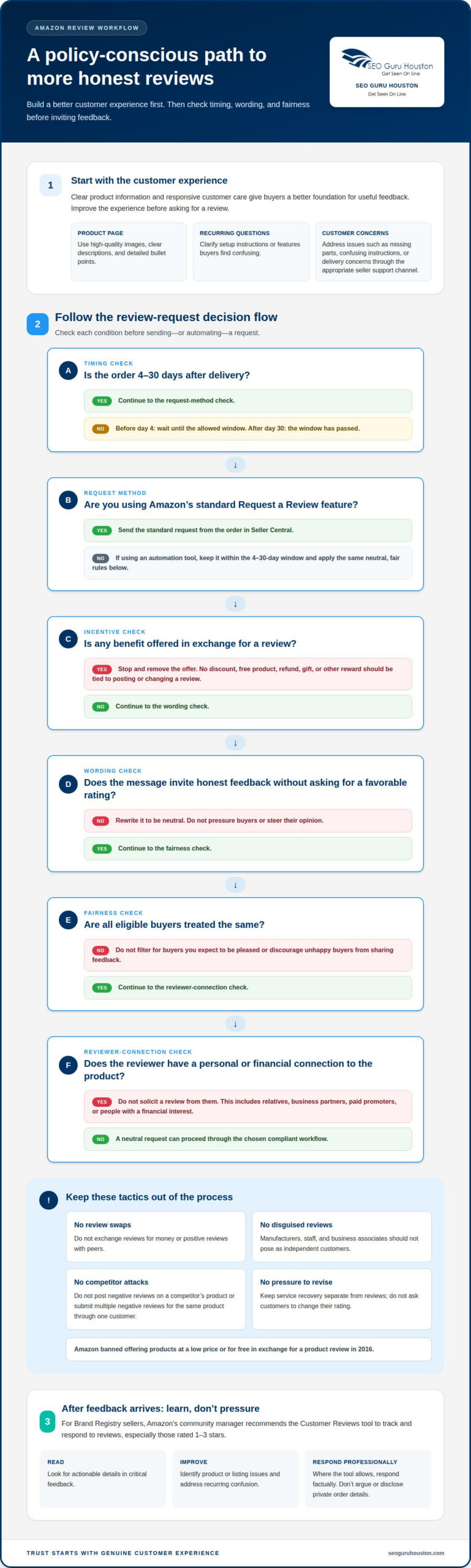
- Ask for honest feedback, never a favorable rating. Amazon encourages customers to share both favorable and unfavorable opinions. Keep your request neutral: invite buyers to describe their experience, not to praise the product. For example, ask what worked well and what could be clearer. This leaves reviewers free to share their genuine views.
- Never trade a benefit for a review. Amazon banned offering products at a low price or for free in exchange for a product review in 2016. A discount, refund, gift, or other reward tied to posting a review turns feedback into an incentive. Keep any promotion separate from review requests, and don’t condition a benefit on whether a customer writes or changes a review.
- Keep the request open to every buyer. Don’t contact only customers you expect to be pleased, or steer unhappy buyers away from posting. Selective requests can distort the feedback shoppers see. Use the same neutral invitation for eligible customers, whether the purchase was straightforward or involved a product question. A balanced range of feedback helps shoppers decide whether the item suits their needs.
- Exclude reviewers with a personal or financial connection. Amazon doesn’t allow reviews from people with a direct or indirect financial interest in a product. It also bars reviews from people perceived to have a close personal relationship with the product’s owner, author, or artist. Don’t ask a relative, business partner, or paid promoter to pose as an ordinary shopper.
- Don’t write reviews while pretending to be a customer. Amazon doesn’t allow manufacturers to review their products while posing as unbiased shoppers. Keep seller communications separate from customer opinions, and don’t ask staff or business associates to hide their connection. Manufacturers can improve product information and customer service, but shouldn’t create praise that appears independent.
- Reject review swaps and competitor attacks. Amazon prohibits reviews exchanged for monetary rewards. It also doesn’t allow an artist to post a positive review of a peer’s album in return for a positive review. Sellers can’t post negative reviews on a competitor’s product or submit multiple negative reviews for the same product through one customer. Focus on improving your own listing and customer experience.
Customer service and review requests
Use reliable customer care to resolve problems, then invite buyers to share honest feedback. Amazon’s built-in request tool provides a direct, consistent way to ask.
-
Use Amazon’s Request a Review Feature
Open the order in Seller Central and use Amazon’s Request a Review feature to send its standard review request. Sellers can send it 4-30 days after delivery, so make the request within that window. Keep the message neutral and use Amazon’s button rather than adding pressure or asking for a particular rating. Amazon’s community manager recommends this feature for requesting product reviews.
-
Automate Compliant Review Requests
Start with Amazon’s Request a Review button as the simplest compliant workflow. It can standardize requests without requiring custom persuasive language. If you use an automation tool to manage order follow-up, make sure it respects the 4-30-day timing and doesn’t offer rewards, filter for satisfied buyers, or ask customers to change reviews. The safest process automates the neutral request, not the customer’s opinion.
- Improve the product experience before asking. Review the listing alongside customer questions. Amazon’s community manager recommends high-quality images, clear product descriptions, and detailed bullet points on product detail pages. Look for recurring questions: if buyers misunderstand setup, clarify the instructions; if a feature is unclear, explain it accurately. Clear expectations can reduce avoidable frustration and help customers give more useful feedback.
- Resolve problems with focused service. When a customer reports a missing part, confusing instructions, or a delivery concern, address the issue through the appropriate seller support channel. Give a clear next step and focus on the problem rather than steering the customer toward a positive review. Good service can improve the experience, but keep service recovery separate from a review request.
- Handle critical feedback constructively. For Brand Registry sellers, Amazon’s community manager recommends using the Customer Reviews tool to track and respond to reviews, especially those rated 1-3 stars. Read the review for actionable details, identify a product or listing issue, and make a factual, professional response where the tool allows. Don’t argue, disclose private order details, or ask the reviewer to revise their rating.
Best tools for automating compliant requests? Start with Amazon’s Request a Review feature in Seller Central, which provides a standard, consistent request. Keep any additional workflow focused on eligible orders and neutral wording.
How can sellers improve quality and customer experience? Compare customer questions and critical feedback with the product page, images, instructions, and product itself. Address recurring confusion or defects before sending another review request.
How should sellers respond to negative reviews? Identify the specific issue, respond professionally, and use the feedback to improve the product or listing. For Brand Registry sellers, the Customer Reviews tool supports tracking and responding to critical reviews.
For sellers aligning review workflows with their wider marketplace strategy, Amazon marketing support can help connect customer experience and listing performance.
Package inserts and review requests
Use each package insert to improve the product experience and make a neutral review request easy to understand. A thank-you card can invite honest feedback, but never make a reward conditional on leaving a review.
- Give the insert a customer-first purpose. Start with practical information that helps someone use the product, such as a setup tip or care instruction. For a kitchen tool, explain a useful first-use step before mentioning feedback. This gives the insert value on its own, rather than making it packaging that exists only to solicit praise.
- Write one neutral invitation. Add a short sentence asking the buyer to share an honest product review on Amazon. Avoid asking for five stars, positive comments, or a specific description. A simple invitation makes room for favorable and unfavorable opinions instead of pushing customers toward a preferred response.
- Keep rewards out of the request. Never offer a discount coupon, free product, refund, or other benefit in exchange for a review. Amazon banned offering products at a low price or for free in exchange for a product review in 2016. Keep promotions separate, and don’t imply that a customer must post feedback to receive a benefit.
- Make the message clear and brief. Use plain language buyers can understand while unpacking their order. For example, thank them for choosing the product and invite them to share their experience on Amazon. Avoid emotional pressure, urgency, or claims that a review is required. A concise card is easier to scan than a dense block of promotional copy.
- Use a handwritten note with care. A personal thank-you can make an order feel considered, and sellers have suggested handwritten notes as a review prompt. Keep the message neutral. Don’t write different notes based on whether a buyer seems satisfied, or ask only customers who contacted you with praise.
- Check every insert before printing. Read the card as a customer would: does it offer help, invite honest feedback, and avoid rewards or requests for a preferred rating? Remove wording such as “show us five stars” or “send a review for a coupon.” Reviewing the printed insert helps catch messages that may be less clear in a draft.
- Keep the package and follow-up consistent. If the insert invites feedback, use the same neutral approach in later customer communications. Don’t pair a thank-you card with a discount conditioned on a review, or ask buyers to contact you before posting. Consistency avoids mixed messages and keeps the request focused on genuine product experience.
Using email and social media to request reviews
Use email and social channels to make useful customer communication more personal, not more pressuring. Keep the request clear, relevant to the purchase, and separate from promotional offers.
- Separate review requests from campaign emails. Send a distinct message to customers who bought a specific product, rather than burying the request in a sales newsletter. For example, a follow-up about a reusable water bottle can ask about the buyer’s experience with that item. Make the purpose clear, and don’t combine the invitation with a coupon or discount offer.
- Organize your email contact list by customer relationship. Keep purchase records and marketing subscribers distinct so each message fits its audience. Someone who bought a particular item should receive relevant information about that item, not an unrelated product blast. Use a clear sender name and subject line, and explain why the customer is receiving the message.
- Personalize with details that help the customer. Address the recipient naturally and mention the product they purchased, such as a specific model or use case. A forum participant endorsed personalized customer communication because customers appreciate it. Keep personalization accurate and restrained: don’t assume the purchase went well or imply you know how the customer feels.
- Write a neutral email invitation. Ask the buyer to share an honest product review on Amazon, using plain language and one clear next step. For example: “If you’ve tried the product, you can share your experience on Amazon.” Don’t ask for a particular star rating, suggest specific praise, or make the invitation sound like a condition of receiving support.
- Use social media for broad, open invitations. A brand post can remind all customers that product feedback helps other shoppers understand real-world use. Keep the message public and general instead of contacting only followers who have praised the product. For example, invite anyone who has purchased the item to leave an honest review through Amazon.
- Keep social replies focused on the conversation. If a customer comments about a product on Instagram or Facebook, answer their question directly before mentioning feedback. Don’t turn a support exchange into pressure to leave a review. You might clarify how to use a feature, then leave the customer free to decide whether to review the purchase.
- Review each message before sending. Check the recipient, product reference, and call to action. Remove language that rewards, filters, or pressures customers, and ensure emails and social posts don’t promise a benefit for posting. A quick final edit can catch an outdated product name or overly promotional wording before it reaches customers.
Importance of Amazon reviews for trust, sales, and product visibility
In 2023, 61% of consumers said they were influenced by the product with the best ratings and reviews. Treat reviews as customer decision support, then improve the listing and product experience behind them.
- Read reviews as evidence of shopper concerns. A product rating gives shoppers a quick signal, while review details explain the experience behind it. Comments about sizing, setup, or durability, for example, can help potential buyers decide whether the product suits their needs. Track recurring themes to identify unclear instructions, mismatched expectations, or opportunities to improve the product.
- Use customer feedback to sharpen the listing. Compare review language with the images, title, description, and bullet points on your Amazon detail page. If shoppers repeatedly ask whether a component is included, clarify that in the listing. If buyers misunderstand a feature, explain how it works in plain language. Accurate details help customers make informed choices and reduce avoidable confusion.
- Value useful reviews over a perfect-looking score. A mix of specific customer experiences gives shoppers more context than generic praise. Northwestern University research suggests that five quality reviews can increase conversion rates by 270%. Treat that finding as a reason to prioritize detailed, authentic feedback, not as a promised result for every product or listing.
- Make review themes part of product decisions. Sort feedback into practical categories, such as quality, packaging, instructions, and fit. Choose a recurring issue to investigate, such as unclear assembly directions. Update the relevant product detail or customer guidance, then monitor later feedback to see whether the change addresses the confusion.
- Connect reviews with the complete buying experience. Reviews can reveal gaps that advertising or listing visits alone won’t explain. If shoppers praise a product but mention confusing setup, improve the instructions before increasing promotion. If feedback shows the item differs from shoppers’ expectations, revise the listing before driving more traffic. Keep the product, detail page, and customer experience aligned.
- Use review insight to guide marketplace marketing. Strong feedback helps clarify which product benefits customers value, while criticism can expose friction that limits confidence. Apply those insights to listing content and campaign messaging without presenting reviews as proof of guaranteed sales or ranking gains. For a coordinated approach, get support with Amazon marketing that connects customer feedback with listing and campaign decisions.
SEO Guru Houston: Houston SEO Services
SEO Guru Houston can help connect your Amazon review strategy with a broader digital marketing plan. When customer feedback reveals what shoppers value, that insight can inform how you present your business across relevant channels. Comprehensive SEO Services can support organic visibility, while expert PPC Services can help structure paid campaigns. Strategic Inbound Marketing and specialized B2B Marketing can support wider audience engagement and lead generation.
Turn to SEO Guru Houston when your review process is in place but your marketing needs better alignment around visibility, audience, and messaging. SEO, PPC, and Amazon Advertising Services can support broader marketing efforts, while customer feedback helps you refine product messaging. Reviews aren’t a guaranteed shortcut to sales or rankings.
Contact SEO Guru Houston to discuss your marketing priorities and next steps.
Make customer insight your next growth move
Turn review feedback into a practical decision process. Assign someone to track recurring customer themes, then match each issue with a next step, such as refining product information or improving support. This connects efforts to get more product reviews on Amazon with a better experience for the next buyer.
As your marketplace strategy develops, align customer insights with the way shoppers discover and evaluate your business. SEO Guru Houston offers Houston SEO Services, Houston PPC Services, and Houston B2B Marketing to support broader visibility and audience growth. The right next step depends on where your marketing needs stronger alignment, not on chasing reviews in isolation.
If you’re ready to strengthen that strategy, contact SEO Guru Houston for SEO help. Keep building from real customer feedback, and make each improvement count.
Frequently Asked Questions
What are Amazon’s current policies for requesting product reviews?
Amazon allows sellers to invite customers to share genuine product feedback, but not to dictate what they say. Keep requests neutral, and don’t use promotional language or select only buyers expected to leave positive feedback. Ask purchasers to describe their experience, whether favorable or critical. Separate review invitations from customer support, marketing offers, and any attempt to influence a product’s rating.
How can sellers use Amazon’s Request a Review button?
In Seller Central, locate an eligible order and use its Request a Review option to send Amazon’s standard invitation. The feature allows requests 4-30 days after delivery. For sellers considering how to get more product reviews on Amazon, a routine for submitting eligible requests can create consistency without persuasive custom messages. Avoid asking buyers for a specific rating or sending additional messages that pressure them.
How do Amazon Vine reviews work, and what does the program cost?
Amazon Vine lets eligible brand owners provide products to Vine reviewers, who can publish honest reviews, including negative ones. Enrollment is for Brand Registry products with fewer than 30 reviews, and products must be available through Fulfillment by Amazon. Fees depend on the enrolled quantity and ASIN. Amazon doesn’t charge an enrollment fee if the product receives no reviews within 90 days after enrollment.
When and how should sellers follow up with buyers to request reviews?
Use Amazon’s Request a Review feature 4-30 days after delivery, rather than relying on an arbitrary schedule based on purchase date. For example, review recently delivered orders and submit eligible requests through Seller Central. A sound plan for how to get more product reviews on Amazon keeps the invitation separate from customer support. Resolve issues directly, without seeking a favorable review or asking buyers to change existing feedback.
What are Amazon’s rules on review incentives, rebates, and compensation?
Don’t offer money, rebates, discounts, free products, refunds, or other benefits in exchange for a review. Amazon banned offering products at a low price or for free in exchange for a product review in 2016, and sellers are prohibited from offering review incentives. Keep promotions independent of review activity. Never make a benefit conditional on posting, editing, or removing feedback.

