
Tag Archives: listing optimization

Ways to Increase Amazon FBA Sales With Better Listings

More traffic won’t fix a listing that fails to convert, and more orders won’t help if advertising eats the margin. To understand how to increase sales on Amazon FBA, strengthen the product page, target relevant searches, price competitively, and build buyer confidence through genuine reviews. Keep break-even ACoS in view: calculate it by dividing contribution before ads by the selling price, then multiplying by 100.

When sales stall, it’s easy to focus on ad spend, but growth often starts with the listing. Clear images, persuasive copy, relevant keywords, and a shopper-appropriate price give every campaign a stronger foundation.

This guide explains how to improve listings, attract traffic, choose keywords, assess pricing, and encourage reviews while protecting profitability. It also shows how to measure performance and make informed adjustments instead of relying on guesswork.

Key Takeaways

  • Make product pages easier to find and more persuasive with clear titles, useful images, and benefit-focused copy.
  • Use your Amazon Storefront and relevant external channels to bring qualified shoppers to your listings.
  • Review competitor pricing and promotions while protecting your contribution margin and break-even ACoS.
  • Research search terms from relevant products, then use them naturally in listings and advertising campaigns.
  • Build buyer confidence with strong product quality and compliant review requests, then use feedback to improve your listing.

1. Product listing optimization

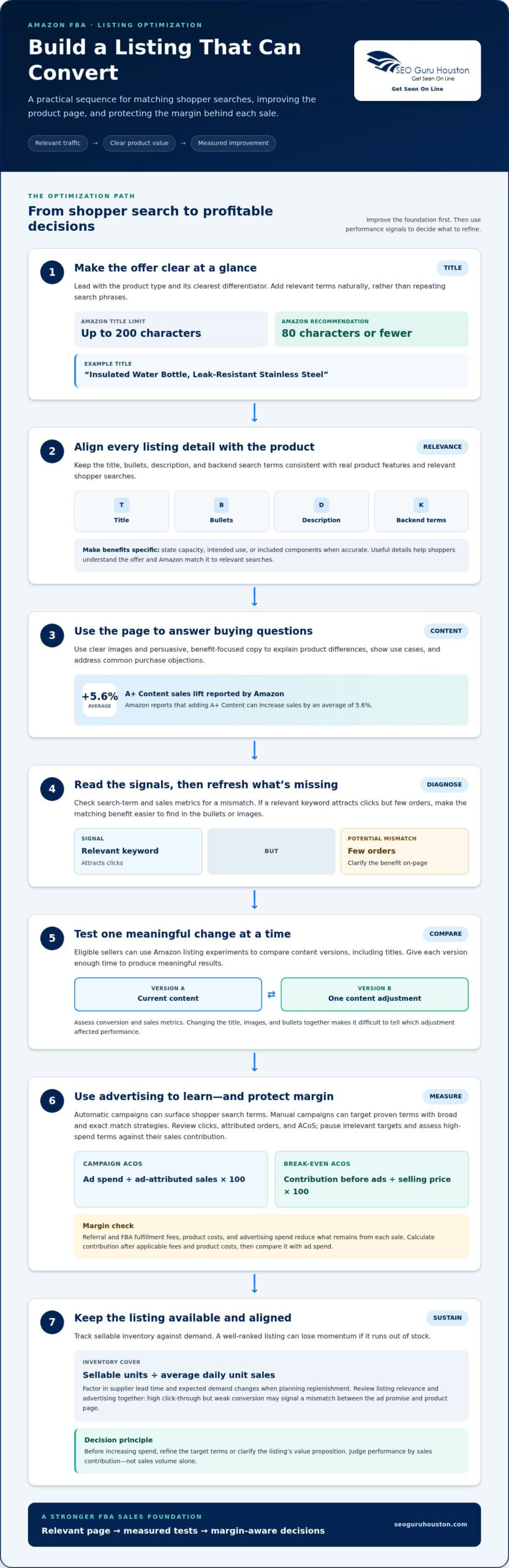
Your listing must match the shopper’s search and answer their buying questions fast. Start with the product title: Amazon allows up to 200 characters and recommends 80 characters or fewer. Lead with the product type and its clearest differentiator, then add relevant keywords naturally. A title such as “Insulated Water Bottle, Leak-Resistant Stainless Steel” is more useful than a string of repeated search terms.

To improve product ranking and organic visibility, align the title, bullets, description, and backend search terms with the product’s actual features and relevant shopper searches. Describe benefits specifically, including capacity, intended use, or included components when accurate. Relevant details help shoppers understand the offer and Amazon match the listing to appropriate searches.

Refresh listing content when search-term or sales metrics show a mismatch. For example, if a relevant keyword attracts clicks but few orders, make the corresponding benefit easier to find in the bullets or images. Amazon reports that adding A+ Content can increase sales by an average of 5.6%. Use that space to clarify product differences, explain use cases, and address common purchase objections.

Test changes rather than guessing. Eligible sellers can use Amazon listing experiments to compare content versions, including titles. Give each title version enough time to produce meaningful results before comparing them. Change one meaningful element at a time, then assess conversion and sales metrics. If you change the title, images, and bullets together, you won’t know which adjustment affected performance.

Use advertising to test relevance as well as generate traffic. Automatic campaigns can surface search terms shoppers use; manual campaigns can then target proven terms using broad and exact match strategies. Control spend by reviewing clicks, attributed orders, and ACoS, which equals ad spend divided by ad-attributed sales, multiplied by 100. Pause irrelevant targets and assess high-spend terms against their sales contribution.

Amazon referral and FBA fulfillment fees, product costs, and advertising spend all reduce the amount left from each sale. Calculate your contribution after applicable fees and product costs, then compare it with ad spend. This sets a practical margin limit for campaign decisions, rather than measuring success by sales volume alone.

Avoid lost FBA sales by tracking sellable inventory against demand. Divide sellable units by average daily unit sales to calculate inventory cover, then factor in supplier lead time and expected demand changes when planning replenishment. Even a well-ranked listing can lose momentum if it runs out of stock.

Review listing relevance and advertising together. A high click-through rate but weak conversion may signal a mismatch between the ad promise and the product page. Before increasing spend, refine the target terms or clarify the listing’s value proposition.

2. Amazon Storefront and external traffic

An Amazon Storefront gives your brand a curated destination within Amazon, beyond an individual product detail page. Use it to group related products, introduce product ranges, and guide shoppers to relevant options. For example, a kitchen brand could organize cookware by cooking task, helping visitors find a suitable product. Keep each page focused: too many choices can obscure the next step.

Build the Storefront around how customers shop, not your internal catalog structure. Create clear categories, use concise product explanations, and feature items available to buy. Then review Amazon traffic and sales metrics by product or page. If visitors reach a category but don’t continue to a product, simplify the layout or make the grouping more intuitive. This gives the Storefront a measurable role in your sales strategy.

External traffic can introduce your products to shoppers who haven’t found them through Amazon search. Social media gives brands a place to demonstrate a product in context, answer common questions, and direct interested viewers to the relevant Amazon page. The research reports that 27% of customers use social media for product discovery and 67% of consumers buy products through social platforms. Treat those figures as a reason to test relevant content, not as a promise of results for any individual brand.

Choose a specific audience and message before publishing. A home organization brand, for example, might show a storage product solving a particular household problem and link to its Amazon listing. Keep the post and destination consistent: if social content promotes a specific size or feature, make it easy to find on the Amazon page. Track referral traffic and attributed orders to identify useful visits, rather than judging performance by views alone.

Amazon’s Brand Referral Bonus averages 10% of the sales price for sales generated by directing traffic to Amazon listings. Include that program in your external-traffic planning, and assess the resulting sales alongside the campaign’s costs. Amazon DSP campaigns can also run outside the Amazon ecosystem, using audience segmentation and shopper retargeting to reach defined groups. These options can help brands expand beyond organic marketplace discovery, but campaign targeting still needs a clear audience and relevant product message.

Coordinate every traffic push with inventory. A successful social post or external campaign can send more shoppers to a listing, so align promotion timing with sellable stock and replenishment plans. After each campaign, compare the channel, promoted product, visits, and orders. Keep the content that brings qualified shoppers; revise weak messages or destinations. If social content is part of your growth plan, social media marketing can help connect campaign messaging with the customer journey.

3. Competitive pricing and promotions

A competitive price can improve conversion, but copying a competitor without checking your own economics can be costly. Compare similar products by features, pack size, and customer value, then decide where your offer fits. Amazon’s launch guidance recommends comparing competitor prices to assess positioning. Revisit the comparison when a competing listing changes its offer or your product costs shift.

Price also matters for the Featured Offer, formerly called the Buy Box. Somewhere between 80% and 90% of Amazon purchases are made through the Featured Offer. A compelling price can help your offer compete for that placement, but selection isn’t controlled by price alone. Amazon announced changes to its separate Featured Offer eligibility step beginning in July 2026; removing that step doesn’t guarantee selection.

Choose a promotion to match its purpose. A coupon can make an offer more noticeable, while a limited-time deal creates a defined buying window. Amazon Lightning Deals run for 4 to 12 hours. Amazon promotes 7-Day Deals on its Deals page for 7 days, and these deals are limited to Brand Registered businesses. Plan campaign timing around inventory and demand, so an effective promotion doesn’t outpace available stock.

For repeat purchases, Amazon suggests offering customers a 10% discount on their next purchase as one way to encourage another order. Use a discount where a follow-up purchase makes sense, such as a replenishable product. Compare resulting orders with full-price sales and watch whether shoppers return after the offer ends. Promotions should strengthen customer value, not train every buyer to wait for a lower price.

Measure each test against a clear comparison. Record the regular price, promotional dates, units sold, conversion, and contribution after costs. Compare results with a similar period without the offer, accounting for differences in inventory or traffic. If ranking or visibility rises during a discount, check whether sales remain steady afterward. This helps distinguish a short-lived promotional spike from lasting demand.

Coordinate pricing and campaigns. If a Featured Offer change, coupon, and Lightning Deal run together, it can be difficult to tell what drove results. Test one major pricing change at a time, then use the outcome to refine future promotions. Protect margin first, and scale campaigns that bring qualified orders and repeat business.
Ways to Increase Amazon FBA Sales With Better Listings

4. Amazon keyword research and long-tail keywords

Start with shoppers’ language, not assumptions about how they describe your product. Write down its core use, audience, material, and key differentiator, then combine those attributes into focused search phrases. For a stainless-steel lunch container, research terms related to meal prep, leak resistance, and office lunches. Each phrase should accurately describe the item and reflect a likely buying need.

Amazon Brand Analytics can help sellers examine shopper searches and product comparisons to identify sales opportunities. Compare search behavior with your orders and listing performance. Look for relevant queries that attract attention but don’t lead to purchases, then check whether your product or page addresses the need. Use the finding to refine positioning, add useful detail, or prioritize a better-matched keyword.

Build a competitor set from 5-10 best-selling ASINs in your category, then examine how their products are described. Note the shared terms that accurately apply to your offer, and separate them from claims or features your product doesn’t have. For example, if shoppers value compact storage, use a phrase such as “space-saving lunch container” only when it describes your product honestly.

Long-tail keywords are specific phrases that reveal a shopper’s intended use or preference. “Lunch container” describes a broad category; “stainless-steel lunch container for meal prep” narrows the search. Add relevant phrases to listing content where they read naturally. Don’t force every variation into the title. Clear copy helps shoppers understand the offer and keeps keyword use relevant to the product.

Use advertising search-term results to test whether researched phrases attract qualified shoppers. Automatic campaigns can uncover relevant queries, while broad and exact manual targeting can gather data on selected terms. Review search terms, clicks, and orders together. Move relevant converting phrases into focused targeting, and exclude irrelevant queries that spend without matching the product. This makes keyword research an ongoing part of your seller strategy, not a one-time launch task.

Revisit keywords when customer demand or your product range changes. A new size, bundle, or use case may call for different search language, while discounts can shift attention toward value-focused terms. If an influencer demonstrates a product for a particular activity, check whether shoppers search for that use case before adding it to your listing copy. Let Amazon Brand Analytics, advertising results, and product accuracy guide each update.

5. Amazon product reviews and Vine

Reviews help shoppers judge whether a product matches its claims before buying. An Amazon survey found that 54.4% of customers read at least four product reviews before making a purchase decision. That makes review quality and relevance important to conversion, especially when shoppers compare similar products. Treat feedback as evidence about the buying experience, not simply a star-rating target.

Use Amazon’s Request a Review button for each order to invite customer feedback through Amazon’s process. Keep the request neutral; don’t ask buyers for positive reviews or offer coupons, discounts, or other incentives in exchange for favorable sentiment. The FTC Consumer Reviews and Testimonials Rule took effect on October 21, 2024, and addresses fake or false reviews and incentives conditioned on a specific review sentiment.

Amazon Vine is another route for eligible products to receive feedback from Vine reviewers. One new seller enrolled 10 product units during launch, but that example isn’t a required enrollment amount or a sales forecast. Vine reviews may take time: an Amazon representative stated that they typically arrive 22 or more days after reviewers request a product. Plan your launch with that timing in mind, rather than expecting immediate reviews.

Use early feedback to improve what shoppers see and receive. If reviews repeatedly mention unclear sizing, revise the relevant listing details. If customers misunderstand an included component, clarify the description and product images. Address product quality issues at their source: a promotional campaign may bring more purchases, but it won’t fix a gap between the product and its claims.

Reliable shipping and quality products can support positive feedback. As an FBA seller, keep inventory available and ensure the product arrives as described. Monitor review themes alongside returns, conversion, and profit. Complaints about damage call for operational attention; repeated setup questions may signal missing instructions or unclear listing content.

Don’t treat review volume as the only measure of progress. Look for specific comments about fit, durability, packaging, or intended use, then decide which changes are actionable. For example, if buyers praise portability but ask about cleaning, make care information easier to find. Keep updates factual, and don’t edit claims simply to pursue a higher rating.

Build a review process into each launch: request reviews through Amazon’s tool, monitor incoming feedback, and resolve recurring product or information problems. Use Vine as one possible launch tactic, not a substitute for customer experience. To connect review insights with listing and advertising improvements, strengthen your Amazon sales strategy.

SEO Guru Houston: Houston SEO Services

SEO Guru Houston helps sellers connect Amazon listing improvements with broader visibility and traffic goals. Its Amazon Services and PPC services fit businesses looking to coordinate marketplace marketing with paid campaigns. Comprehensive SEO services and inbound marketing can support broader discovery and customer acquisition beyond an individual product page.

Turn to SEO Guru Houston when listing updates, keyword targeting, advertising, and customer acquisition need a coordinated strategy. The right approach depends on your products, audience, and marketing priorities, so start by identifying the growth challenge you want to address.

Contact SEO Guru Houston to discuss your Amazon marketing goals, or visit seoguruhouston.com.

Turn your next sales decision into a growth plan

A practical plan for how to increase sales on Amazon FBA starts by identifying the constraint that currently limits growth. Choose the business priority that matters most, assign responsibility for acting on it, and review performance before making another major change. This makes your next move deliberate and helps you learn from the outcome.

Think beyond individual listing adjustments, too. If your growth priorities include broader visibility, paid acquisition, or business-to-business demand, SEO Guru Houston offers Houston SEO Services, Houston PPC Services, and Houston B2B Marketing. These capabilities can support a wider marketing strategy alongside your Amazon efforts.

Bring your goals and current challenges into a focused conversation, then decide which next step best fits your business. Contact SEO Guru Houston today to discuss your marketing priorities. Keep moving with purpose, measure what matters, and build on each informed decision.

Frequently Asked Questions

What Is Break-Even ACoS?

Break-even ACoS is the advertising cost percentage that uses all contribution available before advertising. Calculate it by dividing contribution before ads by the selling price, then multiplying by 100. For example, if you know the amount left after product costs and selling fees, compare that contribution with the sale price. A target below break-even ACoS leaves room for other expenses and profit.

What Is TACoS?

TACoS, or total advertising cost of sales, compares ad spend with total sales, including both ad-attributed and organic sales. Calculate it by dividing total ad spend by total sales, then multiplying by 100. Use TACoS alongside ACoS: if advertising spend stays steady while total sales grow, the relationship can show whether sales beyond directly attributed ad orders are contributing.

What Is Unit Session Percentage?

Unit Session Percentage measures units ordered relative to listing sessions. Divide units ordered by sessions, then multiply by 100. It helps distinguish a traffic problem from a conversion problem: if sessions increase but the percentage falls, visitors may not find the product or offer compelling. Review search-term relevance, product options, and shopper questions before increasing traffic further.

How do I optimize Amazon FBA product listings for more sales?

A practical approach to how to increase sales on Amazon FBA is to make the listing answer buyers’ questions before they order. For a desk lamp, clarify whether the bulb is included, show its controls, and accurately explain its intended use. Check that each variation leads to the correct detail page. Review customer questions and returns for recurring misunderstandings, then update the content causing confusion.

How can sellers use coupons, deals, and promotions to increase Amazon sales?

Match each offer to a clear goal, such as introducing a new product or encouraging a trial purchase. Before activating a coupon, identify the eligible product and estimate how discounted orders affect contribution. After the offer ends, compare purchase patterns with the preceding period. If demand drops immediately, the deal may have attracted price-sensitive buyers rather than built lasting interest.

How do pricing strategies and competitor research improve Amazon sales?

Competitor research helps sellers understand how shoppers may assess an offer, but comparisons should account for meaningful differences. If you’re considering how to increase sales on Amazon FBA, compare pack size, product specifications, and included components before reacting to a lower price. Track how your own price changes relate to orders and conversion. A competitor’s temporary discount alone isn’t a reason to reduce your price.

How can Amazon sellers improve product images, titles, bullet points, and A+ Content?

Give each listing element a distinct job. Use the title to identify the item clearly, bullets to explain practical benefits, and images to show details shoppers can’t assess from text alone. A+ Content can organize comparisons or explain product use. For a kitchen tool, a comparison chart can show which model suits different cooking tasks without repeating the title.

What are the risks of using external traffic and social media to drive Amazon sales?

External traffic can attract visitors whose expectations don’t match the product page, weakening conversion and wasting campaign effort. A popular post can also drive demand beyond available inventory. Keep the social message consistent with the Amazon listing, direct each post to the relevant product, and monitor orders and stock. Don’t judge a campaign by engagement alone; assess whether it attracts likely buyers.
How to Optimize Amazon Product Listings for SEO in 2026

More keywords won’t automatically make an Amazon listing easier to find or more persuasive. Sellers often know their product needs better visibility, but the next steps can feel unclear: which search terms belong in the title, bullets, or backend fields, and how can the copy stay natural? Optimizing amazon product listings for seo works best when relevance and shopper clarity go together, not when keywords are repeated for their own sake.

This guide gives you a practical process to improve both. You’ll learn how to research and group relevant search terms, place them where they make sense, and shape a product detail page around the questions shoppers need answered. You’ll also learn to distinguish a discoverability problem from a conversion problem, then measure listing changes against meaningful outcomes. The goal is a clearer, more relevant listing and a disciplined way to assess whether your edits are helping.

Key Takeaways

  • Build a keyword map before editing so each relevant search term has a clear, useful place in the listing.
  • Make every listing element serve a purpose: help shoppers understand the product, assess its fit, and decide what to do next.
  • When optimizing amazon product listings for seo, prioritize relevance and readable copy over repeating the same phrases across fields.
  • Capture a baseline, update a focused group of related listing elements, and allow a suitable comparison period.
  • Separate discoverability signals from clicks, conversion, and sales to identify what needs attention next.

What Amazon Product Listing SEO Does, and What It Cannot Guarantee

Amazon listing SEO makes a product easier to discover through relevant searches and helps shoppers find useful information once they reach its detail page. That means aligning the listing’s language with the product and the way customers search, then clearly explaining what the product does, who it suits, and what buyers should know before choosing it. Keywords can help describe relevance, but they can’t replace a clear product page.

General SEO concepts offer a useful foundation. What is Search Engine Optimization? explains the broader goal of improving a page’s visibility in search. Amazon adds a marketplace context: shoppers are searching for products and comparing offers they can purchase, not simply looking for information on a topic. So optimizing amazon product listings for seo means considering both whether a listing matches a search and whether its content helps a shopper make a confident decision.

How Amazon search visibility differs from general web SEO

A website may use SEO to attract visitors researching a question, service, or product category. On Amazon, a shopper may search for a specific product type, compare several detail pages, and weigh each offer before buying. The listing must communicate product relevance, while its images, copy, price, availability, and other offer details can shape the shopper’s decision. Treat marketplace visibility and purchase performance as related but distinct questions. Appearing for a query doesn’t guarantee a click, and a click doesn’t guarantee a sale.

Why discoverability alone does not complete the job

Imagine a shopper searching for an adjustable laptop stand. A listing that includes the phrase but leaves compatibility, adjustment options, or key dimensions unclear may attract attention without resolving the buyer’s concerns. If the details are accurate and relevant, making them easy to find helps shoppers assess fit. Strong copy answers real questions; it doesn’t simply make room for more search terms.

Amazon listing SEO balances search relevance with product-page clarity, helping the right shoppers find a listing and understand why it fits their needs. Use that standard to review every field: does the wording accurately describe the product, and does it help a customer decide? If a phrase reads awkwardly or promises more than the product information supports, repetition won’t make it persuasive.

Keep expectations grounded. Optimization can support discoverability and improve the usefulness of a detail page, but it can’t guarantee a particular search position, traffic level, click-through rate, or sale. Results can also be affected by factors beyond listing copy, including the offer and shopper response. Treat changes as informed tests, not promises of a fixed outcome.

Amazon’s category requirements and available listing fields or research features can vary and change. Before editing, review current Seller Central guidance for the product’s category and the fields available to your account. This helps prevent an optimization plan from relying on outdated requirements or unavailable features.

How to Research and Map Amazon Keywords Before Editing a Listing

Start with research, not a rewrite. A focused keyword map helps you decide which phrases accurately describe the product, what shoppers likely mean by them, and where each term can fit naturally. This sequence makes optimizing amazon product listings for seo a deliberate process instead of a race to insert every phrase you find.

Build a relevant keyword set from shopper language

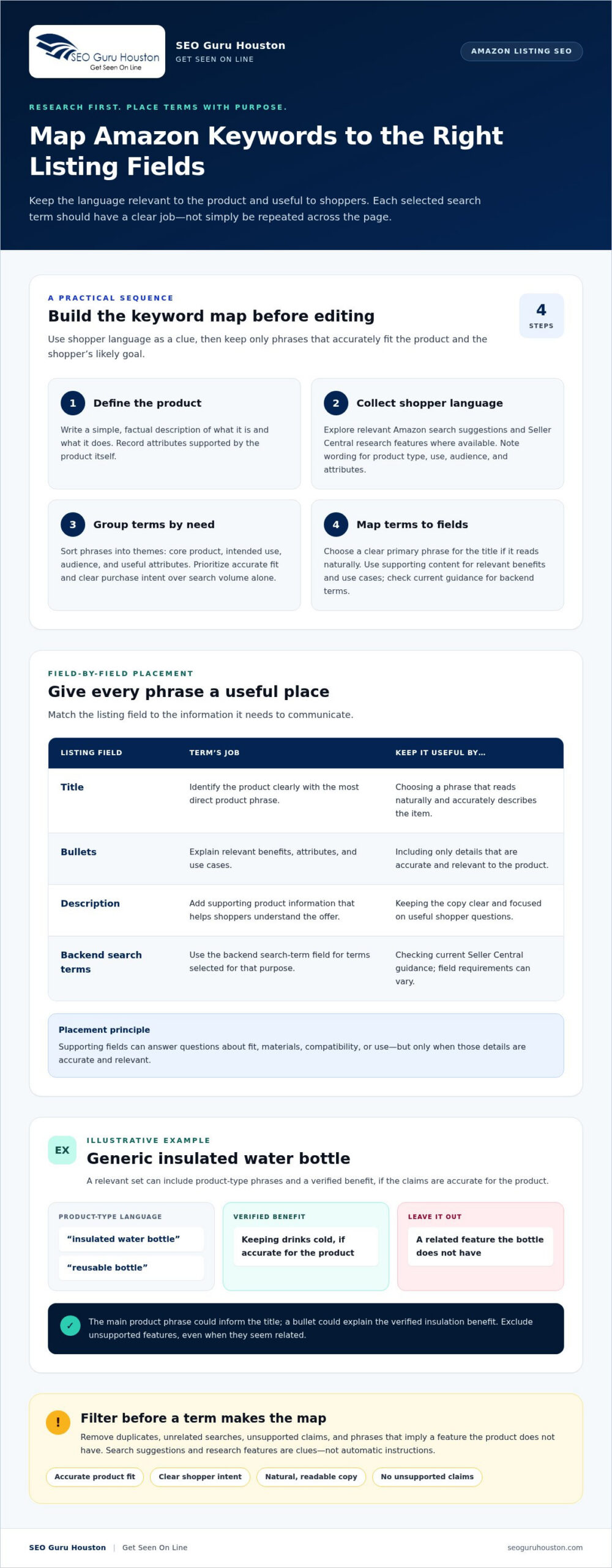
First, define the product plainly: its type, intended use, audience, and distinguishing attributes. Then gather the words shoppers use through Amazon search suggestions and relevant research features available in Seller Central. Treat these as clues, not automatic instructions. Keep terms that match the product and the shopper’s likely goal. Remove duplicates, unrelated searches, unsupported claims, and phrases that imply a feature the product doesn’t have.

  • 1. Define the product. Write a simple, factual description of what it is and what it does. Record only attributes supported by the product itself.
  • 2. Collect shopper language. Explore relevant Amazon search suggestions and Seller Central research features where available. Note variations in product type, use, audience, and attribute wording.
  • 3. Group terms by need. Sort phrases into themes such as core product, intended use, audience, and useful attributes. Prioritize accurate product fit and clear purchase intent over search volume alone.
  • 4. Map terms to fields. Choose the clearest primary phrase for the title if it reads naturally. Use bullets and description content to explain relevant benefits and use cases. Check current Seller Central guidance before entering backend search terms, since requirements can vary.

Illustrative example: For a generic insulated water bottle, a relevant set might include “insulated water bottle,” “reusable bottle,” and phrases about keeping drinks cold, if those claims are accurate for the product. Group the first phrases as product-type language and the last as a benefit. The main product phrase could inform the title, while a bullet explains the verified insulation benefit. Exclude a term for a feature the bottle doesn’t have, even if it seems related.

Map search terms to listing fields

Give every selected phrase a job. Put the most direct product identification where shoppers can quickly understand what’s being offered. Use supporting fields to answer questions about fit, materials, compatibility, or use, but only when those details are accurate and relevant. Backend fields can accommodate suitable terms that don’t fit naturally in visible copy; they aren’t a place to stash unrelated phrases. Review current category-specific Seller Central rules before publishing.

A simple worksheet can keep the process consistent: record each phrase, its shopper intent, its relevance to the product, and its planned field. If several terms express the same need, choose the clearest wording rather than forcing every variation into the listing. For sellers seeking strategic support beyond their own research, Amazon marketing support can help connect keyword choices with broader listing goals.

Which Listing Elements Matter Most for Amazon SEO and Shopper Decisions?

Each listing element has a different job. Some help identify the product, some answer buyer questions, and others help shoppers judge what they’ll receive. Prioritize the fields that address the clearest gap rather than editing everything at once. Also distinguish listing content from offer conditions: price and availability can affect a shopper’s choice, but they aren’t copy edits.

Title, bullets, and description: make relevance easy to understand

Use the title to identify the product and include its core search language naturally. Bullets should make verified features and customer benefits easy to scan, while the description can add context or clarify use. Avoid repeating the same phrase across every field. For each edit, ask whether it improves product understanding or simply adds another keyword.

Listing element Shopper purpose Optimization priority
Title Identify the product quickly and establish its main relevance. High. Make the product type clear and use accurate, natural wording.
Bullets Scan key features, benefits, and product-fit details. High. Lead with useful, specific information that the product supports.
Description Understand additional context, use, or details. Medium. Add information that helps a decision; don’t restate every phrase.
Images See the product and assess visible features or scale. High for shopper clarity. Keep visuals accurate and consistent with the offer.
A+ Content Explore supplementary brand and product information. Consider it where available and useful; verify current access and rules.
Backend search terms Support relevant terms that don’t fit naturally in visible copy. Use selectively. Follow current Seller Central instructions and avoid redundancy.
Price and availability Assess the offer and whether the product can be purchased. Review separately from listing copy; these are offer conditions, not text fields.

Images, A+ Content, and backend terms: support the full listing

Accurate images let shoppers inspect what the written copy describes and compare relevant details. A+ Content can provide additional brand or product context, but eligibility, access, and content rules can vary. Backend terms aren’t a workaround for weak visible copy. Include only relevant terms that comply with current Amazon guidance.

Limits, field names, category requirements, and feature access can change. Verify current rules in Seller Central before publishing, especially for titles and backend terms. Don’t assume a field is available or that a character limit applies uniformly across categories.

Use the element that matches the problem. If shoppers may not recognize the product, review the title. If they can identify it but key benefits or fit remain unclear, strengthen the bullets, description, or supporting content. If the listing communicates the product well but the offer itself is less competitive, review price and availability separately. Repeating keywords everywhere won’t solve these gaps. Optimizing amazon product listings for seo means making each field relevant, readable, and useful for the decision it supports.

How to Optimize Amazon Product Listings for SEO in 2026

How to Optimize an Amazon Listing Step by Step Without Guesswork

A reliable optimization process starts with evidence, not a full-page rewrite. Record what the listing says now, identify the most likely obstacle, make a focused change, and review the result against your starting point. This sequence makes optimizing amazon product listings for seo easier to manage, especially when several people share responsibility for product content.

Create a baseline and prioritize the first improvements

Before editing, save the current title, bullets, description, images, and any other fields you plan to change. Note available indicators for search visibility, listing visits, clicks, and sales, along with the dates covered. Use reporting available in your Seller Central account, and check current documentation for metric names and definitions. Then diagnose the clearest gap: weak relevance, missing or confusing product information, or limited shopper response.

  • 1. Capture the starting point. Save the live listing and record relevant performance indicators for a defined date range. Note offer conditions, such as price or availability, that could affect comparisons.
  • 2. Choose a priority. If the product is hard to identify, refine relevant language in the title. If shoppers may not understand fit or benefits, improve the content that answers those questions. Focus on accurate, meaningful changes rather than cosmetic wording.
  • 3. Revisit your keyword map. Match selected phrases to the field where they fit naturally. Remove terms that don’t describe the product or help explain its value.
  • 4. Edit a focused group of related elements. Update only what’s needed to address the diagnosed issue. When practical, avoid changing unrelated fields at the same time so later comparisons are easier to interpret.
  • 5. Log the change. Record the edit, the date it went live, the reason for it, and the outcome you expect to observe.

Implement edits and evaluate them responsibly

Keep product facts accurate and follow current marketplace requirements as you publish. After an edit, allow a suitable observation period for the indicators you’re tracking to become useful. Compare like with like where possible, and account for seasonality, promotions, price changes, availability shifts, or other listing updates during the same period. If several variables changed together, don’t credit one wording change with the full result.

Use a simple change log to preserve context: “Updated bullets to clarify compatibility; monitor relevant visits and orders; offer price unchanged.” This makes the next decision more disciplined. If the chosen indicator improves but sales don’t, investigate the offer and shopper experience rather than adding more keywords. If no meaningful movement appears, revisit the diagnosis before making another targeted change.

For a related perspective on improving product pages, explore this Amazon listing optimization guide. For support applying a structured approach across your Amazon marketing, discuss your Amazon listing strategy.

How to Measure Amazon Listing SEO and Choose Your Next Move

A listing change is only useful if you can learn from it. Measure the path from search exposure to purchase, and don’t treat every weak result as a keyword problem. Discoverability indicators, shopper response, sales, and offer conditions describe different parts of the journey. Separating them gives you a clearer next step than watching sales alone.

Read performance signals without overclaiming

Use reporting tools and metrics currently available to your seller account. Names, access, and definitions can change, so check current Seller Central documentation before comparing figures or building a report. Compare equivalent date ranges where possible, and note promotions, inventory interruptions, price changes, and other offer shifts that could influence results. If a reporting feature isn’t available to your account, don’t assume a substitute measures the same thing.

Search exposure shows whether shoppers may be seeing your listing; conversion shows what happens after shoppers arrive. Use that distinction to locate the likely bottleneck, then interpret available measures in context:

  • Discoverability: If relevant search exposure is limited, review whether the listing clearly matches the product and the searches you’re targeting. Confirm that the terms are accurate and placed appropriately.
  • Clicks and visits: If shoppers see the offer but don’t select it, assess how clearly the title and main image communicate what’s being sold. Consider the competitive context rather than assuming a keyword change is needed.
  • Conversion: If shoppers visit but purchases remain weak, look for unanswered questions, unclear product details, or a mismatch between the listing and the offer. Review price, availability, and other offer conditions separately from the copy.
  • Sales: Read sales alongside traffic and conversion indicators. A change in sales alone doesn’t identify which part of the customer journey changed.

Choose the next move based on evidence. Retain an edit when relevant indicators improve without a clear trade-off. Refine it when the direction is promising but a specific page element still appears unclear or underperforming. Investigate when signals conflict, the comparison period included major offer changes, or the reporting doesn’t support a confident conclusion. Avoid declaring a single edit the cause when other variables changed at the same time.

When expert support can strengthen the optimization process

Coordinating keyword choices, listing content, and performance analysis can become challenging across multiple products or teams. SEO Guru Houston’s Amazon-specific marketing services can support sellers who want a more connected view of those decisions. To coordinate listing improvements with a wider marketplace strategy, explore Amazon marketing services.

Make Your Next Listing Improvement Count

Your next step doesn’t need to be a sweeping overhaul. Choose one product page with a clear opportunity, then turn what you learn into a repeatable standard for the rest of your catalog. That’s how optimizing amazon product listings for seo becomes an ongoing business practice, not a one-time rewrite. Each disciplined improvement can sharpen how your product is presented and give your team a stronger basis for its next decision.

If you want to connect listing work with a broader growth plan, SEO Guru Houston brings Amazon-specific marketing together with SEO, PPC, and web development expertise. This support can help align marketplace priorities with the rest of your digital strategy while keeping the shopper experience in focus. Explore Amazon marketing services and take a focused next step toward stronger product pages. Keep testing thoughtfully, learning from the evidence, and building momentum.

Frequently Asked Questions

How do I optimize an Amazon product listing for SEO?

Start by confirming every product fact, including size, material, compatibility, and intended use. Then match shopper search phrases to the fields where they read naturally: product identification in the title, decision-making details in bullets, and added context in the description. For example, don’t describe a charger as compatible with a device unless that claim is accurate. Save the original listing and available account data so later adjustments have a useful point of comparison.

What is the most important part of an Amazon listing for SEO?

No single field guarantees a ranking, so prioritize the weakest part of the specific listing. A shopper who can’t identify the item may need a clearer title; someone who understands the product but can’t assess fit may need better bullets, images, or description details. Backend terms can support discoverability under current Amazon requirements, but they can’t replace useful visible content. Diagnose the shopper’s likely question before choosing what to edit.

How many keywords should I use in an Amazon product listing?

There’s no universal keyword count that fits every product and category. Build a relevant set from the language shoppers use, then include a phrase only where it accurately describes the item or helps explain its use. A phrase that adds no new meaning can make copy repetitive. Check Seller Central for current field requirements, especially for backend terms, where formatting and eligibility may differ from customer-facing content.

Do backend keywords help Amazon product listings rank?

Backend search terms can provide relevant product information, but they don’t replace clear customer-facing content or guarantee a ranking change. Use them only for phrases that genuinely apply and follow the instructions currently shown in Seller Central. For example, an alternate term may be useful if shoppers use it for the same product type, while a phrase suggesting an unsupported feature should be left out. Review available account data after edits rather than assuming an effect.

Does Amazon A+ Content improve SEO?

A+ Content can give eligible brands more ways to explain a product and help shoppers understand its features, but don’t assume it directly improves organic rank. Treat it as a content option for answering questions that standard copy may not address well, such as how a product is used or what distinguishes it. Verify current access and publishing rules in Seller Central, then assess available shopper and sales indicators after the content is live.

How long does Amazon SEO take to work?

There’s no universal timeline or guaranteed ranking change after an optimization. A result may depend on whether Amazon processes the update, category conditions, shopper demand, inventory, and changes to the offer. Record when each edit goes live and allow a suitable period to observe relevant account data. Compare similar periods where possible, and avoid stacking frequent changes, since that can make it harder to identify which adjustment may have influenced performance.

Can I use the same keywords in my Amazon title and backend search terms?

Place keywords in a way that follows current Amazon guidance and keeps the title clear. Repeating an identical phrase in multiple fields may add little value, but don’t assume one rule covers every category or field. Keep visible copy natural and accurate, then check Seller Central’s current backend instructions before entering terms. Never use repetition to imply a feature, compatibility, or benefit the product doesn’t actually provide.

How can I tell whether my Amazon listing optimization is working?

Compare available search visibility measures with listing clicks, conversion, and sales to see where the customer journey may be changing. For instance, more visits without more orders may point to a different issue than limited exposure. Keep a record of the listing version, edit dates, and changes to price, inventory, or promotions. Use current Seller Central reporting where available, compare appropriate periods, and decide whether to retain, refine, or investigate the update.