More clicks won’t help if the searches behind them have no chance of becoming customers. A negative keyword list for B2B is a set of words and phrases that tells Google Ads which searches to exclude, such as job-seeking or purely informational queries. The rule is simple: exclude a term when it consistently attracts traffic that doesn’t fit your offer or sales goals.
It’s tempting to block broad terms like “free,” “support,” or “training” straight away. But a term that wastes one campaign’s budget may signal real buying intent in another, so review each against your ideal customer and the purpose of the campaign. This guide shows how to build and organize a practical list, which employment, education, support, and other searches may be worth excluding, and where to apply negatives in Google Ads. You’ll also learn how to judge search terms by lead quality, not just clicks or cost, so you can cut irrelevant traffic without shutting out valuable prospects.
Key Takeaways
- Judge search terms by whether they produce qualified leads and meaningful CRM outcomes, not just by clicks or cost.
- Review generic negative keyword suggestions against your ideal customer profile before applying them; a term that blocks one campaign may attract useful prospects in another.
- Consider employment, education, support, and location-related searches as potential exclusions, while checking whether each theme fits your offer.
- Use account-level or shared lists for exclusions that apply broadly, and campaign- or ad-group-level negatives for terms that depend on context.
- Keep refining exclusions as search behavior and campaign results change, so irrelevant traffic is filtered without blocking valuable intent.
1. How do you review search terms by lead quality, not cost?
A low-cost click can still become a valuable B2B opportunity. Review Google Ads’ Search Terms Report alongside CRM outcomes, then judge each query by whether it produced a qualified lead, sales conversation, or opportunity. Cost matters, but it doesn’t tell you whether a prospect fits your target market.
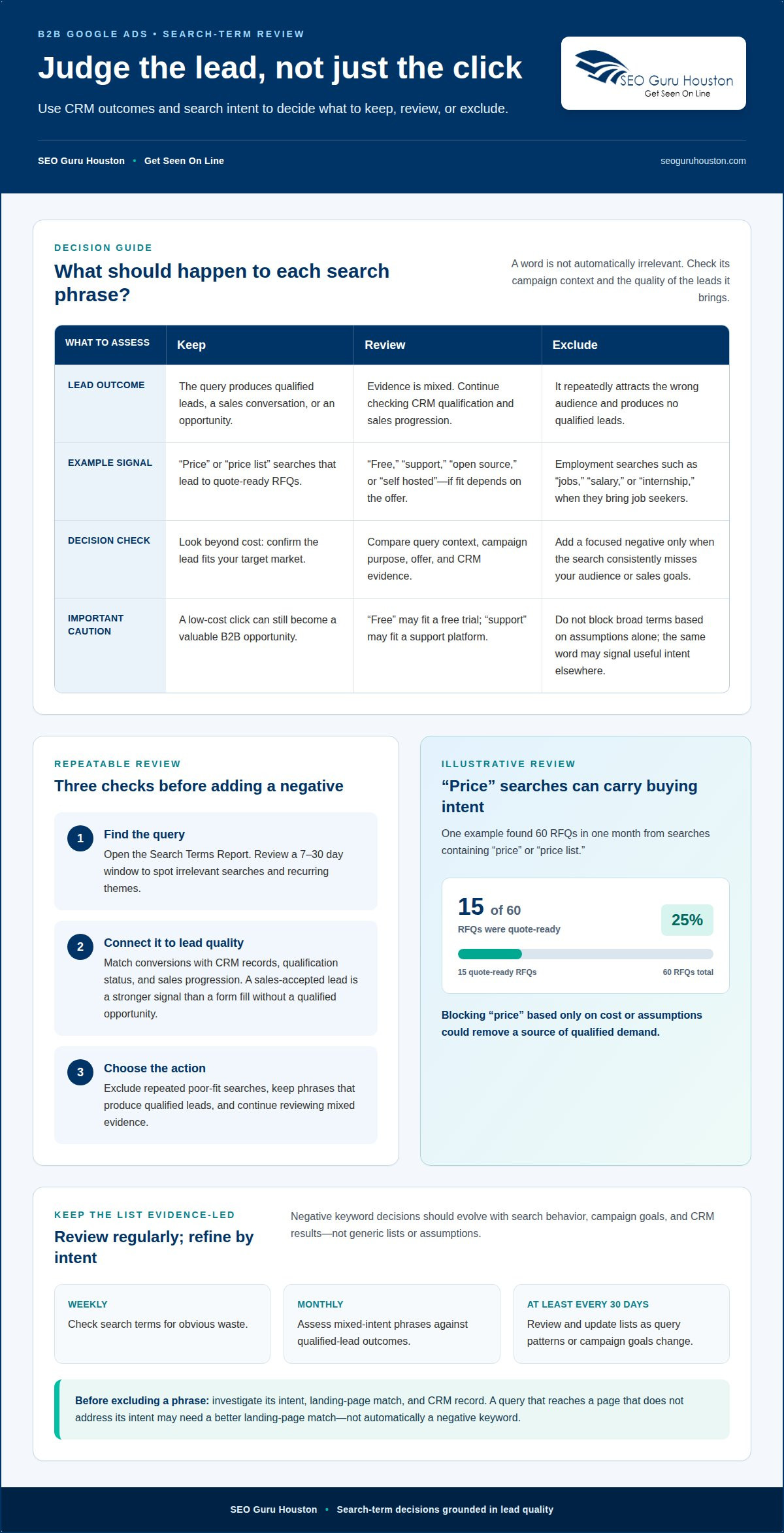
Use a consistent decision process for every search phrase:
- Find the query. Open the Search Terms Report to see searches that triggered your ads. Review a 7-30 day window to spot irrelevant queries and recurring themes.
- Connect it to lead quality. Match conversions with CRM records, including qualification status and sales progression. A form fill without a qualified opportunity is a weaker signal than a lead accepted by sales.
- Choose the action. Exclude a phrase when it repeatedly attracts the wrong audience. Keep it when it produces qualified leads, and continue reviewing it when the evidence is mixed.
For example, one illustrative review found 60 RFQs in one month from searches containing “price” or “price list.” Of those, 15 were quote-ready RFQs, meaning 25% of RFQs from those searches were quote-ready. Blocking “price” based only on cost or assumptions could have removed a source of qualified demand. Apply the same logic to your own CRM outcomes before adding a negative.
Separate employment intent from buying intent. Searches containing “jobs,” “career,” “salary,” “internship,” or “resume” often come from job seekers, not potential customers. If the Search Terms Report repeatedly shows these phrases and they produce no qualified leads, add the relevant terms as negatives. Keep exclusions focused: the same word may also appear in a useful product or service query.
Software and technology searches need the same scrutiny. “Open source” and “self hosted” can be useful negatives for B2B SaaS campaigns when those options don’t match the product being promoted. But a technology provider offering open-source services could attract qualified buyers with the same phrase. Review query context, campaign target, and CRM evidence before excluding it.
Build a repeatable review cadence: check search terms weekly for obvious waste, then assess mixed-intent phrases monthly against qualified-lead outcomes. A negative keyword list for B2B should evolve with those findings, not with assumptions. If a phrase draws clicks but no qualified leads, investigate its intent, landing-page match, and CRM record before deciding whether exclusion is the right move.
2. What are negative keywords?
Negative keywords are words or phrases that prevent an ad from showing for searches containing those terms. Positive keywords help target searches; negative keywords define which searches to avoid. The distinction sounds simple, but applying a generic downloaded list without reviewing its terms can block relevant prospects while leaving wasted spend untouched.
Which negative keywords should B2B companies add to Google Ads? Start with search terms that clearly signal a different audience, such as “jobs,” “salary,” “course,” or “free,” then compare each term with your offer and campaign goal. A word isn’t automatically irrelevant just because it appears on a general B2B list. For example, “free” may be unwanted for a paid software campaign, but useful when promoting a free trial.
Google Ads offers broad, phrase, and exact match types for negative keywords. Broad negatives can exclude searches containing all the negative terms, phrase negatives apply when the phrase appears in the same order, and exact negatives target the matching search without additional terms. Choose the narrowest match that filters unwanted intent. For example, a broad exclusion for “support” could block a prospect researching a support platform.
Which B2B negative keywords should be excluded for jobs, free resources, and consumers? Consider “career,” “job openings,” “salary,” and “internship” for employment intent; “free,” “tutorial,” and “how to” for resource-seeking searches; and “personal,” “home,” or “for consumers” when those audiences don’t fit your target. Review the phrase in context first: a query for a free business guide may still reveal a potential buyer.
General B2B and B2C lists can help identify themes, but industry-specific terms need a separate review. A SaaS advertiser might test “open source” or “self hosted” as negatives when those options don’t match its product. A provider serving those needs could lose valuable traffic by excluding them. Before adding a downloaded list, compare every entry with your campaign structure, customer profile, and actual search queries.
How often should B2B advertisers review and update negative keyword lists? Review search terms regularly, including at least once every 30 days, and update exclusions as query patterns or campaign goals change. Keep recurring account-wide exclusions in shared negative keyword lists; use campaign-level lists for terms that apply only to one offer or audience. If a relevant query lands on a page that doesn’t address its intent, align the landing-page experience before treating the keyword as wasted traffic.
3. Location, support and service-related exclusions
Location exclusions should reflect where a business can actually serve customers. If a campaign targets buyers in specific regions, searches naming places outside its service area may be irrelevant. Review the full query before excluding a location: a prospect might search for a supplier in one city while needing service in another. Exclude location terms only when they consistently attract leads the business cannot serve.
Support-related searches often come from existing users rather than new buyers. Terms such as “login,” “help desk,” “knowledge base,” “customer service,” “phone number,” “portal,” “complaints,” and “cancel” can signal account support or troubleshooting. They may be suitable negatives for a customer-acquisition campaign. But a company selling help-desk software could attract relevant prospects with “help desk,” so let the offer and search-term context guide each decision.
Education and training queries can signal research rather than purchasing intent. Look for phrases containing “course,” “school,” “university,” or “training.” A business selling professional training should not automatically exclude them; a software vendor seeking enterprise buyers might find introductory course queries less relevant. Distinguish people seeking instruction from organizations evaluating a commercial solution before changing which searches trigger ads.
Free-resource and DIY terms call for the same care. “Free,” “tutorial,” “how to,” and “DIY” may attract people who want to solve a problem without buying. Yet “free trial” or “free demo” could be an intentional conversion path. Software campaigns should also assess “open source” and “self hosted” against the product: exclude them when those options do not fit the offer, but retain them when they describe what the business provides.
Employment searches are easier to identify when the query explicitly signals hiring intent. Terms such as “jobs,” “careers,” “job openings,” “internships,” “recruiters,” “resumes,” and “salary” can help filter job seekers from customer prospects. Add relevant exclusions when those searches do not lead to buyer inquiries. A recruiting company, by contrast, may want employment-related traffic, so avoid using a blanket list.
Refine exclusions using conversion and CRM data, not assumptions. For each recurring search term, compare the query with its landing page, lead status, and sales outcome. If “login” produces support requests rather than new opportunities, it may belong on an acquisition campaign’s negative list. If “training” generates qualified business inquiries, keep it. This ongoing review protects reach while removing searches that attract the wrong audience.
4. Account-level, shared-list, campaign, and ad-group negatives
To add a negative keyword list to a Google Ads campaign, create or select a shared list, add the exclusions, then apply the list to the campaign. Use account-level exclusions only for terms that should block traffic across the account; narrower intent belongs at the campaign or ad-group level.
Think of negative keyword placement as a control system with three practical levels: shared lists, campaign-level negatives, and ad-group-level negatives. A shared list suits recurring terms irrelevant across campaigns, such as employment searches when the account targets buyers only. Campaign-level negatives fit exclusions tied to a particular offer or audience. Ad-group negatives resolve tighter conflicts, such as separating searches for “enterprise accounting software” from an ad group focused on small businesses.
Account-wide exclusions have broad consequences. The Google Ads account-level negative keyword list limit is 1,000 terms per account, so reserve this level for terms that almost never match your commercial intent. A term like “careers” may suit an account-wide list if none of its campaigns recruit. A word like “free” needs more caution because one campaign may promote a paid product while another offers a free trial.
Use campaign-level negatives when the same phrase has different relevance across campaigns. For example, a software company could exclude “self hosted” from a cloud-only campaign while retaining it in a campaign for self-hosted solutions. This aligns the exclusion with the actual offer instead of allowing a broad shared list to remove useful searches. Review affected campaigns before applying a shared list, especially when bidding uses conversion signals from several product lines.
At the ad-group level, exclude terms that create overlap between closely related themes. If separate ad groups target “CRM for healthcare” and “CRM for real estate,” negative terms can direct each search toward the more relevant group. Keep exclusions specific: a general negative such as “CRM” would block both groups, while a qualifying phrase tied to one industry can preserve the other ad group’s reach.
Before applying a list, define its scope, purpose, and owner. Label a shared list by function, such as “job seeker queries,” then record which campaigns use it. After making changes, review actual search terms for unexpected exclusions and shifts in relevant traffic. If a phrase has mixed intent, test it at campaign level before applying it account-wide. This structure makes it easier to reverse a negative when sales evidence changes, rather than searching through unrelated lists to find its source.
5. How negative keywords prevent irrelevant Google Ads traffic
Google Ads uses negative keywords to stop an ad from serving when a search query matches an excluded term. That filter can keep a B2B campaign from paying for clicks from people seeking jobs, basic courses, or unrelated consumer products. The goal isn’t to block every unfamiliar phrase. It’s to separate buyer intent from searches that don’t fit the offer.
Consider a company advertising enterprise accounting software. Searches for “accounting jobs” point to employment, while “accounting software for small business” may identify a different buyer segment. Adding “jobs” as a negative can filter the first query without excluding the second. Excluding “small business,” however, makes sense only if that audience is genuinely outside the campaign’s target.
The filter matters even more when a campaign uses Broad Match or AI-driven expansion. These methods give Google more freedom to identify related searches, bringing in both useful variations and irrelevant queries. A negative keyword list helps define boundaries around that broader reach. Review the query context before adding exclusions, since a shared word can appear in searches with very different intent.
Exclusions also affect the signals used by automated bidding. If ads repeatedly attract searches that produce low-quality conversions, those actions can muddy the conversion data bidding systems rely on. Excluding a clearly irrelevant theme can help focus that data on prospects who fit the offer. But an overly broad negative can remove qualified searches and reduce useful signals, too.
Use a practical review cycle: inspect Google Ads search queries, group them by intent, compare conversions with lead quality, then add only clear exclusions. For example, “free accounting course” may signal research or education traffic for a software vendor. “Free accounting software trial” could indicate product interest instead. The word “free” alone is not enough to judge intent; the complete query and campaign structure matter.
After making changes, watch for both wasted spend and unintended losses in reach. Clicks without sales do not, on their own, prove that a term should be excluded. Check whether the query matches the offer and whether the conversion was qualified. Review actual search behavior after each change, then adjust the negative’s scope if relevant queries disappear. This keeps the filter precise as new search patterns emerge.
Negative keywords can improve click-through and conversion rates by limiting mismatched impressions, but they cannot replace a relevant landing page or offer. A prospect searching for enterprise accounting software should land on a page that explains the business solution, not a generic course description. Align query intent, ad message, and landing-page content to turn better-targeted traffic into meaningful opportunities.
SEO Guru Houston
SEO Guru Houston helps national businesses connect Google Ads targeting with the quality of leads their sales teams need. When irrelevant searches keep triggering ads, professional PPC services can support a more focused campaign strategy, from reviewing search intent to refining exclusions. Specialized B2B marketing and inbound marketing strategies can also align paid search with broader demand-generation goals.
Turn to SEO Guru Houston when your negative keyword decisions need to fit your audience, campaign structure, and lead-generation priorities. A well-built landing page also helps ensure that qualified searchers find content aligned with their intent.
Contact SEO Guru Houston to discuss your national B2B advertising goals.
Make your next campaign decision count
Turn search-term reviews into a feedback loop between advertising and sales. When sales qualification reveals a mismatch, use that insight to refine your targeting and shape the next campaign test. A negative keyword list for B2B works best as part of that ongoing improvement, not as a fixed document forgotten after launch.
SEO Guru Houston can connect this work with Houston SEO Services, Houston PPC Services, and Houston B2B Marketing. That broader view helps keep paid search aligned with the audiences and growth goals your business is pursuing.
Ready to sharpen your B2B campaign strategy? Contact SEO Guru Houston to discuss your next step. Clearer targeting starts with a focused plan, and each thoughtful adjustment can move your campaigns toward stronger alignment with real business goals.
Frequently Asked Questions
What are negative keywords?
Negative keywords are exclusions that keep Google Ads from showing an ad for searches containing specified terms. For example, a business selling industrial software might exclude “dating” or “recipe” if those searches have no connection to its offer. The best exclusions reflect the actual audience and campaign purpose, not just words that seem unrelated at first glance.
How do you review search terms by lead quality, not cost?
Compare search queries with lead records and sales outcomes, not just spend or clicks. For example, distinguish sales-qualified inquiries from students, vendors, and people seeking employment, then look for patterns in the query wording. A phrase with modest spend may deserve to stay if it produces genuine opportunities, while a cheap query can still waste budget if it repeatedly attracts the wrong audience.
What is a negative keyword list in B2B advertising?
It’s a set of search terms a business excludes from campaigns aimed at other businesses. A company could consider filtering investor research, political searches, or adult-content queries when they don’t relate to its offer. The right list depends on the product, ideal customer, and campaign goal. Review each term before applying it, since a phrase that’s irrelevant to one B2B advertiser may matter to another.
How do negative keywords differ for B2B and B2C campaigns?
The difference is the audience and buying context, not a universal set of terms. B2B campaigns may filter job seekers, students, or individual consumers when those groups aren’t buyers. A B2C advertiser may have different exclusions based on its product and customer. For instance, “enterprise” could be unhelpful for a consumer-only offer but valuable for a business software campaign.
How to find negative keywords from Google Ads search term reports?
Open the Search Terms Report and review the queries that triggered ads. Group unrelated searches by theme, such as recruiting, coursework, or customer login, then compare those themes with campaign goals and lead outcomes. Look for repeated patterns instead of reacting to a single unfamiliar phrase. Add exclusions only when a query clearly conflicts with the offer or attracts the wrong audience.
How to organize B2B negative keywords into shared lists by campaign?
Keep exclusions that apply across the account in a shared list, such as employment searches when none of the campaigns recruit. Put offer-specific exclusions in the relevant campaign list, then use ad-group negatives to separate closely related themes. Give each list a clear purpose-based name and record which campaigns use it. This makes later reviews more precise.
What are common mistakes and risks when using negative keywords in B2B ads?
A common mistake is applying a downloaded list without checking every term against the offer. Broad exclusions can block valuable searches because the same word may signal different intent in different queries. For example, excluding “free” could remove searches for a free trial as well as resource seekers. Other risks include leaving lists unchanged as campaigns evolve and failing to notice when useful queries stop receiving impressions.