
Tag Archives: PPC advertising

B2B Negative Keyword List: Exclude Irrelevant Google Ads Traffic

More clicks won’t help if the searches behind them have no chance of becoming customers. A negative keyword list for B2B is a set of words and phrases that tells Google Ads which searches to exclude, such as job-seeking or purely informational queries. The rule is simple: exclude a term when it consistently attracts traffic that doesn’t fit your offer or sales goals.

It’s tempting to block broad terms like “free,” “support,” or “training” straight away. But a term that wastes one campaign’s budget may signal real buying intent in another, so review each against your ideal customer and the purpose of the campaign. This guide shows how to build and organize a practical list, which employment, education, support, and other searches may be worth excluding, and where to apply negatives in Google Ads. You’ll also learn how to judge search terms by lead quality, not just clicks or cost, so you can cut irrelevant traffic without shutting out valuable prospects.

Key Takeaways

  • Judge search terms by whether they produce qualified leads and meaningful CRM outcomes, not just by clicks or cost.
  • Review generic negative keyword suggestions against your ideal customer profile before applying them; a term that blocks one campaign may attract useful prospects in another.
  • Consider employment, education, support, and location-related searches as potential exclusions, while checking whether each theme fits your offer.
  • Use account-level or shared lists for exclusions that apply broadly, and campaign- or ad-group-level negatives for terms that depend on context.
  • Keep refining exclusions as search behavior and campaign results change, so irrelevant traffic is filtered without blocking valuable intent.

1. How do you review search terms by lead quality, not cost?

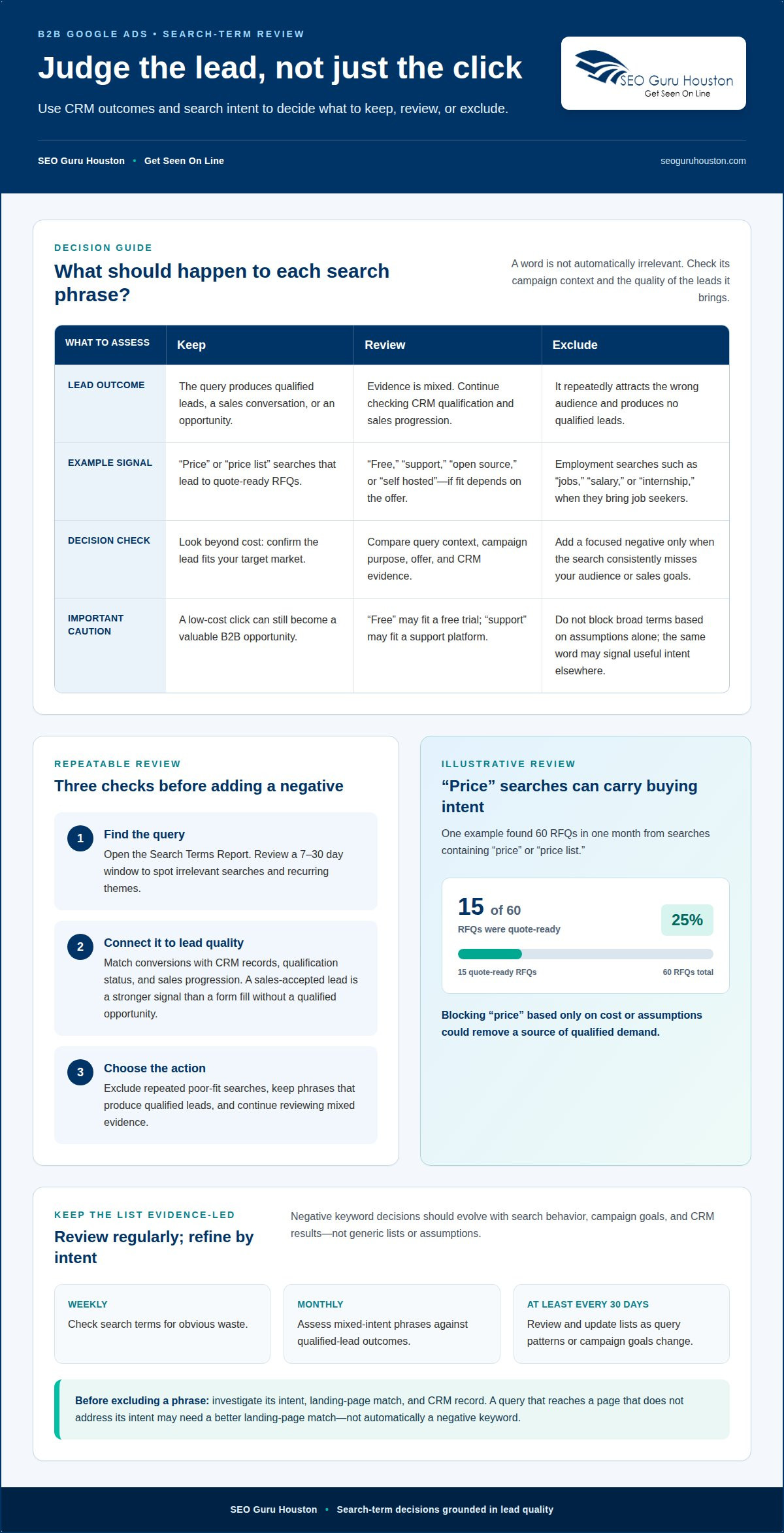
A low-cost click can still become a valuable B2B opportunity. Review Google Ads’ Search Terms Report alongside CRM outcomes, then judge each query by whether it produced a qualified lead, sales conversation, or opportunity. Cost matters, but it doesn’t tell you whether a prospect fits your target market.

Use a consistent decision process for every search phrase:

  1. Find the query. Open the Search Terms Report to see searches that triggered your ads. Review a 7-30 day window to spot irrelevant queries and recurring themes.
  2. Connect it to lead quality. Match conversions with CRM records, including qualification status and sales progression. A form fill without a qualified opportunity is a weaker signal than a lead accepted by sales.
  3. Choose the action. Exclude a phrase when it repeatedly attracts the wrong audience. Keep it when it produces qualified leads, and continue reviewing it when the evidence is mixed.

For example, one illustrative review found 60 RFQs in one month from searches containing “price” or “price list.” Of those, 15 were quote-ready RFQs, meaning 25% of RFQs from those searches were quote-ready. Blocking “price” based only on cost or assumptions could have removed a source of qualified demand. Apply the same logic to your own CRM outcomes before adding a negative.

Separate employment intent from buying intent. Searches containing “jobs,” “career,” “salary,” “internship,” or “resume” often come from job seekers, not potential customers. If the Search Terms Report repeatedly shows these phrases and they produce no qualified leads, add the relevant terms as negatives. Keep exclusions focused: the same word may also appear in a useful product or service query.

Software and technology searches need the same scrutiny. “Open source” and “self hosted” can be useful negatives for B2B SaaS campaigns when those options don’t match the product being promoted. But a technology provider offering open-source services could attract qualified buyers with the same phrase. Review query context, campaign target, and CRM evidence before excluding it.

Build a repeatable review cadence: check search terms weekly for obvious waste, then assess mixed-intent phrases monthly against qualified-lead outcomes. A negative keyword list for B2B should evolve with those findings, not with assumptions. If a phrase draws clicks but no qualified leads, investigate its intent, landing-page match, and CRM record before deciding whether exclusion is the right move.

2. What are negative keywords?

Negative keywords are words or phrases that prevent an ad from showing for searches containing those terms. Positive keywords help target searches; negative keywords define which searches to avoid. The distinction sounds simple, but applying a generic downloaded list without reviewing its terms can block relevant prospects while leaving wasted spend untouched.

Which negative keywords should B2B companies add to Google Ads? Start with search terms that clearly signal a different audience, such as “jobs,” “salary,” “course,” or “free,” then compare each term with your offer and campaign goal. A word isn’t automatically irrelevant just because it appears on a general B2B list. For example, “free” may be unwanted for a paid software campaign, but useful when promoting a free trial.

Google Ads offers broad, phrase, and exact match types for negative keywords. Broad negatives can exclude searches containing all the negative terms, phrase negatives apply when the phrase appears in the same order, and exact negatives target the matching search without additional terms. Choose the narrowest match that filters unwanted intent. For example, a broad exclusion for “support” could block a prospect researching a support platform.

Which B2B negative keywords should be excluded for jobs, free resources, and consumers? Consider “career,” “job openings,” “salary,” and “internship” for employment intent; “free,” “tutorial,” and “how to” for resource-seeking searches; and “personal,” “home,” or “for consumers” when those audiences don’t fit your target. Review the phrase in context first: a query for a free business guide may still reveal a potential buyer.

General B2B and B2C lists can help identify themes, but industry-specific terms need a separate review. A SaaS advertiser might test “open source” or “self hosted” as negatives when those options don’t match its product. A provider serving those needs could lose valuable traffic by excluding them. Before adding a downloaded list, compare every entry with your campaign structure, customer profile, and actual search queries.

How often should B2B advertisers review and update negative keyword lists? Review search terms regularly, including at least once every 30 days, and update exclusions as query patterns or campaign goals change. Keep recurring account-wide exclusions in shared negative keyword lists; use campaign-level lists for terms that apply only to one offer or audience. If a relevant query lands on a page that doesn’t address its intent, align the landing-page experience before treating the keyword as wasted traffic.

Location exclusions should reflect where a business can actually serve customers. If a campaign targets buyers in specific regions, searches naming places outside its service area may be irrelevant. Review the full query before excluding a location: a prospect might search for a supplier in one city while needing service in another. Exclude location terms only when they consistently attract leads the business cannot serve.

Support-related searches often come from existing users rather than new buyers. Terms such as “login,” “help desk,” “knowledge base,” “customer service,” “phone number,” “portal,” “complaints,” and “cancel” can signal account support or troubleshooting. They may be suitable negatives for a customer-acquisition campaign. But a company selling help-desk software could attract relevant prospects with “help desk,” so let the offer and search-term context guide each decision.

Education and training queries can signal research rather than purchasing intent. Look for phrases containing “course,” “school,” “university,” or “training.” A business selling professional training should not automatically exclude them; a software vendor seeking enterprise buyers might find introductory course queries less relevant. Distinguish people seeking instruction from organizations evaluating a commercial solution before changing which searches trigger ads.

Free-resource and DIY terms call for the same care. “Free,” “tutorial,” “how to,” and “DIY” may attract people who want to solve a problem without buying. Yet “free trial” or “free demo” could be an intentional conversion path. Software campaigns should also assess “open source” and “self hosted” against the product: exclude them when those options do not fit the offer, but retain them when they describe what the business provides.

Employment searches are easier to identify when the query explicitly signals hiring intent. Terms such as “jobs,” “careers,” “job openings,” “internships,” “recruiters,” “resumes,” and “salary” can help filter job seekers from customer prospects. Add relevant exclusions when those searches do not lead to buyer inquiries. A recruiting company, by contrast, may want employment-related traffic, so avoid using a blanket list.

Refine exclusions using conversion and CRM data, not assumptions. For each recurring search term, compare the query with its landing page, lead status, and sales outcome. If “login” produces support requests rather than new opportunities, it may belong on an acquisition campaign’s negative list. If “training” generates qualified business inquiries, keep it. This ongoing review protects reach while removing searches that attract the wrong audience.
B2B Negative Keyword List: Exclude Irrelevant Google Ads Traffic

4. Account-level, shared-list, campaign, and ad-group negatives

To add a negative keyword list to a Google Ads campaign, create or select a shared list, add the exclusions, then apply the list to the campaign. Use account-level exclusions only for terms that should block traffic across the account; narrower intent belongs at the campaign or ad-group level.

Think of negative keyword placement as a control system with three practical levels: shared lists, campaign-level negatives, and ad-group-level negatives. A shared list suits recurring terms irrelevant across campaigns, such as employment searches when the account targets buyers only. Campaign-level negatives fit exclusions tied to a particular offer or audience. Ad-group negatives resolve tighter conflicts, such as separating searches for “enterprise accounting software” from an ad group focused on small businesses.

Account-wide exclusions have broad consequences. The Google Ads account-level negative keyword list limit is 1,000 terms per account, so reserve this level for terms that almost never match your commercial intent. A term like “careers” may suit an account-wide list if none of its campaigns recruit. A word like “free” needs more caution because one campaign may promote a paid product while another offers a free trial.

Use campaign-level negatives when the same phrase has different relevance across campaigns. For example, a software company could exclude “self hosted” from a cloud-only campaign while retaining it in a campaign for self-hosted solutions. This aligns the exclusion with the actual offer instead of allowing a broad shared list to remove useful searches. Review affected campaigns before applying a shared list, especially when bidding uses conversion signals from several product lines.

At the ad-group level, exclude terms that create overlap between closely related themes. If separate ad groups target “CRM for healthcare” and “CRM for real estate,” negative terms can direct each search toward the more relevant group. Keep exclusions specific: a general negative such as “CRM” would block both groups, while a qualifying phrase tied to one industry can preserve the other ad group’s reach.

Before applying a list, define its scope, purpose, and owner. Label a shared list by function, such as “job seeker queries,” then record which campaigns use it. After making changes, review actual search terms for unexpected exclusions and shifts in relevant traffic. If a phrase has mixed intent, test it at campaign level before applying it account-wide. This structure makes it easier to reverse a negative when sales evidence changes, rather than searching through unrelated lists to find its source.

5. How negative keywords prevent irrelevant Google Ads traffic

Google Ads uses negative keywords to stop an ad from serving when a search query matches an excluded term. That filter can keep a B2B campaign from paying for clicks from people seeking jobs, basic courses, or unrelated consumer products. The goal isn’t to block every unfamiliar phrase. It’s to separate buyer intent from searches that don’t fit the offer.

Consider a company advertising enterprise accounting software. Searches for “accounting jobs” point to employment, while “accounting software for small business” may identify a different buyer segment. Adding “jobs” as a negative can filter the first query without excluding the second. Excluding “small business,” however, makes sense only if that audience is genuinely outside the campaign’s target.

The filter matters even more when a campaign uses Broad Match or AI-driven expansion. These methods give Google more freedom to identify related searches, bringing in both useful variations and irrelevant queries. A negative keyword list helps define boundaries around that broader reach. Review the query context before adding exclusions, since a shared word can appear in searches with very different intent.

Exclusions also affect the signals used by automated bidding. If ads repeatedly attract searches that produce low-quality conversions, those actions can muddy the conversion data bidding systems rely on. Excluding a clearly irrelevant theme can help focus that data on prospects who fit the offer. But an overly broad negative can remove qualified searches and reduce useful signals, too.

Use a practical review cycle: inspect Google Ads search queries, group them by intent, compare conversions with lead quality, then add only clear exclusions. For example, “free accounting course” may signal research or education traffic for a software vendor. “Free accounting software trial” could indicate product interest instead. The word “free” alone is not enough to judge intent; the complete query and campaign structure matter.

After making changes, watch for both wasted spend and unintended losses in reach. Clicks without sales do not, on their own, prove that a term should be excluded. Check whether the query matches the offer and whether the conversion was qualified. Review actual search behavior after each change, then adjust the negative’s scope if relevant queries disappear. This keeps the filter precise as new search patterns emerge.

Negative keywords can improve click-through and conversion rates by limiting mismatched impressions, but they cannot replace a relevant landing page or offer. A prospect searching for enterprise accounting software should land on a page that explains the business solution, not a generic course description. Align query intent, ad message, and landing-page content to turn better-targeted traffic into meaningful opportunities.

SEO Guru Houston

SEO Guru Houston helps national businesses connect Google Ads targeting with the quality of leads their sales teams need. When irrelevant searches keep triggering ads, professional PPC services can support a more focused campaign strategy, from reviewing search intent to refining exclusions. Specialized B2B marketing and inbound marketing strategies can also align paid search with broader demand-generation goals.

Turn to SEO Guru Houston when your negative keyword decisions need to fit your audience, campaign structure, and lead-generation priorities. A well-built landing page also helps ensure that qualified searchers find content aligned with their intent.

Contact SEO Guru Houston to discuss your national B2B advertising goals.

Make your next campaign decision count

Turn search-term reviews into a feedback loop between advertising and sales. When sales qualification reveals a mismatch, use that insight to refine your targeting and shape the next campaign test. A negative keyword list for B2B works best as part of that ongoing improvement, not as a fixed document forgotten after launch.

SEO Guru Houston can connect this work with Houston SEO Services, Houston PPC Services, and Houston B2B Marketing. That broader view helps keep paid search aligned with the audiences and growth goals your business is pursuing.

Ready to sharpen your B2B campaign strategy? Contact SEO Guru Houston to discuss your next step. Clearer targeting starts with a focused plan, and each thoughtful adjustment can move your campaigns toward stronger alignment with real business goals.

Frequently Asked Questions

What are negative keywords?

Negative keywords are exclusions that keep Google Ads from showing an ad for searches containing specified terms. For example, a business selling industrial software might exclude “dating” or “recipe” if those searches have no connection to its offer. The best exclusions reflect the actual audience and campaign purpose, not just words that seem unrelated at first glance.

How do you review search terms by lead quality, not cost?

Compare search queries with lead records and sales outcomes, not just spend or clicks. For example, distinguish sales-qualified inquiries from students, vendors, and people seeking employment, then look for patterns in the query wording. A phrase with modest spend may deserve to stay if it produces genuine opportunities, while a cheap query can still waste budget if it repeatedly attracts the wrong audience.

What is a negative keyword list in B2B advertising?

It’s a set of search terms a business excludes from campaigns aimed at other businesses. A company could consider filtering investor research, political searches, or adult-content queries when they don’t relate to its offer. The right list depends on the product, ideal customer, and campaign goal. Review each term before applying it, since a phrase that’s irrelevant to one B2B advertiser may matter to another.

How do negative keywords differ for B2B and B2C campaigns?

The difference is the audience and buying context, not a universal set of terms. B2B campaigns may filter job seekers, students, or individual consumers when those groups aren’t buyers. A B2C advertiser may have different exclusions based on its product and customer. For instance, “enterprise” could be unhelpful for a consumer-only offer but valuable for a business software campaign.

How to find negative keywords from Google Ads search term reports?

Open the Search Terms Report and review the queries that triggered ads. Group unrelated searches by theme, such as recruiting, coursework, or customer login, then compare those themes with campaign goals and lead outcomes. Look for repeated patterns instead of reacting to a single unfamiliar phrase. Add exclusions only when a query clearly conflicts with the offer or attracts the wrong audience.

How to organize B2B negative keywords into shared lists by campaign?

Keep exclusions that apply across the account in a shared list, such as employment searches when none of the campaigns recruit. Put offer-specific exclusions in the relevant campaign list, then use ad-group negatives to separate closely related themes. Give each list a clear purpose-based name and record which campaigns use it. This makes later reviews more precise.

What are common mistakes and risks when using negative keywords in B2B ads?

A common mistake is applying a downloaded list without checking every term against the offer. Broad exclusions can block valuable searches because the same word may signal different intent in different queries. For example, excluding “free” could remove searches for a free trial as well as resource seekers. Other risks include leaving lists unchanged as campaigns evolve and failing to notice when useful queries stop receiving impressions.
How to Build a Full-Funnel PPC Campaign Structure for B2B

Paid search can work for B2B, but a campaign built only to capture immediate leads can miss buyers who need time to evaluate a solution. The average B2B sales cycle involves 8 touchpoints, so a scalable ppc campaign structure for b2b should connect search intent, useful follow-up, and sales outcomes across the journey.

If clicks are coming in but qualified opportunities aren’t, the issue may be how campaigns are organized and measured, not simply how much you spend. B2B buying groups take time to research, compare options, and reach a decision. Your campaign needs to reflect that reality.

This guide shows you how to assess paid search for B2B, choose metrics that matter beyond clicks and form fills, and connect ad activity to conversions across longer sales cycles. Then you’ll learn how to organize campaigns around buyer intent and funnel stage, so you can identify what’s working and make smarter decisions about where to scale.

Key Takeaways

  • Match search, display, placements, keywords, and audience targeting to the buyers and intent you want to reach.
  • Look beyond clicks and form fills by tracking lead quality, pipeline progress, and revenue alongside campaign metrics.
  • Connect ad interactions to CRM outcomes so long sales cycles don’t make valuable campaigns look ineffective.
  • Build campaigns around funnel stage and buying intent, then use performance data to guide where to refine and scale.
  • Align ad messaging, landing pages, and follow-up so each touchpoint moves qualified prospects toward a decision.

Does paid search work for B2B?

Yes. B2B companies generate an average of $2 for every $1 invested in Google Ads, according to the market data in this brief. Gartner reports that complex B2B solutions typically involve buying groups of 6 to 10 decision-makers. Structure campaigns to reach their different questions, not just one lead form.

Google and Microsoft campaigns typically organize around search intent and keyword themes. LinkedIn Ads can target professional audiences by role and industry. Separate campaigns by buyer stage to tailor each message, then compare qualified outcomes across platforms.

Group keywords by intent first: brand, problem, solution, and comparison terms. Separate match types into different ad groups or campaigns when they need distinct budgets, messaging, or query controls. Mixing them too broadly can obscure which searches generate relevant leads.

Common risks include grouping unrelated services together, targeting too broadly, and judging success by clicks alone. A generic “business software” keyword may attract research traffic, while a solution-specific query can signal clearer intent. Review search terms and audience results to identify wasted spend.

  1. Define buyer personas before selecting placements. List each high-value persona by role, industry, and buyer stage. A finance leader comparing vendors needs different proof from an operations manager researching a workflow problem. Use those distinctions to choose search, display, or audience-based placements, and align each ad with a relevant landing page.
  2. Separate search campaigns by intent and theme. Build focused groups for brand terms, pain-point searches, solution categories, and competitor-comparison intent. Keep closely related keywords together, but separate themes when the offer or landing page changes. For example, “reduce invoice processing time” and “invoice automation platform” suggest related needs, but different stages of research.
  3. Match platform structure to its targeting strength. On Google Ads, organize around keyword themes and use available targeting such as demographics, location, device, and interests. Apply a similar search-intent structure in Microsoft Ads, then compare performance separately. On LinkedIn Ads, segment by role and industry, with distinct campaigns for awareness and active consideration.
  4. Use display and remarketing to reconnect. Build display audiences from meaningful site behavior, such as visiting a solution page or viewing a case study. Exclude converted leads when the message is no longer relevant. Remarketing campaigns often achieve conversion rates 50-100% higher than cold traffic campaigns, according to the market data in this brief.
  5. Review targeting and placements as one system. Check search terms, audience segments, and placement reports together. If an industry segment clicks but produces poor-fit leads, refine its message or targeting. Test search, display, and video formats against the same buyer need, then shift effort toward the placements that create sales-relevant engagement.

What metrics should be tracked in B2B paid ads?

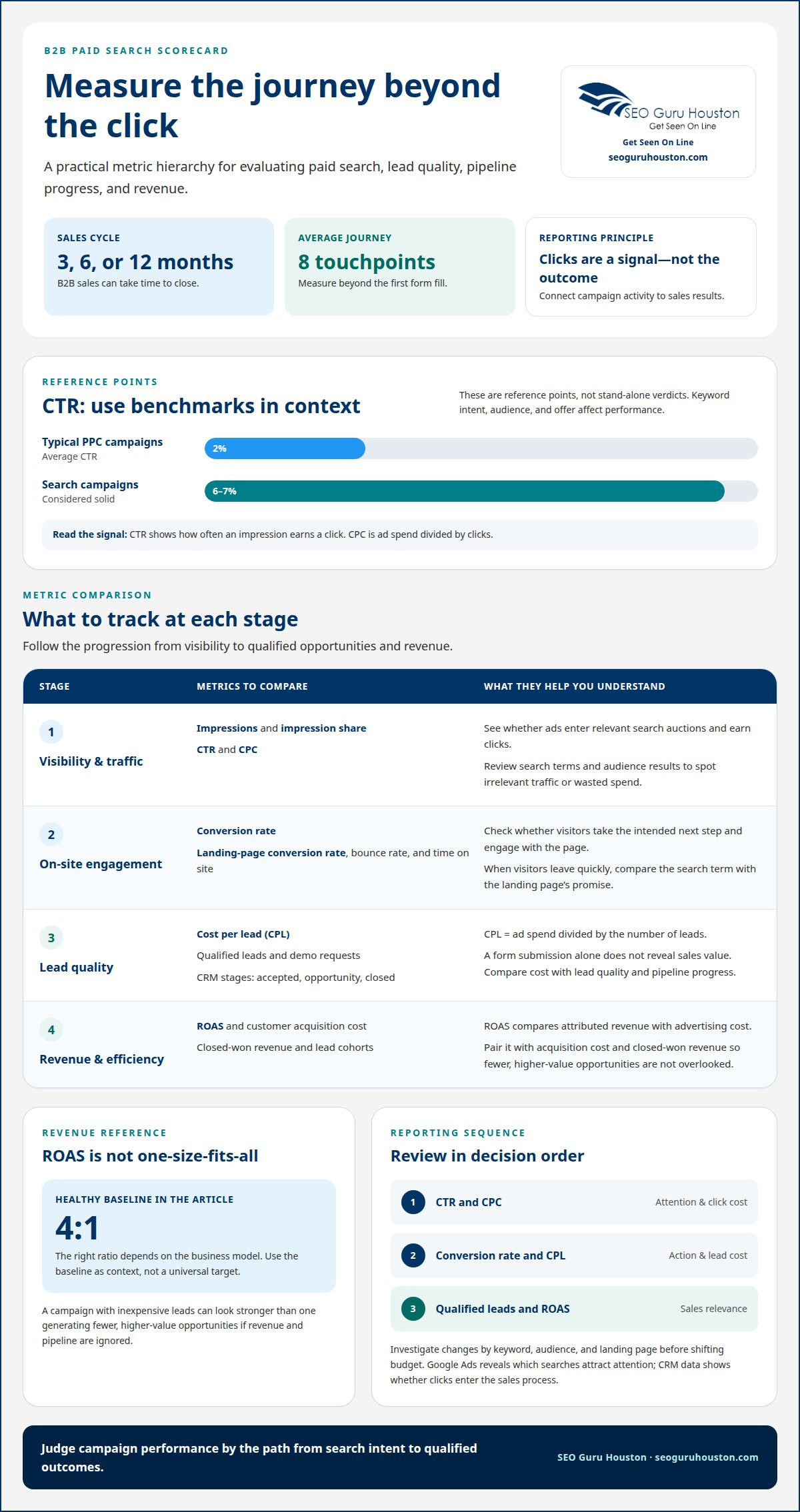
  1. Track the full path from impression to lead. Start with impressions and impression share to see whether Google Ads enters relevant Google Search auctions. Then measure click-through rate (CTR), cost per click (CPC), and conversion rate. CTR shows how often an impression earns a click; CPC is ad spend divided by clicks. A 6-7% CTR is considered solid for search campaigns, while the average CTR for typical PPC campaigns is 2%. Treat these as reference points, not isolated verdicts: keyword intent, audience, and offer all affect performance.
  2. Measure what happens after the click. Track landing-page conversion rate, bounce rate, and time on site to see whether visitors engage with the next step. If a campaign earns clicks but visitors leave quickly, compare the search term with the page’s promise. For example, an ad for a product demo should lead to a page that explains the demo and makes requesting one clear. Segment results by campaign, keyword, device, and demographics so strong averages don’t hide a weak audience or page.
  3. Separate lead volume from lead quality. Cost per lead (CPL) divides ad spend by the number of leads, but a form submission alone doesn’t reveal sales value. Track qualified leads and demo requests separately, then connect those records with CRM stages such as accepted, opportunity, and closed. Compare costs with lead quality and pipeline progress rather than treating an average as a universal target.
  4. Evaluate revenue against spend. Return on ad spend (ROAS) compares attributed revenue with advertising cost. A 4:1 ROAS is a healthy baseline, but the right ratio depends on the business model. Pair ROAS with customer acquisition cost and closed-won revenue; otherwise, a campaign generating inexpensive leads may appear stronger than one producing fewer, higher-value opportunities. Review results by campaign and lead cohort to identify which sources contribute to actual sales.
  5. Use a consistent review sequence. In each reporting cycle, compare CTR and CPC first, then conversion rate and CPL, followed by qualified leads and ROAS. Investigate changes by keyword, audience, and landing page before shifting budget. Google Ads data can show which searches attract attention; CRM data helps reveal whether those clicks enter the sales process. A clear metric hierarchy turns reports into decisions, not just dashboards.

Conversion tracking and attribution for long sales cycles

Track the journey beyond the first form fill. B2B sales can take 3, 6, or 12 months, with an average of 8 touchpoints.

  1. Set Up Conversion Tracking

    Record each meaningful action, from a landing-page inquiry to a sales-qualified lead and closed deal. Connect ad interactions with CRM stages so campaigns aren’t judged only by their earliest conversion. Check that each event fires once and maps to the right campaign. Don’t treat repeat visits or low-intent downloads as equivalent to sales opportunities. Digital marketing teams like Barlo Digital often emphasize starting with comprehensive tracking and measurement audits to ensure search data accurately reflects pipeline value.

  2. Preserve campaign context through the sales journey. Capture the campaign, keyword, and landing page associated with each lead, then retain that information as the record advances through sales stages. This lets you compare first-touch and later interactions without crediting every touch with a full conversion. For example, an initial search click may introduce a solution, while a later visit prompts a demo request.
  3. Assess Lead Quality and Conversion Costs

    Compare conversion volume with sales acceptance, opportunity creation, and closed revenue. Treat CTR and CPC as diagnostic signals, not final outcomes: strong click engagement can still produce poor-fit leads. Calculate cost per conversion for each meaningful milestone, then compare it with the resulting ROI. Don’t optimize for the cheapest form submission if those contacts rarely progress.

  4. Align the landing page with the tracked action. Keep the ad promise, page content, and conversion event consistent. A demo campaign should direct visitors to a page explaining the demo, with a clear call to action and a streamlined form. Track form completions separately from later qualification, so page tests improve lead generation without disguising low-quality submissions as success.
  5. Review attribution against actual sales outcomes. Compare platform-reported conversions with CRM opportunities and closed-won records by campaign and lead cohort. This shows why conversion counts need sales context: investigate lead sources, qualification, and follow-up before scaling spend.
  6. Use mature data to guide optimization. Long sales cycles delay revenue signals, so keep early indicators visible while opportunities progress. Review whether search terms reach the right accounts, whether landing pages generate qualified inquiries, and whether those leads advance. Use that evidence to refine targeting and messaging instead of making a major change after a brief spike in form submissions.

How to Build a Full-Funnel PPC Campaign Structure for B2B

Full-funnel PPC strategy for B2B buying journeys

Organize campaigns by buyer stage and audience, then match each segment with a relevant offer and message. Gartner research indicates approximately 80% of the B2B buying journey happens without direct vendor contact. A ppc campaign structure for b2b should therefore support independent research and guide prospects toward useful next steps.

  1. Map the B2B Buying Journey to Funnel Stages

    Define awareness, consideration, and decision stages by the questions buyers ask at each point. Awareness audiences may need educational content about a business problem; consideration audiences need solution comparisons; decision-stage prospects need a clear next step. Make sure these stages reflect the real buying process, not just website actions. A product-page visit, for example, signals interest but doesn’t establish readiness for a sales conversation.

  2. Assign PPC Roles Across the Funnel

    Give each campaign a distinct job, such as introducing a problem, helping buyers evaluate options, or generating qualified inquiries. Search can capture active research, while display and paid social can reconnect with relevant audiences between searches. LinkedIn can reach professional audiences by role and industry with stage-specific content. Don’t expect every campaign to produce an immediate sales-ready lead.

  3. Organize Campaigns by Stage and Audience

    Separate campaigns by funnel stage, audience, and offer so results remain actionable. For example, create distinct groups for operations leaders researching efficiency and finance leaders evaluating cost control. On LinkedIn, use professional audience attributes; on search, align keyword themes with the same buyer need. Keep campaign names consistent, such as “consideration, operations, efficiency,” and exclude converted leads from messages intended for first-time prospects.

  4. Tailor Ads to Each Funnel Stage

    Write awareness messaging around the business problem, not a hard sales pitch. For consideration, explain outcomes such as cost savings, efficiency gains, or risk reduction, then offer a useful comparison or guide. At the decision stage, make the next action clear and match the landing page to the ad. Use interests and audience signals to improve relevance, not as substitutes for clear intent or compelling messaging.

  5. Set a measurable planning goal. Connect stage-specific activity to a business outcome, then review how audiences advance. A sample B2B lead-generation goal is 75 qualified leads per month within four months, with cost per acquisition under $65. Treat this as a planning example, not a universal benchmark. Use the ppc campaign structure for b2b to assess whether each campaign supports that goal, then refine its audience or offer when engagement fails to progress.

Campaign structure designed to scale

The best ppc campaign structure for b2b separates campaigns by business goal, product or service, and buyer intent. There’s no fixed campaign or ad-group count; create separate Google Ads campaigns when products need distinct budgets, audiences, or outcomes, then group closely related keywords together.

  1. Separate Campaigns by Product or Service

    Build a separate Google Ads campaign for each product or service that needs its own budget, audience, or outcome. A company selling analytics software and implementation support, for example, could separate them because buyers search for different solutions. Give each campaign a matching landing page and conversion goal. Don’t combine offers just because they belong to the same company; mixed intent makes performance harder to interpret and scale.

  2. Set the Number of Campaigns and Ad Groups

    Start with the simplest structure that gives you useful control, then expand when performance or business needs call for it. Create an ad group for a tightly related keyword theme, such as “inventory analytics” and closely related searches, rather than grouping every product term together. Add campaigns when budget, geography, audience, or funnel goals need independent management. Avoid creating extra groups that split similar traffic without changing your decisions.

  3. Keep the campaign hierarchy consistent. Use a naming pattern that shows platform, product, intent, and audience. A Google Ads campaign might be labeled “Search | Analytics | Solution | Operations,” with ad groups for closely related search themes. Apply the same logic to Microsoft Ads while retaining platform-specific reporting. Clear names help teams find valuable traffic and understand each campaign’s purpose.
  4. Build for controlled expansion. Launch with core high-intent search campaigns, then add awareness or remarketing campaigns when you have a defined audience and relevant message. Keep search, display, and social activity distinct enough to compare results. For example, a display campaign for product-page visitors should have a different goal from search ads aimed at new prospects.
  5. Protect budget and learning signals. Avoid spreading limited traffic across near-identical campaigns. If two ad groups target the same keyword theme and landing page, combine them unless they need separate controls. Review search terms, audience fit, and conversion quality before adding another layer. Each campaign should address a business need, not simply make the account look more detailed.
  6. Scale what supports a purchase decision. Expand by adding a product line, buyer intent, or audience only when it creates a meaningful new opportunity. Keep awareness messaging distinct from decision-stage offers, and connect each route to the right page. A ppc campaign structure for b2b should make the next growth decision clear. To turn that structure into a practical growth plan, plan scalable PPC campaigns.

SEO Guru Houston: Houston SEO Services

SEO Guru Houston can help when your B2B campaigns need clearer structure, stronger measurement, or better alignment with sales goals. Its comprehensive PPC Services support paid-search planning, while B2B Marketing and Inbound Marketing services can connect campaign activity with broader demand generation.

Turn to SEO Guru Houston when campaigns target overlapping audiences, landing pages don’t match ad intent, or lead volume isn’t translating into qualified opportunities. PPC management includes campaign creation, ad copy optimization, keyword and geographic targeting, conversion tracking, ongoing account management, monthly calls, and reporting. Specialized SEO services can complement paid search by supporting visibility beyond ads.

Ready to discuss your campaign goals? Contact SEO Guru Houston or visit seoguruhouston.com.

Turn Your Campaign Plan Into a Growth System

Start with a business priority and turn it into a focused campaign plan. Decide which audience, offer, and sales outcome deserve attention first. Assign an owner to each decision so campaign changes have a clear purpose rather than becoming disconnected tests.

A durable ppc campaign structure for B2B should make the next move easier to see. Set criteria for expanding a campaign, refining its message, or pausing an approach. Then use those criteria consistently as new opportunities emerge. This creates a practical framework your team can adapt as products, audiences, and sales priorities change.

Bring marketing and sales into the planning process early. Agreeing on what makes an opportunity valuable helps both teams act on the same signals and keeps campaign decisions tied to business priorities.

SEO Guru Houston can help you turn your campaign priorities into a coordinated plan. Contact SEO Guru Houston today to discuss your next step. Build with focus, learn from each decision, and keep moving toward sustainable growth.

Frequently Asked Questions

What is the difference between B2C and B2B paid ads?

B2C paid ads often target individual consumers, while B2B ads address people evaluating purchases for an organization. That changes the message and the conversion path. A consumer ad might promote a product purchase; a B2B ad could offer a product walkthrough to a technical evaluator and business-case material to a budget owner. For teams executing across both sectors, performance marketing agencies such as peytondigital.com illustrate how data-driven strategies adjust to distinct buyer journeys. Build creative around the audience’s role in the decision, not just the company’s industry.

What Is B2B PPC?

B2B PPC is paid advertising where a business pays when someone clicks an ad promoting its products or services to other businesses. A software provider, for example, might use paid search to reach companies researching a specific operational challenge. The click is only the start: the campaign should connect the ad’s promise with a relevant next step, such as a consultation request or product information.

What about the middle of the funnel?

Middle-funnel campaigns help prospects compare approaches after recognizing a problem but before choosing a vendor. Offer useful decision-support content, such as a feature comparison, implementation overview, or case study. Someone who downloaded a guide, for example, could later see an ad addressing integration questions. Keep follow-up relevant to that earlier action, and don’t push for a sales conversation before the prospect has enough context.

How should B2B PPC budgets and bids be allocated across campaigns?

Prioritize campaigns by business value, audience relevance, and observed lead progression. Maintain coverage for high-intent searches that reach active buyers, then allocate testing budget to new audiences or messages with a clear learning goal. Review spend alongside qualified opportunities, not click volume alone. If a campaign attracts traffic but few relevant prospects, adjust its targeting or offer before increasing its budget.

Which conversion actions should B2B PPC campaigns track?

Track actions that show meaningful progress, from a completed inquiry form to a qualified opportunity or closed sale. Choose events based on how prospects engage with your business: a demo request may suit a complex software offer, while a detailed consultation request may fit a professional service. Keep low-commitment actions, such as content downloads, separate from actions that signal stronger buying intent.

How should B2B landing pages align with campaigns and ad groups?

Make sure each landing page matches the campaign’s promise and audience. An ad group focused on compliance software should lead to a page explaining that solution, not a general company homepage. Match headlines, proof points, and calls to action to the visitor’s likely question. Keep the form focused on information needed for follow-up, and remove competing links that distract from the intended action.

Google Ads Strategy for B2B Services: How Much Should You Spend

A focused Google Ads strategy for B2B services then puts most of that budget behind high-intent search, while reserving spend for remarketing and experiments. The right allocation depends on whether your ads attract the decision-makers and qualified leads your business needs.

It makes sense to want a clear budget before investing. But spend alone won’t fix campaigns that target the wrong searches or send prospects to a landing page that doesn’t match the ad. This guide explains how to set goals, identify audiences, structure campaigns, and refine keywords and bidding. It also shows why persuasive ad copy and relevant landing pages matter: they help turn advertising spend into meaningful opportunities, not just clicks.

Key Takeaways

  • Set campaign goals around qualified business outcomes, then target the roles, companies, and audiences most likely to influence a purchase.
  • Use keyword research and search-term data to focus spend on relevant intent and exclude searches that attract poor-fit clicks.
  • Match campaign messages and assets to each stage of the buyer journey, from early research to solution evaluation.
  • Align ad copy, keywords, and landing-page content so prospects see a clear, relevant next step after clicking.
  • Use expert PPC services and B2B marketing strategies to connect campaign execution with demand generation and long-term business growth goals.

B2B campaign goals and audience identification

Start with the business outcome, not the campaign setting. A clear goal helps connect Google Ads spend to the prospects and actions that can advance a B2B sale.

Campaign Goal Setting

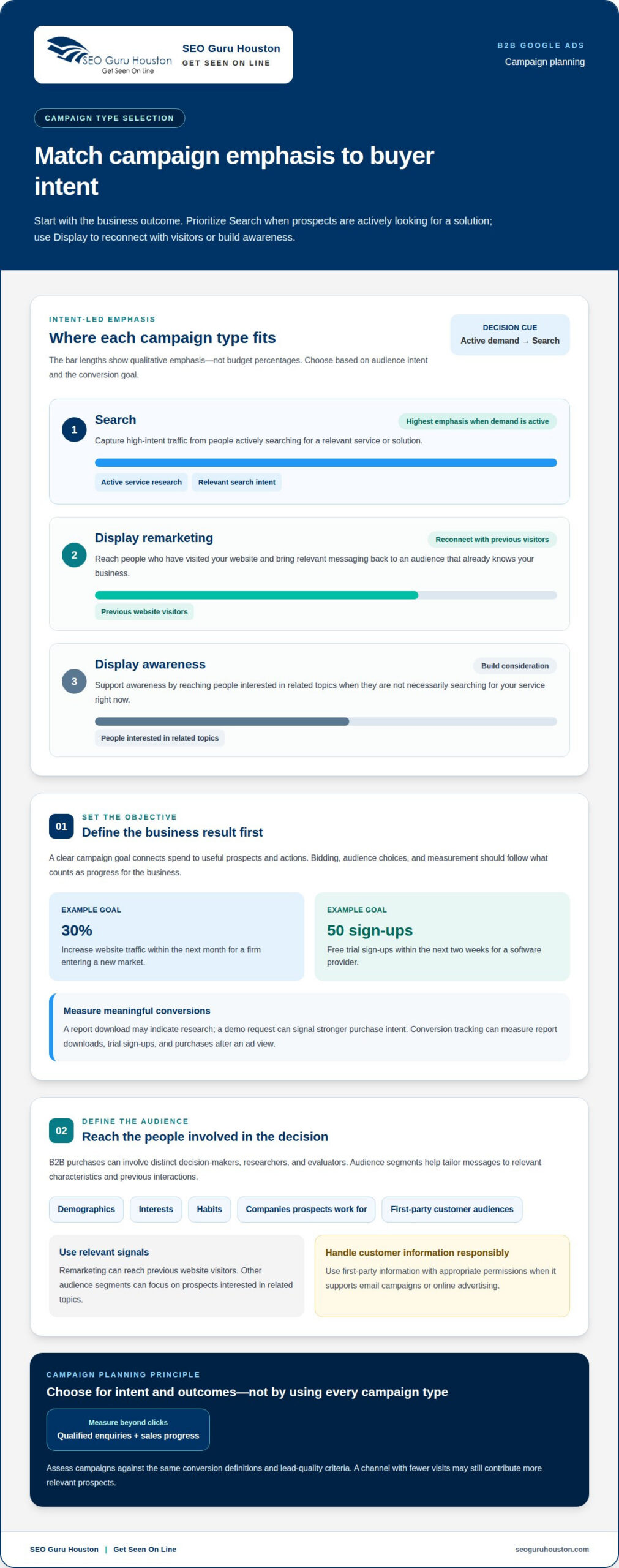
A campaign goal defines the business result advertising should support, such as qualified enquiries or relevant website visits. It matters because bidding, audience choices, and measurement all depend on what counts as progress. For example, a firm entering a new market might aim to increase website traffic by 30% within the next month. A software provider could instead aim for 50 free trial sign-ups within the next two weeks.

Choose a conversion that reflects genuine buyer interest, then distinguish it from lighter engagement. A report download may indicate research, while a demo request can signal stronger purchase intent. Google Ads conversion tracking can measure report downloads, trial sign-ups, and purchases after an ad view. Comparing these actions helps campaign managers assess keywords and ads against the outcomes that matter.

Audience Targeting Segments

Audience segments group potential buyers by relevant characteristics or prior interactions, including first-party audiences built from a business’s own customer information. This matters because B2B purchases often involve distinct decision-makers, researchers, and evaluators. Google Ads targeting can use demographics, interests, habits, and the companies potential customers work for, helping advertisers tailor messages to business audiences.

Use first-party information only with appropriate permissions when it supports email campaigns or online advertising. A company could offer a research report or invite-only webinar in exchange for customer details, then use those details to shape follow-up messaging. Remarketing can reach previous website visitors, while other audience segments can focus on prospects interested in related topics. Keep each message relevant to the audience’s demonstrated interest.

Campaign Type Selection

For B2B services, Search campaigns can capture high-intent traffic from people actively looking for a relevant solution. Display campaigns can support awareness or remarketing by reaching website visitors and people interested in related topics. Digital marketing agencies such as eastpioneers.com often combine these channels to help businesses attract leads and build a stronger online presence. The best fit depends on the goal: prioritize search when prospects are expressing demand, and use Display to reconnect or build consideration.

What Google Ads campaign types work best for B2B services? Search is suited to active service research, while Display can support remarketing and awareness. Select based on the audience’s intent and the conversion goal, rather than using every campaign type at once.

What Google Ads policies and compliance risks apply to B2B service advertisers? Follow Google Ads policies, describe services accurately, and handle customer information responsibly. If collected details will support email or advertising, use them with the appropriate permissions. Clear consent practices and truthful ad claims help reduce avoidable compliance risks.

Keyword research and competitor targeting

Keyword research connects B2B search intent with the services your campaigns promote. Use Keyword Planner, match types, and search-term reports to refine targeting and limit irrelevant clicks.

Keyword Discovery with Keyword Planner

Google Ads Keyword Planner is a research tool that shows keyword search frequency, competition, and bid costs. These signals help you compare phrases before assigning them to campaigns. For example, separate searches for “B2B payroll software” from broader phrases such as “payroll services” when your offer serves a specific business audience.

Start with the services you sell, then expand each into buyer-focused variations. A consultant might compare “supply chain consulting” with “supply chain audit services” to find language that better reflects a prospect’s need. Use the Planner’s estimates as research inputs, then assess whether each phrase matches your offer and landing page.

Search Match Types

Match types control how closely a person’s search must relate to a target keyword before an ad can appear. They matter because a narrow service phrase and a broad category phrase can attract different intent. Choose settings that balance reach and relevance, then review actual search queries to see how Google Ads interprets your keywords.

For example, a campaign targeting “commercial HVAC maintenance” should distinguish service-specific intent from searches about residential repairs or do-it-yourself advice. Broad targeting can surface related searches, while tighter matching focuses exposure on closer variations. Organize keywords by service theme so the ad copy and landing pages address the same need.

Negative Keywords and Search-Term Reports

Negative keywords prevent ads from appearing for searches that don’t fit your offer. Search-term reports show which queries triggered ads, giving you evidence to add exclusions or refine target keywords. This review matters because even a relevant keyword can attract poor-fit searches through related wording.

For instance, a B2B software provider might exclude “jobs” if employment seekers don’t represent prospective buyers. Review the report for queries about free templates, consumer products, or unrelated services, then add negatives where those searches don’t match the business. Search-term data can also reveal phrases worth testing in paid campaigns or considering for SEO content.

Competitor Targeting

Competitor targeting considers searches that mention competing brands or compare providers. It can reach prospects who know the category and are evaluating alternatives, but the ad and landing page should clearly explain your own offer. Group competitor-related terms separately from service keywords to see whether they attract qualified enquiries.

Review competitor names alongside comparison phrases, such as “alternatives to [brand]” or “[brand] versus [service type].” Assess each query for relevance before adding it, and use clear, factual messaging rather than implying an affiliation. Pair this analysis with a paid search campaign strategy that keeps keywords, ad copy, and landing-page content aligned.

Ad extensions and assets

Google Ads assets add useful details and actions to search ads. For B2B campaigns, choose assets that help decision-makers understand the offer and take a relevant next step.

Give Searchers More Relevant Options

Sitelinks and other Google Ads assets can provide extra information and options within search results. They can also increase an ad’s size, helping it stand out and giving prospects more reasons to click. A B2B consultancy, for example, could use sitelinks to direct different audiences toward relevant service information or a case study.

Keep each option aligned with the ad’s promise. If an ad promotes an operational audit, a sitelink to audit details supports that message better than a broad, unrelated page. Useful assets give prospects a clearer route to explore, while mismatched options can distract from the advertised service.

Use Lead Form Assets for Direct Enquiries

Google Ads lead form assets let potential customers submit their contact information directly within an ad. This can give a busy decision-maker a direct response path without first visiting a website. For example, a B2B provider promoting a consultation could use a lead form asset to capture interest from someone searching for that service.

Choose this format when an in-ad enquiry fits the campaign goal. Make the offer clear, and explain what the prospect is requesting. A lead form is not a substitute for useful service information: people should understand the next step before sharing their details. Compare its enquiries with other campaign actions to assess whether it attracts relevant prospects.

Match Assets to the Ad’s Message

Google Ads assets work best when their information reinforces the search ad and the prospect’s intent. For a software implementation campaign, relevant options might point to implementation details, a case study, or a contact path. Each asset should answer a useful follow-up question rather than repeat the same headline elsewhere.

Review the complete search result as a prospect would see it. Check that the ad, sitelinks, and other assets describe the same service and lead to coherent next steps. If the ad promises a specific business solution, an asset pointing to an unrelated offer breaks that connection.

Review Asset Performance

Use campaign reporting to assess which assets support meaningful actions. Compare lead form submissions with visits to relevant pages, then consider the quality of the enquiries each path generates. A larger ad may attract attention, but clicks alone don’t show whether the added information brought in suitable B2B prospects.

Update assets when their destination or message no longer reflects the campaign. For example, if a sitelink points to outdated service information, revise it to match the current offer. This keeps the experience consistent from search result to follow-up and makes each asset work toward the same business goal.

Google Ads Strategy for B2B Services: How Much Should You Spend

Buyer-journey campaign segmentation

B2B prospects need different information as they move from discovering a problem to assessing solutions and contacting a provider. Segment campaigns by that intent, then align the ad, offer, and next step. A research-focused visitor may value a case study, while an evaluator may be ready to compare solutions or request a demo.

Awareness: Reach Prospects Exploring a Problem

At the awareness stage, prospects may search for explanations rather than a specific provider. Search ads can connect relevant queries with useful resources, such as an industry report or case study. For example, a cybersecurity firm could promote a guide to common security challenges instead of pushing a sales meeting to every early-stage visitor.

Google Ads Search campaigns can generate micro-engagements, including resource downloads, case study exploration, and newsletter subscriptions. These actions offer ways to engage people who aren’t yet ready to become sales leads. Treat each as a distinct signal, and use relevant follow-up messaging to nurture interest over time.

Consideration: Help Buyers Evaluate Options

During consideration, prospects compare approaches and assess whether a solution fits their needs. Free trials, demos, testimonials, competitor analysis, and benchmarking can help them evaluate options. A B2B software company, for example, might use an ad leading to a product demo for active evaluators, while a comparison resource serves people still weighing alternatives.

Decision: Make the Next Step Clear

Decision-stage prospects are closer to contacting a provider or beginning a trial. Use focused Search ads for queries that indicate service or solution intent, and make the advertised action clear. For example, an ad promoting a software demo should lead directly to information about that demo, not a general company overview.

Tailor follow-up to the action taken. Someone who explored a case study may need a different prompt from someone who requested a demo. Keep campaign messages aligned with the prospect’s demonstrated interest, and make the path from ad to enquiry straightforward.

Connect Segments Without Blurring Intent

Buyer-journey segmentation works best when each campaign has a defined audience, message, and goal. Separate educational content from demo or trial campaigns so reporting shows which interactions support progress. A visitor who downloads a report can receive relevant nurturing, while a demo request should prompt a more direct sales follow-up.

Review campaign and conversion data together. If resource engagement rises but qualified enquiries don’t, examine the transition from content to the next offer. If demo campaigns attract mismatched prospects, revisit search intent and landing-page messaging. This keeps each stage accountable to the buying task it serves.

Landing pages, ad copy, and Quality Score

Ad relevance doesn’t stop at the click. Your B2B ad, landing page, and conversion path should tell one consistent story.

Landing Page and Ad Copy Alignment

Alignment means the ad promise, target keyword, and landing-page content all address the same buyer need. A decision-maker who clicks an ad for implementation support expects information about that service, not a broad company overview.

Build each page around the search intent and action you want. For example, an ad offering a software demo should lead to a page that explains the demo and makes the next step clear. Use matching language in the headline, supporting copy, and call to action. If the ad targets operations leaders, address their business problem rather than relying on generic claims.

Keep the page focused. A campaign for a specific B2B service can direct visitors to relevant proof, service details, and an enquiry form. Remove competing calls to action that send prospects toward unrelated offers. This creates a clearer route from search to conversion and helps your team understand which message brought the visitor in.

Quality Score

Quality Score is a Google Ads diagnostic that helps advertisers assess keyword, ad, and landing-page relevance. It can highlight where the experience feels disconnected to a searcher. Use it as a signal for investigation, not a substitute for measuring qualified leads and business outcomes.

For example, if a keyword about B2B consulting leads to an ad about general marketing, then a page about unrelated services, the message lacks continuity. Review the keyword, ad copy, and destination together. Make the page answer the question implied by the search, and ensure the ad describes the same offer accurately.

How do you set up conversion tracking and qualify leads from Google Ads? Track meaningful actions such as demo requests, report downloads, and purchases, then compare those conversions with lead quality. Connecting data sources can help campaign systems use relevant signals.

Lead qualification needs a clear definition shared by marketing and sales. For example, a demo request from a decision-maker at a target company may warrant different follow-up from an early-stage resource download. Record the actions and details that distinguish sales-ready enquiries, then assess campaign performance beyond form submissions.

Keep improving the full path, not just the ad. Test a focused headline against a service-specific page, review whether visitors complete the intended action, and refine the message when the page attracts the wrong enquiries. Improve your B2B landing pages by aligning each page with its ad promise and conversion goal.

SEO Guru Houston: Houston SEO Services

SEO Guru Houston helps B2B companies connect campaign strategy with broader search visibility and demand generation. Its Houston PPC Services support paid campaigns, while Houston B2B Marketing and Houston Inbound Marketing can align outreach with how business buyers research and evaluate solutions.

Turn to SEO Guru Houston when your ads need stronger alignment between audience targeting, landing pages, and qualified lead goals, or when paid search should work alongside organic visibility. Houston SEO Services can support that wider search strategy, while PPC focuses on reaching prospects through paid campaigns.

To discuss your B2B marketing goals, contact SEO Guru Houston or visit seoguruhouston.com.

Turn Campaign Learning Into Your Next Growth Move

Your next advantage comes from connecting advertising decisions to what happens after a prospect converts. Build a steady feedback loop between marketing and sales: review which enquiries progress, identify the needs behind qualified opportunities, and use those insights to sharpen future campaign decisions. That discipline makes a Google Ads strategy for B2B services more responsive to real buying signals, rather than simply optimizing for activity.

SEO Guru Houston offers Houston SEO Services, Houston PPC Services, and Houston B2B Marketing. These offerings can support businesses aligning paid search with broader visibility and B2B growth priorities. If your campaigns need a clearer path from ad engagement to business opportunities, consider discussing your goals and the challenges your team wants to address.

Contact SEO Guru Houston today to explore a practical next step for your marketing. Keep testing, keep learning, and build momentum around the prospects your business is ready to serve.

Frequently Asked Questions

How Much Should You Spend on B2B Google Ads?

Set spend according to the lead volume you can handle, your sales capacity, and the campaign data you need to learn. An initial allocation can direct 70% to high-intent search, 20% to remarketing, and 10% to experimental campaigns. Treat this as a starting distribution, then shift budget toward campaigns producing qualified enquiries. Review performance against sales outcomes, not just clicks, before increasing spend.

How to Build a B2B Google Ads Strategy?

Build the plan around a measurable business outcome, a defined buyer, and a clear conversion action. For example, a consulting firm could prioritize qualified assessment requests rather than general page visits. Connect that goal to relevant searches, campaign messages, and a dedicated landing page. Then review conversion and sales data together to distinguish useful leads from actions that show interest but don’t fit your market.

How should B2B service businesses structure Google Ads campaigns and ad groups?

Separate campaigns by service line, objective, or distinct audience need, then group closely related search terms together. A cybersecurity provider might create separate campaigns for incident response and security assessments, with ad groups reflecting specific search themes. This structure makes it easier to tailor ad language and landing pages, and to identify which service themes generate relevant enquiries without mixing results.

Which keywords and match types are most effective for B2B lead generation?

Prioritize keywords that clearly express a business need, such as “enterprise data migration services,” over broad terms like “data.” Choose match types based on how closely searches should relate to each phrase, then inspect actual queries. Add negative keywords for irrelevant intent, such as job searches when recruiting isn’t the goal. The best keyword set reflects your offer and the language prospective buyers use.

How do you target B2B decision-makers by location, industry, and company size in Google Ads?

What are typical Google Ads costs and cost per lead for B2B services in the US?

Costs vary with industry competition, keyword demand, audience intent, and deal size, so a single benchmark can mislead budget decisions. A highly specialized service may face a different auction from a broad business category. Track actual spend alongside qualified leads and sales progression. If leads are plentiful but poorly matched, refine targeting and landing-page expectations before treating a lower cost per lead as better performance.

How should B2B landing pages be designed to improve Google Ads conversion rates?

Give each page one clear purpose that matches the visitor’s search and the ad’s promise. For a technical assessment campaign, explain what the assessment covers, who it serves, and how to request it. Keep the enquiry form focused on information needed for follow-up, and make the next action easy to find. Review completed actions and lead relevance together, then improve the page where prospects drop off.

What bidding strategies and budgets should B2B advertisers use?

Choose bidding based on the campaign objective and the conversion data available. With only 5-6 conversions, automated bidding may underperform; consider Manual CPC until conversion volume builds. Once an advertiser has more than 30 conversions per month, the guidance recommends considering a switch from Maximize Conversions to Maximize Conversion Value. Pair the bid approach with a budget that supports the campaign’s target actions and sales capacity.