
A buyer-ready testimonial starts with evidence, not a camera. The strongest approach to creating customer testimonial videos isn’t a polished script or expensive setup. It’s choosing a real customer story that answers questions prospective buyers are already asking.
An interview can feel awkward, overly promotional, or demanding on your team’s time and equipment. A clear plan makes the conversation more natural and production more manageable. Focus on the customer’s challenge, why they chose your solution, and what they experienced afterward, then let them explain it in their own words.
This guide walks you through a repeatable process, from selecting a customer and preparing questions to recording, editing, publishing, and evaluating the video. You’ll learn how to shape a credible story around buyer concerns and use it across your website, landing pages, sales conversations, and demand generation. The goal isn’t video for its own sake. It’s proof that helps the right buyers take a confident next step.
Key Takeaways
- Start with a buyer question and a customer story that answers it with specific, credible details.
- Make the interview feel natural by agreeing on the story, sharing prompts, and setting expectations before recording.
- Choose remote or in-person recording based on the control and production complexity your project needs.
- When creating customer testimonial videos, edit for a clear story and make shorter cuts without changing the customer’s meaning.
- Give each video a defined audience, destination, and next action so it can support a repeatable marketing workflow.
Why creating customer testimonial videos starts with the buyer’s decision
A customer testimonial video is a customer-led account of a real experience, told in the customer’s own words. It isn’t a brand-written ad with a customer delivering polished praise. Prospects need to hear what happened, what the customer considered, and why the experience might be relevant to someone like them. The Wikipedia article on testimonials offers a comprehensive understanding of their role in marketing.
Generic compliments such as “great service” or “easy to work with” sound positive, but leave a buyer’s real questions unanswered. Specifics make a story useful: what challenge prompted the customer to look for a solution, what alternatives or concerns they weighed, and what changed after making a decision. A video can’t establish that every viewer will have the same experience. It can give prospects enough context to judge whether the customer’s situation resembles their own.
Start by naming the doubt you want the story to address. Is a buyer unsure how a solution fits an existing workflow? Do they want to understand what implementation involved or why a customer chose one approach over another? One video can’t credibly answer every question. Give it a clear job and let the customer’s firsthand account do the work. Production polish helps, but it can’t replace relevance, detail, and a coherent story.
Choose the customer story that answers a buyer question
Look for a customer whose experience matches the audience and use case you want to reach. Then identify a moment they can describe from direct experience: a challenge that triggered their search, a concern that shaped their decision, or an outcome they can explain clearly. For example, if prospects are worried about fitting a new service into a busy process, feature a customer who can describe the steps they took and what they needed to know before deciding.
Connect the story to a known objection or information gap from sales conversations, customer questions, or feedback. Use a simple selection test: can this person explain the problem, decision, and experience in concrete terms that would help a similar buyer assess their options? If the story offers only broad praise, refine the angle or choose a different customer before recording.
Set a focused goal before recording
Choose one primary audience and one stage of the buying journey. Someone discovering a problem needs different context from a prospect comparing solutions. Decide whether the video should explain a challenge, show how a solution was used, or build confidence in a choice. That focus guides the questions, the final edit, and where the video belongs, such as a relevant website page or landing page.
Define a useful next action without promising a particular result. You might want viewers to explore a related service page, discuss their needs with your team, or review another resource. Keep the story honest and the goal specific. That’s the foundation of creating customer testimonial videos that support a real buyer decision instead of adding content without a clear purpose.
How to plan a customer testimonial interview that feels natural
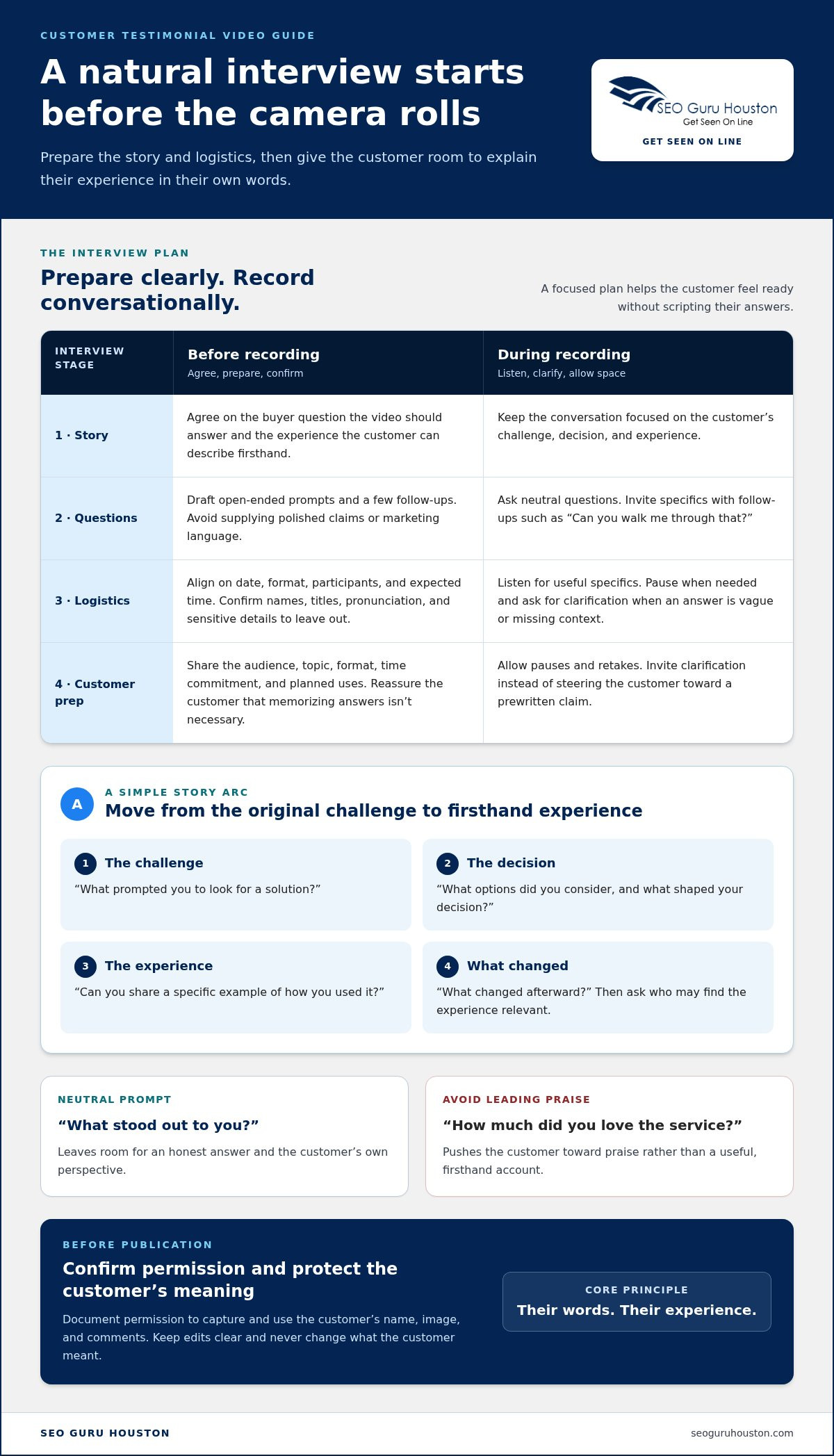
A relaxed interview comes from a clear purpose, thoughtful preparation, and enough room for the customer to speak naturally. Share the topic, expected time commitment, recording format, and intended uses in advance. That gives the customer a chance to prepare without turning their answers into a script.
Use this sequence to keep the process focused:
- 1. Agree on the story. Confirm the buyer question the video should address and the experience the customer can speak about firsthand.
- 2. Prepare prompts. Draft open-ended questions and a few follow-ups. Avoid supplying polished claims or asking the customer to repeat marketing language.
- 3. Confirm logistics. Align on the date, format, participants, and expected time. Confirm names, titles, pronunciation, and any sensitive information to leave out.
- 4. Record conversationally. Listen for useful specifics, pause when needed, and ask for clarification if an answer is vague or missing context.
Build interview questions around a simple story arc
Let the conversation move from the customer’s original challenge to the decision and firsthand experience. Ask, “What prompted you to look for a solution?” then “What options did you consider, and what shaped your decision?” Follow with, “Can you share a specific example of how you used it?” and “What changed afterward?” Close by asking who might find the experience relevant and what they’d want that audience to know.
Keep questions neutral. “What stood out to you?” invites an honest answer; “How much did you love the service?” pushes toward praise. Follow-ups such as “Can you walk me through that?” or “What did that look like in practice?” help turn general statements into details a viewer can evaluate.
Help customers feel prepared without scripting their answers
Send a short briefing that explains the audience, topic, format, time commitment, and planned uses. Reassure the customer that they don’t need to memorize anything. Agree beforehand on how to say names, job titles, and company names, and identify confidential details to avoid. During the interview, allow pauses and retakes. Invite clarification instead of steering the customer toward a prewritten claim.
Before recording and publication, document permission to capture and use the customer’s name, image, and comments. Review current FTC guidance on endorsements, testimonials, and disclosures for the specific situation, especially if there’s a relationship or arrangement viewers may need to understand. The Small Business Administration offers insights into maximizing the marketing impact of customer testimonials, including practical considerations for shaping a testimonial strategy.
A simple interview plan keeps production aligned with the buyer journey and the video’s eventual destination. As you plan a broader website video marketing strategy, connect each interview’s purpose to the page and next step it should support.
Remote or in-person recording: choose the right testimonial video setup
The right setup captures a clear, comfortable account without adding complexity the story doesn’t need. Before choosing equipment, consider how much production control you need, how easily the customer can participate, and what the video needs to show. A customer describing a decision may work well remotely. A story that depends on a workplace setting or product demonstration may benefit from in-person filming.
Three common approaches offer different tradeoffs:
- Remote self-recording: The customer records independently with a smartphone or webcam. It’s convenient and gives them control over timing, but framing, sound, and lighting can vary.
- Guided remote interview: The customer joins a live conversation while an interviewer provides prompts and simple direction. It offers convenience while helping keep the story focused, though connection quality and the customer’s recording environment still matter.
- In-person filming: A planned shoot offers more control over the setting, camera, and sound. It also involves more coordination, including scheduling, location access, and equipment planning.
Match the camera to the intended use, not to the idea that more gear always means a better testimonial. A smartphone may be suitable if it records clear video and can be positioned steadily. A webcam can work for a straightforward interview in a well-lit, quiet space. A dedicated camera may offer greater control when the scene or finished video calls for it. In every case, prioritize clear audio, stable framing, suitable light, and an uncluttered background. Viewers should focus on the customer’s account, not distractions in the shot.
When remote recording fits the customer and project
Remote recording can make participation easier when customer schedules or locations make travel difficult. Before the interview, test the connection and check the camera angle, sound, and light. Position the camera near eye level, reduce background noise, and make sure the customer is framed comfortably. An interviewer can guide the conversation with simple cues, such as pausing between answers or adjusting the camera, without taking over the customer’s story.
When in-person filming adds value
Choose in-person filming when the setting, a demonstration, or several participants add useful context that a remote conversation can’t capture as clearly. Plan for location access, scheduling, and equipment so the shoot doesn’t become a burden for the customer. Keep the story’s purpose central: extra production helps only if it makes the experience easier to understand.
If a customer feels uneasy on camera, make the process less intimidating. Start with an informal conversation, record shorter segments, or consider an audio-first approach if it fits the intended use. Let the customer pause or restart a response. In creating customer testimonial videos, the best setup is a practical one that protects the customer’s comfort and keeps their account clear.
Edit, publish, and measure customer testimonial videos
Editing should sharpen the customer’s story, not reshape it into a brand script. Keep enough context for viewers to understand the original challenge, preserve specific details that make the experience useful, and end with a concise conclusion. Remove repeated points, long pauses, and side conversations, but don’t cut a qualification or key detail in a way that changes the customer’s meaning.
Keep a full-length version as the source asset, then create shorter cuts for placements where a focused excerpt makes sense. A short edit might highlight one buyer concern or a specific part of the customer’s experience. Review each cut against the original: does it still accurately represent what the customer said, and can viewers understand the point without missing context? Accurate captions also help people follow the story when they aren’t listening to the audio.
Adapt the testimonial for each channel
Give the video a descriptive title that identifies the customer’s problem or use case instead of a vague label such as “Customer Story.” Publish it where the story helps answer a relevant question: on a related website page or landing page, in sales materials, or on a social channel. Match the call to action to the content. A viewer who has just watched a customer explain a use case may benefit from a related next step, not an unrelated offer.
For a landing page, place the testimonial near the information it supports and make the page’s next step clear. Thoughtful high-converting landing page design can connect the customer’s story with relevant details and a useful action. Keep the title, captions, surrounding copy, and destination consistent so the video feels like part of the buyer experience, not an isolated asset.
Evaluate whether the video supports the buyer journey
Before publishing, record a baseline and define what you want to learn. Avoid assuming that a change in leads or sales came from one video alone. Where tracking permits, compare engagement and conversion behavior across placements, and look at signals that relate to the video’s job:
- Qualified engagement: Are relevant viewers watching or interacting with the story?
- Video completion: Are viewers reaching the key detail or conclusion?
- Assisted conversions: Does the video appear in the path of people who take a useful next step?
- Sales-team usage: Do team members share it, and does it help address prospect questions?
Pair measurement with feedback. Ask sales teams which questions prospects raise after seeing the video and whether the story helps explain the customer’s use case. Use those observations to refine placement, messaging, or future story selection. For a connected approach, explore website video marketing as part of the broader website and demand generation experience.
Turn customer testimonial videos into a repeatable growth asset
A testimonial becomes a growth asset when it has a clear role beyond being published. Build a workflow you can repeat, and connect every story to an audience, a buying question, a destination, and a measurable next action. That keeps creating customer testimonial videos tied to the buyer journey instead of turning production into a one-off project.
Use a simple operating checklist:
- Select: Choose a customer story that speaks to a distinct buyer need or concern.
- Prepare: Agree on the story, intended audience, questions, and where the video may appear.
- Record: Capture the customer’s experience in a format that suits the story and their comfort.
- Review: Check the edit for accuracy, context, and approved use before publication.
- Publish: Place the video beside content that helps viewers understand the relevant problem or solution.
- Learn: Review engagement, next-step activity, and sales-team feedback to guide future stories.
For each video, document the intended audience, the question it answers, the page or channel where it belongs, and the action a viewer can take. This brief helps marketing and sales use the same story consistently and makes it easier to see whether the video is reaching the right people.
Make customer stories part of a wider B2B strategy
Pair a testimonial with educational content that explains the surrounding problem, then make it available to sales teams for conversations where the customer’s experience adds relevant context. Build a range of stories around distinct buyer needs, such as ease of adoption, a particular use case, or confidence in the decision. Avoid publishing several videos that all make the same general point. A connected B2B demand generation strategy can help align these stories with the information buyers need at different stages.
Choose a production approach that matches your team
Self-managed production gives an internal team direct editorial control, but requires time to coordinate customers, recording, and review. Software-assisted collection can make it easier to gather customer responses, though the team still needs to guide story selection and quality checks. Specialist video marketing support may suit teams with limited internal capacity or more involved publishing needs. Compare each approach by time, customer experience, editorial control, and the work your team can realistically own.
Website video marketing can connect testimonial stories to relevant website pages, landing pages, and demand-generation activity as part of a broader digital strategy. To shape how customer videos fit into your site experience, explore website video marketing.
Make your next customer story count
Choose one unanswered buyer question and make it the starting point for your next testimonial. That focus gives your team a practical way to turn a customer conversation into useful proof, then learn from how prospects and sales teams respond. Keep refining the process as you discover which stories help buyers understand their options.
For stronger impact, treat video as part of the experience around it, not a standalone asset. A testimonial can work alongside a relevant website page, landing page, inbound marketing content, or demand generation effort, with each supporting a different step in the buyer’s decision. Website video marketing can connect those pieces into a more cohesive digital strategy.
Explore website video marketing and consider how website development, landing-page design, inbound marketing, and demand generation can support customer stories across your buyer journey. Start with one clear question, one genuine voice, and one useful next step.
Frequently Asked Questions
How do you create a customer testimonial video?
Start by choosing a real customer whose experience can help a specific audience evaluate your solution. Confirm the story’s focus and intended use, then arrange an interview or recording format that suits the customer. After recording, edit for clarity, check factual details with the customer, and publish the video where it can support a relevant decision. A simple written brief can keep marketing, sales, and the customer aligned from the start.
What questions should I ask in a customer testimonial interview?
Ask questions that invite a firsthand account, such as “What was happening before you started looking for a solution?” and “What nearly stopped you from moving forward?” Follow up with requests for examples: “Can you describe a moment when that mattered?” Avoid questions that assume the customer was satisfied or achieved a particular result. Neutral prompts give customers room to share useful details, including limitations or unexpected parts of their experience.
How long should a customer testimonial video be?
Make the video long enough to explain the customer’s situation and experience, but no longer than the story needs. A short social post may call for a single focused insight, while a website story for buyers comparing options may need more context. Review the edit by asking whether each section helps viewers understand the customer’s perspective. If a detail adds no useful information, consider removing it or saving it for another cut.
Can you create a testimonial video remotely?
Yes. A remote testimonial can be recorded through a live video interview or by asking the customer to record independently. Before filming, check that the recording device has enough battery and storage, notifications are silenced, and the customer knows how to pause or restart. If the internet connection is unreliable, recording locally on the customer’s device and transferring the file afterward may help avoid interruptions during the interview.
How do you make a customer testimonial video feel authentic?
Let the customer speak in their own language rather than asking them to memorize promotional lines. Share the topic in advance, but leave room for answers you didn’t anticipate. Keep edits faithful to the full response, and don’t remove context that changes its meaning. You can also invite the customer to describe a tradeoff, learning curve, or detail that surprised them. Honest nuance often sounds more credible than flawless praise.
Where should you use customer testimonial videos?
Place each video where its story answers a relevant question. A customer describing a specific use case may fit on the corresponding service page, while a story about evaluating options could support a sales follow-up or consideration-stage email. Social channels can help share a focused excerpt with an audience already interested in the topic. Match the surrounding message to the video so viewers know why it’s relevant and what to explore next.
Do customers need to approve a testimonial video before publication?
Build a customer review into your process before publishing. Confirm that the customer understands where the video may appear and has approved the use of their name, role, company details, and likeness. Let them flag factual errors or sensitive information in the edit, while preserving the integrity of their statements. If the customer has a business relationship or received something of value, review current endorsement guidance and any disclosure considerations before release.
How do you measure the impact of a customer testimonial video?
Measure the video against its purpose, not views alone. For a video intended to help prospects explore a service, review relevant page engagement and whether viewers take the next step. For sales enablement, ask team members whether they shared it and what questions followed. Compare results across placements when tracking allows, and note other changes that could influence performance. This gives you useful evidence without assuming the video caused every outcome.

