Author Archives: admin

How to Rank Higher Than My Competitors With Local SEO

Longer content doesn’t automatically rank higher. To understand how to rank higher than my competitors, target relevant searches where your business can offer a stronger, more useful answer, then make it easy for local customers to find and use your site. Keyword difficulty matters as much as content length.

It’s natural to think that publishing more pages or writing longer articles will help you move ahead. But a page earns visibility by matching search intent and meeting people’s needs, not by adding words for their own sake. Choose realistic opportunities and build pages that serve them well.

You’ll learn how to use competition levels to prioritize keywords, create useful local landing pages, align content with search intent, improve site performance, and strengthen your business listings. Each step helps you focus your effort where it can make a practical difference in local search.

Key Takeaways

  • Build location-specific pages around the services and local questions your customers actually search for, rather than repeating the same copy across every page.
  • Match each page’s content and title tag to the searcher’s intent; longer copy alone won’t make a page more competitive.
  • Improve mobile usability and site performance so visitors can quickly find the information and contact options they need.
  • Keep your business details accurate and consistent across your website, Google Business Profile, and relevant directories.
  • Prioritize achievable keywords, especially searches where competitors rank well but your pages are close to becoming visible.

1. Hyperlocal content and location-specific landing pages

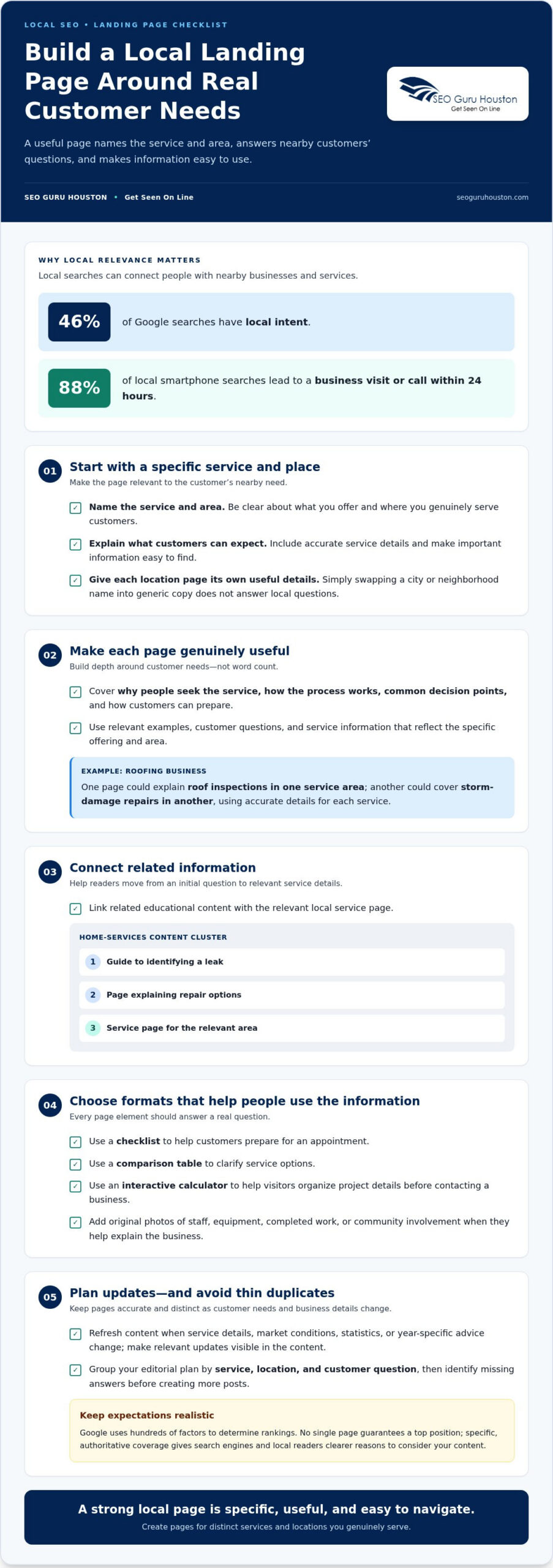
Local relevance starts with a page that answers a nearby customer’s specific need. 46% of Google searches have local intent, and 88% of local smartphone searches lead to a business visit or call within 24 hours. Give those searchers a clear path: name the service and area, explain what customers can expect, and make the next step easy to find. A page that simply swaps a city name into generic copy won’t provide that detail.

Create a dedicated landing page for each distinct service and location you genuinely serve. For example, a roofing company could explain roof inspections in one service area and storm-damage repairs in another, using accurate details about each offering. Include locally relevant examples, customer questions, and service information. Keep each page useful on its own, rather than publishing near-identical pages that differ only by neighborhood name.

Build depth around customer needs, not word count. A strong local page can cover the reasons people seek the service, what the process involves, common decision points, and how to prepare. Then connect it to related educational content. For example, a home-services business might create a guide to identifying a leak, a page explaining repair options, and a service page for the relevant area. This cluster shows topical coverage and helps visitors move from research to action.

Choose a format that makes the information easier to use. A checklist can help customers prepare for an appointment; a comparison table can clarify service options; an interactive calculator can help them organize project details before contacting a business. Add original photos of staff, equipment, completed work, or community involvement where they help explain the business. Each element should answer a real question, not exist merely to make a page look busy.

Plan updates alongside publication. Refresh pages when service details, market conditions, statistics, or year-specific advice change, and make the update visible in the relevant content. A useful editorial plan might group pages by service, location, and customer question, then identify missing answers before creating more posts. Google uses hundreds of factors to determine rankings, so no single page guarantees a top position. But authoritative, specific coverage gives search engines and local readers clearer reasons to consider your content.

2. Search intent and title-tag click-through rates

A page can target the right keywords and still miss the reader’s intent. Search a target phrase and study the results: are the top results service pages, guides, videos, listings, or comparisons? Someone searching for “emergency plumber” is unlikely to need a detailed history of plumbing. Use a format that answers the query, and write a title tag that accurately describes the page.

Google considers many factors when ranking pages. Relevance, useful content, and signals from across the web all shape visibility; no single title or trick controls position. Title tags still matter because they tell searchers what a page covers. Write a distinct, specific title that naturally includes the topic and clearly describes the result. Don’t promise information the page doesn’t provide.

For keyword gap analysis, compare the searches your site targets with the searches competitors visibly address. Group keywords by intent, then note where your page is missing, mismatched, or less helpful. If competitors answer “how to choose a landscaper” with practical criteria and your page only lists services, add the missing decision guidance. Google Search Console shows queries already generating impressions for your site; review them alongside current search results to find useful content opportunities.

AI-generated search experiences make clear, verifiable answers even more important. Use descriptive headings, direct explanations, accurate business details, and supporting evidence where relevant. Organize each page so readers can quickly find the answer and understand its context. These practices improve clarity, but they don’t guarantee a particular display in AI results.

Competitor-analysis tools can help uncover ranking keywords, page topics, and changes in visibility. Start with Google Search Console for your own query and page data; consider paid platforms if you need broader competitor estimates or research workflows. Compare tools by the keyword data, competitor tracking, user seats, and exports they include, since features and pricing vary. Choose one based on the analysis you’ll actually use.

How long does ranking take? Initial local SEO improvements can appear within 30-60 days, while significant ranking improvements typically take 3-6 months, depending on competition and consistent optimization. Review performance regularly, refine titles when they don’t accurately reflect the page, and update content as search needs change.

3. How do site speed and mobile optimization affect my ranking?

A slow website adds friction before visitors can read, call, or request information. Aim for a load time under two seconds when competing in search. A one-second delay affects website rankings and conversions, so speed optimization supports both visibility and visitor experience. Competitor sites loading in under two seconds can feel far more responsive than pages taking four or five seconds.

Start technical SEO work by measuring real page performance, then fix the biggest bottlenecks. Compress oversized images, remove unused scripts, and reduce unnecessary page elements. Test key pages, not just the homepage: a service page with a large gallery or embedded tools may load differently. Recheck after each change to see whether the visitor experience improved.

Mobile responsiveness matters because customers often browse on phones, where limited screen space makes usability problems obvious. Open your important pages on a mobile device and test the full journey. Can someone read the service details, tap the phone number, complete a form, and find the location without pinching or horizontal scrolling? Make buttons easy to tap, text readable, and navigation simple. A dealership, for example, should make inventory, service details, and contact options easy to find.

Check mobile page speed separately from desktop performance. A page that appears fast on a powerful computer may struggle on a phone with a slower connection. Prioritize the content visitors need first, defer nonessential scripts, and use appropriately sized images. Then test forms and menus on different screen sizes. A broken mobile form can cost a lead even when the page loads.

Structured data and HTTPS support a sound technical foundation. Use JSON-LD to describe eligible page content, such as an article’s headline, author, and organization. This helps search crawlers interpret a page, but structured data doesn’t guarantee a special search appearance. Keep markup accurate and aligned with visible content. HTTPS encrypts the connection between a website and its visitors; make sure pages load securely and internal links don’t send users to outdated HTTP versions.

Use a practical review cycle: test speed, inspect mobile usability, correct security warnings, and validate structured data after site changes. A redesign may improve navigation but introduce oversized images or scripts that slow key pages. Technical SEO isn’t a one-time launch task. Track performance on important landing pages and prioritize fixes that help visitors take their next step.

How to Rank Higher Than My Competitors With Local SEO

4. Consistent business citations and directory listings

For local visibility, Google considers relevance and proximity alongside trust signals. A complete Google Business Profile can connect your business with relevant nearby searches, but it can’t erase distance or guarantee a higher position. Treat your profile and directory listings as consistent records: customers should see matching business names, addresses, phone numbers, hours, and service details.

Start with a profile audit. Open Google Business Profile and compare every field with your website and current business records. Check the business name, address, phone number, hours, categories, services, and photos. If your hours change for a holiday, update the profile and website together. If your business moves or changes phone numbers, correct important directory listings too, rather than leaving outdated details across the web.

Build a simple citation tracker with the directory name, profile link, listed details, and last review date. Include major platforms and relevant local or industry directories, then prioritize errors that could send a customer to the wrong address or number. For example, a clinic with an old phone number on a directory should correct that listing promptly. Consistency helps search engines connect records to one business, while useful listings help people act on what they find.

Keep your Google Business Profile active with accurate details and current photos. Add service information that matches your actual offerings, and replace outdated images when the location, team, or customer-facing environment changes. Answer common profile questions clearly. Reviews also contribute to local trust: online reviews account for approximately 15% of local ranking factors. Encourage genuine feedback after completed work, and respond professionally without scripting customers’ opinions.

What SEO tactics can cause Google penalties? Manipulative practices such as keyword stuffing, cloaking, paid links intended to distort rankings, or fake business listings can undermine trust and expose a site to search-quality enforcement. Keep directory entries truthful, and don’t create duplicate profiles to target nearby areas.

Revisit your records whenever business hours, address, phone number, or services change. A practical update process assigns someone to record the change, update the website and Google profile, then review priority directories. This digital marketing housekeeping keeps customer information accurate and supports local search visibility. Reviews and a complete profile matter, but proximity and relevance still influence which businesses appear in nearby searches.

5. Choosing keywords by competition level

Don’t make the most competitive search term your first target. Less-contested keywords may offer more achievable opportunities. A focused keyword strategy compares search intent, competitor positions, and the pages you already have. The goal isn’t to chase every term. Identify searches where your content can offer stronger relevance and a better answer.

Begin with a keyword gap analysis. List the searches that bring visitors to your site, then compare them with queries competitors appear for. Look for terms that match your services but lack a useful page on your website. For example, a commercial cleaning business might find competitors ranking for “office floor cleaning” while its own pages only discuss general janitorial services. That missing topic could merit a dedicated, helpful page.

Next, prioritize opportunities by current ranking position. Focus on terms where a competitor ranks in positions 1–5 while your relevant page appears in positions 11–30. These searches can reveal a page that already has topical relevance but needs clearer coverage, stronger intent alignment, or better internal links. Compare the pages side by side: note which customer questions they answer, what format they use, and where your content leaves useful details out.

Don’t confuse search volume with business value. A broad keyword may attract traffic from people who aren’t ready to buy, while a specific local phrase may signal a clear need. Assess each term by asking whether it describes a service you provide, matches a real customer question, and can support a useful page. Then map each keyword to one primary page, so several pages don’t compete for the same query.

Use a simple scoring sheet to make choices consistent. Record the keyword, intent, competitor position, your page position, business relevance, and the content gap. Give priority to terms with strong relevance and a realistic path to improvement. Recheck competitor rankings monthly to spot movement, then adjust major strategy decisions quarterly using performance data and competitive changes.

Higher rankings for highly competitive keywords may take 6-12 months of sustained effort. Build toward those terms by covering related customer questions and strengthening the pages that support them. If you’re deciding how to rank higher than my competitors, start with the clearest opportunity, not the biggest keyword. A page that serves a specific search well can build the foundation for broader outranking efforts.

SEO Guru Houston: Houston SEO Services

SEO Guru Houston helps businesses put search strategy into action through SEO services, keyword research, competitive research, website traffic analysis, and local SEO campaigns. Turn to the team when your pages, keyword priorities, site performance, or business listings need a coordinated plan rather than disconnected fixes. The work can focus on relevant search opportunities, stronger visibility, and content aligned with customer intent.

For businesses that need complementary support, Houston PPC Services, Houston B2B Marketing, and Houston Inbound Marketing can address other parts of digital growth. The right approach depends on your goals, audience, and current marketing priorities.

Ready to discuss your search visibility? Contact SEO Guru Houston to start the conversation.

Turn Your Search Strategy Into Your Next Growth Move

Competitive visibility improves when someone owns the work after priorities are set. Choose a clear next step: assign responsibility for the highest-impact page or technical fix, define what progress will look like, and review results consistently. That turns the question of how to rank higher than my competitors into a practical business process, rather than a one-time website task.

If you need support connecting that work to broader growth goals, SEO Guru Houston offers Houston SEO Services, Houston PPC Services, and Houston B2B Marketing. The right focus depends on your audience, current online visibility, and the goals your business needs to pursue.

Bring your priorities into a conversation and decide what to tackle first. Contact SEO Guru Houston to discuss your search strategy and next steps. With a focused plan and steady execution, you can build stronger visibility and move your business forward.

Frequently Asked Questions

Does longer content always rank better than shorter content?

No. Content performs when it satisfies search intent, whether that takes a concise answer or a detailed guide. For a query about a business’s opening hours, a clear hours page is more useful than an extended article. For a complex purchasing decision, readers may need comparisons, explanations, and examples. Match the page’s depth to the task, then remove sections that don’t help readers decide or act.

How do site speed and mobile optimization affect my ranking?

Speed and mobile usability can influence whether visitors stay, read, and take action, while performance is one part of a wider ranking picture. Test a page on an actual phone, including its menu, forms, and tap-to-call links. A service page that loads but hides its contact button below a large banner still creates friction. Prioritize fixes that help visitors reach the information or action they need.

How important are backlinks when comparing my site to a competitor?

Backlinks can support a site’s authority, but they shouldn’t replace useful pages, sound technical foundations, or relevant local information. Compare links by their context and relevance, not just by a domain-authority score, which can be manipulated. Look for genuine mentions from organizations, publications, or partners connected to your industry. Avoid buying links designed to manipulate rankings; focus on earning references through useful resources and legitimate business relationships.

Which reasons influence competitor rankings the most?

Competitors can rank higher because their pages better match a search, cover a topic more thoroughly, or earn stronger trust signals. Local results also reflect relevance and the searcher’s proximity. Compare the actual page, not just the domain: a competitor may have a focused service page while your site has only a broad overview. Identify the gap, then address what matters most to the searcher’s task.

Why are your competitors outranking you and what keywords are they ranking for?

Competitors may have pages that answer more specific searches, cover topics more fully, or align more clearly with customer intent. To see which keywords they rank for, compare their visible pages in search results with your own and review your query data in Google Search Console. Note the exact page and query pairing. A competitor’s ranking term is an opportunity only if it fits your services and audience.

How to analyze competitors’ SEO keywords and backlinks?

Start by selecting a few direct competitors, then record the pages appearing for searches relevant to your business. Group their keywords by intent, such as learning, comparing, or contacting a provider. For backlinks, examine the referring page and why it links to the competitor. A relevant industry resource may reveal a useful outreach or content opportunity; a large link count alone doesn’t show whether a link helps your strategy.

How to find high-intent keywords competitors are missing?

Look for searches that signal a decision or immediate need, then compare them with competitors’ page coverage. Search phrases that include a service, problem, or location can reveal specific needs, such as “commercial roof leak repair” rather than “roofing.” Check whether your business offers that service and whether your site answers the query clearly. Build a page only when it can provide accurate, useful information for that search.

How to improve on-page SEO and content quality to outrank competitors?

Choose one clear purpose for the page, then align its title, main heading, introduction, and supporting sections with that purpose. Add details that help readers decide, such as service limitations, preparation steps, or a practical comparison. Link to related pages where useful. Before publishing, remove repeated claims and confirm that every important statement matches the service your business provides.

Content Strategy for Boring Industries That Finds Fresh Angles

A supposedly boring industry can produce compelling content when it starts with real customer questions, not forced gimmicks. A content strategy for boring industries should combine audience insight, an authentic brand voice, perspectives from industry insiders, and useful ideas rooted in everyday problems. A practical starting point is to list 50 questions customers might ask about your product or service, then turn the strongest answers into clear, valuable content.

Some industries may seem to have fewer obvious stories to tell. Yet technical details, recurring customer frustrations, buying decisions, and the people behind the work all offer useful angles. The key is to make each piece relevant to your audience and true to your business.

This article explains how to understand your audience, build a distinctive and credible voice, and bring customers or industry insiders into the conversation. You’ll also get a structured way to generate and organize ideas, giving writers clear direction while leaving room for fresh, useful stories.

Key Takeaways

  • Study how your audience gets information and what it cares about, then use those insights to shape relevant topics and formats.
  • Show personality through a consistent, credible voice. Humor and entertaining angles work best when they still fit your business and audience.
  • Invite customers and industry insiders to contribute practical perspectives that deepen trust and bring fresh experience to your content.
  • Document your audience, voice, priorities, and unresolved decisions so creative work stays aligned with a clear strategy.
  • Find new angles by reframing everyday industry questions, connecting related topics, and curating useful insights from trusted sources.

1. Understanding audience demographics and media habits

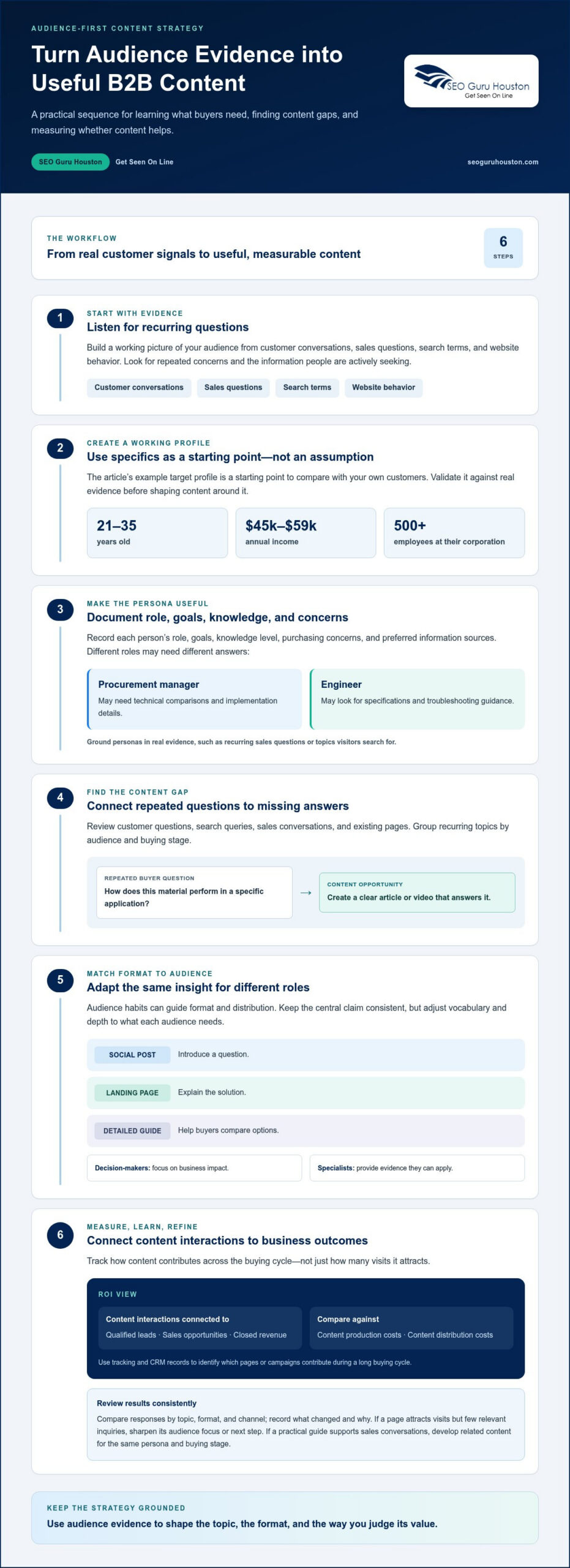
A content strategy for boring industries starts with a specific audience, not a broad assumption about who might buy. Build a working profile from customer conversations, sales questions, search terms, and website behavior. For example, the target profile described here includes people aged 21 to 35 years, earning $45,000 to $59,000, and employed by corporations with more than 500 employees. Treat that profile as a starting point, then compare it with your own customers.

Turn the profile into a practical persona by documenting the person’s role, goals, knowledge level, purchasing concerns, and preferred information sources. A procurement manager may need technical comparisons and implementation details, while an engineer may look for specifications and troubleshooting guidance. Base each persona on real evidence, such as recurring sales questions or topics visitors search for on your site.

How do you identify audience needs and content gaps in a niche industry? Review customer questions, search queries, sales conversations, and existing pages, then group recurring topics by audience and buying stage. If buyers repeatedly ask how a material performs in a specific application but your site offers no clear explanation, that gap could become a useful article or video.

Audience habits can shape both format and distribution. Check which pages attract attention, whether visitors arrive through search or social platforms, and which formats prompt useful responses. An operations leader may prefer a concise process guide, while a technical audience may value a detailed comparison. Test formats, keep the tactics audiences respond to, and revise those they ignore.

Make industry topics interesting by connecting them to audience interests without forcing an unrelated trend. A manufacturer might explain material durability through an environmental angle, or connect a local business story to local sports. A familiar reference, such as a popular book, can also clarify a technical idea. Any connection should strengthen the explanation, not distract from the product or customer problem.

Adapt the same core insight for different roles and formats. A social post can introduce a question, a landing page can explain the solution, and a detailed guide can help buyers compare options. Keep the central claim consistent, but adjust the vocabulary, depth, and next step. Decision-makers need to understand the business impact; specialists need evidence they can apply to their work.

How do you measure content marketing ROI in B2B industries? Connect content interactions to qualified leads, sales opportunities, and closed revenue, then compare the resulting value with content production and distribution costs. Use tracking and CRM records to see which pages or campaigns contribute during a long buying cycle, rather than judging a technical guide by visits alone.

Review results on a consistent schedule. Compare responses by topic, format, and channel, and record what changed and why. If an article attracts visits but few relevant inquiries, sharpen its audience focus or next step. If a practical guide supports sales conversations, develop related content for the same persona and buying stage.

2. Balancing personality and authenticity

Technical accuracy earns trust, but a brand’s personality gives readers a reason to remember it. In 2014, content marketing was dubbed “The Year of the Story.” That idea still applies to industrial topics: explain what a product changes for a real person, not just what it contains. A maintenance company, for example, can pair an equipment guide with a technician’s account of spotting a recurring issue.

Choose three voice attributes, such as practical, candid, and curious, and define each with an example. “Practical” might mean explaining a process in plain language; “candid” means acknowledging a genuine limitation instead of hiding it in vague copy. A brief voice guide gives writers a shared reference and keeps the brand’s personality consistent across blog posts, sales pages, and social updates.

Use humor with judgment. A light joke about a familiar workplace headache can make a post approachable, but humor about safety, customer losses, or a serious technical failure can undermine credibility. Before publishing, check that the humor supports the point, suits the audience, and sounds like the people who do the work. Cut it if it distracts from the useful information.

Show the people behind the expertise. A project manager can explain why a process changed, a technician can clarify a common misconception, and a founder can describe the principle behind a business decision. Use specific details. “We care about quality” is generic; describing how a team handles a difficult handoff demonstrates that value through an example.

Personality also comes through in structure. Replace a stiff introduction with a clear problem, use descriptive subheadings, and close with a useful next step. An article about equipment maintenance might open with signs of an overlooked issue, then offer a simple inspection checklist. This professional structure makes the writing easier to follow and more engaging.

Keep the brand recognizable across topics without making every piece sound identical. An occasional entertaining post can reinforce the voice while staying relevant to the business. A manufacturer, for instance, could share a brief behind-the-scenes account of how a team solved an unusual production challenge. Track comments, shares, and meaningful inquiries to learn which tones and formats prompt responses, then refine future content.

Consistency matters across channels, too. A social post can be punchier than a technical guide, but both should reflect the same values and level of candor. A focused social media marketing approach can help carry that voice into audience conversations, rather than treating each post as a disconnected announcement.

3. Publishing guest posts from customers or industry insiders

A customer or industry insider can explain a difficult problem in language readers recognize. Invite a plant manager to describe how an equipment issue disrupted production, or ask a distributor to explain a recurring buyer misconception. Firsthand details add context that internal experts may overlook. Choose contributors for relevant experience, not job titles alone.

Start with a focused invitation. Name the intended audience, the question the post should answer, and the practical takeaway for readers. For example, ask a maintenance lead to explain how teams identify early signs of wear. Provide a short outline with prompts, but let the contributor bring examples and terminology from their daily work.

Strong guest content can reveal problems customers may not describe in formal interviews. Ask contributors to walk through a recent challenge: what happened, what made it difficult, and what information helped. A supplier might explain why a specification was misunderstood during purchasing. Remove confidential details, then shape the story around a lesson other buyers can use.

Put education first in every draft. A controls engineer could clarify the difference between a sensor fault and a wiring issue, while noting when readers need qualified technical help. Keep explanations precise, define industry terms, and use a practical example for each major point. Readers should get a useful resource, not a disguised product pitch.

Give readers a practical next step. A logistics customer might share a checklist for preparing a shipment, while an industry analyst could explain what data to gather before comparing suppliers. Add a clear summary and relevant links to your own guides. People arriving from search should understand the advice without insider knowledge.

Before publication, edit for clarity, accuracy, and your established voice. Preserve the contributor’s perspective, but remove unexplained acronyms and unsupported claims. Confirm names, product references, and technical details with the author. Then promote the finished post through the contributor’s professional network, email updates, and relevant social channels. A useful post can earn attention from Google and readers when its subject matches a real search need.

Keep the relationship active after publication. Thank the contributor, share audience questions, and invite a follow-up as the topic develops. An older blog post can also become a short video, even if the original was published two years earlier. Repurposing the insight creates another format and a fresh reason to reconnect with the contributor and audience.

A follow-up can turn interest into action: the company in the article estimates that converting a customer by phone gives it about a 75% chance of closing the sale. Keep the next step relevant to the advice, rather than forcing a pitch.

Balance material that moves beyond the brand’s core topic with posts that reinforce it, so readers stay connected without feeling pestered. The gym partnership in the example offers customers a 10% coupon in exchange for promoting a vehicle hail-damage guide. Brands can also link to and share material from industry sources, curating useful content from others to reinforce their authority.

Content Strategy for Boring Industries That Finds Fresh Angles

4. Separating strategy clarity from creative content

Set the strategy before brainstorming headlines. Document what the organization does, who it serves, where revenue comes from, and which audience needs the content should address. Then define voice attributes, channel priorities, and useful outcomes in plain language. A pump manufacturer, for example, might focus on helping facility teams compare maintenance approaches. Clear direction gives creative work a target without dictating every sentence.

What content formats work best for traditionally boring industries? Try practical formats such as evergreen guides, local stories, short videos, and link-worthy resources. A comparison guide can explain technical choices, while a short video can demonstrate a process. Match each format to the audience’s question and the content’s purpose, then track responses, including comments and qualified inquiries.

Plan a monthly mix of one local piece, two evergreen pieces, and one link-worthy asset. A local piece could explain a regional operating challenge, while evergreen articles could answer recurring maintenance questions. The asset might be a checklist, calculator, or original visual guide that others may reference. This mix adds variety while keeping the publishing plan manageable and focused.

A link-worthy resource earns attention by making a useful idea easier to understand or share. For a building supplier, that might be a material selection chart or a clear guide to common project decisions. A contest can also invite participation when it fits the audience. One hail-related example offered a $500 prize to the local homeowner submitting the largest hailstone during the season. The prize was tied directly to the subject.

Videos make complex processes visible. Film a technician explaining a routine inspection, then add captions and a concise written summary for readers who prefer text. A B2B marketer can also repurpose material from a blog post written two years earlier into a short-form video. Keep the central advice accurate, refresh dated details, and adapt the opening to the video audience.

Give writers creative freedom within clear boundaries. Specify the intended reader, voice attributes, core message, and required evidence, then let writers choose the story and presentation. Explicit guidance helps writers and campaign teams interpret the strategy consistently. Flag unresolved decisions, such as a messaging framework still in development, rather than letting each new piece invent its own direction.

How much does a content marketing strategy cost for a small B2B business? The price depends on scope, research, production formats, and distribution needs, and is provided after a quote request. A focused plan may prioritize a few useful formats, while a broader program requires more research and ongoing production.

Review the plan against audience response and business relevance. If a guide prompts thoughtful comments or helps sales answer recurring questions, use that signal to shape the next topic. Content creation becomes more efficient when every piece has a defined purpose, while reader conversations keep the strategy connected to real needs.

5. Content idea generation for less exciting industries

Start with customer questions, not a brainstorm about what sounds exciting. Write down 50 questions buyers ask about a product, process, or decision. A filtration company might list questions about choosing a filter, spotting wear, or comparing materials. Group similar answers, then choose topics that solve real problems and support business goals.

Use a content idea matrix to explore each question through generalization, specification, similarity, and time. A question about equipment maintenance could become a general guide, a model-specific explanation, a comparison with another method, or a seasonal checklist. This framework turns one useful insight into distinct digital content instead of repeating the same article under a new title.

How can B2B companies make technical or complex topics engaging? Start with a familiar problem, explain the technical point in plain language, and show its practical effect. For example, explain how a vehicle’s fuel warning relates to driver decisions, then support the answer with clear details.

Which SEO keywords and topics should boring-industry businesses target? Focus on phrases that reflect customer questions, product applications, comparisons, and troubleshooting needs. Match each keyword with a useful answer, such as a solar company explaining how home-buying decisions affect energy planning.

Useful ideas can come from connections beyond the core product. A content piece about buying a house earned 99 links in the solar energy industry. In auto maintenance, an article about car iterations and how far drivers can travel after the gas light comes on earned 151 linking root domains. Both examples connect an industry subject to a decision people already understand.

What are examples of successful content marketing in boring industries? A blender campaign was associated with a 700% increase in total blender sales between 2006 and 2008. Industrial marketers can also find an audience through a niche newsletter with a mailing list of 10,000 people, as Ross Simmonds has noted.

In regulated industries, key risks include inaccurate claims, unclear qualifications, and advice readers could mistake for guidance about their personal situation. Build review into the workflow: verify technical statements, document evidence, and send sensitive drafts through appropriate internal review before publication.

How do you build a content strategy for an industrial or regulated business? Document what the organization does, where its revenue comes from, who its audience is, and which questions the content should answer. Record shared decisions and unresolved issues, then connect each topic to an audience need and business goal.

Use these steps to build a practical topic pipeline, then turn the strongest ideas into a focused B2B content and demand-generation plan.

SEO Guru Houston: Houston SEO Services

SEO Guru Houston can help turn useful industry knowledge into a clear digital strategy that reaches the right buyers nationwide. If your content answers customer questions but struggles to earn search visibility, professional SEO services can support a focused approach to relevant topics and search intent. For complex business audiences, specialized B2B marketing and inbound marketing methodologies can connect educational content with broader demand generation goals.

Identify where your strategy needs support: audience targeting, search visibility, or a clearer path from useful information to qualified inquiries across your target markets. SEO Guru Houston can align those priorities with your content program and overarching marketing objectives.

Contact SEO Guru Houston to discuss how a clearer content strategy can support your business goals.

Turn Your Next Idea Into a Clear Plan

A content strategy for boring industries becomes valuable when it guides regular decisions, not just when it sits in a document. Choose one audience need, assign responsibility for addressing it, and decide how you’ll judge whether the content is useful. This gives your next idea a purpose before production begins, while leaving room to adjust based on feedback from readers and sales teams.

SEO Guru Houston can support the next stage with Houston SEO Services, Houston PPC Services, and Houston B2B Marketing. These offerings can help connect content priorities with search visibility, paid campaigns, and business-to-business marketing goals. Bring a clear picture of the audience you want to reach and the questions your content should answer.

Ready to turn your ideas into a more focused marketing plan? Explore your next steps with SEO Guru Houston. Your industry already has useful knowledge to share. Put it to work with purpose, and keep building from there.

Frequently Asked Questions

What is content strategy for boring industries?

A content strategy is a documented plan for turning specialized knowledge into information that helps a defined audience make decisions. A commercial flooring supplier, for example, could plan articles about durability, installation considerations, and facility maintenance. Each topic needs a clear reader, purpose, and suitable format. The strategy helps teams choose what to create, maintain a consistent message, and connect useful information to business priorities.

How often should companies in niche industries publish content?

Choose a publishing cadence your team can sustain while keeping information accurate and useful. A monthly planning cycle can coordinate new articles, updates, and distribution without making every week a deadline. For example, a manufacturer could publish a guide when customers repeatedly ask about a specification, then update existing pages when product details change. Review audience response regularly and adjust the schedule to match capacity and demand.

Core Web Vitals Optimization for Faster, More Stable Pages

A page can load quickly and still frustrate visitors. The three Core Web Vitals measure loading performance with Largest Contentful Paint (LCP), responsiveness with Interaction to Next Paint (INP), and visual stability with Cumulative Layout Shift (CLS). A practical core web vitals optimization guide targets an LCP of 2.5 seconds or less, an INP below 200 milliseconds, and a CLS score below 0.1.

Those thresholds turn a vague “my site feels slow” concern into specific issues to investigate. Speed matters, but responsiveness and unexpected page movement can disrupt the experience even after content appears. Improving these signals can make important pages smoother and easier to use.

This guide explains what each metric measures, how layout shifts and delayed interactions affect visitors, and how image delivery influences loading performance. It also covers Core Web Vitals in Google Search, where they are one consideration among several, and the optimization work that can address underlying problems.

Key Takeaways

  • Understand how loading, responsiveness, and visual stability are measured, and what good performance looks like for each metric.
  • Spot common causes of layout shifts, including animations and transitions, and learn how to keep page elements stable as content loads.
  • See why Interaction to Next Paint replaced First Input Delay and what the change means for assessing real interactions.
  • Explore how image formats, sizing, and delivery affect loading speed, especially when an image is the page’s largest visible element.
  • Learn how real-user data and performance dashboards help connect Core Web Vitals improvements with page experience in Google Search.

Cumulative Layout Shift (CLS) – What is CLS?

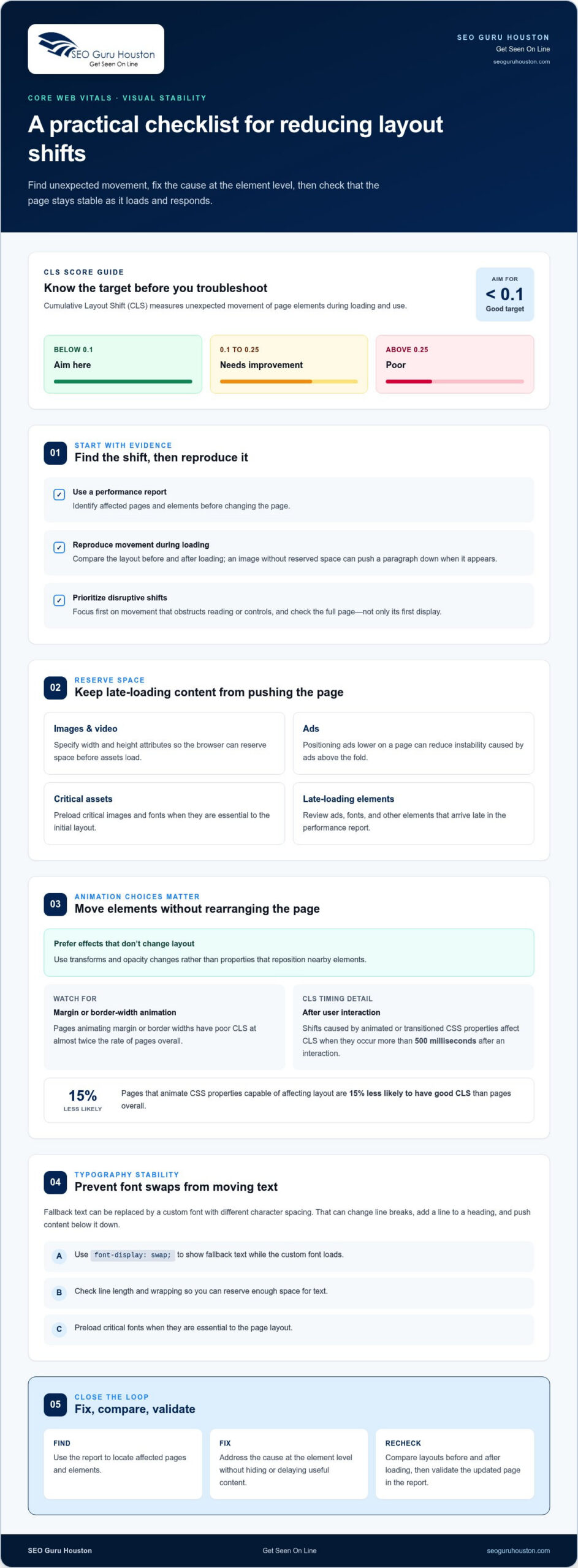
Cumulative Layout Shift (CLS) measures unexpected movement of page elements during loading and use. Aim for a CLS score below 0.1; scores from 0.1 to 0.25 need improvement, while scores above 0.25 are poor.

Animation and Transition Layout Shifts

Animation-related layout shifts happen when motion changes an element’s position or size and pushes other content around. They matter because a moving page can make visitors lose their place or click the wrong control. Layout shifts caused by animated or transitioned CSS properties affect CLS when they occur more than 500 milliseconds after a user interaction.

Choose animations that don’t change the page’s layout, such as transforms and opacity changes, instead of properties that reposition nearby elements. Pages that animate CSS properties capable of affecting layout are 15% less likely to have good CLS than pages overall. Pages animating margin or border widths have poor CLS at almost twice the rate of pages overall.

Font Loading and Layout Stability

Font loading can shift a layout if the browser first displays fallback text, then replaces it with a custom font whose characters occupy different space. That change can alter line breaks and move headings, paragraphs, and buttons. For example, a heading that wraps onto an extra line after a font swap can push the content below it down.

Use the CSS property font-display: swap; to show fallback text while a custom font loads. Check how the chosen font affects line length and wrapping so you can reserve enough space for text. Preloading critical fonts can prioritize assets essential to the page layout and help reduce movement during loading.

Cumulative Layout Shift Optimization

CLS optimization means finding unexpected movement and reducing it without hiding or delaying useful content. Start with a performance report to identify affected pages and elements, then reproduce the movement during loading. For example, an image without reserved space may push a paragraph down when it appears.

Fix the cause at the element level. Specify image and video width and height attributes so the browser can reserve space before those assets load. Positioning ads lower on a page can reduce instability caused by ads above the fold. Preload critical images and fonts when they are essential to the initial layout.

  • Reserve space for images and videos with explicit dimensions.
  • Keep animated effects from changing surrounding layout.
  • Review font swaps, ads, and other late-loading elements in the report.

Check visual stability across the page, not only on first display. A change to one element can affect nearby content, so compare the layout before and after loading. Prioritize shifts that obstruct reading or controls, then validate the updated page in the report.

What are the three Core Web Vitals metrics?

Core Web Vitals measure real-world loading performance, responsiveness, and visual stability. Largest Contentful Paint (LCP) tracks loading, Interaction to Next Paint (INP) evaluates responsiveness, and Cumulative Layout Shift (CLS) captures unexpected movement. Good targets are LCP within 2.5 seconds, INP below 200 milliseconds, and CLS below 0.1. A core web vitals optimization guide can help connect each metric to the page experience it represents.

To measure Core Web Vitals, open the report in Google Search Console to review groups of pages. Use PageSpeed Insights for page-level results and Chrome DevTools’ Performance panel to inspect a browser session. Search Console and Chrome User Experience Report data reflect real-world Chrome user experiences, while DevTools helps investigate issues in a controlled test.

On WordPress or another platform, compare affected URLs, test a representative page, then trace the issue to its theme, page builder, plugins, assets, or server. Where appropriate, disable or defer noncritical scripts and reduce unnecessary builder modules. Retest after each change to see what improved. A core web vitals optimization guide is most useful when you test its recommendations on the actual pages and templates visitors use.

The three metrics reveal different bottlenecks. A simple page may display its main content slowly if the server responds late. A page can load quickly yet feel unresponsive when JavaScript blocks the browser’s main thread. Or the layout can shift after loading, disrupting reading or interaction.

Google evaluates field performance at the 75th percentile of user experiences. That means the report reflects the slower end of real visits, not only a developer’s fastest test. The Chrome User Experience Report uses anonymized data collected from Chrome users, helping distinguish a lab-only issue from a problem visitors encounter across devices and network conditions.

PageSpeed Insights helps connect results to possible causes. Compare field data with lab diagnostics: field data reflects user experience, while a lab test provides a repeatable view of a page load. Test important templates, such as a product page and a lead form, because each may have different bottlenecks.

Performance dashboards are most useful when they track trends alongside affected page groups. In Search Console, check whether issues cluster around a template or URL type, then compare later reports after making changes. One test cannot show whether a fix improved the experience for real users.

Page builders and plugins can add scripts, styles, and requests that compete for browser time. On WordPress, review active plugins and remove unused features or scripts where safe. If TTFB stays above 400 milliseconds, address hosting before relying on frontend changes to improve LCP; a good TTFB target is below 0.8 seconds.

Shared WordPress hosting typically has a TTFB of 500 to 1500 milliseconds, compared with 100 to 300 milliseconds for managed WordPress hosting. Caching can reduce repeated server work, while a content delivery network can deliver assets to users in different locations. When template changes are needed, website development and landing page work can address the page structure behind recurring performance problems.

Interaction to Next Paint (INP): What Is It?

Interaction to Next Paint (INP) measures how quickly a page responds throughout a visitor’s interactions. A good INP is below 200 milliseconds; a score from 200 to 500 milliseconds needs improvement, and above 500 milliseconds is poor. Unlike a metric focused on one input, INP reflects the delay from interaction through the browser’s next visual update.

Google replaced First Input Delay (FID) with INP in March 2024. FID measured only the delay before a browser began processing a visitor’s first input. It did not account for later interactions or the time needed to process an event and render its visual response. INP provides a broader view by considering interactions such as clicking a menu, typing into a search field, or adding an item to a cart.

Consider a visitor selecting a filter. The browser may receive the click promptly, but a long JavaScript task can delay the filtered results appearing. INP includes that wait for the next paint. A page’s INP is 500 milliseconds if its slowest interaction takes half a second to process. This helps identify sluggish controls that a fast initial page display can conceal.

Start diagnosis by reproducing the slow interaction, then inspect the page’s main-thread work in Chrome DevTools. Browser tasks lasting more than 50 milliseconds are considered long tasks and can block responses to user actions. Look for expensive event handlers, repeated layout calculations, and scripts that run during the interaction. Break lengthy JavaScript work into smaller tasks, remove unnecessary processing, and avoid updating large sections of the page when one element changes.

Third-party scripts can compete for processing time. Review analytics, chat widgets, and advertising scripts, then load them asynchronously or limit their use where possible. For example, avoid recalculating search results on every keystroke if the interface can wait until typing pauses. Keep the response clear, such as by showing a loading state while results render.

Use real-user monitoring and the Core Web Vitals report in Search Console to identify patterns across page groups. Lab testing can help reproduce an interaction, while field data shows how visitors experience it across devices and network conditions. Prioritize the slowest meaningful interactions, then compare measurements after each code change.

Preloading helps with resources needed early, but it does not directly fix every INP problem. Prioritizing a critical script can help it arrive sooner, but competing resources can still delay interaction processing. Distinguish loading delays from JavaScript execution issues, then address the bottleneck affecting the visitor’s next action.

Core Web Vitals Optimization for Faster, More Stable Pages

Image format and responsive image optimization

For mobile users, prioritize the image that becomes the largest contentful paint element, then reduce its file size and loading delay. Serve appropriately sized images, use modern formats such as WebP, and lazy-load images outside the viewport while ensuring the primary visual is discoverable early.

Images often determine whether a mobile page feels ready. The 2024 Web Almanac reports that 73% of mobile pages have an image as their LCP element. Compress large files and serve WebP where appropriate; WebP media content is 34% smaller than the usual format. Match each image’s dimensions to its display size instead of sending a large desktop asset to a narrow screen.

Responsive image markup lets the browser choose a suitable source for the screen and layout. Use srcset to offer image variants and sizes to describe their expected display width. For example, a phone showing a small product thumbnail shouldn’t download the oversized file used for a full-width desktop banner. This reduces unnecessary data transfer.

Make the LCP image easy for the browser to discover in the initial HTML. Among pages whose LCP element was an image, 35% had image source URLs that weren’t discoverable in the initial HTML response. A further 7% obscured the LCP image behind a data-src attribute. Avoid hiding the primary image behind JavaScript-driven loading when it needs to appear early.

Prioritize images larger than 10,000 square pixels when investigating LCP. Use image preloading selectively for a critical, immediately visible visual, so the browser can request it sooner. Don’t preload every image: unnecessary requests compete for network capacity and can delay the resource that matters most.

Reserve layout space by setting image dimensions, then lazy-load below-the-fold images. Sixty-six percent of pages have at least one image without an explicit size, which can leave the browser unable to allocate space before loading. WordPress has supported native WebP images since version 5.8, and native lazy loading since version 5.5.

Image optimization is only part of resource optimization. Render-blocking CSS can delay the first display, while large JavaScript bundles and third-party scripts compete for browser time. Minify CSS and JavaScript, defer noncritical resources, and load below-the-fold images as they approach the viewport.

  • Compress images and select responsive variants for mobile display.
  • Keep the LCP image visible in initial HTML and prioritize it selectively.
  • Reserve image space and lazy-load visuals outside the viewport.

A content delivery network can serve image assets quickly to users in different locations. After changing formats, markup, or delivery, compare mobile field performance and inspect the LCP element again. This helps show whether the image itself, its discovery, or another resource is still delaying the visual result in Google Search.

Google treats page experience as part of a broader search picture, not a shortcut to rankings. Its core ranking systems seek to reward page experience, with Core Web Vitals among several considerations. A fast page still needs useful content that matches the search. Strong technical signals support the experience; they do not replace relevance or usefulness.

Core Web Vitals became a Google ranking factor in June 2021, with the change rolling out to desktop searches in February 2022. Those dates matter because they show this isn’t a passing dashboard trend. Google recommends good Core Web Vitals for Search success and user experience, but no single metric guarantees a particular position. Treat performance as a part of sound search strategy, not a substitute for it.

The practical targets help teams decide what to fix. Aim for Largest Contentful Paint within 2.5 seconds, Interaction to Next Paint below 200 milliseconds, and Cumulative Layout Shift below 0.1. Google assesses user experiences at the 75th percentile, so a page’s fastest visit does not represent every visitor. A page that performs well only on a developer’s laptop may still struggle on slower mobile networks.

Use that percentile perspective to prioritize pages and templates. If a Search Console report groups URLs with similar performance, investigate their shared layout or components first. For example, a slow product template may affect many product pages; fixing shared image handling or scripts can address a pattern rather than one URL. Reassess field data after changes because real-world results reflect users’ devices and connections.

Page experience extends beyond the three metrics. After a page loads, visitors still need clear navigation, readable content, and a secure browsing experience. A visually stable page can still frustrate someone if its main content takes several seconds to appear. Review the full journey, from a Google Search result to the page’s key information and next interaction.

Keep the metrics in context. A good LCP score means the largest visible content appeared promptly; it does not prove every form or menu responds well. Likewise, a good Interaction to Next Paint result does not show that a page answers the visitor’s query. Pair Core Web Vitals data with the page’s purpose and user tasks, such as reaching a contact form or comparing service details.

Make the next action specific: connect a page group’s Search Console status to its template, then prioritize changes affecting loading, responsiveness, or stability. For a stronger search experience, build a performance-focused website strategy around the pages visitors need most.

SEO Guru Houston: Houston SEO Services

SEO Guru Houston helps businesses connect organic search priorities with the pages customers use to evaluate their services. If Core Web Vitals reports reveal recurring issues across important landing pages, our professional optimization strategies can align technical performance priorities with search visibility and page goals.

That work can support a broader growth strategy. Comprehensive digital marketing and B2B campaigns help businesses pursue different acquisition goals, while a well-structured website gives visitors a clearer path to useful information and next steps.

For a focused discussion about your website’s search priorities and core web vitals optimization guide implementation, contact SEO Guru Houston.

Turn Better Page Experience Into Your Next Step

Performance work creates the most value when it supports a clear business goal. Choose a priority page, connect its technical needs to the action you want visitors to take, and keep that focus as your site evolves. A core web vitals optimization guide can frame the work, but progress depends on applying the right changes to the pages that matter to your audience.

When technical improvements need to align with broader visibility and growth objectives, SEO Guru Houston offers search engine optimization, pay-per-click advertising, and B2B marketing. These services can support different acquisition strategies while your website gives visitors a smoother path to useful information and next steps.

Bring your priorities into focus and decide what better page experience should help your business achieve. Contact SEO Guru Houston to discuss how its digital marketing services fit your goals. Keep moving forward with a site built to serve both your audience and your growth strategy.

Frequently Asked Questions

FCP vs LCP: What Is the Difference?

First Contentful Paint (FCP) records when the browser first renders visible content, such as text or an image. Largest Contentful Paint (LCP) measures when the largest visible content element appears. FCP may occur while the main image or headline is still loading. Use both measurements to narrow down delays: slow FCP points to an early rendering issue, while a later LCP may point to the primary content element.

FID vs INP: What Changed?

Interaction to Next Paint (INP) replaced First Input Delay (FID) in Google’s Core Web Vitals in March 2024. FID measured delay before the browser began processing a visitor’s first interaction. INP assesses the responsiveness of interactions across a visit, including the delay until the next visual update. For example, a quick first click doesn’t reveal whether a later filter selection takes too long to display results.

First Input Delay (FID): What Is FID?

First Input Delay measured the time between a visitor’s first interaction and the browser beginning to process it. It focused on input delay, not the full time required to update the page afterward. An ideal FID was below 100 milliseconds; 100 to 300 milliseconds needed improvement, and above 300 milliseconds was poor. FID is now a legacy metric, so use INP when evaluating current Core Web Vitals.

Largest Contentful Paint (LCP): What Is LCP?

Largest Contentful Paint measures how long the largest visible content element takes to appear after a page starts loading. That element might be a prominent heading, an image, or another large content area. LCP helps identify whether the content visitors came to see appears promptly. For example, a page may show its logo quickly but still have a slow LCP if its main banner loads later.

What Is a Good LCP Score?

A good LCP is within the first 2.5 seconds after loading begins. A score from 2.5 to 4.0 seconds needs improvement, while a score greater than 4.0 seconds is poor. If a report flags LCP, identify which element was measured before changing code. A large image, delayed server response, or render-blocking resource can each affect when that element appears.

What Does Insufficient Real User Data in PageSpeed Insights Mean?

It means PageSpeed Insights lacks enough eligible real-world Chrome user data to show field results for that page or origin. It is not a performance score and does not establish whether the page is fast or slow. Use available lab diagnostics to investigate a specific test, then review field data later as it becomes available. Test important page templates, not just the homepage.

What Are Core Web Vitals, and What Are the Current LCP, INP, and CLS Thresholds?

Core Web Vitals measure real-world loading performance, responsiveness, and visual stability. Good targets are LCP within 2.5 seconds, INP below 200 milliseconds, and CLS below 0.1. LCP above 4.0 seconds, INP above 500 milliseconds, and CLS above 0.25 are poor. The middle ranges need improvement: LCP from 2.5 to 4.0 seconds, INP from 200 to 500 milliseconds, and CLS from 0.1 to 0.25.

How Do Field Data and Lab Data Differ When Evaluating Core Web Vitals?

Field data reflects real visits from Chrome users, while lab data comes from a controlled test that helps reproduce and diagnose page behavior. Field results show how people experience a page across their actual devices and network conditions. A lab test can help isolate a slow script or image, but one test does not represent every visitor. Compare both views to connect real-world patterns with specific technical causes.

Mobile first design for B2B sites that puts usability first

A desktop layout shrunk to fit a phone isn’t mobile-first. Mobile-first design for B2B sites starts with the smallest screens, prioritizes essential content and actions, then adds features as the layout scales up for tablets and desktops. The goal is a clear, usable experience on every screen, not a desktop page squeezed into a narrow column.

That matters because buyers may use a phone to research a solution, compare options, or reach out between meetings. If key information is hard to find, buttons are awkward to tap, or pages take too long to load, the experience can get in the way of a business decision.

This guide explains what mobile-first design means and how it differs from responsive design. You’ll also learn how device and network testing, navigation, page performance, and Google’s mobile-first indexing affect a B2B website, so you can see which design choices support usability and search visibility.

Key Takeaways

  • Start with essential B2B content and actions on small screens, then expand the experience for larger devices.
  • Test real phones and tablets across screen sizes, orientations, and network conditions to uncover usability issues.
  • Make mobile navigation easy to scan and interactive controls comfortable to tap, while keeping key pathways visible on desktop.
  • Optimize images, scripts, and page layouts to support faster loading and a smoother mobile experience.
  • Review the mobile version of your site as part of both usability and search visibility, since Google uses it for indexing and ranking.

What is mobile first design?

Mobile-first design begins with a phone-sized experience, then expands it for tablets and desktop screens. For B2B teams, that means prioritizing essential information and user actions before adding wider layouts or extra features.

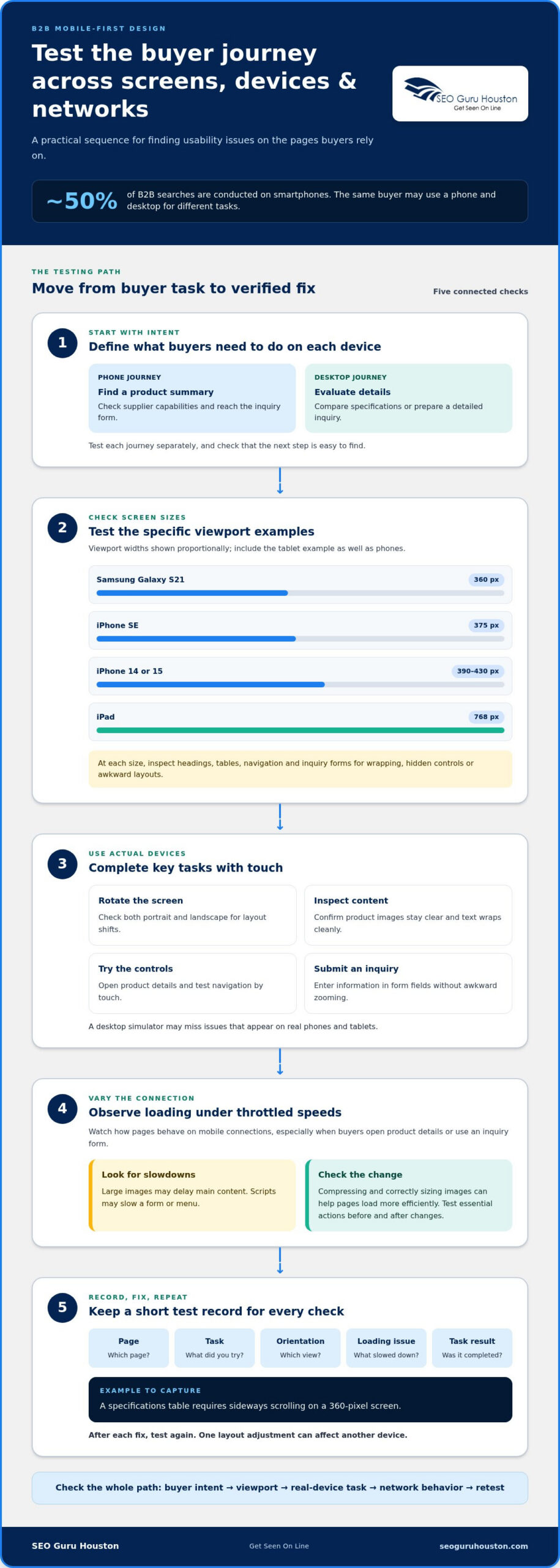
The approach matters because a buyer may first encounter a supplier on a phone, then continue research on a desktop. About 50% of B2B searches are conducted on smartphones. A mobile-first design for B2B sites makes the first interaction usable, while still leaving room for detailed product information and complex decision-making on larger screens.

Mobile-First and Responsive Approaches

Mobile-first defines the order of design decisions, responsive describes how layouts adapt to screen size, and adaptive uses selected fixed layouts. This distinction helps teams avoid treating a mobile view as a compressed desktop page. With mobile-first design, teams establish the essential content and journey first, then enhance the experience as more screen space becomes available.

Responsive layouts can adjust fluidly across device sizes, whether the design began on a phone or desktop. Adaptive design may instead use fixed layouts for widths such as 320, 480, 760, 960, 1,200, and 1,600 pixels. These approaches can overlap: a mobile-first site can also use responsive layouts. The key is to prioritize content and controls for each screen.

For example, a phone layout might place a product overview, specifications, and inquiry action in one clear column. A desktop layout can then show comparison tables or supporting details side by side. Simply stacking desktop elements may retain the content but hide the buyer’s next step.

Value for B2B Buyers and Decision-Makers

Mobile-first design helps B2B buyers find and use essential information on a small screen, which matters during early research and later vendor evaluation. A clear product summary, readable specifications, and accessible inquiry path make the experience easier to navigate without removing depth from the desktop version.

The cost of a B2B redesign depends on its scope, existing platform, content, integrations, and required layout changes; pricing is provided after a quote request. Common mistakes include shrinking desktop text, hiding key actions, and carrying every desktop element onto mobile without prioritizing. Measure results by comparing mobile traffic, form completion, qualified inquiries, and task success before and after launch, segmented by device and key landing page.

Mobile-first design prioritizes mobile users, while responsive design focuses on adapting layouts across device sizes. The goal is to prioritize the mobile experience rather than simply squeeze a desktop site onto a smaller screen. A mobile-first design process begins with smartphone and tablet basics, then adds features as more screen space becomes available.

For B2B website teams, this means adapting the presentation of content across devices rather than simply stacking desktop elements into one mobile column. The mobile-first layout should scale up intentionally, not be scaled down reactively. Starting with the mobile user experience gives teams a foundation for larger screens, where added space can support further features without losing the priorities established for mobile.

Usability testing across devices and network conditions

A design that looks sound in a browser preview can behave differently on actual devices. Test the pages buyers use across screen sizes, orientations, and network conditions.

Device-Specific User Intent

Device-specific intent means the same buyer may use a phone and desktop for different tasks. A mobile user might check a supplier’s capabilities between meetings, while a desktop user compares specifications or prepares a detailed inquiry.

Test those journeys separately, then check that each device supports the next step. For example, confirm that phone users can find a product summary and submit an inquiry, while desktop visitors can scan detailed technical information. Analytics can reveal which devices bring valuable conversions, helping you test against actual buyer behavior.

Cross-Device and Screen-Size Testing

Cross-device testing checks whether content and interactions work across different screens and hardware. It matters because a layout that fits one phone may wrap awkwardly or hide controls on another.

Use specific viewport examples: test an iPhone SE at 375 pixels, an iPhone 14 or 15 at 390-430 pixels, and a Samsung Galaxy S21 at 360 pixels. Include an iPad at 768 pixels, then rotate devices to catch layout shifts. Check headings, tables, navigation, and inquiry forms at each size.

Real-device testing reveals issues a desktop simulator may miss. Open important B2B pages on actual phones and tablets, then complete key tasks using touch. Check whether product images remain clear, text wraps cleanly, and form fields accept input without awkward zooming. Test portrait and landscape orientations, since screen space changes when users rotate a device.

Network conditions matter too. Use throttled speeds to simulate slower connections, then observe how pages load on mobile devices. Large images may delay the main content, while scripts may slow a form or menu. Compressing and correctly sizing images can help pages load more efficiently. Test essential actions, such as opening product details or submitting an inquiry, before and after making changes.

Keep a short test record for each device and connection condition. Note the page, task, screen orientation, loading issue, and whether the user completed the task. For example, record if a specifications table requires sideways scrolling on a 360-pixel screen. Re-test after each fix, because one layout adjustment can affect another device.

If testing identifies layout or interaction problems, focused website development and landing pages can help address them as part of the site experience.

Mobile-first testing can use throttled network speeds to simulate real conditions. Test mobile designs across network speeds, device orientations, screen sizes, and hardware capabilities, using real phones and tablets.

Mobile B2B navigation should make core pages and next actions easy to find and tap. The best mobile-first UX practices combine clear pathways, finger-friendly controls, and simplified menus without hiding essential routes on larger screens.

Touchscreen-Friendly Interfaces

A touchscreen-friendly interface supports tapping and scrolling without requiring precise pointer control. This matters when buyers need to review specifications or complete an inquiry on a phone. Make buttons distinct from nearby text links, use readable labels, and keep interactive elements visually clear. On a product page, separate actions such as “View specifications” and “Request information” so each has an obvious tap area.

Mobile Navigation

Mobile navigation organizes the most important pages into a compact, usable pathway. A collapsible menu can reduce clutter, while sticky navigation can keep a key action available as visitors scroll.

Prioritize core routes such as products, services, and contact. Don’t make buyers navigate several menu layers to reach an inquiry form. On larger screens, keep critical navigation visible instead of automatically hiding it behind a hamburger menu. Responsive design should adapt navigation to the screen, not remove useful options.

Touch Target Sizes and Spacing

Touch targets are the active areas users tap, and adequate size and spacing help prevent missed selections. Apple recommends a minimum touch target of 44 by 44 pixels; Google recommends 48 by 48 pixels.

Apply these recommendations to buttons, menu items, and form controls. Leave enough space between adjacent actions, such as “Download spec sheet” and “Contact sales,” so a tap doesn’t trigger the wrong one. Mobile form fields should have a minimum height of 40 pixels for easier interaction.

Review each high-value page by following a buyer’s route from entry to action. On a phone, check whether the menu opens clearly, the current location is understandable, and the main action remains easy to reach. A long B2B form can be split into manageable steps with progress shown, helping users understand what remains.

Dropdowns need special attention. A select menu containing more than 100 options can be difficult to scan on a phone. Typeahead or autocomplete lets users find a relevant choice by entering text. For example, a buyer selecting an industry can type its name instead of scrolling through a lengthy list.

Test the same navigation on mobile and desktop, then adjust each layout for its context. Thoughtful website development and landing pages can align menus, forms, and calls to action around the buyer’s next step.

Mobile first design for B2B sites that puts usability first

Mobile site performance and search indexing

For mobile lead generation, keep forms focused, labels visible, and inputs easy to complete. Break complex requests into manageable steps, show progress, and make the main action clear. For example, a request form can collect contact details first, then ask for project specifics. This makes each step easier to understand on a smaller screen.

Performance affects how smoothly mobile users can reach that form. Compress and correctly size images, remove unnecessary assets, and defer scripts that aren’t needed immediately. Lazy-load non-critical content, and avoid large autoplay videos that compete with page content. These choices reduce the work needed to display the first screen, especially on slower connections.

Use Core Web Vitals to assess key parts of the mobile experience. A Largest Contentful Paint (LCP) time of 2.5 seconds or less is important for SEO ranking. The mobile Core Web Vitals checklist specifies an Interaction to Next Paint (INP) target of 200 milliseconds or less, and a Cumulative Layout Shift (CLS) target below 0.1.

Each metric points to a different issue. LCP measures how quickly the largest visible content appears, such as a product heading or hero image. INP reflects how quickly the page responds to actions, such as opening a hamburger menu. CLS tracks unexpected movement, such as a form shifting after an image loads. Stabilize image dimensions and limit script-heavy interactions to address these problems.

Google uses mobile-first indexing, so the mobile version of a site is central to how it indexes and ranks pages. Keep important text, links, metadata, and structured content available on mobile instead of hiding them in a separate version. A desktop page may display a full specification table while its mobile version collapses it. Ensure users and search engines can still access the same essential information.

Measure performance on key landing pages, not just the homepage. Compare loading and interaction behavior before and after changes, then review form completion alongside page performance. A faster page alone doesn’t prove that a lead-generation flow works. Check whether visitors can complete every field and submit successfully. Test changes on smaller screens, where cramped forms or delayed buttons can interrupt conversion.

Mobile optimization works best as an ongoing cycle: identify the slow or unstable element, make a targeted change, then retest the page. For example, if a large product image delays LCP, resize and compress that asset before changing unrelated scripts. This keeps improvements tied to measurable page behavior and the actions B2B visitors need to complete.

Mobile-first design and search rankings

Mobile-first design for B2B sites supports search visibility by making the phone experience fast, usable, and complete. Google uses mobile-first indexing, so the mobile version matters for how pages are indexed and ranked. The practical takeaway is clear: build mobile pages that preserve useful content and actions, not stripped-down copies of desktop pages.

Start with content parity. If a desktop product page includes specifications, pricing context, and internal links, make those details available on phones too. A mobile layout can present them in accordions or stacked sections, but visitors and search engines still need access. Hiding a product’s technical specifications from the mobile version, for example, can undermine buyer research and the page’s topical relevance.

Next, make each important page easy to find and understand. Use descriptive page titles, clear headings, and links that explain where they lead. A buyer searching for industrial filtration equipment should land on a page focused on that equipment, not a generic homepage. Connect related pages with contextual links, such as linking a product description to compatible applications.

Mobile usability influences what visitors can do after arriving from search. On phones, visual hierarchy should make the offer, supporting details, and next action easy to scan. Buttons need clear labels and enough space, while text must remain readable without zooming. If a buyer can’t find a request-information action beneath a long product description, search visibility may not translate into useful engagement.

Performance is part of that experience. A large hero image can delay the content visitors came to see, while heavy scripts can slow a menu or form. Compress images, load non-critical assets later, and test key pages on actual phones. Then check that the main heading, product details, and buttons appear and work as intended at different screen sizes.

Use search and behavior data together to find weak points. Compare mobile impressions, clicks, landing-page engagement, and completed inquiries for the same pages. If a page earns search visits but few visitors reach its form, review the content order, loading behavior, and mobile action path. Judge changes to buttons or page layouts by these outcomes, not appearance alone.

Mobile-first design for B2B sites isn’t a shortcut to rankings; it aligns indexable content with a usable buyer journey. Keep the mobile version complete, relevant, and easy to act on. For a site that needs stronger page structure and mobile usability, explore website development and landing pages.

SEO Guru Houston: Houston SEO Services

SEO Guru Houston can help connect mobile usability with the search and lead-generation goals behind your B2B website. Its professional SEO services address organic visibility, while comprehensive B2B marketing and inbound marketing support strategies for reaching business buyers and guiding them toward meaningful next steps.

Consider a focused review when mobile pages are difficult to find in search, attract visitors who don’t convert, or make important information hard to use. The review can align search priorities with the mobile experience, from landing-page content to inquiry paths. The right approach depends on your audience, website, and business objectives.

Contact SEO Guru Houston to discuss how mobile usability and search visibility fit your B2B marketing goals.

Turn a Better Mobile Experience Into Your Next Move

Make your next step focused: choose a B2B page that supports an important buyer decision, then align marketing and sales around what that page needs to accomplish. A mobile-first design strategy for B2B sites works best when usability, search visibility, and lead quality serve the same business goal. That shared direction helps teams prioritize improvements instead of treating design, SEO, and demand generation as separate projects.

SEO Guru Houston offers Houston SEO Services, Houston PPC Services, and Houston B2B Marketing to support businesses working toward stronger digital performance. If your team is ready to connect its website experience with its marketing priorities, contact SEO Guru Houston today.

Set a clear objective, make the buyer journey easier to act on, and keep improving with purpose. Your next opportunity can start with a more usable first visit.

Frequently Asked Questions

What is mobile-first design for B2B websites?

Mobile-first design for B2B websites starts by shaping essential buyer tasks for phones, then expands the experience for wider screens. For example, a procurement manager should be able to locate a product’s application details and share the page with colleagues without relying on a desktop. The method sets priorities around real buyer tasks, rather than simply shrinking a desktop page or removing information from the mobile version.

How should B2B websites prioritize content and navigation on mobile?

Put information that helps buyers make their next decision near the top, such as a clear product purpose, key specifications, and a relevant action. Keep secondary material available without letting it dominate the first screen. For example, a distributor’s product page can foreground compatibility and an inquiry option, with detailed documentation in clearly labeled sections. Use analytics to identify the pages and actions mobile visitors actually use.

What mobile-first website performance benchmarks should B2B sites meet?

Use these Core Web Vitals benchmarks: Largest Contentful Paint (LCP) at 2.5 seconds or less, Interaction to Next Paint (INP) at 200 milliseconds or less, and Cumulative Layout Shift (CLS) below 0.1. Assess these measures on key mobile landing pages, not just the homepage. A product page with a large visual or interactive quote form can behave differently, so investigate the page-level cause when a metric falls short.

How does mobile-first design affect B2B SEO and Google rankings?

Google uses mobile-first indexing, so it relies on a site’s mobile version for indexing and ranking. Keep valuable page content and crawlable links accessible there, including details that support a buyer’s search, such as product applications or technical documents. Mobile-friendly design can support search visibility through usability and performance, but it doesn’t replace relevant content or clear page organization. Review important landing pages on phones alongside search performance.

LinkedIn Ads for B2B Lead Generation: Targeting and ROI

A filled form is only the start; the right targeting and a low-friction form turn LinkedIn ads for B2B lead generation into a stronger path to qualified pipeline. Build audiences around professional attributes such as job title, company, industry, seniority, and skills. Then use LinkedIn Lead Gen Forms to pre-fill profile details, making it easier for prospects to share their information in a single click.

It makes sense to focus on audience fit and form completion, because a high lead count alone can hide poor-quality prospects. This guide explains how to define your ideal customer profile, target decision-makers, and optimize form fields without sacrificing useful qualification details. You’ll also learn how to assess lead quality beyond the initial submission and measure campaign performance through the pipeline, from clicks and conversions to sales outcomes. The goal is simple: make every campaign decision serve better-fit leads and clearer ROI.

Key Takeaways

  • Define your ideal customer profile before building an audience, then focus targeting on the professional attributes that signal buying relevance.
  • Make Lead Gen Forms easy to complete while keeping only the fields that help your team qualify and follow up with prospects.
  • Look beyond lead volume: evaluate whether submissions fit your audience and progress toward meaningful sales conversations.
  • Track campaign performance through the pipeline so you can identify where leads stall and which changes may improve results.
  • Use a mix of content and ad formats to keep your brand relevant as B2B buyers research their options.

1. ICP definition and LinkedIn audience targeting

Strong LinkedIn ads for B2B lead generation start with a precise ideal customer profile (ICP), not a broad industry label. Define the organizations most likely to benefit, then identify the people involved in their buying decisions. For example, a software company might prioritize mid-market manufacturers and target operations leaders, finance executives, and IT decision-makers. Specify firmographic fit, relevant roles, seniority, and the business problem your offer addresses.

Translate that ICP into LinkedIn’s professional targeting criteria. Advertisers can select job title, company, industry, seniority, and skills, then combine attributes to narrow relevance. Start with the strongest fit signals, such as “manufacturing” plus “operations director,” instead of stacking every possible filter. LinkedIn can match uploaded target-company lists against more than 8 million LinkedIn Pages, helping account-based campaigns reach decision-makers at named organizations.

Use Matched Audiences to prioritize high-value accounts and build retargeting groups from people who visited your website, engaged with an ad, or downloaded content. Website retargeting requires at least 300 matched users before the audience can be targeted. Keep prospecting and retargeting distinct: a first-touch audience may need an educational resource, while people who already engaged can receive a more specific case study or demo offer.

Audience size matters. A practical campaign starting point is 50,000-500,000 members, as recommended in the guidance summarized here. If your filters make the audience too narrow, remove weaker constraints before expanding beyond your ICP. For example, retain the target industry and seniority, but test related job titles. Exclude current customers, employees, competitors, or converted leads where those groups would waste impressions or receive the wrong message.

Map audiences to buying stages before choosing creative. Cold prospects need a useful introduction; engaged visitors may respond to proof, such as a customer story; sales-ready accounts may be ready for a direct consultation offer. This staged approach supports demand generation without assuming every prospect is equally close to buying.

How do LinkedIn ads compare with Google Ads and Meta ads for B2B leads? LinkedIn’s professional attributes and company targeting help focus on roles and accounts, while Google Ads can reach people expressing search intent. Meta ads commonly use broader demographic and interest signals, so the strongest channel depends on whether account fit, active search, or broader discovery matters most.

What LinkedIn advertising policies and targeting restrictions apply to lead generation? Use LinkedIn’s available professional attributes and eligible Matched Audiences, and ensure each audience meets platform requirements. In particular, website retargeting needs 300 matched users; campaign content and targeting must also follow LinkedIn’s advertising policies.

2. Lead quality, pipeline measurement, and campaign optimization

Lead volume can look strong while sales receives few useful opportunities. Set a quality baseline before launch: aim for at least 70% ideal-customer-profile fit among leads, then record each lead’s status from submission through opportunity. A simple scoring model can weigh company fit, role, engagement, and buying intent. Use those criteria to distinguish promising prospects from contacts who downloaded an asset but aren’t ready to speak with sales.

Build conversion tracking around the campaign objective, not clicks alone. LinkedIn Lead Gen Forms reporting includes cost per lead, form fill rate, and the audiences converting. Connect those metrics to CRM stages such as marketing-qualified lead, sales-accepted lead, sales-qualified lead, and opportunity. Offline conversion tracking can link ad exposure to later sales actions, while integrations with HubSpot, Marketo, or Salesforce can pass lead data into nurturing workflows.

Choose creative that fits both the offer and the buying stage. Sponsored Content can feature a case study, whitepaper, or industry report; carousel ads can present several benefits, while video can demonstrate a product or share a customer testimonial. Lead Gen Forms reduce manual entry, but results still depend on audience fit and a useful offer. Test creative variations and compare qualified pipeline, not just click-through rate.

Its ad auction uses advertiser bids, and Campaign Manager supports daily or lifetime budgets that you can change as results develop. Start with a budget aligned to the test’s audience and conversion goal; avoid frequent changes that make it harder to compare performance. LinkedIn Accelerate campaigns should receive 4-6 weeks of stable budget to learn, according to the playbook.

Use a staged launch. During the initial phase, confirm tracking, review lead fit, and correct delivery problems. During days 31-60, the playbook recommends an SAL rate of at least 60% and an SQL rate of at least 35%. By days 61-90, it recommends achieving at least 15% better CPA on SQLs and opportunities than when optimizing for leads alone. Treat these as operating benchmarks, not substitutes for your own pipeline data.

How do you improve conversion and lead quality? Refresh creative every 2-3 weeks, keep the offer relevant, and use lead scoring to prioritize follow-up. Route LinkedIn leads for first contact in under five minutes, then follow up within 24 hours of each Lead Gen Form submission.

How should you measure campaigns? Review cost per lead and form fill rate alongside lead quality, sales-stage progression, and return on ad spend. Track whether leads become sales-accepted leads, qualified opportunities, and revenue, then use those outcomes to refine targeting, creative, and bids.

Common risks include judging success by lead count, neglecting follow-up, and letting irrelevant impressions consume budget. Keep the wasted impression rate below 5%, and use retargeting, including website and video engagement, to support the pipeline. About 30% of assisted pipeline in a LinkedIn B2B campaign should come from retargeting, according to the playbook.

Need a clearer demand generation plan connecting paid campaigns to pipeline? Explore demand generation strategy as a way to align audience, offer, and follow-up.

LinkedIn Ads for B2B Lead Generation: Targeting and ROI

3. CTR, conversion rate, CPL, lead quality, and ROAS

Use click-through rate (CTR) to diagnose whether an ad earns attention, not to declare a campaign successful. Cold-prospecting LinkedIn content ads should aim for at least 0.5% CTR. Single-image ads paired with Lead Gen Forms typically see 0.4-0.8% CTR. Compare each campaign with its format and audience, since a relevant decision-maker click matters more than an unqualified click.

Conversion rate reveals what happens after the click. Calculate it by dividing completed actions by the relevant visits, then multiplying by 100. For a Lead Gen Form campaign, track both form opens and completed submissions to spot friction. A form-fill rate of 10-20% is a target for cold audiences, while warm audiences can aim for 20-40%. If clicks are healthy but completions lag, review the offer, form fields, and message match.

LinkedIn reports that Lead Gen Form campaigns increase conversions by 2-3x compared with standard Sponsored Content campaigns. That comparison can help guide a test, but assess your own audience and conversion path. Test one clear variable at a time, such as the offer or creative, and compare completed forms and qualified leads. Keep campaign objectives, attribution settings, and reporting periods consistent so the result reflects the change you tested.

Cost per lead (CPL) is campaign spend divided by submitted leads. LinkedIn’s guide reports that its cost per lead is 28% lower than Google AdWords. Use that comparison as context, not a substitute for your account’s actual results. A low CPL can still mask weak fit, so segment leads by company, role, and sales qualification. For example, compare the CPL of all form submissions with the CPL of sales-qualified leads.

Lead quality connects advertising metrics to revenue potential. Score fit and intent using signals such as target-company match, decision-making responsibility, and engagement with a high-value asset. Then assess how leads progress into sales conversations and opportunities. An audience that generates fewer submissions but more qualified opportunities may be more valuable than a larger, less relevant group.

Return on ad spend (ROAS) compares revenue attributed to ads with campaign spend. Calculate it by dividing attributed revenue by advertising cost, using the same attribution approach across campaigns. For a longer B2B sales cycle, monitor qualified pipeline and closed revenue alongside immediate form conversions. This prevents early engagement from being mistaken for final business impact.

Review metrics as a connected sequence: CTR indicates attention, conversion rate shows response, CPL measures acquisition efficiency, and lead quality tests fit. ROAS connects the path to revenue. When results weaken, identify the stage first. Low CTR may point to an audience or creative issue; low form completion suggests friction in the offer or form; high lead volume with a weak pipeline calls for stronger qualification and follow-up.

4. Lead Gen Forms and form-field optimization

LinkedIn Lead Gen Forms reduce friction by pre-filling professional details from a member’s profile. Depending on available profile information, fields can include name, contact details, company, seniority, job title, and location. Members can submit with one click instead of typing each answer, making the form useful for mobile users responding to Sponsored Content or a Message Ad.

Keep the form focused on the information sales needs to act. A practical starting point is four fields for most B2B forms. For example, request name, work email, company, and job title when those details support lead routing and qualification. Each extra question asks for more effort, so add a field only when its answer changes follow-up, qualification, or audience segmentation.

Match the form to the offer. Someone requesting an introductory guide may only need to provide basic work details, while a consultation request may justify a qualifying question about business needs. Keep the question direct and easy to answer. For example, offer a short set of choices about the prospect’s main challenge instead of asking for a lengthy description.

Set expectations before the click. Explain in the ad what the prospect will receive, who the offer is for, and what happens after submission. Then use the thank-you page to deliver the promised resource or direct the person to a relevant website destination. A downloadable eBook, case study, or product information page can clarify the next step.

LinkedIn Lead Gen Forms reporting shows cost per lead, form fill rate, and which audiences convert. Review these measures together: a high fill rate matters only when submissions fit your target accounts and provide actionable details. Leads can be downloaded from Campaign Manager or sent to a CRM or marketing automation platform. Connecting the data to HubSpot, Marketo, or Salesforce supports timely routing and nurturing.

Test changes deliberately. Compare one form version with another, changing a single element such as the offer description, field selection, or call to action. Track both completed submissions and downstream lead quality, then keep the version that contributes stronger prospects. LinkedIn’s guide reports that Bynder increased leads by 400% using Lead Gen Forms, but that case study is not a forecast for every campaign.

Use a 10% form completion rate as a target, then diagnose performance against your own audience and offer. If completion is weak, check whether the ad promise matches the form, whether each requested detail is essential, and whether the thank-you page gives a clear next step. Small edits to those elements can make the path from LinkedIn impression to useful lead more direct.

5. How do LinkedIn ads generate B2B leads?

LinkedIn ads put a business offer in front of professionals researching solutions and guide interested members toward a next step. A typical path moves from a relevant impression to content engagement, a form submission, and sales follow-up. Strong campaigns connect each step, keeping the ad promise, landing experience, and follow-up message consistent.

Sponsored Content appears in members’ feeds and can promote whitepapers, case studies, or industry reports. A carousel can present related ideas, such as a business challenge, its impact, and a practical solution. Video ads can feature a short product demonstration or customer testimonial. Match the format to the asset: a report suits a detailed learning offer, while a demo can show how a product works.

LinkedIn Message Ads can deliver personalized messages to members’ inboxes for account-based marketing. Dynamic Ads use profile data to create personalized experiences, while Spotlight Ads can direct people to a landing page. Follower Ads serve a different purpose: growing a Company Page audience. Choose the format for the action you want, rather than treating every ad type as interchangeable.

For a named-account campaign, pair a useful asset with company and role relevance. For example, a manufacturer could promote an operations case study to decision-makers at selected manufacturing accounts. Prospects who engage can later see a more focused offer. LinkedIn retargeting can reach people who visited a website, engaged with an ad, or downloaded content, helping the campaign continue the conversation.

Content helps buyers evaluate options before they’re ready to speak with sales. LinkedIn’s lead generation guide says a typical B2B buyer consumes 7 to 10 pieces of content before making a choice. Plan a sequence that offers distinct value, such as an industry report, a practical case study, and a product demonstration. Each asset should answer a different question and make the next step clear.

Buying decisions involve more than one person. LinkedIn research found that 3.1 to 4.6 groups can influence a B2B purchase decision. Build messages for the roles involved, such as finance, technical, and operational stakeholders, and give each group a reason to engage. A campaign that speaks to only one contact may miss other voices shaping the purchase.

Ultimately, LinkedIn ads for B2B lead generation work by combining professional targeting, relevant content, and a clear conversion path. Map each creative to an audience need, then connect form submissions and content engagement with suitable sales follow-up. Plan your LinkedIn lead generation approach around the pipeline you want to build.

SEO Guru Houston: Houston SEO Services

SEO Guru Houston can help when LinkedIn campaigns need to connect with a broader B2B acquisition strategy. Its B2B marketing and PPC services support businesses aligning paid campaigns with audience needs, landing pages, and pipeline goals. SEO services can complement that work by building organic visibility for prospects researching solutions beyond an ad click.

Turn to SEO Guru Houston when campaign activity generates leads but it is unclear how channels contribute to sales opportunities. SEO, PPC, and inbound marketing can bring targeting, content, and follow-up into sharper focus, while supporting buyer education across relevant touchpoints.

Contact SEO Guru Houston to discuss how these services can fit your B2B marketing goals.

Turn Campaign Insight Into Your Next Growth Move

The next step is to make every marketing channel support the same business goal. Treat each LinkedIn campaign as part of a wider path: the message creates interest, your website builds understanding, and a relevant next step helps prospects continue their research. That perspective keeps LinkedIn advertising for B2B lead generation connected to the conversations and opportunities your business wants to create.

SEO Guru Houston can support that broader strategy through B2B marketing, PPC, and SEO services. These offerings can help align paid visibility with B2B audience needs and organic discovery, giving your team a clearer foundation for reaching prospective customers across their research journey.

Ready to shape a more connected approach to B2B growth? Contact SEO Guru Houston to discuss your marketing goals and the next steps that fit your business. Build with focus, learn from each campaign, and keep moving toward stronger opportunities.

Frequently Asked Questions

How to target B2B audiences on LinkedIn by job title, company, and industry?

Build a LinkedIn audience by combining the role, organization, and sector that define a qualified prospect. For example, target procurement leaders at healthcare companies, then compare that segment with operations leaders at the same companies. Keep audience groups distinct so reporting shows which combination attracts stronger prospects. Exclude existing customers or converted leads when the offer is aimed at new business, and refine targeting with sales feedback.

What is the average cost per lead for LinkedIn B2B ads in the United States?

LinkedIn B2B cost per lead varies with the auction, audience competition, ad format, offer, and conversion rate, so one average won’t predict your campaign’s result. A narrow audience of senior decision-makers may cost more to reach than a broader group, while a stronger offer can improve form completions. Track spend against qualified leads and sales opportunities, not submissions alone, to understand whether the campaign’s acquisition cost supports your pipeline goals.

How to set up LinkedIn Lead Gen Forms step by step?

Create a LinkedIn Page and access Campaign Manager, then build a Sponsored Content or Message Ad campaign with a Lead Gen Form. Choose only the fields needed to qualify leads, keeping most forms to four fields or fewer, and add a thank-you page. Download leads from Campaign Manager or connect the form to a CRM or marketing automation platform.

Marketing Automation for Small Business: Which Tool Type Fits

The best marketing automation for small business isn’t automatically an all-in-one platform. These tools automate repeatable marketing tasks, such as sending follow-up emails, nurturing leads, and organizing customer information in a CRM. For example, a B2B SaaS company can use a five-day onboarding email flow to send a new user one helpful tip per day.

It makes sense to want fewer manual tasks and more consistent follow-up without adding software that is too complex for your team. The right approach to marketing automation for small business depends on where leads come from, how you communicate with them, and whether your CRM also needs to manage marketing activity.

This guide compares the main tool types and about ten options for campaigns, lead nurturing, workflows, and CRM fit. You’ll see what each type does well, where it may fall short, and how to narrow your choices to a practical match for your business.

Key Takeaways

  • Match the tool type to the job you need done, from email campaigns to lead nurturing and broader customer journeys.
  • Compare automation options by workflow flexibility, channel coverage, reporting, and how easily they fit your team’s processes.
  • Choose a setup that suits your business size and current needs, then expand as your marketing becomes more complex.
  • Connect marketing activity with your CRM so lead details and follow-up actions stay organized across the customer journey.
  • When stronger visibility and lead generation are priorities, Houston SEO Services can support a broader growth strategy alongside automation.

What are marketing automation tools?

Marketing automation software uses rules and customer data to send emails, update records, and coordinate follow-up, such as welcoming a new subscriber.

Email Lifecycle and Behavioral Automation

Email lifecycle automation sends messages according to a contact’s stage, while behavioral automation responds to actions such as a form submission or product-page visit. For example, a B2B company can send a five-day onboarding flow with one practical tip each day. In the United States, requirements depend on the message and data use. Build clear sender identification, consent records, unsubscribe handling, and data safeguards into workflows, then review applicable federal and state rules.

Welcome Emails and Onboarding

Welcome automation starts when someone subscribes, creates an account, or requests information. An onboarding sequence can introduce a service, explain a useful feature, and point the reader to a relevant resource. Unlike lifecycle automation, which responds to changing customer stages, welcome emails focus on the first interaction. Set the trigger, choose a helpful next step, and stop later messages when the subscriber completes onboarding.

CRM, Email, and Landing Page Automation

A connected platform can capture a landing-page form, create or update a CRM contact, and trigger a relevant email. This links lead acquisition with follow-up, while an email-only starter mainly manages messages and subscriber lists. Map each form field to the right CRM record, then test the full journey with a sample submission. Check that the email matches the request and the contact record updates correctly.

AI-Powered Email Send-Time Optimization

Send-time optimization uses engagement signals to choose when an individual contact receives an email. Unlike a fixed schedule, it can adjust delivery timing based on past interactions. Treat it as a campaign setting to evaluate, not a replacement for useful content. Compare its results with a consistent schedule, and assess whether the platform gives your team clear control over timing and audience selection.

Tool option Best fit Automation focus Key criterion
Email-first platform Campaigns and subscriber follow-up Lists, email triggers Ease of building sequences
CRM-centered platform Contact and sales coordination Records, lead activity Reliable data flow
Integrated platform Connected customer journeys Email, forms, landing pages Workflow flexibility

Choose a platform that supports your current workflow, connects the customer data you need, and remains manageable for your team.

Cross-channel campaigns and customer journeys

Cross-channel campaigns coordinate messages across touchpoints, guiding a contact from an initial interaction toward a meaningful next step. Begin with the customer action you want to support, then connect the channels and measure the journey.

AI-Assisted Campaign and Workflow Building

AI-assisted builders can help draft campaign content, suggest workflow steps, or organize a customer journey. Unlike a single-channel email campaign, they can help assemble connected actions across channels. Treat suggestions as a starting point: define the audience, check each trigger, and review every message before launch. A clear goal keeps the workflow focused, whether you want a form submission or a completed purchase.

Cart and Browser Abandonment Campaigns

Cart abandonment campaigns respond when a shopper adds an item but leaves before purchasing. Browser abandonment can reach visitors who viewed products without adding them to a cart, when the platform can identify and appropriately message them. Vodafone increased conversion rates by 159% using on-site cart reminders. Build the workflow around the visitor’s action, then ensure reminders stop after checkout to avoid irrelevant follow-up.

Integrations and Campaign Management

Integrations connect campaign tools with systems that hold customer, order, or engagement data. For example, a campaign connected to a spreadsheet workflow can organize responses, while an ecommerce integration can pass purchase activity into follow-up campaigns. Compare integrations by the data they sync, how often they update, and whether they preserve useful fields. Test a customer journey before relying on the connection across campaigns.

Campaign Performance Reporting

Reporting shows whether a campaign moves people through the intended journey. Track delivery, clicks, form submissions, purchases, and unsubscribes together rather than judging success by opens alone. A two-week email campaign gives you a defined period to review activity and compare messages. Use the results to identify where engagement drops, then adjust one workflow element at a time.

Map the journey before opening the builder: identify the entry point, the next useful message, and the action that ends follow-up. For a service business, a landing-page inquiry might trigger a confirmation, followed by a relevant case example and a request to book a conversation. A customer can also receive an automatic review request three days after a successful purchase or service appointment.

Keep campaign management practical by documenting triggers, audience rules, and suppression conditions in one shared place. Test links, forms, and integration fields using a sample journey, then review the reporting after launch. If a landing page is part of the journey, campaign landing pages can give visitors a focused next step.

Choosing tools by business size and use case

Choosing marketing automation for small business starts with identifying the tasks your team needs to simplify. A business managing 10-50 contacts can use basic automation to keep records organized and follow-up consistent. With a larger contact base, segmentation, CRM connections, and reporting may matter more. List the processes that currently slow your team down, then compare platforms against the most important one.

Match features to team size and workflow

For a small team, prioritize clear contact records, dependable email sending, and automation features that are easy to maintain. Start with 3-5 audience segments, such as new subscribers, active prospects, and existing customers. This keeps campaigns relevant without creating unnecessary rules. Add features only when a real workflow calls for them, such as lead assignment or social media coordination.

Use a short evaluation process: identify the task, map its trigger, and define success. A service business, for example, might automate a response to each inquiry, then route qualified contacts for personal follow-up. Keep the first workflow simple enough for one person to review. Add complexity to meet a business need, not just because software makes it possible.

Desktop agents versus browser-based tools

Desktop agents run through software installed on a computer, while browser-based tools operate through an online platform. A desktop setup may suit tasks tied to local files or a specific workstation. Browser-based software can better support teams coordinating campaigns from different locations. Compare access, collaboration, data connections, and routine maintenance before choosing.

AI creates another decision point. McKinsey & Company reports that 39% of organizations have begun experimenting with AI agents. That signals exploration, not a requirement for every small business. If you’re comparing marketing automation for small business options, favor tools that keep your team in control of sending, audience rules, and final content review.

Evaluate plans, analytics, and long-term fit

A free plan can help you test a workflow with a small subscriber list, but compare its limits with your needs. Review contact allowances, automation features, reporting access, and available integrations. Consider how the platform handles growth so a successful test doesn’t force an immediate rebuild.

Compare the total effort over a three-to-five-year period, including setup, training, integrations, and campaign management. Analytics should show which channel brings inquiries, which messages prompt action, and where prospects disengage. Choose software that makes these decisions visible without creating unnecessary work.

Marketing Automation for Small Business: Which Tool Type Fits

Lead nurture sequences and workflow branching

A lead-nurture workflow turns a prospect’s actions into relevant follow-up. Begin with one entry trigger, such as a quote request, then define the next message and exit condition. A useful template might send a welcome email, track a response, and route engaged contacts for personal sales follow-up. The sequence should reflect the actual decision process, not simply fill an automated calendar.

Build sequences around intent

A five-email welcome sequence gives a business a practical structure to test. Each email can serve a distinct purpose: explain the offer, answer a common concern, share a relevant example, and present a next step. Use tracking to distinguish clicks from passive delivery, then adjust the message tied to the weakest action. Review workflow performance after the first 50 contacts to spot friction before expanding the audience.

Branching makes a sequence more responsive. For example, a contact who clicks a product guide can receive a detailed follow-up, while someone who doesn’t engage can receive a simpler message. Set a clear condition for each path, and add an exit rule for when a lead books a call or becomes a customer. A useful workflow is easy to understand, test, and maintain.

Connect ecommerce and omnichannel workflows

An ecommerce workflow can connect a product view, cart activity, purchase, and post-purchase support. If a shopper buys, stop abandoned-cart reminders and start relevant customer follow-up. If they browse without purchasing, make the next message relevant to the product or question. For omnichannel journeys, coordinate email with social media or sales activity so customers don’t receive conflicting prompts.

Use integrations to keep those actions aligned. A purchase record should update the contact profile, while a sales conversation should pause promotional messages when appropriate. A CRM such as HubSpot can serve as the shared reference point for lead status and activity. Map the fields and triggers before launch, then test each path with sample records.

Apply AI with clear controls

AI-powered workflow automation can help draft message variations, summarize engagement patterns, or suggest workflow steps. Unlike rule-based branching, it can assist with interpreting patterns, but your team still defines the goal and approves customer-facing content. Keep a human review step for claims, audience rules, and sensitive messages. An enterprise-style feature set may be excessive if your small team only needs reliable lead follow-up.

Set a measurable signal before adding AI. If email open rates fall below 15%, investigate the workflow, including relevance, timing, and audience fit. For contacts who haven’t opened a message in six months, consider a re-engagement path that confirms continued interest and suppresses unresponsive records. Check results against the original goal, then refine one condition or message at a time.

Small business CRM and marketing automation

A CRM connects customer records with marketing automation, giving each trigger useful context. Common mistakes include sending irrelevant messages, using outdated contact data, and building workflows without exit rules. These errors can overwhelm subscribers and leave sales teams with incomplete or duplicate records.

Think of the CRM as the hub for managing customer relationships. It stores contact details, lead status, campaign interactions, and purchase history. Automation uses that information to trigger the next action, such as assigning a new inquiry, starting a nurture sequence, or pausing promotions after a purchase.

Set up a dependable handoff between marketing and sales. Define what makes a lead ready for personal follow-up, then record that status in the CRM. Zapier’s survey of sales and marketing managers found that 37% of respondents regularly saw leads get stuck between marketing tools and the CRM or during the marketing-to-sales handoff. A shared record and clear ownership rules help teams identify where those prospects stall.

Data quality matters just as much as workflow design. A business’s database may decay by approximately 22.5% per year, so outdated addresses and old preferences can undermine targeting. Create a regular process to remove invalid records, update customer details, and suppress contacts who should not receive a campaign. Keep fields consistent across forms, CRM records, and email tools.

Connect automation to actual business outcomes. Track whether a campaign creates qualified opportunities, supports a purchase, or improves follow-up, rather than counting messages sent. Oracle reported that businesses implementing marketing automation see a 451% increase in qualified leads. Separately, 76% of companies using automation generate positive ROI within the first year. Use your own CRM analytics to identify which workflows contribute to results and which need revision.

  • Trigger: A form submission, sales-status change, or purchase starts the appropriate action.
  • Context: CRM fields determine the message, owner, and next step.
  • Exit: A purchase, unsubscribe, or completed sales action stops irrelevant follow-up.

Keep the first connected workflow focused. For example, route a new inquiry to its owner, send a confirmation, and pause nurture messages when a sales conversation begins. Test each branch with sample records before activating the sequence. These capabilities work only when the contact data, trigger, and team responsibility align.

For businesses aligning lead generation with CRM follow-up, strengthen your inbound marketing strategy with a clear path from discovery to qualified inquiry.

SEO Guru Houston: Houston SEO Services

SEO Guru Houston helps businesses strengthen visibility and generate demand through comprehensive SEO services, PPC services, B2B marketing, and inbound marketing. These solutions can complement a marketing automation platform by attracting prospects and guiding them toward a relevant inquiry, where a clear nurture workflow can take over.

Turn to SEO Guru Houston when your campaigns are organized but the right prospects aren’t finding your business, or when your lead-generation strategy needs a stronger connection between discovery and follow-up. For example, SEO can support visibility in search, while PPC can bring targeted traffic to relevant pages. B2B and inbound marketing can align outreach and content with the audience’s buying journey.

Contact SEO Guru Houston to discuss how its SEO, PPC, and digital marketing services can support your business goals.

Turn Your Marketing System Into Your Next Growth Step

The next move isn’t adding more software. Decide what your marketing system should make easier for customers and your team, then build around that priority. A practical approach to marketing automation for small business should leave room to adapt as customer needs and sales goals change. Review workflows regularly, keep ownership clear, and connect marketing activity to the outcomes your business values.

When visibility or lead generation needs more strategic support, SEO Guru Houston offers Houston SEO Services, Houston PPC Services, and Houston B2B Marketing. These services can help connect audience reach with a clear path to inquiry, while your automation supports the follow-up.

Explore how SEO Guru Houston can support your marketing goals, and take the next step with a strategy built for forward motion.

Frequently Asked Questions

Autonomous vs guided: which is best for marketers?

Guided automation is usually the more controllable starting point: software suggests or prepares actions, while a marketer approves them. Autonomous tools can execute more steps without individual review, which suits repeatable, clearly defined tasks. For example, let a guided assistant draft campaign variations, then have a person approve the final copy and audience. Choose the level of autonomy based on the risk of an error and how closely your team needs to supervise decisions.

Do I need a technical team to set this up?

Not necessarily. A marketer can often configure standard actions through a visual interface, such as tagging a new inquiry or sending a confirmation. Technical help is more useful when connecting custom databases, cleaning inconsistent records, or troubleshooting data that fails to sync. Before setup, document the information each workflow needs and assign someone to test it. This preparation helps prevent small configuration issues from disrupting follow-up.

How do I choose the right AI marketing alternative?

Start with the task, not the AI label. If you need predictable actions, rule-based automation can send a message after a form submission without AI-generated decisions. If you need help drafting or analyzing campaign content, consider an AI-assisted tool with review controls. Compare data access, editing options, and human approval steps. Choose the simplest approach that solves the specific bottleneck, then assess whether it improves the work.

What is marketing automation and how can small businesses use it?

Marketing automation uses software rules and customer information to coordinate repeatable marketing actions. A small business could connect a consultation request to an internal task, then track whether a staff member followed up. This goes beyond sending a campaign: it links marketing activity to team responsibilities. Start with one recurring task that currently relies on memory, define who owns the next step, and check that the record shows completion.

What are the best marketing automation platforms for small businesses in 2026?

The best platform in 2026 is the one that fits your team’s core workflow, customer records, and reporting needs. There isn’t one universal choice for every business. Compare email-focused tools, CRM-centered systems, and platforms combining both. During evaluation, test a real process, such as moving an inquiry from a form to a sales task. Favor straightforward setup and useful reporting over features your team won’t use.

How much does marketing automation software cost for small businesses?

Software pricing depends on the platform’s plan structure and included capabilities. Contact volume, user access, channel coverage, integrations, and advanced analytics can all affect the amount. Compare plans with your current requirements and likely growth, and include setup and maintenance time in your decision. Focus on the workflows the subscription supports rather than choosing a tier based only on a long feature list.

Which marketing automation tools offer free plans or trials?

Some software providers offer free plans or trials, but included features and limits vary. Use an evaluation period to test a real workflow, not just browse the dashboard. Confirm that the tool can handle the contact data, handoffs, and reports you need. Note which capabilities stop working when a trial ends or a free plan reaches its limits, then decide whether those restrictions affect your daily process.

What marketing automation features should a small business prioritize?

Prioritize features that prevent missed follow-up: clear contact records, dependable triggers, workflow controls, and a way to see task completion. Add integrations when customer information lives in separate systems. Useful analytics should connect campaign activity with inquiries or sales conversations, not simply display activity totals. For example, test whether a new lead’s source and status remain visible through handoff so your team can identify gaps.

Improving Lead Quality from Digital Ads: A 2026 Guide

What if the leads your ads attract aren’t a targeting problem at all, but a measurement problem? If inquiries go silent, miss your ideal customer profile, or never become sales opportunities, a low cost per lead can hide a costly gap. Improving lead quality from digital ads starts with looking beyond form fills and asking whether campaigns are creating real sales conversations.

You already know that more inquiries don’t automatically mean more growth. The challenge is finding where the mismatch begins: audience targeting, ad messaging, the offer, the landing page form, or follow-up. This guide will help you define lead quality using business-relevant criteria, spot weak leads at each stage of the campaign journey, and use consistent conversion tracking and sales feedback to make better decisions.

We’ll explore how to align campaign goals with the customers you want, strengthen the path from click to inquiry, and assess performance based on meaningful outcomes rather than volume alone. The goal is a clearer connection between ad spend and qualified sales conversations, so your next campaign decision is based on evidence, not guesswork.

Key Takeaways

  • Judge a lead by fit, need, responsiveness, and readiness for a relevant sales conversation, not by form volume alone.
  • Trace the path from audience and ad promise through the landing page, form, and first contact to find where mismatched inquiries enter.
  • Compare contactability, qualification, and sales progression alongside lead volume and cost per lead. Each metric reveals a different part of campaign performance.
  • Improving lead quality from digital ads starts with identifying the specific failure point, then testing one evidence-based change at a time.
  • Connect PPC decisions to business goals with conversion tracking, ongoing account management, monthly calls, and reporting.

What Does Lead Quality from Digital Ads Actually Mean?

A digital ad lead is commercially useful when the person or organization fits your intended customer profile, has a need your business can address, can be contacted, and is ready to take a relevant next step. Those signals matter more than a form submission by itself. A completed form shows that someone responded to an offer; it doesn’t prove they’re a prospective buyer or that sales can start a meaningful conversation.

That distinction matters because lead volume and cost per lead measure activity and acquisition efficiency, not commercial usefulness. A campaign can generate more inquiries at a lower cost while attracting people outside your target market, people with no current need, or contacts who can’t be reached. To understand What is Lead Generation? in the broader marketing and sales funnel, consider how a response moves from initial interest toward a conversation and potential opportunity.

A practical lead-quality definition

  • Raw lead: A person or organization that submits a form or otherwise responds to an ad. Their suitability and intent still need to be assessed.
  • Qualified lead: An inquiry that meets criteria agreed on by marketing and sales, such as customer fit, relevant need, and usable contact information.
  • Sales opportunity: A qualified inquiry that progresses into a substantive sales conversation, with a relevant need or potential next step identified.

Which lead-quality signals matter to your business?

Choose indicators your team can observe and record, rather than relying on subjective labels like “good lead.” Check whether contact details work, whether the inquiry matches your intended customer profile, whether the person describes a relevant need, and whether they respond to follow-up. Each signal points to a different possible issue: invalid details suggest a contactability problem, poor fit suggests a targeting or message mismatch, and no expressed need may indicate low intent.

Marketing and sales should define a qualified inquiry together. Write down the criteria, then apply them consistently so campaign results mean the same thing to both teams.

Why more leads can still mean weaker ad performance

A rising form count can look like progress even as the share of relevant, reachable inquiries falls. For example, a campaign may attract more submissions but produce fewer replies, fewer prospects who match the target profile, or fewer conversations that move forward. Volume alone hides that drop-off. Compare responses with what happens after each one, and identify where prospects stop progressing.

Lead quality is the degree to which an inquiry fits your business and takes a meaningful step toward a relevant sales conversation. Use that as your standard when improving lead quality from digital ads. The aim isn’t simply to collect more names; it’s to attract and recognize inquiries with a credible path to business.

How Digital Ad Choices Shape the Quality of Incoming Leads

A lead’s path begins before anyone fills out a form. The audience selected, promise made in the ad, landing-page explanation, form questions, and first follow-up all shape who responds and what they expect. A mismatch at any point can bring in inquiries that look like conversions in an ad account but don’t fit the business or move toward a real conversation.

Lead quality reflects the alignment of every step from audience selection to first contact, not a single setting or channel. To diagnose campaigns across search, social, and other digital placements, follow the journey and pinpoint where expectations or intent stop matching.

Audience fit and ad messaging set expectations

Start by comparing campaign targeting with the customers your business can serve and the needs they bring. Broad targeting can expand reach, but it may also attract people with different requirements, people outside your relevant audience, or people who aren’t ready to act. Review search terms, audience criteria, and placement context alongside the inquiries sales receives.

Ad copy can pre-qualify interest by making the offer’s purpose, intended audience, and next step clear. For example, a general promise to “get more customers” leaves room for different interpretations. A specific description of the business need addressed helps people decide whether the offer fits. Keep the landing page consistent with that claim. If the ad promises one thing and the page emphasizes another, visitors may submit with mismatched expectations or leave without acting.

Landing pages and forms shape intent signals

After the click, the landing page should quickly explain what the offer is, who it’s for, and what happens after someone responds. Clear, relevant details help prospects self-select. They also make it easier to assess the campaign promise: if the right audience arrives but the page obscures the offer, the issue may be the post-click experience rather than targeting alone.

Forms involve a trade-off. Fewer fields can make it easier to respond, while a small number of relevant questions can help distinguish inquiries by need or fit. Ask only for information that informs the next step, such as the type of service needed or the business challenge involved. Unnecessary questions add friction without giving sales useful context.

To trace the journey, compare what the campaign promised with what prospects saw and what they were asked to provide. Then review the first contact: did the prospect recognize the offer, respond, and have a need aligned with it? This sequence helps separate audience mismatch from unclear messaging, form friction, or follow-up gaps. It gives your team a specific point to investigate instead of changing several campaign elements at once.

Improving lead quality from digital ads means tightening that alignment, then checking whether the inquiries that follow are a better fit. SEO Guru Houston’s PPC campaign management connects targeting, ad messaging, and conversion tracking to business goals.

Which Metrics Reveal Whether Digital Ad Leads Are Improving?

No single campaign metric shows whether advertising is creating better sales conversations. Lead volume and cost per lead describe the response and its acquisition efficiency. Contactability, qualification, and sales progression show what happens after that response reaches your team. Read the metrics together to see where performance is strengthening or breaking down.

Platform conversions alone can count responses, but they can’t establish whether those leads fit your business or progress into sales conversations. That takes consistent conversion tracking paired with sales feedback. The platform shows which ad interactions were recorded; your sales process adds the context needed to assess their commercial value.

Build a measurement view beyond cost per lead

Use shared definitions across campaigns, and compare results over the same reporting window. A lead counted as qualified in one campaign should meet the same criteria in another. Otherwise, apparent performance differences may reflect inconsistent labeling rather than a change in lead quality.

Metric What it signals Main limitation
Lead volume How many responses the campaign generated Doesn’t show fit, intent, or sales progress
Cost per lead How efficiently the campaign generated recorded leads Doesn’t reveal whether those leads are useful
Contactability Whether the team can reach the person who submitted an inquiry A reachable person may still be a poor fit
Qualification rate How many leads meet the agreed criteria Depends on consistent definitions and sales records
Sales progression Whether qualified leads advance into meaningful conversations or next steps Can take longer to observe and may reflect follow-up as well as campaign quality

Keep advertising response metrics separate from sales disposition data. A platform may record a form submission, while the sales team records whether the details were valid, the need was relevant, and the conversation progressed. Conversion tracking can connect campaign activity with meaningful milestones, but those milestones need clear definitions and reliable recording.

Use sales feedback to find weak points in the funnel

Give sales a concise set of consistent reasons for leads that don’t progress, such as unreachable, poor fit, no relevant need, or no response after contact. Record the stage and reason rather than relying on broad labels like “bad lead.” Then review patterns by campaign, audience, keyword, offer, or landing page where the available data supports that comparison.

Look for recurring signals before changing the campaign. If one audience produces more poor-fit inquiries, targeting or messaging may need review. If contact details are often incomplete, examine the form. If prospects fit but don’t advance, follow-up or the next step may be part of the issue.

Change one factor at a time where practical, and keep the comparison window and lead-stage criteria consistent. If targeting, offer, form, and follow-up all change together, you may improve results without knowing why. A disciplined measurement approach makes improving lead quality from digital ads a business decision grounded in campaign data and sales evidence.

Improving Lead Quality from Digital Ads: A 2026 Guide

How to Improve Lead Quality from Digital Ads: A Practical Test Plan

Don’t change targeting, copy, and forms all at once. If the results shift, you won’t know which change mattered. A focused test plan starts with evidence from the lead journey, identifies the likeliest failure point, and tests a matching intervention. That’s how improving lead quality from digital ads becomes a disciplined process, not a string of guesses.

  1. Define the failure. Describe the problem in observable terms, such as a rise in inquiries outside your intended customer profile, incomplete contact details, or qualified prospects who don’t respond. Use campaign records and sales feedback to identify the pattern.
  2. Inspect the journey. Follow the inquiry from audience or keyword through the ad, landing page, form, and first response. Note where the prospect’s expectations, information, or actions stop matching what your team needs to move the conversation forward.
  3. Choose one intervention. Select the change that addresses the strongest evidence. Write down why you chose it, what you expect to change, and which lead-quality signals you’ll review.
  4. Review the results. Compare the test with a defined baseline using the same quality criteria and reporting window. Look at sales feedback as well as ad-platform responses, then keep, revise, or roll back the change based on the evidence.

Choose a change that addresses the diagnosed problem

Match the adjustment to the failure point. For poor-fit inquiries, review audience and keyword relevance alongside ad wording. If prospects misunderstand what the offer includes, align the offer, ad copy, and landing-page message so each step sets the same expectation. For incomplete or unreachable inquiries, assess whether the form asks for essential details and whether the response process helps the team act on submissions.

Be precise. If sales reports inquiries that don’t match the intended customer profile, adding more form fields may create friction without fixing the source. If the audience appears relevant but submissions lack information needed for an appropriate response, test a useful question rather than broadly tightening targeting. Let the evidence determine which lever to adjust.

Test, review, and refine without chasing volume alone

Set a comparison period that gives both ad and sales outcomes time to appear. Keep lead definitions and reporting criteria consistent, and document the dates, campaign elements changed, rationale, and sales feedback. Where practical, adjust one major variable at a time. If several changes are necessary, record them clearly and avoid claiming that one specific change caused the outcome.

When the diagnosed issue sits on the post-click path, review the page’s message, form, and next step together. This high-converting landing page design guidance can help focus your review on whether the page supports the ad’s promise and captures useful lead details.

A test is useful even when it doesn’t improve results, provided it clarifies what is and isn’t working. SEO Guru Houston’s PPC campaign management connects advertising decisions with conversion tracking and business goals.

How SEO Guru Houston Connects PPC Management to Better Lead Decisions

Improving lead quality from digital ads takes more than attracting clicks. Campaign choices need to support a clear business goal, and results need to be assessed against what happens after an inquiry arrives. SEO Guru Houston’s PPC management brings campaign execution and measurement together, helping businesses evaluate ad responses with sales relevance in view.

What ongoing PPC management contributes to lead-quality work

Keyword bidding helps shape which searches a campaign competes for, while ad copy optimization clarifies the offer and sets expectations. Geographic targeting further defines where ads are shown. Together, these activities can improve campaign relevance by aligning targeting and messaging with the audience the business intends to reach.

Conversion tracking helps connect ad activity with defined actions, giving the team a more useful way to assess performance against business goals than clicks or form submissions alone. Changes to PPC ads or keywords have an immediate effect on the campaign, but that doesn’t guarantee an immediate change in lead quality or sales outcomes. Assess tracked responses alongside lead and sales feedback to understand the effect.

SEO Guru Houston’s PPC work includes keyword bidding, ad copy optimization, geographic targeting, conversion tracking, ongoing account management, monthly calls, and reporting. This ongoing process creates opportunities to review what the campaign is generating, identify where it may be falling short, and make informed adjustments. The goal is to increase qualified leads, not to promise a specific result.

Turn campaign evidence into a clear next step

Useful campaign reviews connect the data to a decision. If tracked responses are rising but sales feedback points to poor fit, the team can investigate whether keyword choices, targeting, or ad messaging need adjustment. If inquiries appear relevant but aren’t progressing, the review can consider the conversion path and the quality signals being tracked. Consistent reporting and monthly calls keep these discussions tied to campaign activity and business priorities.

With 950+ completed projects, 100+ B2B and B2C projects, and 12+ years of experience, SEO Guru Houston brings practical campaign experience to these decisions. For businesses focused on reaching and engaging other businesses, B2B demand generation can also help connect marketing activity with the goal of generating relevant prospects.

Ready to connect PPC activity with clearer lead-quality decisions? Discuss your digital advertising goals and identify what you want your campaign tracking and sales feedback to reveal.

Make Your Next Campaign Decision Count

Better advertising starts with a better question: what should the next campaign teach you about the people most likely to become customers? Choose one signal to improve, such as relevant inquiries progressing to conversations, and make it the focus of your next review. That keeps optimization grounded in the outcome your business needs, not activity that merely looks good in a dashboard.

Improving lead quality from digital ads is an ongoing discipline. As your team learns which messages attract the right prospects and what helps them take a meaningful next step, use those insights to sharpen future campaign decisions. Keep the feedback loop active, and each review can give you a clearer direction for testing and refining your approach.

Ready to put that focus into practice? Discuss your digital advertising goals and take the next step toward campaigns built around more meaningful sales conversations.

Frequently Asked Questions

Why are my digital ads generating leads that do not convert?

Ads may be attracting people whose needs, timing, or expectations don’t match what your business can offer. A campaign promising a broad outcome can draw interest from prospects looking for something different, while a useful inquiry may stall because the next step isn’t clear. For improving lead quality from digital ads, compare a sample of non-converting inquiries with your intended customer profile and note the specific mismatch before changing the campaign.

How can I tell whether my leads are low quality or my follow-up is too slow?

Compare the inquiry details with the first-contact record. If a lead has invalid contact information, an unrelated need, or a clear mismatch before anyone reaches out, investigate lead quality. If the inquiry fits but contact attempts happen late, go unanswered, or aren’t recorded consistently, follow-up may be contributing. Review individual records, not just totals, and check whether the same pattern appears across different campaigns or team members.

Can adding questions to a lead form improve lead quality?

Yes, if the answers help your team assess relevance or choose a useful next step. For example, asking which type of service a prospect needs may provide clearer context than collecting a detail no one uses. Extra questions can also make a form harder to complete. Add one question tied to a real decision, then compare the usefulness of submitted inquiries with form completion before deciding whether to keep it.

Should I optimize digital ads for leads or sales?

Use the deepest outcome you can measure consistently and in sufficient volume to guide campaign decisions. A sales-focused event is closer to business value, but incomplete or inconsistent records can mislead the system and your team. If sales outcomes are sparse, track a reliable qualified-inquiry stage while improving how sales dispositions are recorded. Move toward sales outcomes as the data becomes dependable, and keep checking lead fit.

How often should I review lead quality from an advertising campaign?

Review new inquiries regularly enough to catch issues before they become entrenched, then assess trends on a consistent schedule. A weekly check can surface missing details or a sudden shift in fit; a monthly comparison can give later-stage outcomes more time to emerge. Match the review rhythm to your sales cycle and lead volume, and avoid judging a change from a handful of very recent inquiries.

What is a good cost per lead if the leads are not converting?

There isn’t a useful cost-per-lead target without knowing whether inquiries become qualified prospects and sales conversations. A lower figure can still reflect weak commercial value if leads don’t fit, can’t be reached, or don’t progress. Track the cost of qualified leads and opportunities alongside cost per lead, using consistent definitions. If no inquiries convert, investigate lead disposition and follow-up before treating a cheaper lead as a better result.

How does conversion tracking help improve lead quality?

Conversion tracking records which campaign interactions lead to defined actions, so you can compare performance against more than clicks. For example, tracking a completed inquiry separately from a qualified inquiry helps reveal whether a campaign attracts responses that meet your criteria. Check that tracked events reflect real actions and aren’t duplicated or triggered by irrelevant visits. Pair platform records with sales outcomes to guide more informed campaign adjustments.

Can better landing page messaging reduce unqualified inquiries?

Clear landing-page messaging can help people decide whether an offer fits before they submit a form. State who the offer is intended for, what need it addresses, and what the next step involves. Keep those details consistent with the ad, and avoid broad claims that invite assumptions the business can’t meet. Then review whether inquiries better match the intended audience, rather than judging the page only by how many forms it generates.

Average B2B Marketing Budget in 2026: Benchmarks and a Smarter Plan

Which average B2B marketing budget should leadership trust when credible 2026 benchmarks disagree? Gartner puts marketing at 7.8% of company revenue, while The CMO Survey reports 9.0%. That gap reflects differences in survey populations and definitions, not a simple right-or-wrong answer. A revenue percentage alone can’t show whether your budget fits your growth targets, business model, or profitability goals.

You still need a defensible starting point, especially when leadership expects marketing spend to contribute to qualified demand and sales. This article explains what the available B2B benchmarks measure, why they vary, and how to build a budget around your priorities and resources. It also covers how to assess SEO, PPC, and other channel investments using clear goals, conversion tracking, and reporting. Treat averages as context, not a spending rule. The right plan connects investment to measurable business outcomes.

Key Takeaways

  • Use the average b2b marketing budget as a reference point, not a target to copy. Benchmark figures depend on who was surveyed and what spending they include.
  • Start with growth goals, sales priorities, and internal capacity before deciding how much to invest.
  • Match SEO, PPC, content, social media, and website work to audience intent and each channel’s role in the buying journey.
  • Make investments accountable with clear goals, owners, tracking, and a regular review cadence.
  • Consider where external SEO, PPC, or demand-generation expertise can extend your team’s capacity and support measurable progress.

Why the Average B2B Marketing Budget Is a Starting Point, Not a Target

The average b2b marketing budget can frame a planning conversation, but it can’t tell your company exactly what to spend. A B2B marketing budget is the planned investment in activities that support awareness, demand, and sales. It can cover far more than advertising, including employees, agency support, media, content, marketing technology, research, and website work.

That distinction matters. Total marketing investment and an advertising budget are not interchangeable. Advertising usually refers to paid placements, while a broader marketing budget may also include the people and resources needed to plan, create, distribute, and measure marketing. Before comparing benchmarks, check what each one counts. One study may include staff and technology; another may focus on media or a narrower set of costs. The percentages can look comparable while measuring different spending baskets.

What belongs in a B2B marketing budget?

Organize costs into six practical groups: personnel, external services, media, content, tools, and research. Personnel covers the internal team; external services can include agency or specialist support. Media covers paid placements, while content includes planning and production. Tools support marketing work, and research helps teams understand markets and buyers. Grouping costs this way makes gaps visible and helps you compare like with like.

Then separate committed operating costs from flexible campaign investment. Salaries, ongoing services, and essential tools may be difficult to change quickly. Campaigns, production projects, and media levels may offer more room to adjust. The distinction depends on your contracts and operating plan, so label each item rather than assuming every cost can be shifted.

Why B2B budgets need business context

B2B buying can involve extended evaluation and several stakeholders, but the process varies by sale. The nature of Business marketing (B2B) depends on the target market and how organizations buy. Your category, sales cycle, company stage, and growth ambition all affect which comparison is useful. An industry average can’t account for these differences on its own.

Start with the outcome. A company entering a market may need to build awareness and create demand. A business focused on retention may prioritize customer communication and expansion opportunities. A team pursuing efficiency may concentrate on conversion and measuring channel contribution. These goals don’t dictate fixed allocations, but they do change the job marketing needs to do.

Check capacity before increasing investment. If sales can follow up on more qualified inquiries, additional demand may support the plan. If sales coverage or delivery capacity is constrained, more lead volume may not translate into progress. Set the budget against what the business can pursue and serve, then assess whether marketing is helping advance that goal.

An average is a reference point, not a company-specific spending recommendation. Use it to ask better questions about scope, ambition, and capacity, then build a plan around the outcomes your organization needs.

Average B2B Marketing Budget Benchmarks: What the Available Figures Say

Published estimates can look like competing answers to one question, but they may measure different things. The average b2b marketing budget figures below are useful reference points when you understand their scope. The cited estimates include a Forrester figure and ranges attributed to WebFX, but they don’t provide enough methodological detail to treat them as directly comparable.

Source Budget definition Reported measure
Forrester B2B marketing budget as a share of annual revenue Approximately 8% of revenue, 2024 benchmark
WebFX Marketing spending as a share of revenue 2%-5% of revenue, with some companies spending up to 10%
Marketing Week Parts of advertising budgets, not total marketing investment Agency fees: 17% B2B versus 11% B2C; paid media: 30% B2B versus 46% B2C

How much do B2B companies spend on marketing?

The estimates cited here range from 2%-5% of revenue in the WebFX range, with some companies spending up to 10%, to approximately 8% in Forrester’s cited 2024 B2B benchmark. Don’t combine them into a new average or treat them as universal targets. Before using a figure in a budget proposal, review the original study’s publication date, geography, sample, and definition of included costs. The Forrester’s B2B Marketing Budget for 2026 report offers a current planning reference, but it shouldn’t be treated as proof of a separate historical estimate.

Keep the denominator in view. A revenue-share benchmark compares marketing investment with company revenue. A channel-allocation percentage describes how a marketing or advertising budget is divided. Revenue-share benchmarks describe total investment relative to revenue; channel-allocation percentages describe how a budget is distributed. Marketing Week’s agency-fee and paid-media figures belong in the second category, not beside total-budget estimates as if they measured the same thing.

Why published averages can point in different directions

Differences may reflect the study year, geography, company size, industry mix, or included costs. A survey of large enterprises may not describe smaller firms. A measure focused on advertising won’t capture the same spending as one that includes people, agencies, technology, and production. Check each source’s definition rather than assuming that a label such as “marketing budget” means the same thing across studies.

Use each estimate to frame questions, not settle the decision. If you’re translating a benchmark into a plan, SEO Guru Houston’s B2B marketing services connect channel choices with qualified demand and measurable outcomes.

How to Set a B2B Marketing Budget That Fits Your Growth Goals

Build the budget from the business plan, not from a percentage copied from another company. The average b2b marketing budget can offer context, but your investment needs to reflect what the business is trying to achieve, what it can support, and how marketing’s contribution will be measured. A clear process gives leadership a rationale for spending and a way to adjust the plan as conditions change.

Translate business goals into marketing requirements

Start by naming the outcome: more qualified pipeline, stronger visibility in a target market, improved lead-generation efficiency, or support for retention. Then map marketing’s role across the buying journey, from initial discovery to sales conversations. Consider sales follow-up capacity before creating more demand. If the team can’t respond to or progress additional qualified inquiries, increasing lead volume alone may not advance the goal.

  1. Define outcomes. Set business and sales objectives, then identify the marketing contribution that can support them. Separate outcomes such as qualified demand from activity measures such as campaign reach.
  2. Assess capacity. Review internal skills, available time, sales follow-up, and delivery constraints. Note which work the team can handle and where agency or specialist support may help.
  3. Model investment. Estimate the people, services, media, content, and tools required for each activity. Record assumptions so leadership can see what the plan depends on.
  4. Allocate resources. Protect essential commitments, then direct flexible campaign investment toward priorities with a clear role in the plan. Avoid spreading resources across channels without a reason.
  5. Review and adjust. Set review points and use campaign reporting and conversion tracking to assess progress. Revise the plan when evidence, business priorities, or available capacity changes.

Build and review a budget model

Separate fixed commitments from adjustable investment in your working model. Recurring personnel, agency services, or essential tools may need to be planned differently from campaign tests or media that can be scaled. For each line, record its purpose, owner, expected contribution, and assumptions. This makes trade-offs visible and shows leadership what must stay funded and what can be tested or changed.

Use scenarios to prepare for different levels of ambition without assuming one is automatically right. A conservative scenario protects core commitments and limits new tests. A planned scenario funds the activities required to meet agreed priorities. A growth-focused scenario expands validated work only where marketing and sales can support the added demand. Compare each scenario against resources and outcomes, not just its headline total.

A sound marketing budget connects business goals to available capacity and measurable outcomes. Review assumptions on a set cadence, then use conversion tracking and reporting to decide what to continue, refine, or pause. The result is a plan leadership can evaluate and adapt, not a static figure chosen because it matches an industry average.

Average B2B Marketing Budget in 2026: Benchmarks and a Smarter Plan

How to Allocate B2B Marketing Spend Across Channels and Measurement

Channel budgets work best when each investment has a defined job in the buying journey. Don’t divide spend evenly just to appear balanced. Use audience intent, buying stage, internal resources, and sales priorities to decide which channels need investment and what evidence will guide future decisions. The average b2b marketing budget won’t tell you whether your business needs more visibility, paid search, or stronger conversion paths.

Match investment to the job each channel must do

Think in roles, not a fixed channel formula. SEO can support visibility for relevant searches through keyword research and on-page work. SEO Guru Houston’s monthly SEO service includes keyword research, meta-data alteration, front-page content consultation, internal text-link review, Google Analytics implementation, and ranking/status reporting. PPC can reach people searching for specific solutions. SEO Guru Houston’s PPC service includes keyword bidding, ad placement to the right of search results, geographic targeting, conversion tracking, and reporting. Changes to PPC ads or keywords have an immediate effect. The service also includes campaign creation, ad copy optimization, keyword targeting, ongoing account management, and monthly calls. Advertisers pay for PPC when a user clicks an ad.

Content marketing can answer buyer questions and support evaluation, while social media can distribute ideas and keep a brand visible to its audience. Website and landing-page work gives interested prospects a clear next step and a focused place to learn or submit an inquiry.

Choose channels based on what buyers need at each stage. If prospects are actively searching, SEO and PPC may support discovery. If they need to understand a complex offer, useful content and a well-structured website can help them evaluate it. If a channel creates attention but there’s no suitable follow-up, revisit the plan before increasing its budget. For more detail on planning paid search, use this PPC management planning guide.

Measure outcomes without mistaking activity for impact

Track the path from investment to business result, but keep the stages distinct. Spend is the resource committed; impressions indicate exposure; traffic records visits; conversions capture defined actions; qualified leads reflect fit and sales relevance; and sales outcomes show progress beyond marketing response. A high number at one stage doesn’t automatically prove success at the next.

Use consistent definitions and reporting periods across channels. Agree on what counts as a conversion and a qualified lead, then review campaign tracking alongside sales feedback. Conversion tracking shows which interactions are recorded, while reporting helps compare activity and outcomes over time. Neither guarantees that every sale can be attributed to one channel; B2B buyers may encounter multiple touchpoints before speaking with sales.

Marketing Week’s comparison reports agency fees at 17% for B2B versus 11% for B2C, and paid media at 30% for B2B versus 46% for B2C. These figures describe portions of advertising budgets, not total marketing budgets or a recommended allocation. Read them as a reminder to scrutinize the balance between agency support, production, and media reach, then base your own mix on audience response and business objectives.

A channel plan needs qualified-demand goals, clear measurement, and the capacity to act on results. SEO Guru Houston’s B2B demand generation services connect channel roles with a broader growth plan.

Turn Your B2B Marketing Budget Into an Accountable Growth Plan

A budget becomes useful when every investment has a purpose, an owner, and a way to assess progress. Bring the plan together in one working document that connects business goals to channel roles and the resources needed to execute. This gives leadership a clear basis for review and gives marketing and sales a shared view of what the investment is meant to support.

For each priority, record:

  • Goal: The business outcome marketing is expected to support.
  • Channel role: How SEO, PPC, content, or lead-capture work contributes.
  • Owner and assumptions: Who is responsible, what resources are required, and what the plan depends on.
  • Measures and cadence: Which indicators will be tracked, who reviews them, and when adjustments will be considered.

Set measures that fit the goal. A visibility initiative and a lead-generation campaign won’t necessarily use the same success indicators. Agree on definitions with sales, track conversions, and review qualified demand alongside campaign activity. This makes it easier to spot where follow-up, channel execution, or the original assumption needs attention, without treating every result as attributable to one touchpoint.

What accountability should look like

Accountability is a regular working rhythm, not a report filed away after a campaign. SEO Guru Houston’s PPC service includes account management, monthly calls, conversion tracking, and reporting. Use these touchpoints to review progress against shared goals, discuss what tracking shows, and align next steps. Clear measurement supports better decisions, but it doesn’t guarantee rankings, a specific return, or a set volume of leads.

Where SEO Guru Houston can support execution

External expertise can help when internal capacity, channel knowledge, or execution time limits the plan. SEO Guru Houston connects keyword research, SEO, PPC, and lead-capture tactics to agreed marketing goals. Its professional team provides account management, conversion tracking, and reporting, with work aligned to increasing visibility and generating qualified leads. This B2B demand generation agency guide offers more context on connecting demand-generation activity to business priorities.

Experience provides context, not a promise of a particular outcome. SEO Guru Houston has completed 950+ completed projects, including 100+ B2B and B2C projects, and brings 12+ years of experience. Treat these proof points as background when considering whether outside execution support fits your plan, not as a forecast of results for your company.

Keep the plan active. If priorities change, capacity tightens, or reporting points to a different opportunity, revisit channel roles and assumptions rather than letting the budget run on autopilot. SEO Guru Houston’s results-focused B2B marketing services support planning grounded in goals, tracking, and accountable execution.

Make Your Next Budget Decision Count

Your next step isn’t to defend a number because it matches the average b2b marketing budget. Make the logic behind your investment easy to see: what the business needs, what marketing will do, and how the team will judge progress. That clarity turns budget conversations from requests for spend into decisions about priorities and execution.

Choose one business objective to anchor the plan. Confirm who owns each marketing activity, what sales needs to follow through, and when you’ll review the evidence. If the plan depends on new capabilities or additional execution capacity, identify that before campaigns are underway. Small, deliberate adjustments grounded in reporting can keep investment aligned as priorities shift.

SEO Guru Houston brings professional account management, conversion tracking, and reporting to marketing execution, supported by experience across B2B and B2C projects. Put your priorities into a plan built around measurable progress. Build a results-focused B2B marketing plan.

Frequently Asked Questions

What is the average B2B marketing budget as a percentage of revenue?

There isn’t one universal percentage for the average b2b marketing budget. The cited Forrester 2024 B2B benchmark is approximately 8%, while the WebFX range is 2%-5%, with some companies spending up to 10%. These are revenue-share estimates, not instructions. Before applying one, review the original study’s sample, geography, date, and included costs. Use it as context alongside your company’s goals and resources.

How much should a B2B company spend on marketing?

Set the amount by working backward from the outcomes the business needs and the activities required to support them. For example, if the priority is entering a new market, identify the research, visibility, and sales-support work involved before deciding what to fund. Document assumptions, separate ongoing commitments from adjustable campaigns, and agree on review measures. This gives leadership a rationale for revisiting the plan if priorities or capacity shift.

Is a revenue-based B2B marketing budget reliable?

Revenue is a useful reference, but it can’t account for every company’s growth goals, margins, market conditions, or past campaign performance. A business protecting profitability may make different choices from one investing to expand, even at a similar revenue level. Use the calculation as one planning input, then assess whether the proposed investment fits financial priorities and the company’s ability to convert demand.

What should a B2B marketing budget include?

Define the budget’s boundaries before comparing it with another company’s plan. Depending on the reporting method, it may include internal staffing, agency services, paid media, content production, research, and marketing tools. A media-only figure won’t reflect the resources needed to create campaigns or assess their performance. Label each category and clarify whether a figure represents total marketing investment or advertising spend, so decision-makers can interpret it correctly.

How should B2B marketing spend be divided between paid media and agency fees?

Don’t copy an allocation ratio without checking what it measures and whether it fits your objectives. Marketing Week reports B2B figures for agency fees and paid media, but these describe portions of advertising budgets, not a universal formula for total marketing spend. Consider the work your team can handle, the reach needed, production requirements, and how results will be assessed. Revisit the mix when campaign evidence or business needs change.

How do you measure whether a B2B marketing budget is working?

Agree on the business outcome and measurement definitions before launching work. Then evaluate indicators in context: a rise in website visits, for example, matters more if those visits lead to relevant inquiries and sales conversations. Track results across consistent reporting periods and compare campaign data with sales feedback. B2B buyers may interact with several channels, so attribution can be incomplete. Treat reported contribution as evidence for decisions, not automatic proof of cause.

Should a B2B business hire a marketing agency or build an in-house team?

Choose based on the skills, workload, and execution needs your plan creates. An in-house team may suit work that needs close day-to-day coordination, while an external agency can add specialist capacity or support campaigns the team can’t manage internally. Compare responsibilities, not just team labels: who will shape strategy, manage channels, track conversions, and report progress? A blended arrangement can also work if ownership and decision-making are clear.

© Copyright 2001 - 2026 seoguruhouston All Rights Reserved.

Call ButtonCall Button