Author Archives: admin

Is Facebook Advertising Effective for B2B? Assess the Fit

Facebook can be an effective B2B advertising channel, but only when the campaign is built around how business buyers discover, evaluate, and choose solutions. The answer to whether Facebook advertising is effective for B2B depends on fit: the right audience, a relevant offer, and messaging matched to the buyer’s stage matter more than simply running ads. Treat it as a strategic channel, not a shortcut to instant sales.

It’s fair to question whether a platform often associated with consumer brands can support a longer, more considered business purchase. The opportunity is there when your audience uses Facebook, your campaign gives them a useful reason to engage, and your landing page carries the conversation forward. This guide explains when Facebook can fit a B2B brand, how its strategy differs from B2C, and how precise targeting and funnel-stage messages can strengthen campaign effectiveness. You’ll also learn what to measure beyond clicks, so you can judge whether your ads are attracting the right prospects and helping move them toward a meaningful next step.

Key Takeaways

  • Assess whether Facebook can reach the people involved in your B2B buying process before committing campaign budget.
  • Adapt B2B creative to build trust and support a considered decision, rather than relying on consumer-style, immediate-purchase messaging.
  • Use custom and lookalike audiences to shape who sees your ads, then refine targeting based on the prospects who engage.
  • Match each message and landing-page experience to the buyer’s next step, including smaller actions that signal growing interest.
  • Measure campaign performance against business outcomes, so clicks alone don’t disguise whether your ads are contributing to conversions.

1. Should Your B2B Brand Advertise on Facebook?

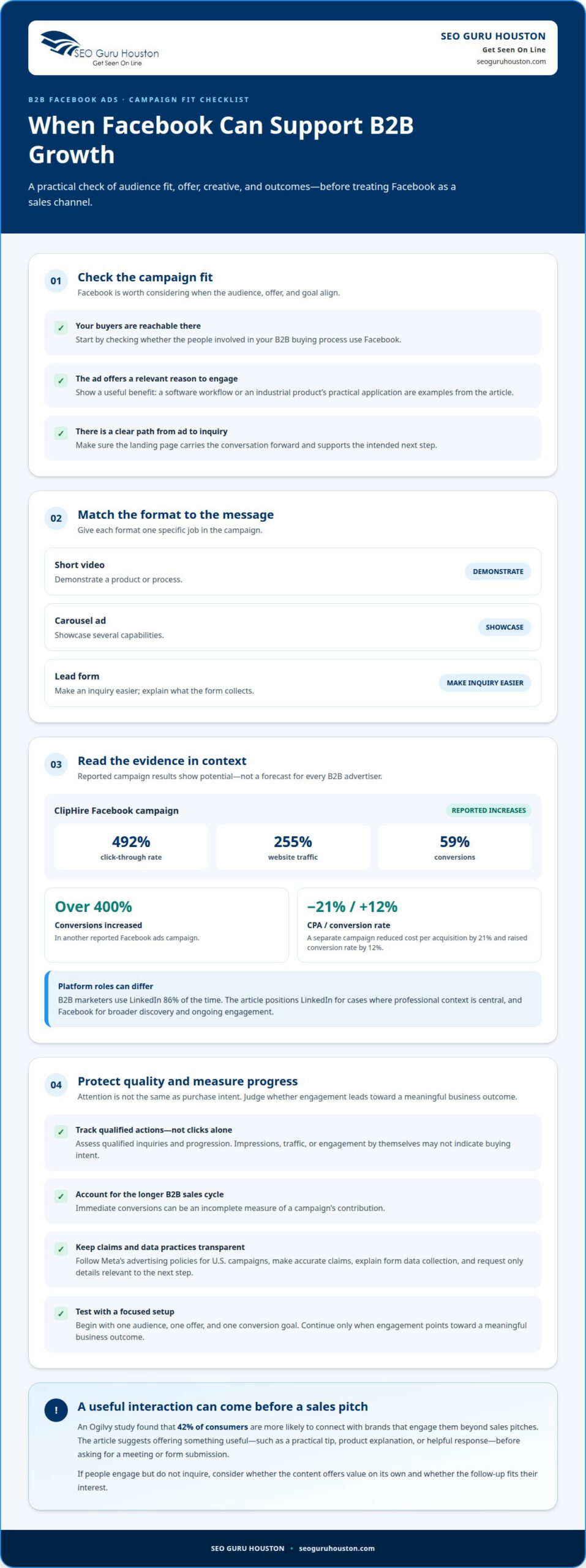
Facebook can support B2B growth when its audience, offer, and campaign goal align. The results from ClipHire show why the channel deserves a measured test: its Facebook campaign increased click-through rate by 492%, website traffic by 255%, and conversions by 59%. So, is Facebook advertising effective for B2B? It can be, when you judge performance by qualified actions, not attention alone.

No single industry automatically performs best. The strongest fit comes when buyers are reachable on Facebook and an ad can show a relevant benefit. For example, a software company can demonstrate a product workflow, while an industrial supplier can spotlight a practical application. Both need a clear path from ad to inquiry.

Campaign outcomes can vary sharply by offer and execution. In another reported campaign, Facebook ads increased a client’s conversions by over 400%. A separate campaign reduced cost per acquisition by 21% and raised conversion rate by 12%. These examples show potential, not a forecast for every B2B advertiser.

Facebook and LinkedIn can serve different roles. B2B marketers use LinkedIn 86% of the time, while Facebook can broaden discovery and support ongoing engagement. Use LinkedIn when professional context is central; consider Facebook for reaching prospects with useful content and following up with people who showed interest.

Choose the ad format to suit the message. Short video can demonstrate a product or process; carousel ads can showcase several capabilities; lead forms can make inquiries easier. Give each format a specific purpose, such as presenting a software demo, a customer-use scenario, or a downloadable guide.

For U.S. campaigns, follow Meta’s advertising policies and use data transparently. Make claims accurate, explain what a form collects, and request only details relevant to the next step. Avoid copy that implies you know someone’s sensitive or private circumstances.

There are limits. Facebook engagement doesn’t automatically mean purchase intent, and a broad audience can produce low-quality clicks. Long B2B sales cycles also make immediate conversions an incomplete measure. Track qualified inquiries and progression, not just impressions or traffic.

Start with one audience, one offer, and one conversion goal. For example, promote a case study to relevant decision-makers and assess whether they take the intended next step. Continue the test only if engagement points toward a meaningful business outcome.

That makes the quality of the interaction worth considering alongside the offer. An Ogilvy study found that 42% of consumers are more likely to connect with brands that engage them beyond sales pitches. For B2B advertisers, that can mean giving prospects something useful before asking for a meeting or submitting a form. A practical tip, a product explanation, or a helpful response can make the brand’s presence feel relevant rather than purely promotional.

Use this principle to shape both the ad and the response that follows. Offer information that addresses a genuine business question, then make the next step clear without making it feel like a demand. If people engage but do not inquire, assess whether the content offers value on its own and whether the follow-up matches their interest. The goal is a useful exchange that builds trust and gives the campaign a measurable purpose.

2. Differences between B2B and B2C ad strategies

A B2C ad often sells a product directly to an individual buyer. A B2B ad usually supports a decision involving several people, business needs, and follow-up. For example, a project-management platform may need to persuade a department lead and earn approval from finance. That changes the offer, message, and campaign goal.

Start with the buying decision, not the product category. A consumer furniture ad might lead with a new sofa and a purchase prompt. A commercial furniture company could instead show how configurable workstations suit a growing office. The B2B message connects the offer to a business task, such as planning a workspace or comparing specifications.

The audience also changes the creative. A consumer campaign can focus on personal preference, convenience, or an immediate need. A B2B campaign should make its business relevance clear. For instance, an accounting software ad can highlight invoice workflows for finance teams, while avoiding claims that every company shares the same process.

Proof matters in different ways, too. A consumer may respond to a product demonstration or a straightforward feature comparison. A business buyer may need evidence to explain a decision internally. A case study, implementation overview, or product demonstration can give prospects material to discuss with colleagues. Keep every claim specific and supportable.

The conversion action should fit the amount of commitment. A direct purchase prompt may suit a low-cost consumer product. A B2B prospect evaluating enterprise software may prefer a demo request or a detailed guide first. Make the next step explicit: explain what the person receives after submitting a form, and keep the requested details relevant.

Campaign timing follows the same distinction. A consumer promotion may focus on a seasonal purchase window. A business campaign can support research over a longer decision process, with separate messages for learning, evaluating, and taking action. For example, introduce a checklist before offering a product demonstration.

Use different success measures for each objective. A B2C campaign may prioritize completed purchases. For a B2B campaign, assess whether inquiries fit the intended customer profile and progress toward a sales conversation. A high click rate with irrelevant inquiries signals a mismatch between the ad promise and the offer.

Build the campaign in sequence: define the business problem, write a buyer-focused message, choose an appropriate next step, and align the landing page. A cybersecurity provider, for instance, could offer a risk-assessment guide instead of asking for an immediate sale. This gives prospects a useful first action while keeping the campaign connected to a business need.
Is Facebook Advertising Effective for B2B? Assess the Fit

3. Effectiveness of Facebook ads for B2B brands

Facebook campaign effectiveness depends on the business result you measure. A campaign may attract attention without generating suitable inquiries, while a smaller audience may produce prospects worth pursuing. A software firm, for example, should distinguish guide downloads from demo requests and sales-qualified leads. Each action signals a different level of commercial intent.

There isn’t one typical conversion rate that applies across B2B Facebook campaigns. A guide download, demo request, and qualified inquiry are different conversions, so compare rates only when the action and audience match. A campaign offering a product demonstration shouldn’t be benchmarked against one offering an introductory checklist.

Set a measurable objective before launching. If a cybersecurity company wants demo requests, its primary measure should be completed requests from relevant businesses, not video views. If the goal is to introduce a new service, meaningful engagement with an explanatory page may be an earlier signal. The objective determines which campaign events matter.

Connect ad activity to the landing-page action. A mismatch can weaken performance: an ad promising a practical procurement guide should lead to that guide, not a generic homepage. Track the steps from ad click to form completion and review where prospective buyers leave. This gives you a clearer diagnosis than clicks alone.

Lead quality matters as much as volume. A student’s form submission for an assignment is different from an inquiry by a company evaluating vendors. Define useful qualification criteria, such as business type, role, or stated need, then assess which ads generate matching inquiries. Don’t treat every completed form as an equal sales opportunity.

Facebook campaign results can change when the audience, creative, offer, or landing page changes. Test one meaningful variable at a time. For example, a manufacturing supplier could compare a production-process video with a downloadable equipment checklist while keeping the audience and next step consistent. This makes the comparison more informative.

Review performance across the full path to revenue. A strong click-through rate may conceal weak lead quality, while an early-stage campaign may support later decisions without generating immediate inquiries. Compare engagement with qualified leads and sales progression, using consistent definitions. This keeps reporting focused on business outcomes.

Use the findings to make a deliberate adjustment: refine the audience, sharpen the offer, or improve the landing page. If prospects click but don’t submit the form, review the page’s relevance and friction. If submissions rarely qualify, refine the message to attract businesses with a matching need. Then measure the revised campaign against its original goal.

There is no single typical conversion rate for B2B Facebook ads; results vary with the audience and the action being measured. Compare rates only for campaigns with the same conversion goal and audience.

4. Facebook targeting with custom and lookalike audiences

An effective B2B Facebook campaign starts with a defined business goal, a focused audience, and a relevant offer. Custom audiences can reconnect with people who already engaged, while lookalike audiences help find new users resembling a selected source audience. For example, a software firm might reach past site visitors, then seek similar prospects.

A custom audience uses a business’s existing audience signals, such as customer records, website activity, or engagement with a Facebook or Instagram account. Each source serves a different purpose: a customer list can support retention, while product-page visitors may be suitable for follow-up advertising.

Choose the source according to the campaign’s next step. A company promoting a product demo could focus on visitors to its demo information page. A firm introducing a new service might target people who engaged with its social content. Avoid combining unrelated interactions, such as webinar viewers and existing customers, into one audience without a clear reason.

Lookalike audiences extend a useful source audience to reach new people with similar characteristics. A B2B advertiser could use its qualified customer records as the source, rather than every form submission. The source quality matters: if it contains poor-fit leads, the resulting audience may reflect that weakness.

Keep audience groups distinct enough to interpret the results. For example, separate recent product-page visitors from people who watched a general brand video. Tailor the message to each group: the first may need a detailed comparison, while the second may benefit from an introductory explanation.

Use customer data responsibly and keep audience inputs relevant to the campaign. Consider how records were collected and whether their use aligns with your privacy commitments. Ad copy should address business needs without implying knowledge of sensitive personal details.

Evaluate an audience by the quality of the resulting actions, not its size alone. Compare qualified inquiries from customer-based targeting with those from a lookalike audience. If the lookalike audience brings broad interest but few relevant prospects, refine the source, offer, or message before expanding the campaign.

5. Funnel-stage messaging and micro-conversions

A B2B buyer rarely moves from first impression to sales conversation in one click. A facilities manager discovering a maintenance platform needs different information from a manager comparing vendors. Map each Facebook ad to the buyer’s current question, then offer one clear next action. This keeps the message useful instead of demanding a decision too soon.

At the awareness stage, introduce the problem and explain its business impact. A logistics company, for example, could promote a guide to reducing delivery delays. Use plain language in the ad, then direct readers to a page that delivers the promised guidance. A hard sales pitch can feel premature to someone still defining the problem.

Consideration-stage messages help prospects evaluate possible approaches. A manufacturing software provider might share a process comparison, product walkthrough, or case study. Each asset should answer a specific question, such as how a workflow changes or which teams use the tool. The next step could be viewing a demonstration rather than immediately booking a sales call.

Decision-stage creative can make the commercial next step more direct. A prospect who has reviewed a product page may be ready to request a consultation or tailored demonstration. Match the ad’s promise to the form and follow-up. If the ad offers a product walkthrough, the landing page should make it easy to understand and request.

Micro-conversions are smaller actions that show progress before a final inquiry. Examples include watching a product video, opening a comparison page, or downloading a checklist. Track them separately from qualified leads. A video view signals attention, but not the same intent as a completed demo request.

Build a sequence that reflects those actions. Someone who reads an introductory guide could later see a detailed comparison. A visitor to a pricing or product page could receive a demonstration offer. Exclude people who already completed the intended action, where campaign setup allows, so follow-up messages remain relevant rather than repetitive.

Keep the landing page aligned with each funnel stage. An ad for a guide should open the guide’s page, while a demonstration ad should explain what the demonstration covers. Remove unrelated navigation or competing offers when they distract from the chosen action. Then review the path from ad engagement to form completion and qualified inquiry.

Set a distinct success measure for each message: guide downloads for awareness, comparison engagement for consideration, and qualified requests for decision-stage campaigns. Review these actions together to see where prospects advance or stall. Turn your funnel map into a focused campaign sequence, with each ad earning the next step through relevant information.

Track every interaction—whether it involves a document download, comparison view, or demonstration request. Tailor each message to its funnel stage, and optimize its landing page to convert ad-generated traffic. Review whether the page makes that stage’s next action clear and easy.

SEO Guru Houston

SEO Guru Houston helps B2B brands assess whether Facebook advertising supports their audience, goals, and sales process. If you’re unsure how paid social fits alongside search and lead generation, comprehensive B2B Marketing, PPC Services, and Inbound Marketing solutions can connect campaign planning with the broader path from discovery to inquiry. Professional SEO Services can also support visibility when prospects research solutions beyond social platforms.

Turn to SEO Guru Houston when your ads attract attention but don’t clearly support qualified inquiries, or when you need a more connected strategy across channels. Share your audience, campaign goals, and current challenges to start a focused conversation. Contact SEO Guru Houston to discuss the right next step for your B2B marketing.

Turn Your Facebook Strategy Into a Measurable Next Step

Turn your campaign idea into a clear test. Decide which business outcome matters, define the audience that can influence it, and choose an action that signals genuine interest. Then align the ad, landing page, and follow-up around that same goal.

Whether Facebook advertising is effective for B2B depends on how well the campaign advances a real business objective. Treat each launch as a learning opportunity: use the results to sharpen the message, improve the audience fit, and guide prospects toward a useful next conversation. A disciplined approach gives your team a stronger basis for deciding what to refine or scale.

If you’re ready to shape a focused plan around your B2B goals, contact SEO Guru Houston today. Take the next step with clarity, and build a campaign strategy that keeps your business moving forward.

Frequently Asked Questions

Should Your B2B Brand Advertise on Facebook?

Yes, if your prospective buyers use Facebook and you can connect their attention to a relevant business need. For example, a company selling specialized inventory software could test an educational resource for operations teams, then assess whether resulting inquiries represent suitable organizations. If your audience is difficult to reach there or the offer needs a highly specific professional context, prioritize channels that better match those conditions.

How effective is Facebook advertising for B2B lead generation?

Facebook can generate B2B leads, but the useful measure is whether those leads fit your sales criteria and advance into real conversations. For example, a training provider could separate inquiries from companies seeking team instruction from individual requests for personal courses. Align the form questions with that distinction, then review lead feedback with sales. This helps identify whether the campaign attracts prospective buyers, rather than simply collecting contact details.

Which B2B industries perform best with Facebook advertising?

No single B2B industry automatically performs best. Facebook is a stronger fit when buyers are reachable there and the ad can show a relevant benefit, such as a software workflow or an industrial application.
Build B2B Brand Trust Through LinkedIn Community Engagement

LinkedIn branding is built through useful conversations, not a company logo alone. Using LinkedIn for B2B branding means sharing relevant expertise, joining industry discussions, and helping buyers understand what your business stands for. That steady engagement gives decision-makers a reason to recognize and trust your brand before they’re ready to buy.

You already know that B2B decisions take consideration and input from more than one person. A polished page can introduce your business, but trust grows when the people behind it show up with clear, helpful perspectives. This guide explains how to turn LinkedIn activity into a consistent brand presence, from community participation to employee voices and storytelling.

Explore practical ways to strengthen your company page, engage the right audience, and learn from recognizable B2B brand examples. You’ll also see how decision-makers use LinkedIn and how to shape stories that make your expertise memorable without making every post a sales pitch.

Key Takeaways

  • Build trust through useful conversations and consistent participation, not company announcements alone.
  • Make your LinkedIn Page a clear credibility hub with messaging that explains who you help and how.
  • Study how established B2B brands use LinkedIn, then adapt the underlying tactics to your audience and goals.
  • Reach buying groups with relevant content for different decision-makers, rather than treating every prospect alike.
  • Use employee perspectives and specific stories to make your expertise more relatable and memorable.

1. Community engagement and relationship building

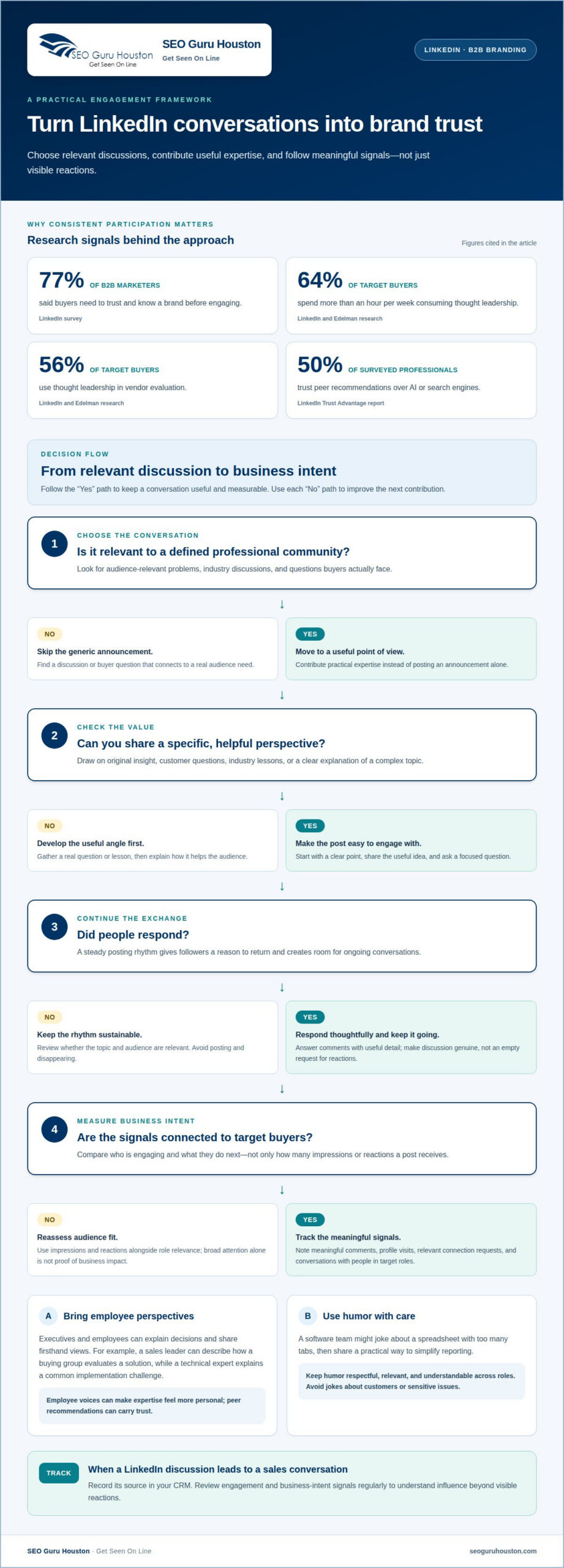
Using LinkedIn for B2B branding starts with a clear commitment: help a defined professional community solve relevant problems. Share practical expertise, join industry discussions, and answer comments with useful detail. LinkedIn’s survey found that 77% of B2B marketers said buyers need to trust and know a brand before engaging. Trust grows through consistent contributions, not announcements alone.

Choose a posting rhythm your team can maintain. A steady presence gives followers a reason to return and makes room for ongoing conversations. Share original insight, customer questions, industry lessons, and clear explanations of complex topics. LinkedIn and Edelman research found that 64% of target buyers spend more than an hour per week consuming thought leadership, while 56% use it in vendor evaluation.

Executives and employees can build thought leadership by sharing firsthand perspectives, explaining decisions, and commenting thoughtfully on industry conversations. For example, a sales leader might describe how a buying group evaluates a solution, while a technical expert explains a common implementation challenge. LinkedIn’s Trust Advantage report found that 50% of surveyed professionals trust peer recommendations over AI or search engines. Employee voices can make expertise feel more personal.

To increase organic reach, make every company post relevant to a defined audience and encourage genuine discussion. Start with a clear point, share a useful idea, and ask a focused question. Respond thoughtfully to comments and keep the conversation going rather than posting and disappearing. This builds meaningful engagement; avoid empty prompts that ask for reactions without offering value.

Measure business intent as well as engagement. Track meaningful comments, profile visits, relevant connection requests, and conversations with people in target roles. Compare these signals with impressions and reactions to see whether posts reach potential buyers or attract broad attention. When a LinkedIn discussion leads to a sales conversation, record its source in your CRM. This helps marketing assess influence beyond visible reactions.

Humor can make a brand more approachable when it reflects the audience’s working life. A software team, for example, might joke about a spreadsheet with too many tabs, then share a practical way to simplify reporting. Keep humor respectful, relevant, and easy for different roles to understand. Avoid jokes about customers or sensitive issues. Aim for a human moment that opens a useful conversation.

A disciplined approach to using LinkedIn for B2B branding turns engagement into a repeatable marketing practice. Identify relevant conversations, contribute useful expertise, and follow up thoughtfully with people who respond. Review engagement and business-intent signals regularly. This helps businesses build relationships that executives and buying groups can remember.

2. Company page optimization and credibility

Your LinkedIn company page should answer three buyer questions quickly: what you do, whom you help, and why your expertise matters. According to LinkedIn’s 2026 Global B2B Marketing Outlook, 83% of B2B marketers said credibility matters more than traditional brand messaging. Make that principle visible through specific services, useful proof points, and consistent language across your page.

Start with the essentials: use a recognizable logo and banner, then write a concise description that names your audience, expertise, and business value. Add relevant specialties and a clear next step, such as exploring a case study or contacting your team. Check that the page’s wording matches your website, so buyers encounter a consistent message in both places.

Strong B2B company page examples clarify value rather than relying on design alone. Picture a cybersecurity provider whose banner identifies its focus, while its overview explains the risks it helps address. Its posts might share threat-prevention guidance, leadership commentary, and customer lessons. These specific points give visitors a reason to follow the page and understand its value.

Optimization is an ongoing strategy, not a one-time profile task. Review the page whenever your services, audience, or market position changes. Keep the overview current, use language buyers recognize, and ensure recent posts demonstrate genuine expertise. For example, a manufacturing company discussing supply-chain trends should connect each update to its capabilities rather than simply repeat industry headlines.

Build credibility with valuable details that support your claims. Explain your process, show how your team approaches common challenges, and share useful perspectives from leaders closest to the work. Keep claims precise and avoid broad superlatives that buyers cannot assess. An authentic page sounds like the people behind the business, not a collection of polished slogans.

Use page analytics to assess whether your strategy attracts the right audience. Look for patterns in visitor roles, post engagement, and clicks on key page elements. If a leadership post draws relevant comments but few page visits, test a clearer profile description or a stronger next step. Treat these signals as prompts for focused improvements, not as proof of business impact on their own.

If your LinkedIn presence needs to connect more clearly with the experience buyers find on your site, website development and landing pages can help align those touchpoints. A consistent message across the company page and a relevant landing page makes the next step easier to understand.

Before publishing an update, consider whether it gives prospective customers useful context and sounds clearly connected to the business. Specific examples, plain language, and a consistent voice can make the page easier to recognize and trust. Keep the goal practical: help the right visitors find a relevant perspective and a credible reason to continue the conversation, rather than simply presenting a polished brand.

3. Examples of B2B brands using LinkedIn

Study what established companies make visible, then adapt the tactic to your own target audience. Microsoft has more than 29 million LinkedIn followers, while GE Vernova has more than 4 million. Established B2B brands can build a substantial following on LinkedIn. These figures show their broad platform presence, not a guaranteed result for smaller businesses.

Use these examples to assess brand consistency, not just follower totals. Microsoft, GE Vernova, Citi, and Abbott operate in distinct sectors, so their messaging serves different professional audiences. Consider what expertise each company highlights, how its posts reflect its business, and which themes recur. Then adapt relevant observations into a strategy suited to your own buyers.

Individual contributions offer another model. A single LinkedIn post helped Ross close a $70,000 deal, and an SDR booked six meetings in under two hours from one post. These examples illustrate how a relevant point of view can start a business conversation. They don’t establish a typical outcome; the practical lesson is to connect useful content with a clear audience and timely follow-up.

Organic posts and LinkedIn ads serve different awareness needs. Organic thought leadership and community engagement build a presence through useful, ongoing contributions; ads can amplify a message and target people by job function. A B2B brand can use organic content to explore a topic, then use paid promotion to extend a specific message to a selected professional audience.

For branded content, distinguish company messaging from an employee’s personal perspective. For sponsored posts, make the business relationship clear to readers. For employee advocacy, give colleagues approved facts and key points while letting them express those ideas authentically. Treat these as practical principles for building trust, not as claims about a specific LinkedIn policy.

LinkedIn campaign costs depend on the audience, bidding competition, campaign objective, format, and delivery settings. Targeting options can include professional attributes such as job function, helping brands reach relevant roles rather than a broad audience. Set the campaign objective first, define the target group, then assess costs in relation to the reach and engagement the campaign is designed to generate.

Avoid copying a large brand’s volume or tone without considering whether it fits your business. Microsoft’s scale does not make every corporate announcement effective for a specialist supplier. Skip vague messages, unsupported claims, and engagement prompts that offer no value. Before publishing, check the audience, business purpose, factual accuracy, and next step. This keeps social media activity focused on brand awareness and buyer relevance.

Build B2B Brand Trust Through LinkedIn Community Engagement

4. LinkedIn audience size and decision-makers

LinkedIn’s scale creates reach, but audience size alone won’t build a qualified B2B presence. The platform has 1.2 billion members, including 180 million senior-level influencers and more than 130 million decision-makers. Treat those figures as context, not your target market. Effective B2B marketing starts by identifying the professionals involved in your buyers’ decisions.

B2B purchases are often complex, high-value, and long-term, with up to eight internal stakeholders involved. A technical evaluator may prioritize integration, while a finance leader weighs business value. Procurement may focus on risk, and an executive may assess strategic fit. Map these roles before planning content, then address each person’s priorities without changing your core brand promise.

Start with a simple buying-group map. Identify the job functions that influence a purchase, the problems each role needs to solve, and the evidence each needs to move forward. For example, a cybersecurity company might share risk-management insights for security leaders and business-continuity perspectives for executives. This makes audience targeting and content choices more deliberate.

LinkedIn’s professional context supports sharing expertise that helps buyers evaluate options. An Edelman-LinkedIn survey found that 55% of decision-makers review thought leadership content as part of their vetting process. Use that insight to create useful posts for different roles, such as implementation guidance for technical teams and clear business cases for senior leaders.

Build audience segments around relevant professional attributes, such as job function and seniority, rather than broad assumptions about industries. LinkedIn Ads can amplify messages to selected professional audiences, while organic posts help your team develop themes through regular sharing. Match each message to a role, then review whether the people engaging align with the intended audience.

Measure more than follower growth. Compare post engagement and company-page visits with signals from target roles, such as relevant comments, profile views, and sales conversations. If a post attracts broad attention but few intended buyers, refine the topic or audience. If a specific insight sparks discussion among decision-makers, develop that theme further.

Large audiences don’t replace precision. Use LinkedIn’s reach to make relevant ideas visible, then tailor the message to the buying group’s actual concerns. A disciplined audience map helps marketers connect content with decision-makers, support internal consensus, and build a brand presence that remains useful throughout a long B2B purchase.

Check the audience map against who already follows the page. B2B purchases are usually high-value, long-term, complex, and often involve multiple decision-makers, so follower totals can conceal a mismatch between broad reach and the people shaping a buying group. A company audit found that 23% of its LinkedIn followers matched its target roles. Treat that as a reason to review follower composition, not as a universal benchmark: compare the roles represented with those your own offers require, then adjust content and targeting where gaps appear.

Organic visibility can help keep useful expertise discoverable: LinkedIn posts receive an estimated 17.6 million monthly organic visits. Use that potential to share role-relevant material consistently, while judging success by whether the right professionals engage and progress into meaningful conversations.

5. Storytelling and brand humanization

Stories make a B2B brand easier to understand because they show decisions in context. Use a simple arc: identify a customer challenge, explain the choice your team made, and show what changed. For example, an operations specialist might describe how a plant team handled a recurring scheduling bottleneck. Keep the account specific, accurate, and useful to the reader.

Make the people behind the work visible. An engineer can explain why a design decision mattered, while a project manager can describe how teams coordinated a complex delivery. These first-person details give employees a natural voice and help audiences connect expertise with real experience. Protect customer confidentiality and get approval before sharing identifiable details.

Choose a format that fits the story. Research by Ipsos and LinkedIn found that 78% of B2B marketers use video. LinkedIn research says video posts are shared 20 times more than any other content type on the platform. A short native video can show an expert explaining one useful lesson, while a text post can unpack the context and invite discussion.

Start employee advocacy with 3-5 team members who already have valuable client conversations. Give them a clear topic, relevant facts, and room to speak in their own voice. For example, a consultant might share a recurring client question, then explain the thinking behind a practical answer. This creates thought leadership without making every employee sound like a corporate press release.

Anchor storytelling in 2-4 core belief areas. A logistics company might focus on reliability, operational visibility, and responsible growth. Build posts around those themes, using customer questions, lessons learned, and leadership perspectives as evidence. Repeated, relevant themes help people recognize what the brand stands for, rather than encountering disconnected updates.

A 40-40-10-5-5 distribution framework can help balance a content plan: 40% asset distribution, 40% thought leadership, 10% culture, 5% lead generation, and 5% trendjacking. Treat it as a planning option, not a rule. A smaller team might prioritize useful expertise and employee stories, then adjust the mix based on audience response.

Turn each story into a conversation, not a finished sales pitch. End with a focused prompt, such as asking how other teams handle the same workflow challenge. Reply with details, acknowledge different experiences, and use recurring questions to shape future posts. Those exchanges make LinkedIn storytelling more human and give B2B companies fresh insights for their next content format.

If your LinkedIn stories need a clear destination for interested buyers, build a focused landing page that carries the same message from social post to next step.

SEO Guru Houston

SEO Guru Houston helps businesses connect LinkedIn activity with a broader B2B growth strategy. Turn to its comprehensive B2B Marketing and Social Media Marketing services when your team needs a clearer plan for community engagement, thought leadership, and reaching decision-makers. Inbound Marketing solutions can help align useful content with the buyer journey, while professional SEO services can support visibility beyond LinkedIn. The right mix depends on your audience, message, and business goals. Contact SEO Guru Houston to discuss how to strengthen your B2B brand strategy through effective digital channels.

Turn LinkedIn attention into lasting brand momentum

A LinkedIn presence becomes more valuable when it has a clear role in your wider growth plan. Choose the audience you want to earn trust with, decide what you want them to understand, and make each post or conversation reinforce that direction. That discipline keeps using LinkedIn for B2B branding connected to real business priorities, rather than activity for its own sake. A focused strategy also gives your team a stronger basis for deciding what to share next.

SEO Guru Houston can help businesses shape that direction through Houston B2B Marketing, Houston SEO Services, and Houston PPC Services. The right starting point depends on the challenge you need to solve, from clarifying your brand strategy to connecting visibility with demand.

Ready to turn your ideas into a more deliberate plan? Discuss your B2B growth strategy with SEO Guru Houston. Keep showing up with purpose, and give the right buyers a clear reason to remember your brand.

Frequently Asked Questions

What Is LinkedIn B2B Marketing?

LinkedIn B2B marketing uses the platform to help businesses reach professional audiences, build brand familiarity, and develop business relationships. For example, a cybersecurity firm could publish an expert’s explanation of a new operational challenge, then promote a related resource to relevant roles. The approach combines company content, employee participation, and paid promotion when useful. Its focus is helping business buyers understand a brand before a sales conversation begins.

How can B2B marketers measure LinkedIn brand awareness and engagement?

Measure awareness and engagement separately. For awareness, monitor reach, impressions, and changes in relevant follower activity over a consistent reporting period. For engagement, review reactions, comments, shares, and clicks, then assess whether those interactions come from your intended professional audience. Compare results by post theme and format. For example, if expert explainers draw substantive comments from target roles, use that insight to guide future content.

What are the current costs and targeting options for LinkedIn brand awareness campaigns?

Costs depend on the audience, bidding competition, campaign objective, format, and delivery settings. Targeting can use professional attributes such as job function to reach relevant roles. Define the objective and audience before assessing costs.

B2B Negative Keyword List: Exclude Irrelevant Google Ads Traffic

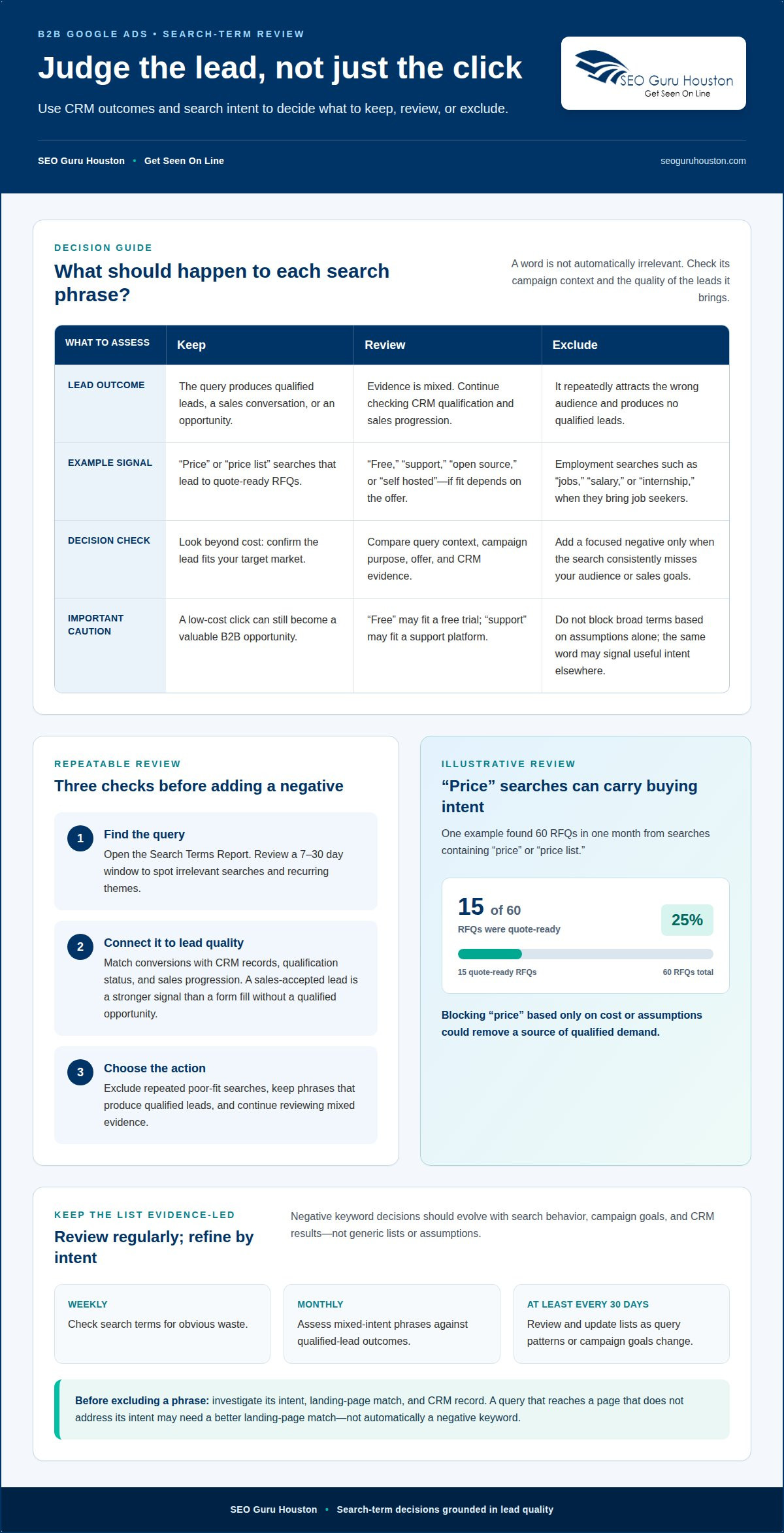
More clicks won’t help if the searches behind them have no chance of becoming customers. A negative keyword list for B2B is a set of words and phrases that tells Google Ads which searches to exclude, such as job-seeking or purely informational queries. The rule is simple: exclude a term when it consistently attracts traffic that doesn’t fit your offer or sales goals.

It’s tempting to block broad terms like “free,” “support,” or “training” straight away. But a term that wastes one campaign’s budget may signal real buying intent in another, so review each against your ideal customer and the purpose of the campaign. This guide shows how to build and organize a practical list, which employment, education, support, and other searches may be worth excluding, and where to apply negatives in Google Ads. You’ll also learn how to judge search terms by lead quality, not just clicks or cost, so you can cut irrelevant traffic without shutting out valuable prospects.

Key Takeaways

  • Judge search terms by whether they produce qualified leads and meaningful CRM outcomes, not just by clicks or cost.
  • Review generic negative keyword suggestions against your ideal customer profile before applying them; a term that blocks one campaign may attract useful prospects in another.
  • Consider employment, education, support, and location-related searches as potential exclusions, while checking whether each theme fits your offer.
  • Use account-level or shared lists for exclusions that apply broadly, and campaign- or ad-group-level negatives for terms that depend on context.
  • Keep refining exclusions as search behavior and campaign results change, so irrelevant traffic is filtered without blocking valuable intent.

1. How do you review search terms by lead quality, not cost?

A low-cost click can still become a valuable B2B opportunity. Review Google Ads’ Search Terms Report alongside CRM outcomes, then judge each query by whether it produced a qualified lead, sales conversation, or opportunity. Cost matters, but it doesn’t tell you whether a prospect fits your target market.

Use a consistent decision process for every search phrase:

  1. Find the query. Open the Search Terms Report to see searches that triggered your ads. Review a 7-30 day window to spot irrelevant queries and recurring themes.
  2. Connect it to lead quality. Match conversions with CRM records, including qualification status and sales progression. A form fill without a qualified opportunity is a weaker signal than a lead accepted by sales.
  3. Choose the action. Exclude a phrase when it repeatedly attracts the wrong audience. Keep it when it produces qualified leads, and continue reviewing it when the evidence is mixed.

For example, one illustrative review found 60 RFQs in one month from searches containing “price” or “price list.” Of those, 15 were quote-ready RFQs, meaning 25% of RFQs from those searches were quote-ready. Blocking “price” based only on cost or assumptions could have removed a source of qualified demand. Apply the same logic to your own CRM outcomes before adding a negative.

Separate employment intent from buying intent. Searches containing “jobs,” “career,” “salary,” “internship,” or “resume” often come from job seekers, not potential customers. If the Search Terms Report repeatedly shows these phrases and they produce no qualified leads, add the relevant terms as negatives. Keep exclusions focused: the same word may also appear in a useful product or service query.

Software and technology searches need the same scrutiny. “Open source” and “self hosted” can be useful negatives for B2B SaaS campaigns when those options don’t match the product being promoted. But a technology provider offering open-source services could attract qualified buyers with the same phrase. Review query context, campaign target, and CRM evidence before excluding it.

Build a repeatable review cadence: check search terms weekly for obvious waste, then assess mixed-intent phrases monthly against qualified-lead outcomes. A negative keyword list for B2B should evolve with those findings, not with assumptions. If a phrase draws clicks but no qualified leads, investigate its intent, landing-page match, and CRM record before deciding whether exclusion is the right move.

2. What are negative keywords?

Negative keywords are words or phrases that prevent an ad from showing for searches containing those terms. Positive keywords help target searches; negative keywords define which searches to avoid. The distinction sounds simple, but applying a generic downloaded list without reviewing its terms can block relevant prospects while leaving wasted spend untouched.

Which negative keywords should B2B companies add to Google Ads? Start with search terms that clearly signal a different audience, such as “jobs,” “salary,” “course,” or “free,” then compare each term with your offer and campaign goal. A word isn’t automatically irrelevant just because it appears on a general B2B list. For example, “free” may be unwanted for a paid software campaign, but useful when promoting a free trial.

Google Ads offers broad, phrase, and exact match types for negative keywords. Broad negatives can exclude searches containing all the negative terms, phrase negatives apply when the phrase appears in the same order, and exact negatives target the matching search without additional terms. Choose the narrowest match that filters unwanted intent. For example, a broad exclusion for “support” could block a prospect researching a support platform.

Which B2B negative keywords should be excluded for jobs, free resources, and consumers? Consider “career,” “job openings,” “salary,” and “internship” for employment intent; “free,” “tutorial,” and “how to” for resource-seeking searches; and “personal,” “home,” or “for consumers” when those audiences don’t fit your target. Review the phrase in context first: a query for a free business guide may still reveal a potential buyer.

General B2B and B2C lists can help identify themes, but industry-specific terms need a separate review. A SaaS advertiser might test “open source” or “self hosted” as negatives when those options don’t match its product. A provider serving those needs could lose valuable traffic by excluding them. Before adding a downloaded list, compare every entry with your campaign structure, customer profile, and actual search queries.

How often should B2B advertisers review and update negative keyword lists? Review search terms regularly, including at least once every 30 days, and update exclusions as query patterns or campaign goals change. Keep recurring account-wide exclusions in shared negative keyword lists; use campaign-level lists for terms that apply only to one offer or audience. If a relevant query lands on a page that doesn’t address its intent, align the landing-page experience before treating the keyword as wasted traffic.

Location exclusions should reflect where a business can actually serve customers. If a campaign targets buyers in specific regions, searches naming places outside its service area may be irrelevant. Review the full query before excluding a location: a prospect might search for a supplier in one city while needing service in another. Exclude location terms only when they consistently attract leads the business cannot serve.

Support-related searches often come from existing users rather than new buyers. Terms such as “login,” “help desk,” “knowledge base,” “customer service,” “phone number,” “portal,” “complaints,” and “cancel” can signal account support or troubleshooting. They may be suitable negatives for a customer-acquisition campaign. But a company selling help-desk software could attract relevant prospects with “help desk,” so let the offer and search-term context guide each decision.

Education and training queries can signal research rather than purchasing intent. Look for phrases containing “course,” “school,” “university,” or “training.” A business selling professional training should not automatically exclude them; a software vendor seeking enterprise buyers might find introductory course queries less relevant. Distinguish people seeking instruction from organizations evaluating a commercial solution before changing which searches trigger ads.

Free-resource and DIY terms call for the same care. “Free,” “tutorial,” “how to,” and “DIY” may attract people who want to solve a problem without buying. Yet “free trial” or “free demo” could be an intentional conversion path. Software campaigns should also assess “open source” and “self hosted” against the product: exclude them when those options do not fit the offer, but retain them when they describe what the business provides.

Employment searches are easier to identify when the query explicitly signals hiring intent. Terms such as “jobs,” “careers,” “job openings,” “internships,” “recruiters,” “resumes,” and “salary” can help filter job seekers from customer prospects. Add relevant exclusions when those searches do not lead to buyer inquiries. A recruiting company, by contrast, may want employment-related traffic, so avoid using a blanket list.

Refine exclusions using conversion and CRM data, not assumptions. For each recurring search term, compare the query with its landing page, lead status, and sales outcome. If “login” produces support requests rather than new opportunities, it may belong on an acquisition campaign’s negative list. If “training” generates qualified business inquiries, keep it. This ongoing review protects reach while removing searches that attract the wrong audience.

B2B Negative Keyword List: Exclude Irrelevant Google Ads Traffic

4. Account-level, shared-list, campaign, and ad-group negatives

To add a negative keyword list to a Google Ads campaign, create or select a shared list, add the exclusions, then apply the list to the campaign. Use account-level exclusions only for terms that should block traffic across the account; narrower intent belongs at the campaign or ad-group level.

Think of negative keyword placement as a control system with three practical levels: shared lists, campaign-level negatives, and ad-group-level negatives. A shared list suits recurring terms irrelevant across campaigns, such as employment searches when the account targets buyers only. Campaign-level negatives fit exclusions tied to a particular offer or audience. Ad-group negatives resolve tighter conflicts, such as separating searches for “enterprise accounting software” from an ad group focused on small businesses.

Account-wide exclusions have broad consequences. The Google Ads account-level negative keyword list limit is 1,000 terms per account, so reserve this level for terms that almost never match your commercial intent. A term like “careers” may suit an account-wide list if none of its campaigns recruit. A word like “free” needs more caution because one campaign may promote a paid product while another offers a free trial.

Use campaign-level negatives when the same phrase has different relevance across campaigns. For example, a software company could exclude “self hosted” from a cloud-only campaign while retaining it in a campaign for self-hosted solutions. This aligns the exclusion with the actual offer instead of allowing a broad shared list to remove useful searches. Review affected campaigns before applying a shared list, especially when bidding uses conversion signals from several product lines.

At the ad-group level, exclude terms that create overlap between closely related themes. If separate ad groups target “CRM for healthcare” and “CRM for real estate,” negative terms can direct each search toward the more relevant group. Keep exclusions specific: a general negative such as “CRM” would block both groups, while a qualifying phrase tied to one industry can preserve the other ad group’s reach.

Before applying a list, define its scope, purpose, and owner. Label a shared list by function, such as “job seeker queries,” then record which campaigns use it. After making changes, review actual search terms for unexpected exclusions and shifts in relevant traffic. If a phrase has mixed intent, test it at campaign level before applying it account-wide. This structure makes it easier to reverse a negative when sales evidence changes, rather than searching through unrelated lists to find its source.

5. How negative keywords prevent irrelevant Google Ads traffic

Google Ads uses negative keywords to stop an ad from serving when a search query matches an excluded term. That filter can keep a B2B campaign from paying for clicks from people seeking jobs, basic courses, or unrelated consumer products. The goal isn’t to block every unfamiliar phrase. It’s to separate buyer intent from searches that don’t fit the offer.

Consider a company advertising enterprise accounting software. Searches for “accounting jobs” point to employment, while “accounting software for small business” may identify a different buyer segment. Adding “jobs” as a negative can filter the first query without excluding the second. Excluding “small business,” however, makes sense only if that audience is genuinely outside the campaign’s target.

The filter matters even more when a campaign uses Broad Match or AI-driven expansion. These methods give Google more freedom to identify related searches, bringing in both useful variations and irrelevant queries. A negative keyword list helps define boundaries around that broader reach. Review the query context before adding exclusions, since a shared word can appear in searches with very different intent.

Exclusions also affect the signals used by automated bidding. If ads repeatedly attract searches that produce low-quality conversions, those actions can muddy the conversion data bidding systems rely on. Excluding a clearly irrelevant theme can help focus that data on prospects who fit the offer. But an overly broad negative can remove qualified searches and reduce useful signals, too.

Use a practical review cycle: inspect Google Ads search queries, group them by intent, compare conversions with lead quality, then add only clear exclusions. For example, “free accounting course” may signal research or education traffic for a software vendor. “Free accounting software trial” could indicate product interest instead. The word “free” alone is not enough to judge intent; the complete query and campaign structure matter.

After making changes, watch for both wasted spend and unintended losses in reach. Clicks without sales do not, on their own, prove that a term should be excluded. Check whether the query matches the offer and whether the conversion was qualified. Review actual search behavior after each change, then adjust the negative’s scope if relevant queries disappear. This keeps the filter precise as new search patterns emerge.

Negative keywords can improve click-through and conversion rates by limiting mismatched impressions, but they cannot replace a relevant landing page or offer. A prospect searching for enterprise accounting software should land on a page that explains the business solution, not a generic course description. Align query intent, ad message, and landing-page content to turn better-targeted traffic into meaningful opportunities.

SEO Guru Houston

SEO Guru Houston helps national businesses connect Google Ads targeting with the quality of leads their sales teams need. When irrelevant searches keep triggering ads, professional PPC services can support a more focused campaign strategy, from reviewing search intent to refining exclusions. Specialized B2B marketing and inbound marketing strategies can also align paid search with broader demand-generation goals.

Turn to SEO Guru Houston when your negative keyword decisions need to fit your audience, campaign structure, and lead-generation priorities. A well-built landing page also helps ensure that qualified searchers find content aligned with their intent.

Contact SEO Guru Houston to discuss your national B2B advertising goals.

Make your next campaign decision count

Turn search-term reviews into a feedback loop between advertising and sales. When sales qualification reveals a mismatch, use that insight to refine your targeting and shape the next campaign test. A negative keyword list for B2B works best as part of that ongoing improvement, not as a fixed document forgotten after launch.

SEO Guru Houston can connect this work with Houston SEO Services, Houston PPC Services, and Houston B2B Marketing. That broader view helps keep paid search aligned with the audiences and growth goals your business is pursuing.

Ready to sharpen your B2B campaign strategy? Contact SEO Guru Houston to discuss your next step. Clearer targeting starts with a focused plan, and each thoughtful adjustment can move your campaigns toward stronger alignment with real business goals.

Frequently Asked Questions

What are negative keywords?

Negative keywords are exclusions that keep Google Ads from showing an ad for searches containing specified terms. For example, a business selling industrial software might exclude “dating” or “recipe” if those searches have no connection to its offer. The best exclusions reflect the actual audience and campaign purpose, not just words that seem unrelated at first glance.

How do you review search terms by lead quality, not cost?

Compare search queries with lead records and sales outcomes, not just spend or clicks. For example, distinguish sales-qualified inquiries from students, vendors, and people seeking employment, then look for patterns in the query wording. A phrase with modest spend may deserve to stay if it produces genuine opportunities, while a cheap query can still waste budget if it repeatedly attracts the wrong audience.

What is a negative keyword list in B2B advertising?

It’s a set of search terms a business excludes from campaigns aimed at other businesses. A company could consider filtering investor research, political searches, or adult-content queries when they don’t relate to its offer. The right list depends on the product, ideal customer, and campaign goal. Review each term before applying it, since a phrase that’s irrelevant to one B2B advertiser may matter to another.

How do negative keywords differ for B2B and B2C campaigns?

The difference is the audience and buying context, not a universal set of terms. B2B campaigns may filter job seekers, students, or individual consumers when those groups aren’t buyers. A B2C advertiser may have different exclusions based on its product and customer. For instance, “enterprise” could be unhelpful for a consumer-only offer but valuable for a business software campaign.

How to find negative keywords from Google Ads search term reports?

Open the Search Terms Report and review the queries that triggered ads. Group unrelated searches by theme, such as recruiting, coursework, or customer login, then compare those themes with campaign goals and lead outcomes. Look for repeated patterns instead of reacting to a single unfamiliar phrase. Add exclusions only when a query clearly conflicts with the offer or attracts the wrong audience.

How to organize B2B negative keywords into shared lists by campaign?

Keep exclusions that apply across the account in a shared list, such as employment searches when none of the campaigns recruit. Put offer-specific exclusions in the relevant campaign list, then use ad-group negatives to separate closely related themes. Give each list a clear purpose-based name and record which campaigns use it. This makes later reviews more precise.

What are common mistakes and risks when using negative keywords in B2B ads?

A common mistake is applying a downloaded list without checking every term against the offer. Broad exclusions can block valuable searches because the same word may signal different intent in different queries. For example, excluding “free” could remove searches for a free trial as well as resource seekers. Other risks include leaving lists unchanged as campaigns evolve and failing to notice when useful queries stop receiving impressions.

How to Build a Full-Funnel PPC Campaign Structure for B2B

Paid search can work for B2B, but a campaign built only to capture immediate leads can miss buyers who need time to evaluate a solution. The average B2B sales cycle involves 8 touchpoints, so a scalable ppc campaign structure for b2b should connect search intent, useful follow-up, and sales outcomes across the journey.

If clicks are coming in but qualified opportunities aren’t, the issue may be how campaigns are organized and measured, not simply how much you spend. B2B buying groups take time to research, compare options, and reach a decision. Your campaign needs to reflect that reality.

This guide shows you how to assess paid search for B2B, choose metrics that matter beyond clicks and form fills, and connect ad activity to conversions across longer sales cycles. Then you’ll learn how to organize campaigns around buyer intent and funnel stage, so you can identify what’s working and make smarter decisions about where to scale.

Key Takeaways

  • Match search, display, placements, keywords, and audience targeting to the buyers and intent you want to reach.
  • Look beyond clicks and form fills by tracking lead quality, pipeline progress, and revenue alongside campaign metrics.
  • Connect ad interactions to CRM outcomes so long sales cycles don’t make valuable campaigns look ineffective.
  • Build campaigns around funnel stage and buying intent, then use performance data to guide where to refine and scale.
  • Align ad messaging, landing pages, and follow-up so each touchpoint moves qualified prospects toward a decision.

Does paid search work for B2B?

Yes. B2B companies generate an average of $2 for every $1 invested in Google Ads, according to the market data in this brief. Gartner reports that complex B2B solutions typically involve buying groups of 6 to 10 decision-makers. Structure campaigns to reach their different questions, not just one lead form.

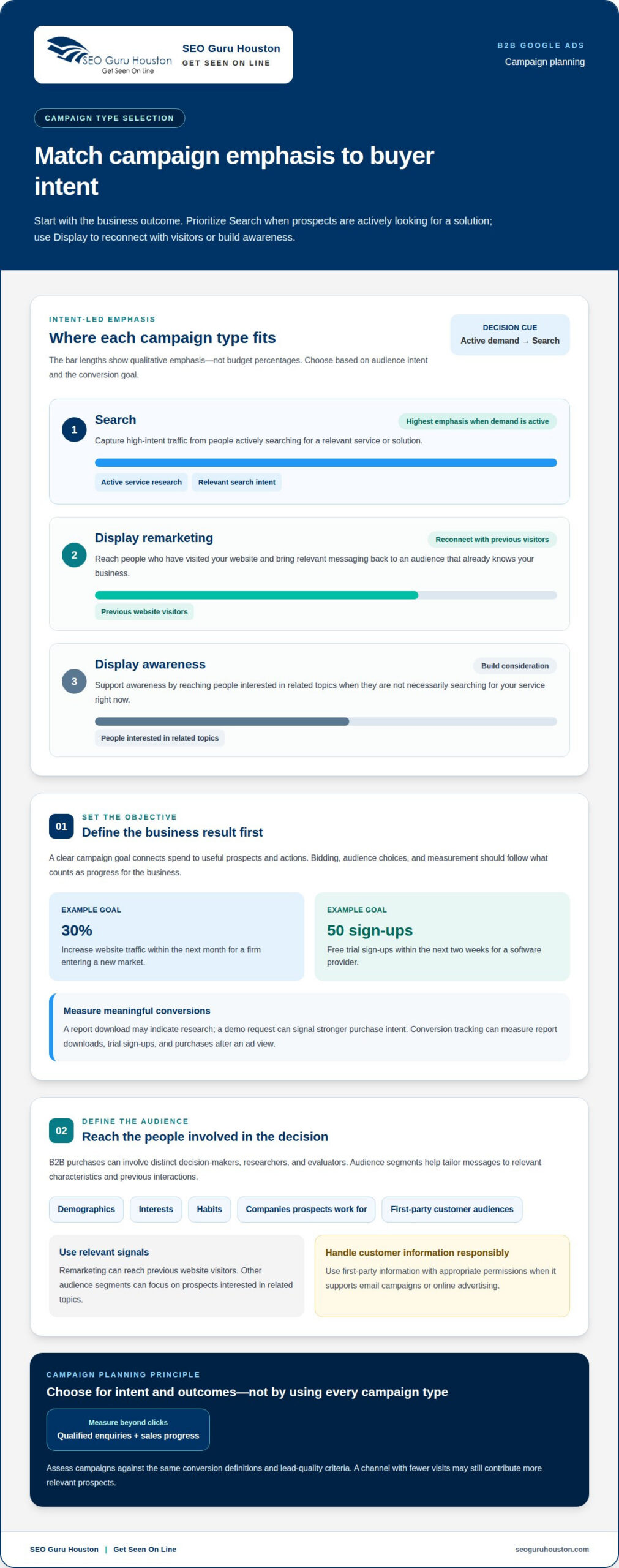
Google and Microsoft campaigns typically organize around search intent and keyword themes. LinkedIn Ads can target professional audiences by role and industry. Separate campaigns by buyer stage to tailor each message, then compare qualified outcomes across platforms.

Group keywords by intent first: brand, problem, solution, and comparison terms. Separate match types into different ad groups or campaigns when they need distinct budgets, messaging, or query controls. Mixing them too broadly can obscure which searches generate relevant leads.

Common risks include grouping unrelated services together, targeting too broadly, and judging success by clicks alone. A generic “business software” keyword may attract research traffic, while a solution-specific query can signal clearer intent. Review search terms and audience results to identify wasted spend.

  1. Define buyer personas before selecting placements. List each high-value persona by role, industry, and buyer stage. A finance leader comparing vendors needs different proof from an operations manager researching a workflow problem. Use those distinctions to choose search, display, or audience-based placements, and align each ad with a relevant landing page.
  2. Separate search campaigns by intent and theme. Build focused groups for brand terms, pain-point searches, solution categories, and competitor-comparison intent. Keep closely related keywords together, but separate themes when the offer or landing page changes. For example, “reduce invoice processing time” and “invoice automation platform” suggest related needs, but different stages of research.
  3. Match platform structure to its targeting strength. On Google Ads, organize around keyword themes and use available targeting such as demographics, location, device, and interests. Apply a similar search-intent structure in Microsoft Ads, then compare performance separately. On LinkedIn Ads, segment by role and industry, with distinct campaigns for awareness and active consideration.
  4. Use display and remarketing to reconnect. Build display audiences from meaningful site behavior, such as visiting a solution page or viewing a case study. Exclude converted leads when the message is no longer relevant. Remarketing campaigns often achieve conversion rates 50-100% higher than cold traffic campaigns, according to the market data in this brief.
  5. Review targeting and placements as one system. Check search terms, audience segments, and placement reports together. If an industry segment clicks but produces poor-fit leads, refine its message or targeting. Test search, display, and video formats against the same buyer need, then shift effort toward the placements that create sales-relevant engagement.

What metrics should be tracked in B2B paid ads?

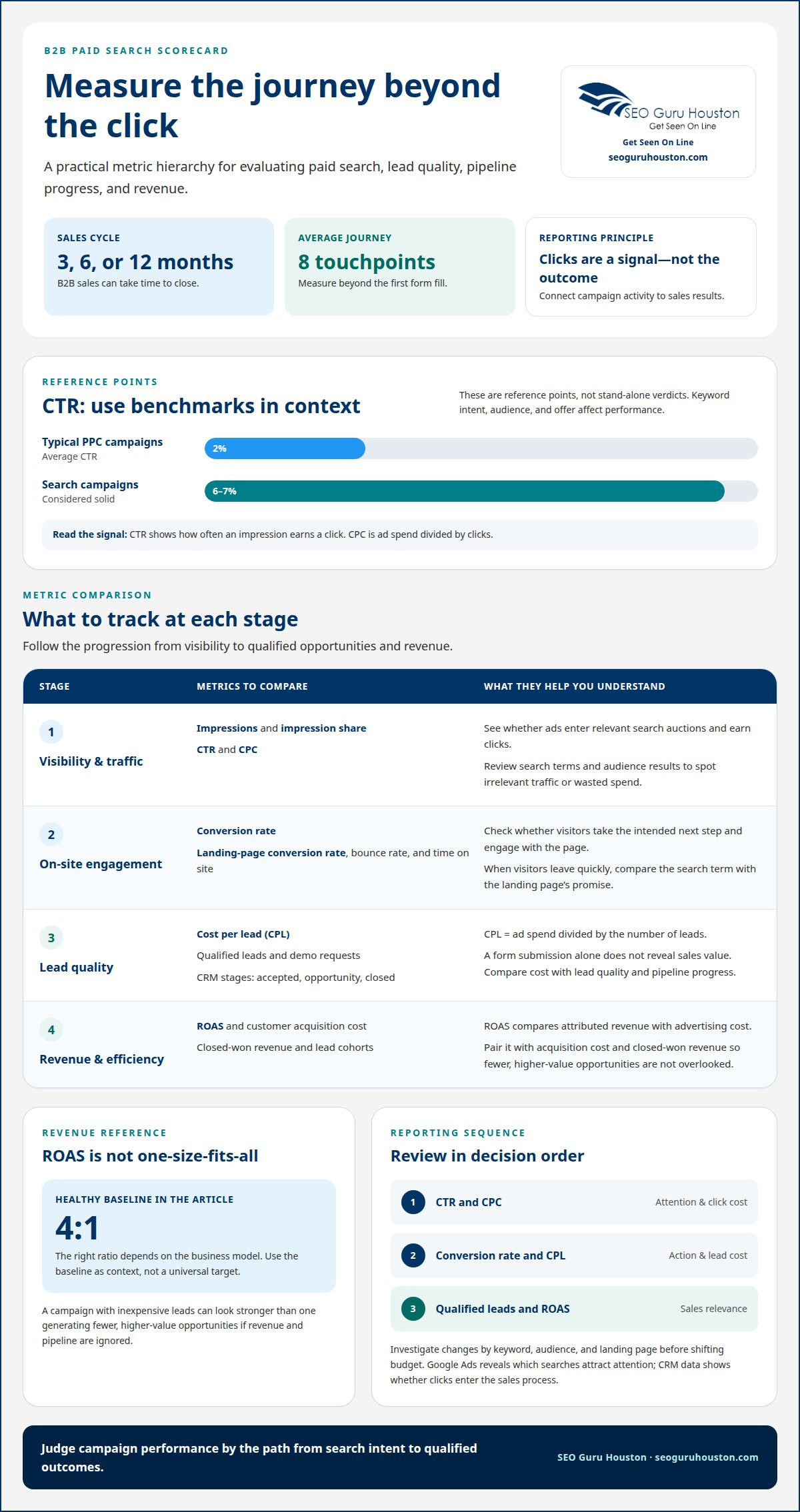
  1. Track the full path from impression to lead. Start with impressions and impression share to see whether Google Ads enters relevant Google Search auctions. Then measure click-through rate (CTR), cost per click (CPC), and conversion rate. CTR shows how often an impression earns a click; CPC is ad spend divided by clicks. A 6-7% CTR is considered solid for search campaigns, while the average CTR for typical PPC campaigns is 2%. Treat these as reference points, not isolated verdicts: keyword intent, audience, and offer all affect performance.
  2. Measure what happens after the click. Track landing-page conversion rate, bounce rate, and time on site to see whether visitors engage with the next step. If a campaign earns clicks but visitors leave quickly, compare the search term with the page’s promise. For example, an ad for a product demo should lead to a page that explains the demo and makes requesting one clear. Segment results by campaign, keyword, device, and demographics so strong averages don’t hide a weak audience or page.
  3. Separate lead volume from lead quality. Cost per lead (CPL) divides ad spend by the number of leads, but a form submission alone doesn’t reveal sales value. Track qualified leads and demo requests separately, then connect those records with CRM stages such as accepted, opportunity, and closed. Compare costs with lead quality and pipeline progress rather than treating an average as a universal target.
  4. Evaluate revenue against spend. Return on ad spend (ROAS) compares attributed revenue with advertising cost. A 4:1 ROAS is a healthy baseline, but the right ratio depends on the business model. Pair ROAS with customer acquisition cost and closed-won revenue; otherwise, a campaign generating inexpensive leads may appear stronger than one producing fewer, higher-value opportunities. Review results by campaign and lead cohort to identify which sources contribute to actual sales.
  5. Use a consistent review sequence. In each reporting cycle, compare CTR and CPC first, then conversion rate and CPL, followed by qualified leads and ROAS. Investigate changes by keyword, audience, and landing page before shifting budget. Google Ads data can show which searches attract attention; CRM data helps reveal whether those clicks enter the sales process. A clear metric hierarchy turns reports into decisions, not just dashboards.

Conversion tracking and attribution for long sales cycles

Track the journey beyond the first form fill. B2B sales can take 3, 6, or 12 months, with an average of 8 touchpoints.

  1. Set Up Conversion Tracking

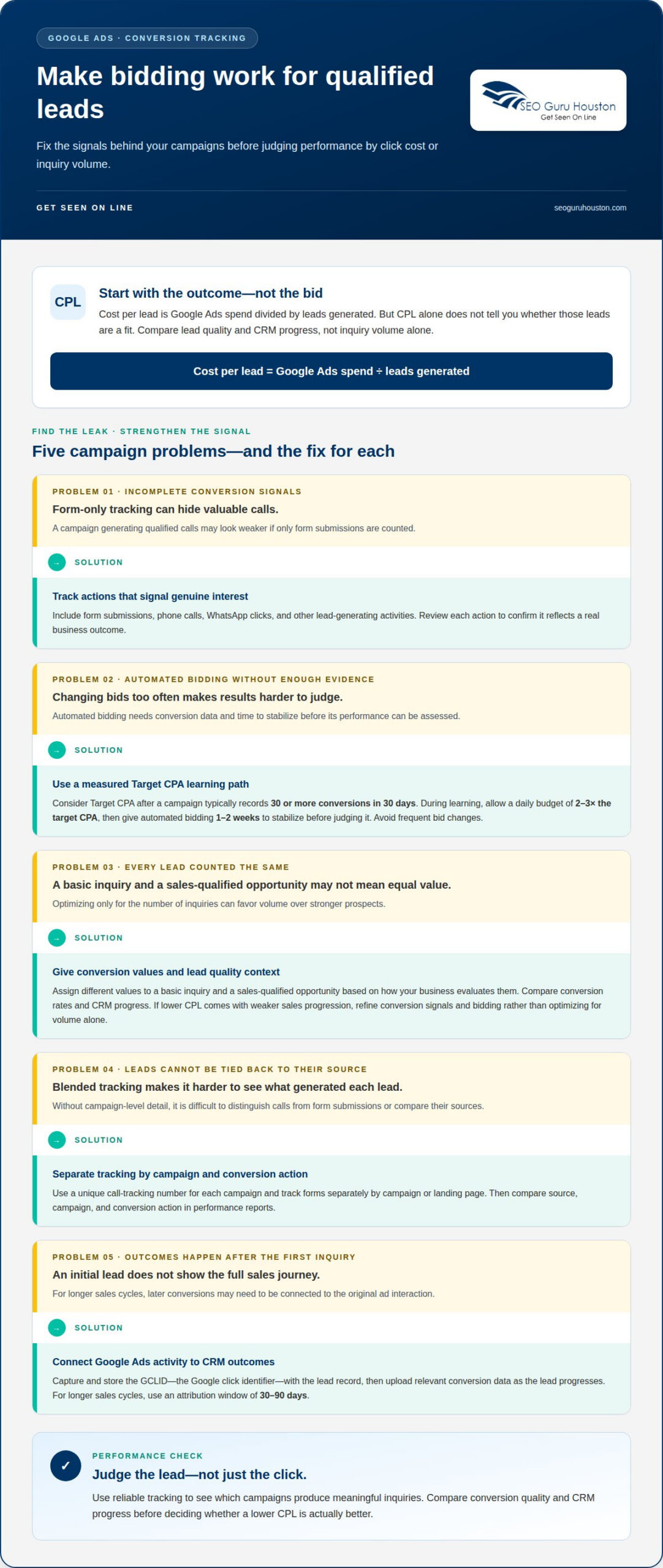
    Record each meaningful action, from a landing-page inquiry to a sales-qualified lead and closed deal. Connect ad interactions with CRM stages so campaigns aren’t judged only by their earliest conversion. Check that each event fires once and maps to the right campaign. Don’t treat repeat visits or low-intent downloads as equivalent to sales opportunities. Digital marketing teams like Barlo Digital often emphasize starting with comprehensive tracking and measurement audits to ensure search data accurately reflects pipeline value.

  2. Preserve campaign context through the sales journey. Capture the campaign, keyword, and landing page associated with each lead, then retain that information as the record advances through sales stages. This lets you compare first-touch and later interactions without crediting every touch with a full conversion. For example, an initial search click may introduce a solution, while a later visit prompts a demo request.
  3. Assess Lead Quality and Conversion Costs

    Compare conversion volume with sales acceptance, opportunity creation, and closed revenue. Treat CTR and CPC as diagnostic signals, not final outcomes: strong click engagement can still produce poor-fit leads. Calculate cost per conversion for each meaningful milestone, then compare it with the resulting ROI. Don’t optimize for the cheapest form submission if those contacts rarely progress.

  4. Align the landing page with the tracked action. Keep the ad promise, page content, and conversion event consistent. A demo campaign should direct visitors to a page explaining the demo, with a clear call to action and a streamlined form. Track form completions separately from later qualification, so page tests improve lead generation without disguising low-quality submissions as success.
  5. Review attribution against actual sales outcomes. Compare platform-reported conversions with CRM opportunities and closed-won records by campaign and lead cohort. This shows why conversion counts need sales context: investigate lead sources, qualification, and follow-up before scaling spend.
  6. Use mature data to guide optimization. Long sales cycles delay revenue signals, so keep early indicators visible while opportunities progress. Review whether search terms reach the right accounts, whether landing pages generate qualified inquiries, and whether those leads advance. Use that evidence to refine targeting and messaging instead of making a major change after a brief spike in form submissions.

How to Build a Full-Funnel PPC Campaign Structure for B2B

Full-funnel PPC strategy for B2B buying journeys

Organize campaigns by buyer stage and audience, then match each segment with a relevant offer and message. Gartner research indicates approximately 80% of the B2B buying journey happens without direct vendor contact. A ppc campaign structure for b2b should therefore support independent research and guide prospects toward useful next steps.

  1. Map the B2B Buying Journey to Funnel Stages

    Define awareness, consideration, and decision stages by the questions buyers ask at each point. Awareness audiences may need educational content about a business problem; consideration audiences need solution comparisons; decision-stage prospects need a clear next step. Make sure these stages reflect the real buying process, not just website actions. A product-page visit, for example, signals interest but doesn’t establish readiness for a sales conversation.

  2. Assign PPC Roles Across the Funnel

    Give each campaign a distinct job, such as introducing a problem, helping buyers evaluate options, or generating qualified inquiries. Search can capture active research, while display and paid social can reconnect with relevant audiences between searches. LinkedIn can reach professional audiences by role and industry with stage-specific content. Don’t expect every campaign to produce an immediate sales-ready lead.

  3. Organize Campaigns by Stage and Audience

    Separate campaigns by funnel stage, audience, and offer so results remain actionable. For example, create distinct groups for operations leaders researching efficiency and finance leaders evaluating cost control. On LinkedIn, use professional audience attributes; on search, align keyword themes with the same buyer need. Keep campaign names consistent, such as “consideration, operations, efficiency,” and exclude converted leads from messages intended for first-time prospects.

  4. Tailor Ads to Each Funnel Stage

    Write awareness messaging around the business problem, not a hard sales pitch. For consideration, explain outcomes such as cost savings, efficiency gains, or risk reduction, then offer a useful comparison or guide. At the decision stage, make the next action clear and match the landing page to the ad. Use interests and audience signals to improve relevance, not as substitutes for clear intent or compelling messaging.

  5. Set a measurable planning goal. Connect stage-specific activity to a business outcome, then review how audiences advance. A sample B2B lead-generation goal is 75 qualified leads per month within four months, with cost per acquisition under $65. Treat this as a planning example, not a universal benchmark. Use the ppc campaign structure for b2b to assess whether each campaign supports that goal, then refine its audience or offer when engagement fails to progress.

Campaign structure designed to scale

The best ppc campaign structure for b2b separates campaigns by business goal, product or service, and buyer intent. There’s no fixed campaign or ad-group count; create separate Google Ads campaigns when products need distinct budgets, audiences, or outcomes, then group closely related keywords together.

  1. Separate Campaigns by Product or Service

    Build a separate Google Ads campaign for each product or service that needs its own budget, audience, or outcome. A company selling analytics software and implementation support, for example, could separate them because buyers search for different solutions. Give each campaign a matching landing page and conversion goal. Don’t combine offers just because they belong to the same company; mixed intent makes performance harder to interpret and scale.

  2. Set the Number of Campaigns and Ad Groups

    Start with the simplest structure that gives you useful control, then expand when performance or business needs call for it. Create an ad group for a tightly related keyword theme, such as “inventory analytics” and closely related searches, rather than grouping every product term together. Add campaigns when budget, geography, audience, or funnel goals need independent management. Avoid creating extra groups that split similar traffic without changing your decisions.

  3. Keep the campaign hierarchy consistent. Use a naming pattern that shows platform, product, intent, and audience. A Google Ads campaign might be labeled “Search | Analytics | Solution | Operations,” with ad groups for closely related search themes. Apply the same logic to Microsoft Ads while retaining platform-specific reporting. Clear names help teams find valuable traffic and understand each campaign’s purpose.
  4. Build for controlled expansion. Launch with core high-intent search campaigns, then add awareness or remarketing campaigns when you have a defined audience and relevant message. Keep search, display, and social activity distinct enough to compare results. For example, a display campaign for product-page visitors should have a different goal from search ads aimed at new prospects.
  5. Protect budget and learning signals. Avoid spreading limited traffic across near-identical campaigns. If two ad groups target the same keyword theme and landing page, combine them unless they need separate controls. Review search terms, audience fit, and conversion quality before adding another layer. Each campaign should address a business need, not simply make the account look more detailed.
  6. Scale what supports a purchase decision. Expand by adding a product line, buyer intent, or audience only when it creates a meaningful new opportunity. Keep awareness messaging distinct from decision-stage offers, and connect each route to the right page. A ppc campaign structure for b2b should make the next growth decision clear. To turn that structure into a practical growth plan, plan scalable PPC campaigns.

SEO Guru Houston: Houston SEO Services

SEO Guru Houston can help when your B2B campaigns need clearer structure, stronger measurement, or better alignment with sales goals. Its comprehensive PPC Services support paid-search planning, while B2B Marketing and Inbound Marketing services can connect campaign activity with broader demand generation.

Turn to SEO Guru Houston when campaigns target overlapping audiences, landing pages don’t match ad intent, or lead volume isn’t translating into qualified opportunities. PPC management includes campaign creation, ad copy optimization, keyword and geographic targeting, conversion tracking, ongoing account management, monthly calls, and reporting. Specialized SEO services can complement paid search by supporting visibility beyond ads.

Ready to discuss your campaign goals? Contact SEO Guru Houston or visit seoguruhouston.com.

Turn Your Campaign Plan Into a Growth System

Start with a business priority and turn it into a focused campaign plan. Decide which audience, offer, and sales outcome deserve attention first. Assign an owner to each decision so campaign changes have a clear purpose rather than becoming disconnected tests.

A durable ppc campaign structure for B2B should make the next move easier to see. Set criteria for expanding a campaign, refining its message, or pausing an approach. Then use those criteria consistently as new opportunities emerge. This creates a practical framework your team can adapt as products, audiences, and sales priorities change.

Bring marketing and sales into the planning process early. Agreeing on what makes an opportunity valuable helps both teams act on the same signals and keeps campaign decisions tied to business priorities.

SEO Guru Houston can help you turn your campaign priorities into a coordinated plan. Contact SEO Guru Houston today to discuss your next step. Build with focus, learn from each decision, and keep moving toward sustainable growth.

Frequently Asked Questions

What is the difference between B2C and B2B paid ads?

B2C paid ads often target individual consumers, while B2B ads address people evaluating purchases for an organization. That changes the message and the conversion path. A consumer ad might promote a product purchase; a B2B ad could offer a product walkthrough to a technical evaluator and business-case material to a budget owner. For teams executing across both sectors, performance marketing agencies such as peytondigital.com illustrate how data-driven strategies adjust to distinct buyer journeys. Build creative around the audience’s role in the decision, not just the company’s industry.

What Is B2B PPC?

B2B PPC is paid advertising where a business pays when someone clicks an ad promoting its products or services to other businesses. A software provider, for example, might use paid search to reach companies researching a specific operational challenge. The click is only the start: the campaign should connect the ad’s promise with a relevant next step, such as a consultation request or product information.

What about the middle of the funnel?

Middle-funnel campaigns help prospects compare approaches after recognizing a problem but before choosing a vendor. Offer useful decision-support content, such as a feature comparison, implementation overview, or case study. Someone who downloaded a guide, for example, could later see an ad addressing integration questions. Keep follow-up relevant to that earlier action, and don’t push for a sales conversation before the prospect has enough context.

How should B2B PPC budgets and bids be allocated across campaigns?

Prioritize campaigns by business value, audience relevance, and observed lead progression. Maintain coverage for high-intent searches that reach active buyers, then allocate testing budget to new audiences or messages with a clear learning goal. Review spend alongside qualified opportunities, not click volume alone. If a campaign attracts traffic but few relevant prospects, adjust its targeting or offer before increasing its budget.

Which conversion actions should B2B PPC campaigns track?

Track actions that show meaningful progress, from a completed inquiry form to a qualified opportunity or closed sale. Choose events based on how prospects engage with your business: a demo request may suit a complex software offer, while a detailed consultation request may fit a professional service. Keep low-commitment actions, such as content downloads, separate from actions that signal stronger buying intent.

How should B2B landing pages align with campaigns and ad groups?

Make sure each landing page matches the campaign’s promise and audience. An ad group focused on compliance software should lead to a page explaining that solution, not a general company homepage. Match headlines, proof points, and calls to action to the visitor’s likely question. Keep the form focused on information needed for follow-up, and remove competing links that distract from the intended action.

Lower Cost per Lead in Google Ads with Smarter Campaigns

A cheaper click isn’t the goal; an affordable, qualified lead is. Calculate cost per lead by dividing Google Ads spend by the number of leads generated. To understand how to lower cost per lead in Google Ads, improve the traffic, ads, and landing pages that turn clicks into inquiries. CPL tells only part of the story if those leads aren’t a fit for your business.

Rising costs can make it tempting to cut bids or pause campaigns quickly. A better approach is to find where spend is leaking and strengthen the parts of the campaign that attract and convert suitable prospects. This guide explains how to calculate CPL, assess what a lead is worth, and refine bidding and conversion tracking without losing sight of lead quality.

You’ll also learn how to improve ad relevance, organize campaigns around services and intent, and use search-term reviews and negative keywords to reduce irrelevant clicks. With a clearer view of performance, you can focus on campaigns that generate valuable leads, not just more traffic.

Key Takeaways

  • Compare cost per lead with lead quality so you can prioritize campaigns that generate prospects likely to become customers.
  • Use reliable conversion tracking to see which ads and campaigns produce meaningful inquiries, then adjust bidding based on that evidence.
  • Align keywords, ad copy, and landing-page messaging to attract relevant clicks and make the next step clear.
  • Organize campaigns around distinct services, locations, and search intent to make performance easier to assess and optimize.
  • Review search terms regularly and exclude irrelevant queries that spend budget without bringing in suitable leads.

1. Bidding strategy and conversion tracking

Start with the conversion, not the bid. In Google Ads, track actions that signal genuine interest, such as form submissions, phone calls, WhatsApp clicks, and other lead-generating activities. If you track only form submissions, a campaign generating qualified calls may look weaker than it is. Review each conversion action to ensure it reflects a real business outcome.

Conversion values can help Smart Bidding distinguish leads with different potential. For example, assign different values to a basic inquiry and a sales-qualified opportunity, based on how your business evaluates them. That gives bidding signals more context than counting every form fill equally. For longer sales cycles, use an attribution window of 30-90 days so conversions that happen later can still be connected to the original ad interaction.

Make call tracking and form attribution specific enough to identify what generated each lead. Use a unique call-tracking number for each campaign, and track forms separately by campaign or landing page. Then compare the source, campaign, and conversion action in performance reports. Separate tracking makes it easier to distinguish campaigns that drive calls from those that generate form submissions.

For offline conversion tracking, connect Google Ads interactions with later CRM outcomes. Capture and store the GCLID, Google’s click identifier, with the lead record when someone submits a form or calls. As the lead progresses through the pipeline, upload the relevant conversion data to Google Ads. This connects campaign activity to milestones beyond the initial inquiry and helps bidding learn from outcomes closer to revenue.

Google Ads policies govern advertising and conversion tracking. Collect only the information needed to measure lead outcomes, and align notices and consent with the privacy requirements that apply to your audience. To assess lead quality, compare conversion rates and CRM progress, not just inquiry volume. If a lower CPL comes with fewer qualified opportunities or weaker sales progression, refine your conversion signals and bidding strategy instead of optimizing for volume alone.

2. Quality Score and ad-to-landing-page relevance

A relevant click is more valuable than a cheap click that leaves immediately. Quality Score is associated with how closely keywords, ads, and landing pages align. Improving those signals can strengthen campaign efficiency while bringing more suitable visitors to your offer. A Quality Score of 8-10 can reduce cost per click by as much as 50%, but the score isn’t a substitute for measuring actual leads.

Start by aligning the message. If a keyword targets emergency plumbing, the ad should promote emergency plumbing, and the landing page should explain that service. A visitor who lands on a broad company homepage has to search again for the offer. Match each ad group’s intent with a focused page, a clear service description, and one lead-generation call to action.

Optimize the page around the visitor’s decision. Put the service, location, and key benefit near the top so people can quickly confirm they’ve found the right page. Keep the form focused on essential qualifying details, and make the submit button easy to find. If the ad offers a quote request, make requesting a quote the obvious next step.

Mobile experience demands its own review. Open the landing page on a phone and test the full path: load, read, tap, and submit. Remove layout clutter, shorten unnecessary form fields, and make buttons easy to use on a small screen. A strong score won’t fix confusing copy or a broken form.

Use controlled tests to find which changes improve conversion rates. Change one meaningful element at a time, such as the headline, form length, or call-to-action wording. Compare completed leads, not just clicks. The recommended threshold is 100 conversions per variation for an A/B test, helping reduce the risk of acting on a small, unrepresentative sample. Keep the winning version only when it brings relevant prospects.

Review the whole journey together: search intent, keyword, ad promise, landing-page content, and completed conversion. If clicks rise but leads don’t, inspect the page’s message and form before changing bids. If the page needs a clearer structure or stronger conversion path, website development and landing pages can support that optimization work.

3. Campaign structure by service, location, and search intent

Give each service its own campaign to keep performance clear. For example, a roofing company can separate roof repairs from full replacements. Each campaign can then use relevant keywords, ads, and landing pages. This structure helps reveal which offer attracts qualified inquiries and prevents a strong service from being obscured by weaker results in blended reporting.

Separate campaigns by location when geography affects the offer or lead value. A business serving several communities can use focused geographic targeting instead of combining every area. Check location settings against the areas the business serves, then compare results. If one area brings clicks but few suitable leads, adjust its targeting or budget rather than changing every campaign.

Let search intent shape the ad groups within each service campaign. Someone searching for “roof repair company” may be ready to hire, while someone searching for “how roof repairs work” may be researching. Group closely related searches and tailor the ad to that intent. For e-commerce, organize campaigns around relevant product categories or shopping goals, then assess which categories generate valuable orders, not just traffic.

Scheduling can also sharpen targeting. Review when inquiries arrive and when your team can respond, then compare conversion quality across days and times. If a campaign receives inquiries outside operating hours, check whether those leads progress through the sales process. Use the results to refine ad schedules, rather than assuming every late or weekend click is wasted. Review location, device, and time segments together because one change can affect another.

Keep analysis ongoing, but base decisions on comparable periods and outcomes. Review campaign-level clicks, conversions, lead quality, and sales progression together. If a service campaign draws volume but few qualified prospects, inspect its search intent, geographic reach, and offer before shifting budget. Don’t merge campaigns just to simplify the account; that can hide which service or location needs attention.

Remarketing gives campaigns another way to reach people who showed interest but didn’t convert on their first visit. A visitor who viewed a service page can see a relevant follow-up ad, while someone who completed a lead form should be excluded from that audience. Remarketing campaigns typically achieve cost per lead 50-70% lower than cold-traffic campaigns. Treat this as a comparison to evaluate in your own account, and track lead quality alongside cost.

Lower Cost per Lead in Google Ads with Smarter Campaigns

4. Negative keyword lists and search-term audits

Research keywords around the searches that signal a real need. In Google Ads, review the search-term report to see the queries that triggered your ads, then compare each query with the service or product advertised. Keep relevant terms, add promising high-intent phrases, and exclude searches that clearly don’t fit. Long-tail keywords can have average cost per click up to 70% lower than broad, head terms.

Negative keywords prevent ads from showing for selected irrelevant searches, reducing clicks that consume budget without a realistic path to conversion. For example, a company that sells services but isn’t hiring could exclude “jobs”; it might also exclude “free,” “courses,” or unrelated locations when those searches don’t match its offer. Adding negative keywords can reduce wasted Google Ads spend by up to 30% in some accounts.

Build your negative keyword list from actual search behavior, not assumptions alone. Check the search-term report regularly, group irrelevant queries by theme, and add negatives at the campaign or account level where appropriate. A “jobs” exclusion may suit several service campaigns, while an unrelated-location exclusion may apply to just one geographic campaign. Review each exclusion against the ads it affects to avoid blocking useful searches.

Refine keyword targeting by starting with specific terms closely tied to your offer, then expand when search-term data supports it. Phrase and exact match can give advertisers more control over when ads appear. For instance, a home remodeling company can distinguish searches for “kitchen remodeling company” from general searches about kitchen design. Match each term to the service, location, and intent represented in the ad.

Don’t let high click volume disguise weak performance. In Google Ads, compare each keyword’s clicks, conversions, and cost per acquisition; pause a keyword or ad group when it attracts many clicks, few conversions, and a higher CPA. Before pausing, inspect its search terms and landing-page match. A broad query may be wasting spend, while a specific query could need a better ad or page.

Keep a change log with the date, keyword, action, and reason. After each weekly audit, compare relevant traffic and lead outcomes against the previous period. Campaigns using 200 or more negative keywords can see CPA up to 67% lower, but a large list isn’t a goal by itself. Add exclusions based on evidence, then review whether they remove waste without suppressing qualified searches.

5. Calculating cost per lead

Calculate Google Ads cost per lead by dividing total ad spend by the number of leads received. Use the same reporting period for both figures, and count leads consistently. Comparing monthly spend with leads from a different period produces a misleading result.

Then separate raw CPL from qualified CPL. The second measure shows what it costs to attract a prospect who fits your offer, rather than simply generate a contact.

What is a good Google Ads CPL in the US? There’s no universal target because industries, competition, lead quality, and sales conversion rates differ.

Connect CPL to sales outcomes before deciding whether it’s too high. Consider the hypothetical examples of a $50 lead converting at 20% and a $15 lead converting at 2%. A lower CPL can therefore deliver worse economics when fewer leads become customers.

Track averages over consistent periods and compare campaigns with similar services, locations, and lead definitions. An account-wide average can hide a costly campaign or make a strong one look weaker. Record spend, total leads, qualified leads, and resulting sales together. Then calculate raw and qualified CPL for each campaign using the same formula and time period.

Use the figures to set a working target from your own sales economics. Estimate how many qualified leads become customers, then compare the resulting acquisition cost with the value of a sale. If CPL rises, identify whether spend increased, lead volume fell, or lead quality changed. That diagnosis points toward the right optimization, rather than an arbitrary budget cut. For a stronger conversion path, improve your lead-generation landing pages so the page supports the offer and captures suitable inquiries.

SEO Guru Houston: Houston SEO Services

SEO Guru Houston helps businesses connect paid search strategy with broader efforts to attract and convert qualified prospects. If your Google Ads campaigns need closer analysis, our PPC services can support improvements to targeting, campaign structure, and lead measurement. For businesses building longer-term visibility alongside paid acquisition, our comprehensive SEO services can complement that approach.

When leads involve longer B2B decisions, specialized B2B marketing and inbound marketing frameworks can help align demand generation with how prospects research and evaluate solutions. The right next step depends on where your funnel needs attention, whether that’s campaign performance, organic visibility, or the path from first visit to sales inquiry. Contact SEO Guru Houston to discuss your marketing goals and discover strategies to lower cost per lead in Google Ads.

Turn Campaign Insights Into Your Next Growth Move

Make optimization a repeatable habit, not a one-time cleanup. Set regular review points, record each adjustment, and connect campaign decisions to the leads your sales team values. This discipline helps you identify which tests deserve more investment and which assumptions need another look. A practical process for how to lower cost per lead in Google Ads gives your team a consistent way to turn campaign insights into its next growth move.

SEO Guru Houston offers Houston PPC Services, alongside Houston SEO Services and Houston B2B Marketing. If you’re ready to build a stronger approach to how to lower cost per lead in Google Ads, bring your campaign goals and lead-generation priorities into the conversation. Together, you can identify where focused strategy may help your business move forward. Contact SEO Guru Houston today to discuss your next step.

Frequently Asked Questions

How Do I Calculate the Cost-Per-Lead and Why Does It Matter?

Divide Google Ads spend for a reporting period by the leads attributed to that spend. The result helps compare campaign efficiency, but it isn’t a complete measure of profitability. A campaign may produce fewer leads yet create more sales opportunities. Compare CPL with qualification and sales outcomes, using the same lead definition and reporting period so one campaign doesn’t look stronger simply because it counts more actions.

How do you calculate cost per lead and conversion rate in Google Ads?

Calculate CPL by dividing ad spend by leads. Conversion rate can show how often ad clicks lead to the action you’re tracking, so define that action consistently before comparing campaigns. Keep the conversion action consistent: don’t mix submitted inquiries and phone calls unless both count as leads in your reporting. For a useful comparison, align the date range and campaign scope for spend, clicks, and conversions before interpreting either metric.

How can you improve Google Ads conversion tracking for lead generation?

Define which actions count as leads, then test that each action records correctly before using the data for optimization. A form confirmation should register after a successful submission, not just when someone opens the form. Review phone-call and form records for duplicate counting, and connect CRM outcomes to the original ad interaction where possible. This gives you a clearer view of which campaigns generate genuine inquiries and which merely trigger trackable events.

How can match types and search terms be optimized to lower cost per lead?

Use phrase and exact match to focus on searches closely related to your offer, then inspect actual queries in Google Ads search-term reports. Keep terms that show relevant intent, add useful specific phrases, and exclude queries that don’t fit. For example, a business seeking service customers could filter out research or employment searches when those visitors aren’t prospects. Recheck exclusions to avoid accidentally blocking useful variations.

How do landing page changes improve Google Ads lead conversion rates?

How should you adjust bids, budgets, and bidding strategies to reduce cost per lead?

Base bid and budget changes on qualified-lead outcomes, not click volume alone. Avoid cutting every campaign after a brief dip; first identify whether the cause is weak search intent, limited conversion volume, or a change in lead quality. Set an efficiency goal for each campaign, make a focused adjustment, and allow enough time to assess its effect before changing the strategy again.

How can ad copy and assets improve lead quality and lower cost per lead?

Use ad copy to make the offer and intended audience clear before someone clicks. A B2B provider, for instance, can name the business audience and the specific service, helping discourage unrelated consumer inquiries. Choose ad assets that reinforce useful details, such as a relevant service or contact option. Review the search query, ad engagement, and resulting lead quality together; a higher click-through rate alone doesn’t prove the campaign attracts better prospects.

How do location, device, and schedule targeting affect Google Ads lead costs?

These settings shape which searches can trigger ads, so compare performance by location, device, and time before changing targeting. Mobile visitors may behave differently from desktop visitors, while leads from one service area may qualify more often than others. Review completed leads and sales progression in each segment, not just clicks. Refine the specific underperforming segment, and preserve targeting that brings suitable prospects.

How to Get More Product Reviews on Amazon Through Better Service

More reviews start with better service, not bigger incentives. To understand how to get more product reviews on Amazon, make the buying experience worth talking about, then use Amazon’s Request a Review feature 4-30 days after delivery. Keep every request neutral: don’t offer discounts, free products, or other rewards in exchange for a review.

It’s frustrating to earn a sale and hear nothing afterward, especially when shoppers rely on reviews to judge whether a product is right for them. A steady, policy-conscious review process can help build trust and give your listing more useful customer feedback. This guide explains how to improve the experience before and after purchase, use package inserts and customer communications appropriately, and make social media part of the conversation without pressuring buyers. You’ll also see why authentic reviews matter for shopper confidence, sales, and product visibility, and which common tactics can put that trust at risk.

Key Takeaways

  • Make product quality, clear information, and responsive customer care the foundation of a review strategy.
  • Use Amazon’s Request a Review feature within its allowed timing, and keep every request neutral and respectful.
  • Design package inserts and follow-up messages to help customers, never to reward or pressure them for a review.
  • Use email and social media to build genuine engagement while keeping review requests separate from incentives and promotional pressure.
  • Connect customer trust and product visibility with a broader marketing strategy that supports your Amazon presence.

Why are Amazon Reviews so important?

Amazon describes a zero-tolerance policy for reviews that mislead or manipulate customers. These tactics breach its review rules, so build your process around inviting honest feedback rather than trying to control ratings.

  1. Ask for honest feedback, never a favorable rating. Amazon encourages customers to share both favorable and unfavorable opinions. Keep your request neutral: invite buyers to describe their experience, not to praise the product. For example, ask what worked well and what could be clearer. This leaves reviewers free to share their genuine views.
  2. Never trade a benefit for a review. Amazon banned offering products at a low price or for free in exchange for a product review in 2016. A discount, refund, gift, or other reward tied to posting a review turns feedback into an incentive. Keep any promotion separate from review requests, and don’t condition a benefit on whether a customer writes or changes a review.
  3. Keep the request open to every buyer. Don’t contact only customers you expect to be pleased, or steer unhappy buyers away from posting. Selective requests can distort the feedback shoppers see. Use the same neutral invitation for eligible customers, whether the purchase was straightforward or involved a product question. A balanced range of feedback helps shoppers decide whether the item suits their needs.
  4. Exclude reviewers with a personal or financial connection. Amazon doesn’t allow reviews from people with a direct or indirect financial interest in a product. It also bars reviews from people perceived to have a close personal relationship with the product’s owner, author, or artist. Don’t ask a relative, business partner, or paid promoter to pose as an ordinary shopper.
  5. Don’t write reviews while pretending to be a customer. Amazon doesn’t allow manufacturers to review their products while posing as unbiased shoppers. Keep seller communications separate from customer opinions, and don’t ask staff or business associates to hide their connection. Manufacturers can improve product information and customer service, but shouldn’t create praise that appears independent.
  6. Reject review swaps and competitor attacks. Amazon prohibits reviews exchanged for monetary rewards. It also doesn’t allow an artist to post a positive review of a peer’s album in return for a positive review. Sellers can’t post negative reviews on a competitor’s product or submit multiple negative reviews for the same product through one customer. Focus on improving your own listing and customer experience.

Customer service and review requests

Use reliable customer care to resolve problems, then invite buyers to share honest feedback. Amazon’s built-in request tool provides a direct, consistent way to ask.

  1. Use Amazon’s Request a Review Feature

    Open the order in Seller Central and use Amazon’s Request a Review feature to send its standard review request. Sellers can send it 4-30 days after delivery, so make the request within that window. Keep the message neutral and use Amazon’s button rather than adding pressure or asking for a particular rating. Amazon’s community manager recommends this feature for requesting product reviews.

  2. Automate Compliant Review Requests

    Start with Amazon’s Request a Review button as the simplest compliant workflow. It can standardize requests without requiring custom persuasive language. If you use an automation tool to manage order follow-up, make sure it respects the 4-30-day timing and doesn’t offer rewards, filter for satisfied buyers, or ask customers to change reviews. The safest process automates the neutral request, not the customer’s opinion.

  3. Improve the product experience before asking. Review the listing alongside customer questions. Amazon’s community manager recommends high-quality images, clear product descriptions, and detailed bullet points on product detail pages. Look for recurring questions: if buyers misunderstand setup, clarify the instructions; if a feature is unclear, explain it accurately. Clear expectations can reduce avoidable frustration and help customers give more useful feedback.
  4. Resolve problems with focused service. When a customer reports a missing part, confusing instructions, or a delivery concern, address the issue through the appropriate seller support channel. Give a clear next step and focus on the problem rather than steering the customer toward a positive review. Good service can improve the experience, but keep service recovery separate from a review request.
  5. Handle critical feedback constructively. For Brand Registry sellers, Amazon’s community manager recommends using the Customer Reviews tool to track and respond to reviews, especially those rated 1-3 stars. Read the review for actionable details, identify a product or listing issue, and make a factual, professional response where the tool allows. Don’t argue, disclose private order details, or ask the reviewer to revise their rating.

Best tools for automating compliant requests? Start with Amazon’s Request a Review feature in Seller Central, which provides a standard, consistent request. Keep any additional workflow focused on eligible orders and neutral wording.

How can sellers improve quality and customer experience? Compare customer questions and critical feedback with the product page, images, instructions, and product itself. Address recurring confusion or defects before sending another review request.

How should sellers respond to negative reviews? Identify the specific issue, respond professionally, and use the feedback to improve the product or listing. For Brand Registry sellers, the Customer Reviews tool supports tracking and responding to critical reviews.

For sellers aligning review workflows with their wider marketplace strategy, Amazon marketing support can help connect customer experience and listing performance.

Package inserts and review requests

Use each package insert to improve the product experience and make a neutral review request easy to understand. A thank-you card can invite honest feedback, but never make a reward conditional on leaving a review.

  1. Give the insert a customer-first purpose. Start with practical information that helps someone use the product, such as a setup tip or care instruction. For a kitchen tool, explain a useful first-use step before mentioning feedback. This gives the insert value on its own, rather than making it packaging that exists only to solicit praise.
  2. Write one neutral invitation. Add a short sentence asking the buyer to share an honest product review on Amazon. Avoid asking for five stars, positive comments, or a specific description. A simple invitation makes room for favorable and unfavorable opinions instead of pushing customers toward a preferred response.
  3. Keep rewards out of the request. Never offer a discount coupon, free product, refund, or other benefit in exchange for a review. Amazon banned offering products at a low price or for free in exchange for a product review in 2016. Keep promotions separate, and don’t imply that a customer must post feedback to receive a benefit.
  4. Make the message clear and brief. Use plain language buyers can understand while unpacking their order. For example, thank them for choosing the product and invite them to share their experience on Amazon. Avoid emotional pressure, urgency, or claims that a review is required. A concise card is easier to scan than a dense block of promotional copy.
  5. Use a handwritten note with care. A personal thank-you can make an order feel considered, and sellers have suggested handwritten notes as a review prompt. Keep the message neutral. Don’t write different notes based on whether a buyer seems satisfied, or ask only customers who contacted you with praise.
  6. Check every insert before printing. Read the card as a customer would: does it offer help, invite honest feedback, and avoid rewards or requests for a preferred rating? Remove wording such as “show us five stars” or “send a review for a coupon.” Reviewing the printed insert helps catch messages that may be less clear in a draft.
  7. Keep the package and follow-up consistent. If the insert invites feedback, use the same neutral approach in later customer communications. Don’t pair a thank-you card with a discount conditioned on a review, or ask buyers to contact you before posting. Consistency avoids mixed messages and keeps the request focused on genuine product experience.

How to Get More Product Reviews on Amazon Through Better Service

Using email and social media to request reviews

Use email and social channels to make useful customer communication more personal, not more pressuring. Keep the request clear, relevant to the purchase, and separate from promotional offers.

  1. Separate review requests from campaign emails. Send a distinct message to customers who bought a specific product, rather than burying the request in a sales newsletter. For example, a follow-up about a reusable water bottle can ask about the buyer’s experience with that item. Make the purpose clear, and don’t combine the invitation with a coupon or discount offer.
  2. Organize your email contact list by customer relationship. Keep purchase records and marketing subscribers distinct so each message fits its audience. Someone who bought a particular item should receive relevant information about that item, not an unrelated product blast. Use a clear sender name and subject line, and explain why the customer is receiving the message.
  3. Personalize with details that help the customer. Address the recipient naturally and mention the product they purchased, such as a specific model or use case. A forum participant endorsed personalized customer communication because customers appreciate it. Keep personalization accurate and restrained: don’t assume the purchase went well or imply you know how the customer feels.
  4. Write a neutral email invitation. Ask the buyer to share an honest product review on Amazon, using plain language and one clear next step. For example: “If you’ve tried the product, you can share your experience on Amazon.” Don’t ask for a particular star rating, suggest specific praise, or make the invitation sound like a condition of receiving support.
  5. Use social media for broad, open invitations. A brand post can remind all customers that product feedback helps other shoppers understand real-world use. Keep the message public and general instead of contacting only followers who have praised the product. For example, invite anyone who has purchased the item to leave an honest review through Amazon.
  6. Keep social replies focused on the conversation. If a customer comments about a product on Instagram or Facebook, answer their question directly before mentioning feedback. Don’t turn a support exchange into pressure to leave a review. You might clarify how to use a feature, then leave the customer free to decide whether to review the purchase.
  7. Review each message before sending. Check the recipient, product reference, and call to action. Remove language that rewards, filters, or pressures customers, and ensure emails and social posts don’t promise a benefit for posting. A quick final edit can catch an outdated product name or overly promotional wording before it reaches customers.

Importance of Amazon reviews for trust, sales, and product visibility

In 2023, 61% of consumers said they were influenced by the product with the best ratings and reviews. Treat reviews as customer decision support, then improve the listing and product experience behind them.

  1. Read reviews as evidence of shopper concerns. A product rating gives shoppers a quick signal, while review details explain the experience behind it. Comments about sizing, setup, or durability, for example, can help potential buyers decide whether the product suits their needs. Track recurring themes to identify unclear instructions, mismatched expectations, or opportunities to improve the product.
  2. Use customer feedback to sharpen the listing. Compare review language with the images, title, description, and bullet points on your Amazon detail page. If shoppers repeatedly ask whether a component is included, clarify that in the listing. If buyers misunderstand a feature, explain how it works in plain language. Accurate details help customers make informed choices and reduce avoidable confusion.
  3. Value useful reviews over a perfect-looking score. A mix of specific customer experiences gives shoppers more context than generic praise. Northwestern University research suggests that five quality reviews can increase conversion rates by 270%. Treat that finding as a reason to prioritize detailed, authentic feedback, not as a promised result for every product or listing.
  4. Make review themes part of product decisions. Sort feedback into practical categories, such as quality, packaging, instructions, and fit. Choose a recurring issue to investigate, such as unclear assembly directions. Update the relevant product detail or customer guidance, then monitor later feedback to see whether the change addresses the confusion.
  5. Connect reviews with the complete buying experience. Reviews can reveal gaps that advertising or listing visits alone won’t explain. If shoppers praise a product but mention confusing setup, improve the instructions before increasing promotion. If feedback shows the item differs from shoppers’ expectations, revise the listing before driving more traffic. Keep the product, detail page, and customer experience aligned.
  6. Use review insight to guide marketplace marketing. Strong feedback helps clarify which product benefits customers value, while criticism can expose friction that limits confidence. Apply those insights to listing content and campaign messaging without presenting reviews as proof of guaranteed sales or ranking gains. For a coordinated approach, get support with Amazon marketing that connects customer feedback with listing and campaign decisions.

SEO Guru Houston: Houston SEO Services

SEO Guru Houston can help connect your Amazon review strategy with a broader digital marketing plan. When customer feedback reveals what shoppers value, that insight can inform how you present your business across relevant channels. Comprehensive SEO Services can support organic visibility, while expert PPC Services can help structure paid campaigns. Strategic Inbound Marketing and specialized B2B Marketing can support wider audience engagement and lead generation.

Turn to SEO Guru Houston when your review process is in place but your marketing needs better alignment around visibility, audience, and messaging. SEO, PPC, and Amazon Advertising Services can support broader marketing efforts, while customer feedback helps you refine product messaging. Reviews aren’t a guaranteed shortcut to sales or rankings.

Contact SEO Guru Houston to discuss your marketing priorities and next steps.

Make customer insight your next growth move

Turn review feedback into a practical decision process. Assign someone to track recurring customer themes, then match each issue with a next step, such as refining product information or improving support. This connects efforts to get more product reviews on Amazon with a better experience for the next buyer.

As your marketplace strategy develops, align customer insights with the way shoppers discover and evaluate your business. SEO Guru Houston offers Houston SEO Services, Houston PPC Services, and Houston B2B Marketing to support broader visibility and audience growth. The right next step depends on where your marketing needs stronger alignment, not on chasing reviews in isolation.

If you’re ready to strengthen that strategy, contact SEO Guru Houston for SEO help. Keep building from real customer feedback, and make each improvement count.

Frequently Asked Questions

What are Amazon’s current policies for requesting product reviews?

Amazon allows sellers to invite customers to share genuine product feedback, but not to dictate what they say. Keep requests neutral, and don’t use promotional language or select only buyers expected to leave positive feedback. Ask purchasers to describe their experience, whether favorable or critical. Separate review invitations from customer support, marketing offers, and any attempt to influence a product’s rating.

How can sellers use Amazon’s Request a Review button?

In Seller Central, locate an eligible order and use its Request a Review option to send Amazon’s standard invitation. The feature allows requests 4-30 days after delivery. For sellers considering how to get more product reviews on Amazon, a routine for submitting eligible requests can create consistency without persuasive custom messages. Avoid asking buyers for a specific rating or sending additional messages that pressure them.

How do Amazon Vine reviews work, and what does the program cost?

Amazon Vine lets eligible brand owners provide products to Vine reviewers, who can publish honest reviews, including negative ones. Enrollment is for Brand Registry products with fewer than 30 reviews, and products must be available through Fulfillment by Amazon. Fees depend on the enrolled quantity and ASIN. Amazon doesn’t charge an enrollment fee if the product receives no reviews within 90 days after enrollment.

When and how should sellers follow up with buyers to request reviews?

Use Amazon’s Request a Review feature 4-30 days after delivery, rather than relying on an arbitrary schedule based on purchase date. For example, review recently delivered orders and submit eligible requests through Seller Central. A sound plan for how to get more product reviews on Amazon keeps the invitation separate from customer support. Resolve issues directly, without seeking a favorable review or asking buyers to change existing feedback.

What are Amazon’s rules on review incentives, rebates, and compensation?

Don’t offer money, rebates, discounts, free products, refunds, or other benefits in exchange for a review. Amazon banned offering products at a low price or for free in exchange for a product review in 2016, and sellers are prohibited from offering review incentives. Keep promotions independent of review activity. Never make a benefit conditional on posting, editing, or removing feedback.

Google Ads Strategy for B2B Services: How Much Should You Spend

A focused Google Ads strategy for B2B services then puts most of that budget behind high-intent search, while reserving spend for remarketing and experiments. The right allocation depends on whether your ads attract the decision-makers and qualified leads your business needs.

It makes sense to want a clear budget before investing. But spend alone won’t fix campaigns that target the wrong searches or send prospects to a landing page that doesn’t match the ad. This guide explains how to set goals, identify audiences, structure campaigns, and refine keywords and bidding. It also shows why persuasive ad copy and relevant landing pages matter: they help turn advertising spend into meaningful opportunities, not just clicks.

Key Takeaways

  • Set campaign goals around qualified business outcomes, then target the roles, companies, and audiences most likely to influence a purchase.
  • Use keyword research and search-term data to focus spend on relevant intent and exclude searches that attract poor-fit clicks.
  • Match campaign messages and assets to each stage of the buyer journey, from early research to solution evaluation.
  • Align ad copy, keywords, and landing-page content so prospects see a clear, relevant next step after clicking.
  • Use expert PPC services and B2B marketing strategies to connect campaign execution with demand generation and long-term business growth goals.

B2B campaign goals and audience identification

Start with the business outcome, not the campaign setting. A clear goal helps connect Google Ads spend to the prospects and actions that can advance a B2B sale.

Campaign Goal Setting

A campaign goal defines the business result advertising should support, such as qualified enquiries or relevant website visits. It matters because bidding, audience choices, and measurement all depend on what counts as progress. For example, a firm entering a new market might aim to increase website traffic by 30% within the next month. A software provider could instead aim for 50 free trial sign-ups within the next two weeks.

Choose a conversion that reflects genuine buyer interest, then distinguish it from lighter engagement. A report download may indicate research, while a demo request can signal stronger purchase intent. Google Ads conversion tracking can measure report downloads, trial sign-ups, and purchases after an ad view. Comparing these actions helps campaign managers assess keywords and ads against the outcomes that matter.

Audience Targeting Segments

Audience segments group potential buyers by relevant characteristics or prior interactions, including first-party audiences built from a business’s own customer information. This matters because B2B purchases often involve distinct decision-makers, researchers, and evaluators. Google Ads targeting can use demographics, interests, habits, and the companies potential customers work for, helping advertisers tailor messages to business audiences.

Use first-party information only with appropriate permissions when it supports email campaigns or online advertising. A company could offer a research report or invite-only webinar in exchange for customer details, then use those details to shape follow-up messaging. Remarketing can reach previous website visitors, while other audience segments can focus on prospects interested in related topics. Keep each message relevant to the audience’s demonstrated interest.

Campaign Type Selection

What Google Ads campaign types work best for B2B services? Search is suited to active service research, while Display can support remarketing and awareness. Select based on the audience’s intent and the conversion goal, rather than using every campaign type at once.

What Google Ads policies and compliance risks apply to B2B service advertisers? Follow Google Ads policies, describe services accurately, and handle customer information responsibly. If collected details will support email or advertising, use them with the appropriate permissions. Clear consent practices and truthful ad claims help reduce avoidable compliance risks.

Keyword research and competitor targeting

Keyword research connects B2B search intent with the services your campaigns promote. Use Keyword Planner, match types, and search-term reports to refine targeting and limit irrelevant clicks.

Keyword Discovery with Keyword Planner

Google Ads Keyword Planner is a research tool that shows keyword search frequency, competition, and bid costs. These signals help you compare phrases before assigning them to campaigns. For example, separate searches for “B2B payroll software” from broader phrases such as “payroll services” when your offer serves a specific business audience.

Start with the services you sell, then expand each into buyer-focused variations. A consultant might compare “supply chain consulting” with “supply chain audit services” to find language that better reflects a prospect’s need. Use the Planner’s estimates as research inputs, then assess whether each phrase matches your offer and landing page.

Search Match Types

Match types control how closely a person’s search must relate to a target keyword before an ad can appear. They matter because a narrow service phrase and a broad category phrase can attract different intent. Choose settings that balance reach and relevance, then review actual search queries to see how Google Ads interprets your keywords.

For example, a campaign targeting “commercial HVAC maintenance” should distinguish service-specific intent from searches about residential repairs or do-it-yourself advice. Broad targeting can surface related searches, while tighter matching focuses exposure on closer variations. Organize keywords by service theme so the ad copy and landing pages address the same need.

Negative Keywords and Search-Term Reports

Negative keywords prevent ads from appearing for searches that don’t fit your offer. Search-term reports show which queries triggered ads, giving you evidence to add exclusions or refine target keywords. This review matters because even a relevant keyword can attract poor-fit searches through related wording.

For instance, a B2B software provider might exclude “jobs” if employment seekers don’t represent prospective buyers. Review the report for queries about free templates, consumer products, or unrelated services, then add negatives where those searches don’t match the business. Search-term data can also reveal phrases worth testing in paid campaigns or considering for SEO content.

Competitor Targeting

Competitor targeting considers searches that mention competing brands or compare providers. It can reach prospects who know the category and are evaluating alternatives, but the ad and landing page should clearly explain your own offer. Group competitor-related terms separately from service keywords to see whether they attract qualified enquiries.

Review competitor names alongside comparison phrases, such as “alternatives to [brand]” or “[brand] versus [service type].” Assess each query for relevance before adding it, and use clear, factual messaging rather than implying an affiliation. Pair this analysis with a paid search campaign strategy that keeps keywords, ad copy, and landing-page content aligned.

Ad extensions and assets

Google Ads assets add useful details and actions to search ads. For B2B campaigns, choose assets that help decision-makers understand the offer and take a relevant next step.

Give Searchers More Relevant Options

Sitelinks and other Google Ads assets can provide extra information and options within search results. They can also increase an ad’s size, helping it stand out and giving prospects more reasons to click. A B2B consultancy, for example, could use sitelinks to direct different audiences toward relevant service information or a case study.

Keep each option aligned with the ad’s promise. If an ad promotes an operational audit, a sitelink to audit details supports that message better than a broad, unrelated page. Useful assets give prospects a clearer route to explore, while mismatched options can distract from the advertised service.

Use Lead Form Assets for Direct Enquiries

Google Ads lead form assets let potential customers submit their contact information directly within an ad. This can give a busy decision-maker a direct response path without first visiting a website. For example, a B2B provider promoting a consultation could use a lead form asset to capture interest from someone searching for that service.

Choose this format when an in-ad enquiry fits the campaign goal. Make the offer clear, and explain what the prospect is requesting. A lead form is not a substitute for useful service information: people should understand the next step before sharing their details. Compare its enquiries with other campaign actions to assess whether it attracts relevant prospects.

Match Assets to the Ad’s Message

Google Ads assets work best when their information reinforces the search ad and the prospect’s intent. For a software implementation campaign, relevant options might point to implementation details, a case study, or a contact path. Each asset should answer a useful follow-up question rather than repeat the same headline elsewhere.

Review the complete search result as a prospect would see it. Check that the ad, sitelinks, and other assets describe the same service and lead to coherent next steps. If the ad promises a specific business solution, an asset pointing to an unrelated offer breaks that connection.

Review Asset Performance

Use campaign reporting to assess which assets support meaningful actions. Compare lead form submissions with visits to relevant pages, then consider the quality of the enquiries each path generates. A larger ad may attract attention, but clicks alone don’t show whether the added information brought in suitable B2B prospects.

Update assets when their destination or message no longer reflects the campaign. For example, if a sitelink points to outdated service information, revise it to match the current offer. This keeps the experience consistent from search result to follow-up and makes each asset work toward the same business goal.

Google Ads Strategy for B2B Services: How Much Should You Spend

Buyer-journey campaign segmentation

B2B prospects need different information as they move from discovering a problem to assessing solutions and contacting a provider. Segment campaigns by that intent, then align the ad, offer, and next step. A research-focused visitor may value a case study, while an evaluator may be ready to compare solutions or request a demo.

Awareness: Reach Prospects Exploring a Problem

At the awareness stage, prospects may search for explanations rather than a specific provider. Search ads can connect relevant queries with useful resources, such as an industry report or case study. For example, a cybersecurity firm could promote a guide to common security challenges instead of pushing a sales meeting to every early-stage visitor.

Google Ads Search campaigns can generate micro-engagements, including resource downloads, case study exploration, and newsletter subscriptions. These actions offer ways to engage people who aren’t yet ready to become sales leads. Treat each as a distinct signal, and use relevant follow-up messaging to nurture interest over time.

Consideration: Help Buyers Evaluate Options

During consideration, prospects compare approaches and assess whether a solution fits their needs. Free trials, demos, testimonials, competitor analysis, and benchmarking can help them evaluate options. A B2B software company, for example, might use an ad leading to a product demo for active evaluators, while a comparison resource serves people still weighing alternatives.

Decision: Make the Next Step Clear

Decision-stage prospects are closer to contacting a provider or beginning a trial. Use focused Search ads for queries that indicate service or solution intent, and make the advertised action clear. For example, an ad promoting a software demo should lead directly to information about that demo, not a general company overview.

Tailor follow-up to the action taken. Someone who explored a case study may need a different prompt from someone who requested a demo. Keep campaign messages aligned with the prospect’s demonstrated interest, and make the path from ad to enquiry straightforward.

Connect Segments Without Blurring Intent

Buyer-journey segmentation works best when each campaign has a defined audience, message, and goal. Separate educational content from demo or trial campaigns so reporting shows which interactions support progress. A visitor who downloads a report can receive relevant nurturing, while a demo request should prompt a more direct sales follow-up.

Review campaign and conversion data together. If resource engagement rises but qualified enquiries don’t, examine the transition from content to the next offer. If demo campaigns attract mismatched prospects, revisit search intent and landing-page messaging. This keeps each stage accountable to the buying task it serves.

Landing pages, ad copy, and Quality Score

Ad relevance doesn’t stop at the click. Your B2B ad, landing page, and conversion path should tell one consistent story.

Landing Page and Ad Copy Alignment

Alignment means the ad promise, target keyword, and landing-page content all address the same buyer need. A decision-maker who clicks an ad for implementation support expects information about that service, not a broad company overview.

Build each page around the search intent and action you want. For example, an ad offering a software demo should lead to a page that explains the demo and makes the next step clear. Use matching language in the headline, supporting copy, and call to action. If the ad targets operations leaders, address their business problem rather than relying on generic claims.

Keep the page focused. A campaign for a specific B2B service can direct visitors to relevant proof, service details, and an enquiry form. Remove competing calls to action that send prospects toward unrelated offers. This creates a clearer route from search to conversion and helps your team understand which message brought the visitor in.

Keep the page focused. A campaign for a specific B2B service can direct visitors to relevant proof, service details, and an enquiry form. Remove competing calls to action that send prospects toward unrelated offers. This creates a clearer route from search to conversion and helps your team understand which message brought the visitor in. For teams upgrading their digital infrastructure to support paid campaigns, collaborating with a dedicated website development company Ghana such as Digital Reviews can help create high-performing pages that capture qualified buyer interest.

Quality Score

Quality Score is a Google Ads diagnostic that helps advertisers assess keyword, ad, and landing-page relevance. It can highlight where the experience feels disconnected to a searcher. Use it as a signal for investigation, not a substitute for measuring qualified leads and business outcomes.

For example, if a keyword about B2B consulting leads to an ad about general marketing, then a page about unrelated services, the message lacks continuity. Review the keyword, ad copy, and destination together. Make the page answer the question implied by the search, and ensure the ad describes the same offer accurately.

How do you set up conversion tracking and qualify leads from Google Ads? Track meaningful actions such as demo requests, report downloads, and purchases, then compare those conversions with lead quality. Connecting data sources can help campaign systems use relevant signals.

Lead qualification needs a clear definition shared by marketing and sales. For example, a demo request from a decision-maker at a target company may warrant different follow-up from an early-stage resource download. Record the actions and details that distinguish sales-ready enquiries, then assess campaign performance beyond form submissions.

Keep improving the full path, not just the ad. Test a focused headline against a service-specific page, review whether visitors complete the intended action, and refine the message when the page attracts the wrong enquiries. Improve your B2B landing pages by aligning each page with its ad promise and conversion goal.

SEO Guru Houston: Houston SEO Services

SEO Guru Houston helps B2B companies connect campaign strategy with broader search visibility and demand generation. Its Houston PPC Services support paid campaigns, while Houston B2B Marketing and Houston Inbound Marketing can align outreach with how business buyers research and evaluate solutions.

Turn to SEO Guru Houston when your ads need stronger alignment between audience targeting, landing pages, and qualified lead goals, or when paid search should work alongside organic visibility. Houston SEO Services can support that wider search strategy, while PPC focuses on reaching prospects through paid campaigns.

To discuss your B2B marketing goals, contact SEO Guru Houston or visit seoguruhouston.com.

Turn Campaign Learning Into Your Next Growth Move

Your next advantage comes from connecting advertising decisions to what happens after a prospect converts. Build a steady feedback loop between marketing and sales: review which enquiries progress, identify the needs behind qualified opportunities, and use those insights to sharpen future campaign decisions. That discipline makes a Google Ads strategy for B2B services more responsive to real buying signals, rather than simply optimizing for activity.

SEO Guru Houston offers Houston SEO Services, Houston PPC Services, and Houston B2B Marketing. These offerings can support businesses aligning paid search with broader visibility and B2B growth priorities. If your campaigns need a clearer path from ad engagement to business opportunities, consider discussing your goals and the challenges your team wants to address.

Contact SEO Guru Houston today to explore a practical next step for your marketing. Keep testing, keep learning, and build momentum around the prospects your business is ready to serve.

Frequently Asked Questions

How Much Should You Spend on B2B Google Ads?

Set spend according to the lead volume you can handle, your sales capacity, and the campaign data you need to learn. An initial allocation can direct 70% to high-intent search, 20% to remarketing, and 10% to experimental campaigns. Treat this as a starting distribution, then shift budget toward campaigns producing qualified enquiries. Review performance against sales outcomes, not just clicks, before increasing spend.

How to Build a B2B Google Ads Strategy?

How should B2B service businesses structure Google Ads campaigns and ad groups?

Separate campaigns by service line, objective, or distinct audience need, then group closely related search terms together. A cybersecurity provider might create separate campaigns for incident response and security assessments, with ad groups reflecting specific search themes. This structure makes it easier to tailor ad language and landing pages, and to identify which service themes generate relevant enquiries without mixing results.

Which keywords and match types are most effective for B2B lead generation?

Prioritize keywords that clearly express a business need, such as “enterprise data migration services,” over broad terms like “data.” Choose match types based on how closely searches should relate to each phrase, then inspect actual queries. Add negative keywords for irrelevant intent, such as job searches when recruiting isn’t the goal. The best keyword set reflects your offer and the language prospective buyers use.

How do you target B2B decision-makers by location, industry, and company size in Google Ads?

What are typical Google Ads costs and cost per lead for B2B services in the US?

Costs vary with industry competition, keyword demand, audience intent, and deal size, so a single benchmark can mislead budget decisions. A highly specialized service may face a different auction from a broad business category. Track actual spend alongside qualified leads and sales progression. If leads are plentiful but poorly matched, refine targeting and landing-page expectations before treating a lower cost per lead as better performance.

How should B2B landing pages be designed to improve Google Ads conversion rates?

Give each page one clear purpose that matches the visitor’s search and the ad’s promise. For a technical assessment campaign, explain what the assessment covers, who it serves, and how to request it. Keep the enquiry form focused on information needed for follow-up, and make the next action easy to find. Review completed actions and lead relevance together, then improve the page where prospects drop off.

What bidding strategies and budgets should B2B advertisers use?

Choose bidding based on the campaign objective and the conversion data available. With only 5-6 conversions, automated bidding may underperform; consider Manual CPC until conversion volume builds. Once an advertiser has more than 30 conversions per month, the guidance recommends considering a switch from Maximize Conversions to Maximize Conversion Value. Pair the bid approach with a budget that supports the campaign’s target actions and sales capacity.

Amazon A+ Content Practices for More Helpful Product Pages

Helpful A+ pages make product details easier to understand, not harder to find. The most effective Amazon A+ content best practices are to explain features in specific, customer-friendly language, use clear product-focused images, and place key information in text fields rather than burying it in graphics. Each uploaded image file must be under 2 MB.

It’s easy to focus on polished visuals and overlook the questions shoppers need answered: how a product is made, what a feature does, or how options compare. A+ Content works best when each image and module clarifies a specific detail instead of repeating the listing or adding generic sales copy.

This guide explains how to choose useful modules, organize product information, prepare images and alt text, and make comparisons easy to scan. You’ll find practical ways to create product pages that communicate clearly and help shoppers make informed decisions.

Key Takeaways

  • Explain product features and construction in specific, shopper-friendly language instead of relying on broad sales claims.
  • Choose product-focused images that clarify details, and keep each uploaded image file under 2 MB.
  • Use module text fields for key information, and write descriptive image text to support shoppers using screen readers.
  • Consider a comparison table to help customers understand differences across your product line.
  • Review how Amazon marketing and SEO can work together to strengthen product-page visibility and usefulness.

Amazon a+ content best practices

Amazon A+ Content lets registered brand owners add storytelling, enhanced product images, and customized text placements to product detail pages. Treat each module as an answer to a shopper’s next question, not another advertisement. Effective Amazon A+ content best practices start with identifying product questions, then matching each answer to the clearest text or visual format.

Start with the product’s real differentiators. Explain its materials, construction, dimensions, or functions when those details apply. For example, replace “built for convenience” with a clear explanation of how a feature works. Friendly, informative wording helps shoppers understand the product without broad sales claims or unsupported promises.

Choose modules with distinct purposes. Amazon recommends using both Basic A+ Content and Brand Story modules to build out a brand’s presence on the detail page. Basic A+ can explain product features; Brand Story can provide broader brand context. A banner can pair brand elements with a product feature, while module text gives shoppers details they can read and scan.

Use the shoppable Comparison Table when customers need to distinguish products in a line. Compare meaningful attributes, such as product type or a relevant feature, rather than filling columns with repeated claims. Make each comparison clear enough to support a decision. If products serve different purposes, spell out those differences instead of suggesting one option suits everyone.

Prepare creative assets to meet Amazon’s stated technical requirements before uploading:

  • Keep every image file under 2 MB, with a resolution of at least 72 dpi.
  • Use .jpg, .bmp, or .png files in RGB color space; CMYK files aren’t supported.
  • Leave out animated images such as GIFs, which aren’t permitted in A+ Content.
  • Use one brand logo, and spell out numbers below 10 in A+ text.
  • Write descriptive Image Keywords, also called alt text, that explain each image for screen-reader users.

Make every image count. Amazon recommends high-resolution visuals that highlight product features or show the product in use. A close-up can clarify a surface or component; a lifestyle image can demonstrate scale or context. Avoid generic visuals that don’t show the item. Keep A+ images and text unique to this section rather than reusing gallery images.

Put essential wording in module text fields. Text embedded in an image may be harder to read, especially on smaller screens or for customers using assistive technology. Use graphics to demonstrate, not to carry the entire explanation. For example, pair a labeled product detail with a text module explaining what it does and why it may matter to a shopper.

Premium A+ Content supports integrated videos at 720p resolution. Use video when motion can clarify a product function or demonstrate how a feature works. Keep the accompanying text useful for shoppers who don’t watch. Video should add an explanation, not replace product details that customers need to compare options or understand the item.

Before publishing, review the page from a shopper’s perspective. Check that each module answers a distinct question, comparisons are accurate, and images match their descriptions. Confirm the text is readable and the visuals support the written explanation. These steps turn A+ modules into a coherent product guide rather than a collection of disconnected brand assets.

Give every module a clear role in answering likely shopper questions. Amazon recommends using banner images to highlight product features and brand elements in A+ Content, so choose a banner that connects the brand presentation to a useful product detail. Explain product features and construction specifically, using helpful, friendly language instead of general sales-focused text. Keep the wording focused on the product and how its features work, so shoppers can assess the information without relying on broad promotional language. For product lines with alternatives, Amazon recommends the shoppable Comparison Table module to highlight features and help customers make purchase decisions. Use the table to make distinctions easy to understand, not to repeat claims.

Creative choices and file preparation also affect how clearly the page communicates. Amazon recommends high-resolution images that highlight product features or show the product in use, and advises avoiding generic images that do not showcase the product. Choose visuals that directly support the accompanying explanation, then check the supported file formats: Amazon A+ Content supports .jpg, .bmp, and .png image files in RGB color space; CMYK color space is not supported. Keep the A+ presentation distinct from the gallery: Amazon A+ images and text must be unique to A+ and should not reuse images already published in the product page’s image gallery. Distinct copy and relevant visuals give each module a clear purpose on the detail page.

Amazon A+ Content Practices for More Helpful Product Pages

SEO Guru Houston: Houston SEO Services

SEO Guru Houston offers Amazon Services to help businesses align product-page content with a broader marketing strategy. Turn to this support when aligning listing content with product positioning, brand messaging, and customer discovery across channels. Clear A+ modules can explain product value, while a coordinated strategy helps keep messaging consistent wherever shoppers encounter the brand.

Comprehensive digital marketing services can support search visibility beyond Amazon, while targeted PPC services and inbound marketing strategies address other parts of the digital customer journey. The right mix depends on your goals, audience, and existing marketing activity. Start by identifying where your product information is unclear or disconnected, then define what your Amazon presence needs to accomplish.

Contact SEO Guru Houston to discuss your Amazon marketing needs and implement proven amazon a+ content best practices for your brand.

Turn Clear Product Pages Into a Stronger Strategy

Treat each product page as part of a larger customer journey. Use shopper questions and product feedback to guide future updates, then keep the language and positioning consistent wherever customers discover your brand. Amazon A+ content best practices are most useful when the page supports a clear business goal, not just a visual refresh.

SEO Guru Houston offers Houston SEO Services, Houston PPC Services, and Houston B2B Marketing. These services can support businesses working to connect product marketing with broader search, advertising, or business-to-business goals. The right focus starts with understanding which audience you need to reach and what you want your digital marketing to accomplish.

Ready to discuss how Amazon marketing fits into your broader strategy? Contact SEO Guru Houston to explore a practical next step for your business. Build with purpose, keep improving, and give every product page a clear job to do.

Ways to Increase Amazon FBA Sales With Better Listings

More traffic won’t fix a listing that fails to convert, and more orders won’t help if advertising eats the margin. To understand how to increase sales on Amazon FBA, strengthen the product page, target relevant searches, price competitively, and build buyer confidence through genuine reviews. Keep break-even ACoS in view: calculate it by dividing contribution before ads by the selling price, then multiplying by 100.

When sales stall, it’s easy to focus on ad spend, but growth often starts with the listing. Clear images, persuasive copy, relevant keywords, and a shopper-appropriate price give every campaign a stronger foundation.

This guide explains how to improve listings, attract traffic, choose keywords, assess pricing, and encourage reviews while protecting profitability. It also shows how to measure performance and make informed adjustments instead of relying on guesswork.

Key Takeaways

  • Make product pages easier to find and more persuasive with clear titles, useful images, and benefit-focused copy.
  • Use your Amazon Storefront and relevant external channels to bring qualified shoppers to your listings.
  • Review competitor pricing and promotions while protecting your contribution margin and break-even ACoS.
  • Research search terms from relevant products, then use them naturally in listings and advertising campaigns.
  • Build buyer confidence with strong product quality and compliant review requests, then use feedback to improve your listing.

1. Product listing optimization

Your listing must match the shopper’s search and answer their buying questions fast. Start with the product title: Amazon allows up to 200 characters and recommends 80 characters or fewer. Lead with the product type and its clearest differentiator, then add relevant keywords naturally. A title such as “Insulated Water Bottle, Leak-Resistant Stainless Steel” is more useful than a string of repeated search terms.

To improve product ranking and organic visibility, align the title, bullets, description, and backend search terms with the product’s actual features and relevant shopper searches. Describe benefits specifically, including capacity, intended use, or included components when accurate. Relevant details help shoppers understand the offer and Amazon match the listing to appropriate searches.

Refresh listing content when search-term or sales metrics show a mismatch. For example, if a relevant keyword attracts clicks but few orders, make the corresponding benefit easier to find in the bullets or images. Amazon reports that adding A+ Content can increase sales by an average of 5.6%. Use that space to clarify product differences, explain use cases, and address common purchase objections.

Test changes rather than guessing. Eligible sellers can use Amazon listing experiments to compare content versions, including titles. Give each title version enough time to produce meaningful results before comparing them. Change one meaningful element at a time, then assess conversion and sales metrics. If you change the title, images, and bullets together, you won’t know which adjustment affected performance.

Use advertising to test relevance as well as generate traffic. Automatic campaigns can surface search terms shoppers use; manual campaigns can then target proven terms using broad and exact match strategies. Control spend by reviewing clicks, attributed orders, and ACoS, which equals ad spend divided by ad-attributed sales, multiplied by 100. Pause irrelevant targets and assess high-spend terms against their sales contribution.

Amazon referral and FBA fulfillment fees, product costs, and advertising spend all reduce the amount left from each sale. Calculate your contribution after applicable fees and product costs, then compare it with ad spend. This sets a practical margin limit for campaign decisions, rather than measuring success by sales volume alone.

Avoid lost FBA sales by tracking sellable inventory against demand. Divide sellable units by average daily unit sales to calculate inventory cover, then factor in supplier lead time and expected demand changes when planning replenishment. Even a well-ranked listing can lose momentum if it runs out of stock.

Review listing relevance and advertising together. A high click-through rate but weak conversion may signal a mismatch between the ad promise and the product page. Before increasing spend, refine the target terms or clarify the listing’s value proposition.

2. Amazon Storefront and external traffic

An Amazon Storefront gives your brand a curated destination within Amazon, beyond an individual product detail page. Use it to group related products, introduce product ranges, and guide shoppers to relevant options. For example, a kitchen brand could organize cookware by cooking task, helping visitors find a suitable product. Keep each page focused: too many choices can obscure the next step.

Build the Storefront around how customers shop, not your internal catalog structure. Create clear categories, use concise product explanations, and feature items available to buy. Then review Amazon traffic and sales metrics by product or page. If visitors reach a category but don’t continue to a product, simplify the layout or make the grouping more intuitive. This gives the Storefront a measurable role in your sales strategy.

External traffic can introduce your products to shoppers who haven’t found them through Amazon search. Social media gives brands a place to demonstrate a product in context, answer common questions, and direct interested viewers to the relevant Amazon page. The research reports that 27% of customers use social media for product discovery and 67% of consumers buy products through social platforms. Treat those figures as a reason to test relevant content, not as a promise of results for any individual brand.

Choose a specific audience and message before publishing. A home organization brand, for example, might show a storage product solving a particular household problem and link to its Amazon listing. Keep the post and destination consistent: if social content promotes a specific size or feature, make it easy to find on the Amazon page. Track referral traffic and attributed orders to identify useful visits, rather than judging performance by views alone.

Amazon’s Brand Referral Bonus averages 10% of the sales price for sales generated by directing traffic to Amazon listings. Include that program in your external-traffic planning, and assess the resulting sales alongside the campaign’s costs. Amazon DSP campaigns can also run outside the Amazon ecosystem, using audience segmentation and shopper retargeting to reach defined groups. These options can help brands expand beyond organic marketplace discovery, but campaign targeting still needs a clear audience and relevant product message.

Coordinate every traffic push with inventory. A successful social post or external campaign can send more shoppers to a listing, so align promotion timing with sellable stock and replenishment plans. After each campaign, compare the channel, promoted product, visits, and orders. Keep the content that brings qualified shoppers; revise weak messages or destinations. If social content is part of your growth plan, social media marketing can help connect campaign messaging with the customer journey.

3. Competitive pricing and promotions

A competitive price can improve conversion, but copying a competitor without checking your own economics can be costly. Compare similar products by features, pack size, and customer value, then decide where your offer fits. Amazon’s launch guidance recommends comparing competitor prices to assess positioning. Revisit the comparison when a competing listing changes its offer or your product costs shift.

Price also matters for the Featured Offer, formerly called the Buy Box. Somewhere between 80% and 90% of Amazon purchases are made through the Featured Offer. A compelling price can help your offer compete for that placement, but selection isn’t controlled by price alone. Amazon announced changes to its separate Featured Offer eligibility step beginning in July 2026; removing that step doesn’t guarantee selection.

Choose a promotion to match its purpose. A coupon can make an offer more noticeable, while a limited-time deal creates a defined buying window. Amazon Lightning Deals run for 4 to 12 hours. Amazon promotes 7-Day Deals on its Deals page for 7 days, and these deals are limited to Brand Registered businesses. Plan campaign timing around inventory and demand, so an effective promotion doesn’t outpace available stock.

For repeat purchases, Amazon suggests offering customers a 10% discount on their next purchase as one way to encourage another order. Use a discount where a follow-up purchase makes sense, such as a replenishable product. Compare resulting orders with full-price sales and watch whether shoppers return after the offer ends. Promotions should strengthen customer value, not train every buyer to wait for a lower price.

Measure each test against a clear comparison. Record the regular price, promotional dates, units sold, conversion, and contribution after costs. Compare results with a similar period without the offer, accounting for differences in inventory or traffic. If ranking or visibility rises during a discount, check whether sales remain steady afterward. This helps distinguish a short-lived promotional spike from lasting demand.

Coordinate pricing and campaigns. If a Featured Offer change, coupon, and Lightning Deal run together, it can be difficult to tell what drove results. Test one major pricing change at a time, then use the outcome to refine future promotions. Protect margin first, and scale campaigns that bring qualified orders and repeat business.

Ways to Increase Amazon FBA Sales With Better Listings

4. Amazon keyword research and long-tail keywords

Start with shoppers’ language, not assumptions about how they describe your product. Write down its core use, audience, material, and key differentiator, then combine those attributes into focused search phrases. For a stainless-steel lunch container, research terms related to meal prep, leak resistance, and office lunches. Each phrase should accurately describe the item and reflect a likely buying need.

Amazon Brand Analytics can help sellers examine shopper searches and product comparisons to identify sales opportunities. Compare search behavior with your orders and listing performance. Look for relevant queries that attract attention but don’t lead to purchases, then check whether your product or page addresses the need. Use the finding to refine positioning, add useful detail, or prioritize a better-matched keyword.

Build a competitor set from 5-10 best-selling ASINs in your category, then examine how their products are described. Note the shared terms that accurately apply to your offer, and separate them from claims or features your product doesn’t have. For example, if shoppers value compact storage, use a phrase such as “space-saving lunch container” only when it describes your product honestly.

Long-tail keywords are specific phrases that reveal a shopper’s intended use or preference. “Lunch container” describes a broad category; “stainless-steel lunch container for meal prep” narrows the search. Add relevant phrases to listing content where they read naturally. Don’t force every variation into the title. Clear copy helps shoppers understand the offer and keeps keyword use relevant to the product.

Use advertising search-term results to test whether researched phrases attract qualified shoppers. Automatic campaigns can uncover relevant queries, while broad and exact manual targeting can gather data on selected terms. Review search terms, clicks, and orders together. Move relevant converting phrases into focused targeting, and exclude irrelevant queries that spend without matching the product. This makes keyword research an ongoing part of your seller strategy, not a one-time launch task.

Revisit keywords when customer demand or your product range changes. A new size, bundle, or use case may call for different search language, while discounts can shift attention toward value-focused terms. If an influencer demonstrates a product for a particular activity, check whether shoppers search for that use case before adding it to your listing copy. Let Amazon Brand Analytics, advertising results, and product accuracy guide each update.

5. Amazon product reviews and Vine

Reviews help shoppers judge whether a product matches its claims before buying. An Amazon survey found that 54.4% of customers read at least four product reviews before making a purchase decision. That makes review quality and relevance important to conversion, especially when shoppers compare similar products. Treat feedback as evidence about the buying experience, not simply a star-rating target.

Use Amazon’s Request a Review button for each order to invite customer feedback through Amazon’s process. Keep the request neutral; don’t ask buyers for positive reviews or offer coupons, discounts, or other incentives in exchange for favorable sentiment. The FTC Consumer Reviews and Testimonials Rule took effect on October 21, 2024, and addresses fake or false reviews and incentives conditioned on a specific review sentiment.

Amazon Vine is another route for eligible products to receive feedback from Vine reviewers. One new seller enrolled 10 product units during launch, but that example isn’t a required enrollment amount or a sales forecast. Vine reviews may take time: an Amazon representative stated that they typically arrive 22 or more days after reviewers request a product. Plan your launch with that timing in mind, rather than expecting immediate reviews.

Use early feedback to improve what shoppers see and receive. If reviews repeatedly mention unclear sizing, revise the relevant listing details. If customers misunderstand an included component, clarify the description and product images. Address product quality issues at their source: a promotional campaign may bring more purchases, but it won’t fix a gap between the product and its claims.

Reliable shipping and quality products can support positive feedback. As an FBA seller, keep inventory available and ensure the product arrives as described. Monitor review themes alongside returns, conversion, and profit. Complaints about damage call for operational attention; repeated setup questions may signal missing instructions or unclear listing content.

Don’t treat review volume as the only measure of progress. Look for specific comments about fit, durability, packaging, or intended use, then decide which changes are actionable. For example, if buyers praise portability but ask about cleaning, make care information easier to find. Keep updates factual, and don’t edit claims simply to pursue a higher rating.

Build a review process into each launch: request reviews through Amazon’s tool, monitor incoming feedback, and resolve recurring product or information problems. Use Vine as one possible launch tactic, not a substitute for customer experience. To connect review insights with listing and advertising improvements, strengthen your Amazon sales strategy.

SEO Guru Houston: Houston SEO Services

SEO Guru Houston helps sellers connect Amazon listing improvements with broader visibility and traffic goals. Its Amazon Services and PPC services fit businesses looking to coordinate marketplace marketing with paid campaigns. Comprehensive SEO services and inbound marketing can support broader discovery and customer acquisition beyond an individual product page.

Turn to SEO Guru Houston when listing updates, keyword targeting, advertising, and customer acquisition need a coordinated strategy. The right approach depends on your products, audience, and marketing priorities, so start by identifying the growth challenge you want to address.

Contact SEO Guru Houston to discuss your Amazon marketing goals, or visit seoguruhouston.com.

Turn your next sales decision into a growth plan

A practical plan for how to increase sales on Amazon FBA starts by identifying the constraint that currently limits growth. Choose the business priority that matters most, assign responsibility for acting on it, and review performance before making another major change. This makes your next move deliberate and helps you learn from the outcome.

Think beyond individual listing adjustments, too. If your growth priorities include broader visibility, paid acquisition, or business-to-business demand, SEO Guru Houston offers Houston SEO Services, Houston PPC Services, and Houston B2B Marketing. These capabilities can support a wider marketing strategy alongside your Amazon efforts.

Bring your goals and current challenges into a focused conversation, then decide which next step best fits your business. Contact SEO Guru Houston today to discuss your marketing priorities. Keep moving with purpose, measure what matters, and build on each informed decision.

Frequently Asked Questions

What Is Break-Even ACoS?

Break-even ACoS is the advertising cost percentage that uses all contribution available before advertising. Calculate it by dividing contribution before ads by the selling price, then multiplying by 100. For example, if you know the amount left after product costs and selling fees, compare that contribution with the sale price. A target below break-even ACoS leaves room for other expenses and profit.

What Is TACoS?

TACoS, or total advertising cost of sales, compares ad spend with total sales, including both ad-attributed and organic sales. Calculate it by dividing total ad spend by total sales, then multiplying by 100. Use TACoS alongside ACoS: if advertising spend stays steady while total sales grow, the relationship can show whether sales beyond directly attributed ad orders are contributing.

What Is Unit Session Percentage?

Unit Session Percentage measures units ordered relative to listing sessions. Divide units ordered by sessions, then multiply by 100. It helps distinguish a traffic problem from a conversion problem: if sessions increase but the percentage falls, visitors may not find the product or offer compelling. Review search-term relevance, product options, and shopper questions before increasing traffic further.

How do I optimize Amazon FBA product listings for more sales?

A practical approach to how to increase sales on Amazon FBA is to make the listing answer buyers’ questions before they order. For a desk lamp, clarify whether the bulb is included, show its controls, and accurately explain its intended use. Check that each variation leads to the correct detail page. Review customer questions and returns for recurring misunderstandings, then update the content causing confusion.

How can sellers use coupons, deals, and promotions to increase Amazon sales?

Match each offer to a clear goal, such as introducing a new product or encouraging a trial purchase. Before activating a coupon, identify the eligible product and estimate how discounted orders affect contribution. After the offer ends, compare purchase patterns with the preceding period. If demand drops immediately, the deal may have attracted price-sensitive buyers rather than built lasting interest.

How do pricing strategies and competitor research improve Amazon sales?

Competitor research helps sellers understand how shoppers may assess an offer, but comparisons should account for meaningful differences. If you’re considering how to increase sales on Amazon FBA, compare pack size, product specifications, and included components before reacting to a lower price. Track how your own price changes relate to orders and conversion. A competitor’s temporary discount alone isn’t a reason to reduce your price.

How can Amazon sellers improve product images, titles, bullet points, and A+ Content?

Give each listing element a distinct job. Use the title to identify the item clearly, bullets to explain practical benefits, and images to show details shoppers can’t assess from text alone. A+ Content can organize comparisons or explain product use. For a kitchen tool, a comparison chart can show which model suits different cooking tasks without repeating the title.

What are the risks of using external traffic and social media to drive Amazon sales?

External traffic can attract visitors whose expectations don’t match the product page, weakening conversion and wasting campaign effort. A popular post can also drive demand beyond available inventory. Keep the social message consistent with the Amazon listing, direct each post to the relevant product, and monitor orders and stock. Don’t judge a campaign by engagement alone; assess whether it attracts likely buyers.

Build a B2B Demand Generation Content Strategy for Pipeline Growth

Pipeline growth starts before a prospect is ready to talk to sales. The main goal of B2B demand generation is to build awareness and trust across the buyer journey, then turn that interest into qualified opportunities. A strong B2B demand generation content strategy supports that goal with useful content at each stage, not just lead capture.

It’s easy to focus on the leads coming in now. But buyers also need clear, relevant information while they’re still identifying a problem, comparing approaches, and building internal agreement. Content that meets them at those moments can make your business easier to understand and consider.

This guide explains how to build a strategy around buyer needs, map content to awareness, consideration, and decision stages, and activate it across channels such as search, social media, email, and paid advertising. You’ll also learn how to align sales and marketing around qualified opportunities and measure content’s contribution to the pipeline. The aim is practical: create a connected system that earns attention, supports buying decisions, and gives demand generation a clear path to growth.

Key Takeaways

  • Build ideal customer profiles and buyer personas around real needs, roles, and buying triggers so your content speaks to the people involved in a purchase.
  • Align sales and marketing on qualified-lead definitions, shared measures, and a smooth handoff to keep promising opportunities moving.
  • Activate useful content across search, social, email, and paid channels, adapting each asset to the audience and platform.
  • Use demand generation to build awareness and trust before prospects are ready to buy, then connect that interest to relevant next steps.
  • Map content to awareness, consideration, and decision stages so buyers get the right information as their needs evolve.

1. Why Has Content Become the Foundation of Modern Demand Generation?

Content gives buyers useful information before a sales conversation begins. That matters because B2B purchasing often involves several stakeholders, each evaluating different risks and requirements. A 2025 benchmark puts buying groups at an average of 11 stakeholders. A clear content program helps a business build awareness across that group, rather than relying only on lead capture when someone is ready to talk.

Start by defining an ideal customer profile around company fit, then create buyer personas for the people inside those companies. Record their roles, priorities, pain points, triggers, and jobs-to-be-done. For example, a finance leader may need evidence of cost control, while an operations leader needs to understand implementation demands. B2B purchasing decisions involve around 6-10 decision-makers, and more than a dozen individuals may express distinct needs. These details make lead generation programs more relevant and help teams choose topics buyers actually need.

Next, map content to the buyer journey. At awareness, explain the problem and its business impact through educational articles. During consideration, compare approaches and answer technical questions with guides or webinars. At decision, use case studies and clear product information to help stakeholders assess fit. Voice of the Buyer 2026 reports that 58% of buyers prioritize alignment with their use case or technical requirements when shortlisting vendors. Each asset should answer a specific question and point to a useful next step.

Independent research also shapes buyer confidence. In 2025, 61% of B2B buyers preferred sales-rep-free experiences while conducting their own research. Content must therefore stand on its own: explain claims clearly, address objections, and give different stakeholders material they can share internally. Forrester reported in 2024 that 86% of B2B purchases stall and result in no decision. Useful content can help a buying group build understanding and agreement before that momentum disappears.

For example, a persona-led program could pair an awareness article about a costly workflow problem with a consideration guide comparing possible solutions. A decision-stage case study could then show how a similar organization evaluated its options. Use this practical planning rule for every asset: match it to a stage, a stakeholder need, and a clear next action.

2. How can a company develop a successful B2B content marketing strategy?

Build the plan around shared decisions, not separate departmental calendars. Sales hears objections in conversations; marketing sees audience engagement across channels. Bring both teams together to connect those signals and choose content themes that address real buyer questions. For organizations seeking senior leadership to drive this collaboration, engaging fractional CMO services London can provide the strategic oversight needed to unite both functions. A useful starting point is a monthly planning session where sales shares recurring objections and marketing matches each one to a relevant asset.

Agree on what qualifies as a lead before launching campaigns. Document the company fit, role, problem, and intent signals that make an opportunity relevant. Then define the handoff: what context accompanies a lead, who follows up, and how sales shares feedback. This prevents a campaign download from being mistaken for sales readiness without evidence of need or fit.

Align content with the audience and its decision stage. An early-stage operations leader may need a practical explanation of a process problem. A technical evaluator may need implementation details, while a finance stakeholder needs a business case. Create a version of the core message for each role, but keep the central claim consistent. The result should be one coherent idea tailored to each stakeholder’s responsibilities.

Map the buying group before assigning content. A CRM record can connect target accounts with their contacts, roles, interactions, and open questions. Use that view to spot gaps: if a champion engages with a guide but the technical evaluator still needs answers, create material to support that review. Account-based marketing can use CRM data to tailor messaging for high-value accounts and their decision-makers.

Measure performance through a connected set of indicators: content engagement, qualified opportunities, pipeline contribution, and revenue outcomes. Use campaign and CRM records to connect interactions with account progression, then review attribution rules jointly so teams interpret influence consistently. In the Tenth Edition State of Marketing, 83% of marketers reported a clear view into their impact on the sales pipeline. Treat that visibility as a reason to define shared reporting, not as proof that one asset caused a sale.

Run a regular review to improve the plan. Marketing can bring engagement patterns; sales can bring call feedback and stalled-deal reasons. Together, decide which topics need a new format, which messages need revision, and where a buyer lacks useful information. For teams seeking help coordinating content with pipeline priorities, B2B marketing support can be a relevant next step.

3. Content activation across ABX, outreach, and paid channels

Content creates demand only when target buyers can find and use it. Build an activation plan around account priorities, buyer intent, and channel behavior. In an account-based experience (ABX), coordinate content across the account’s interactions, not just one contact’s clicks. For a target account researching workflow issues, a useful sequence could pair a search-focused article with a LinkedIn insight and tailored sales outreach.

Give each channel a distinct role. Organic search helps buyers discover educational material while investigating a problem. LinkedIn can distribute industry reports and whitepapers to professional audiences. Email can provide relevant follow-up based on a person’s expressed interests. Paid advertising can extend reach to selected audiences or promote a high-value asset. Keep the message consistent, but adapt its format and opening to each channel.

Plan organic and paid distribution together. First, identify the asset’s audience, funnel stage, and intended action. Then select channels that match how that audience consumes information. For example, publish an educational article organically, use paid promotion to reach relevant account roles, and send an email with a deeper guide to engaged readers. LinkedIn is described as a leading channel for reaching B2B executives and senior stakeholders.

Social engagement needs a repeatable cadence. Small B2B teams can publish two to three organic posts per week on LinkedIn or another channel their ideal customers use. A single webinar can also become five LinkedIn posts, each highlighting a distinct takeaway or question. This repurposing gives the original content more entry points without copying the same promotional message into every post.

Use paid media to extend useful content, not to disguise a weak offer. Match the promotion to buyer intent: an educational asset suits problem-aware audiences, while a case study can support active evaluation. Set campaign measures before launch, such as target-account engagement, meaningful asset interactions, and qualified follow-up. The 81% of buyers are more likely to engage with brands that have a strong, cohesive professional social presence figure points to the importance of consistency across organic and paid activity.

Events create opportunities for direct interaction. Before a webinar or industry event, promote a clear topic through social posts, email, and paid placements where appropriate. During the event, capture audience questions and engagement signals. Afterward, share relevant resources and tailor follow-up to expressed intent rather than sending every attendee the same message.

Review performance across channels, not in isolated dashboards. Compare which assets attract target accounts, support meaningful engagement, and contribute to pipeline conversations. Then focus distribution on the channels and formats that prompt useful buyer actions. This discipline turns content activation into a coordinated system, with each touchpoint helping the next work harder.

Build a B2B Demand Generation Content Strategy for Pipeline Growth

4. What is the main goal of B2B demand generation?

The goal is to create sustained interest and move suitable accounts toward qualified opportunities. That work begins before a buyer is actively comparing vendors. Demand generation helps people recognize a problem, explore possible responses, and develop enough understanding to consider a next step. A b2b demand generation content strategy supports this by connecting useful information with the buyer’s changing needs, rather than treating every interaction as an immediate sales lead.

Demand generation also nurtures accounts before they’re ready to buy. A buyer who encounters a useful explanation today may return later with specific questions. Build a sequence that responds to those changing needs: start with accessible educational material, then offer deeper insights as interest develops. A second b2b demand generation content strategy consideration is keeping follow-up relevant to the account’s behavior, rather than sending every contact the same campaign.

Marketing automation can help keep follow-up relevant. Set up personalized email communications based on the resources a contact engages with and the topics they explore. Someone reading about an operational challenge could receive an implementation guide next. A contact evaluating possible approaches might benefit from a case study. The goal is to make the next useful resource easier to find, not to automate messages for their own sake.

Evaluate the program by the progress it supports. Track meaningful content engagement, account progression, qualified opportunities, and contributions to pipeline or revenue. If a report attracts interest but doesn’t lead to further exploration, review its audience, topic, and next step. This analysis helps teams distinguish content that builds awareness from work that captures active intent or supports ongoing nurturing. Demand generation succeeds when these functions work together throughout the buyer relationship.

5. Demand generation framework and funnel stages

A useful framework turns funnel stages into decisions about what to publish, promote, and measure. Start with five demand-generation phases: demand creation, demand capture, revival, acceleration, and expansion. For each phase, define the audience, buyer question, content asset, and next action. This makes the framework operational, not just a diagram. Teams can see where a buying group needs new insights and where existing content already supports progress.

At the awareness stage, buyers need help naming a problem and understanding its impact. Use educational articles, short videos, or checklists that explain a challenge in plain language. For example, an article about delayed reporting can describe symptoms and possible causes without pushing for an immediate sales conversation. Focus on the reader’s question, then offer a related resource to deepen understanding.

During consideration, buyers compare approaches and assess whether a solution fits their needs. Use detailed guides, webinars, comparison tools, or expert interviews to explain trade-offs and implementation questions. A useful asset should help a stakeholder bring informed insights to an internal discussion. At the decision stage, case studies, product demonstrations, and practical implementation information can help the buying group assess evidence and reduce uncertainty.

Choose formats by the work buyers need to do, not by a calendar template. A technical evaluator may prefer a detailed guide, while an executive may need a concise summary of business impact. Case studies are preferred by 78% of B2B decision-makers during evaluation. Webinars are trusted by 58% of B2B decision-makers. Use these formats where they answer genuine evaluation questions, then judge performance by relevant engagement and account progression.

Balance gated and ungated content according to an asset’s value. Keep foundational articles and practical explainers ungated to support discovery and sharing. Gate a substantial guide or webinar when registration creates a useful follow-up opportunity, and make the value clear before requesting details. Avoid placing every useful insight behind a form: buyers need enough accessible information to decide whether deeper engagement is worthwhile.

Finally, review the funnel as a connected system. If awareness content attracts readers but few explore related material, improve the next step or link to a stronger consideration asset. If decision-stage case studies draw attention but opportunities stall, ask sales which evaluation questions remain unanswered. Update the asset map based on those observations, then assign owners for revisions and distribution. This feedback loop keeps the framework aligned with real buying behavior.

SEO Guru Houston: B2B Marketing Support

SEO Guru Houston can help connect your content plan with the channels buyers use to research and evaluate solutions. Its SEO services can strengthen search visibility for useful resources, while PPC services can promote content to relevant audiences. B2B marketing can align content with pipeline priorities, and inbound marketing can support attracting and nurturing business prospects. The right mix depends on your audience, funnel priorities, and content gaps. To discuss your demand generation goals, contact SEO Guru Houston.

Turn Your Content Plan Into the Next Growth Move

Choose one pipeline priority and use it to guide every content decision. It might be reaching a new audience, improving the path from first interaction to sales conversation, or helping active opportunities resolve a specific concern. Set the priority, identify the buyer behavior that would signal progress, and give the team a clear review point.

A practical B2B demand generation content strategy should keep evolving as buyer questions, sales feedback, and channel performance change. Treat each campaign as a learning cycle: publish with intent, observe meaningful engagement, and use what you learn to sharpen the next asset. Consistency matters, but so does the willingness to adjust when the content isn’t helping buyers take a useful next step.

Ready to put your priorities into action? Start a conversation with SEO Guru Houston about the direction you want your demand generation to take. Build with purpose, learn from the response, and keep moving your pipeline forward.

Frequently Asked Questions

What is the main goal of B2B demand generation?

The goal is to create sustained interest that can develop into qualified business opportunities. Help potential buyers understand a problem before they actively evaluate vendors, then give them useful ways to explore solutions. For example, a company entering a new market could publish educational material that clarifies an overlooked operational challenge, helping future buyers recognize a need before a sales conversation begins.

How can a company develop a successful B2B content marketing strategy?

Start with evidence from customer conversations, sales calls, and recurring support questions. Choose a business priority, then create an editorial brief for each asset: intended reader, question answered, proof required, and next step. If prospects often ask about implementation risk, for example, produce a practical explainer covering dependencies and common decision points. Review responses with sales and revise topics as buyer questions change.

How can B2B marketers boost demand?

Make useful expertise easier to discover, share, and discuss. Turn customer questions into educational resources, then ask subject-matter experts to add practical insight rather than generic claims. A software company, for instance, could publish a clear guide to diagnosing a process bottleneck and invite prospects to discuss their challenges. Consistent distribution through relevant professional channels helps the material reach people before they enter an active buying cycle.

Why Has Content Become the Foundation of Modern Demand Generation?

Content lets buyers learn and compare ideas without starting with a sales meeting. A well-organized resource library can answer questions at different levels, from basic terminology to implementation concerns. A new visitor might find a plain-language explainer, while a returning reader can access a detailed evaluation guide. This continuity helps a brand remain useful across separate research sessions and internal discussions.

How Does Content Build Buyer Confidence Throughout the Buying Journey?

Confidence grows when content explains both the value and the practical realities of a decision. Use transparent examples, clear evidence, and specific answers to common objections. A case study is more useful when it describes the original challenge, the approach taken, and lessons learned, rather than offering only praise. Pair that evidence with implementation guidance so buyers can judge its relevance and share informed details with colleagues.

How Does Content Support Every Buying Committee Member?

Give each stakeholder material tied to their decision responsibilities. A technical evaluator may need architecture details, while a finance reviewer needs a clear explanation of business impact. The internal champion benefits from a concise resource they can forward to colleagues. Create a shared core message, then adapt the supporting details to each role. This helps the buying group discuss one solution using information relevant to everyone involved.

How can I improve content consumption in B2B marketing?

Make every asset easy to scan and use. Lead with the key takeaway, organize sections around buyer questions, and provide a clear next resource. A long research report, for example, can include an executive summary and descriptive section headings so readers can find relevant findings. Repurpose its core insights into shorter formats, but preserve context so each version remains accurate and useful.

How do you use intent data for B2B demand generation campaigns?

Use intent signals to guide relevance, not to assume a buyer is ready to purchase. Review patterns such as repeated visits to related resources, engagement with a product-focused page, or questions raised during a webinar. Combine those signals with account fit and known interactions before choosing follow-up content. For example, send a technical guide after repeated interest in implementation topics, then use subsequent engagement to shape the next step.

© Copyright 2001 - 2026 seoguruhouston All Rights Reserved.

Call ButtonCall Button