
What if the form that brings in the most leads is also the reason sales spends time on poor-fit prospects? When visitors reach your page but don’t submit, it’s tempting to shorten the form or copy another business’s layout. But effective lead capture page examples show that the right amount of friction depends on the offer, audience, and visitor’s readiness to act.
There’s more to a successful page than polished design. The offer should match the ad, search result, or email that brought visitors there. Ask for too much information too soon, and qualified prospects may leave. Ask for too little, and your team may struggle to identify which inquiries deserve attention.
This guide compares five page formats and explains where each fits, what it asks of visitors, and what to consider in its copy, form, and trust elements. Use it to match a page to your conversion goal, balance form completion with lead quality, and create a focused experience that turns the right visitors into actionable prospects.
Key Takeaways
- See how five lead capture page examples align different offers with visitor readiness and a clear next step.
- Compare form fields, calls to action, and qualification goals before choosing a page format.
- Match the page promise to the message that brought visitors there, then focus the page on one primary conversion action.
- Use testing and iteration to refine the page without losing sight of lead quality.
- Learn when in-house resources may be enough and when coordinated design, development, traffic acquisition, and demand generation can help.
What Makes a Lead Capture Page Example Worth Copying?
A page can look polished and still miss its goal if the offer, form, and visitor’s reason for arriving don’t line up. A lead capture page is a focused page that offers something of value in exchange for a visitor’s contact or business information. It connects a relevant offer to a focused form and a clear conversion action, giving visitors a reason to share their details.
The best lead capture page examples aren’t templates to copy blindly. They show how the structure should change with the page’s goal, the audience’s readiness, and the value being offered. Someone exploring a topic may be open to downloading a practical guide, while a prospect comparing vendors may be ready to request a consultation or product demo. Match the next step to the visitor’s likely needs instead of sending everyone to the same form.
Lead capture page vs. landing page: what is the difference?
A lead capture page is a type of landing page built specifically to collect prospect details. The broader term also covers pages designed for other actions, such as selling a product or encouraging event registration. The Landing page overview also identifies “lead capture page” as another name for this focused format.
For example, a company promoting a webinar might send visitors to a dedicated registration page with the event details and signup form. A general website page might describe the webinar too, but its navigation and other links can draw attention toward unrelated content.
What should a strong lead capture page accomplish?
The headline and offer should reflect why visitors arrived. If an ad promises a product demonstration, explain what the demo helps them evaluate rather than switching to an unrelated offer. Make the next step obvious with one primary call to action and as few competing paths as practical.
Then balance form friction with lead fit. A low-commitment resource may need only basic contact details, while a consultation request may justify asking about a business need or role. Request information only when it supports a clear follow-up or qualification purpose, and explain what visitors receive in return. The exchange should feel relevant and straightforward.
5 Lead Capture Page Examples for Different Offers and Buyer Stages
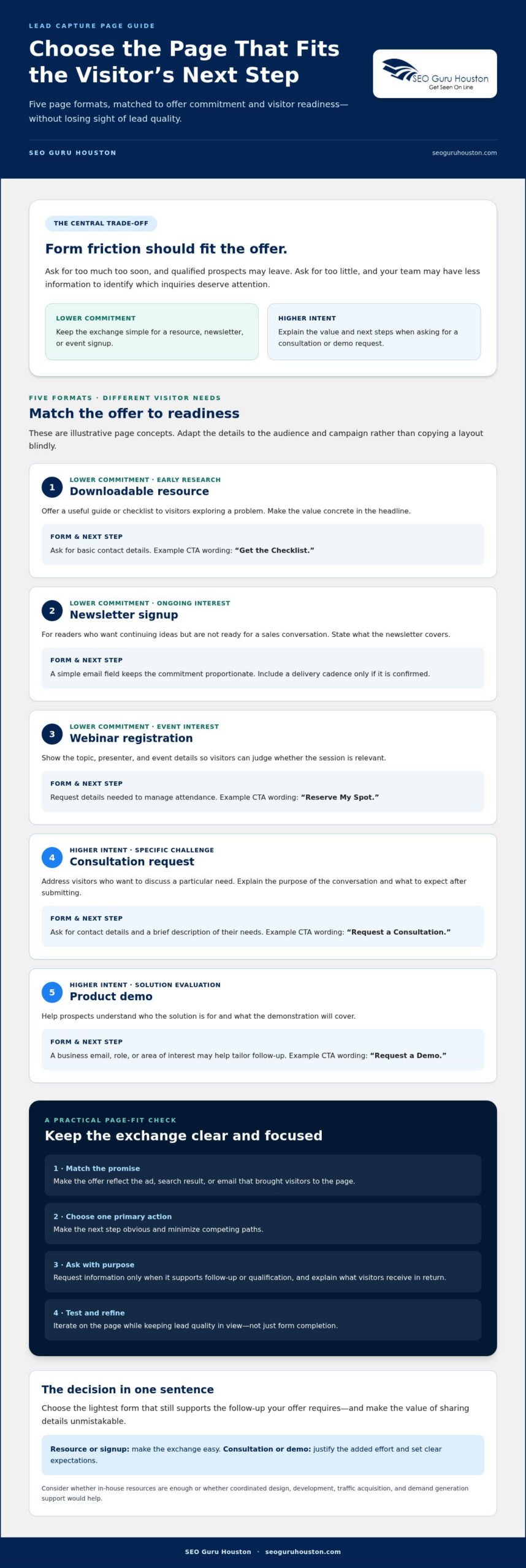
The right page format depends on what visitors are ready to do and what you’re asking them to share. These five concepts are illustrative, not client examples, case studies, or claims of proven results. Use them to shape a page around your offer, then adapt the details to your audience and campaign.
The more commitment an offer asks of a visitor, the more clearly the page should justify that effort and explain what happens next. Unbounce’s collection of lead capture page examples can offer additional design ideas, but the best model still depends on your offer and traffic source.
Examples for lower-commitment offers and early-stage visitors
- Downloadable resource: For visitors researching a problem, offer a useful guide or checklist in exchange for basic contact details. A headline such as “Plan Your First Product Launch With This Step-by-Step Checklist” makes the value concrete. Keep the form concise and use a direct CTA such as “Get the Checklist.”
- Newsletter signup: Invite readers who want ongoing ideas but aren’t ready for a sales conversation. State the subject matter, and include a delivery cadence only if it’s confirmed. A simple email field and “Sign Up” CTA keep the commitment proportionate.
- Webinar registration: Feature the topic, presenter, and event details so visitors can judge the session’s relevance before sharing information. Ask for the details needed to manage attendance, and make the next step clear with a “Reserve My Spot” CTA.
These lower-commitment offers can attract people at different stages of interest. A short form reduces effort, but a signup alone doesn’t establish whether someone is a strong fit for a future sales conversation.
Examples for higher-intent prospects and considered purchases
- Consultation request: Address visitors who want to discuss a specific challenge. Explain the purpose of the conversation and what to expect after submitting. Ask for contact details and a brief description of their needs, then use a CTA such as “Request a Consultation”—a structure used by platforms like adudesk.com to assess project scope before matching homeowners with vetted professionals.
- Product demo: Help prospects evaluating a solution understand who it’s for and what the demonstration will cover. A form might ask for a business email, role, or area of interest if those details help tailor the follow-up. “Request a Demo” makes the next step clear.
Consultation and demo pages ask for a stronger signal of intent than a newsletter signup, so additional questions may be reasonable. Tie each field to a real qualification or follow-up need. Greater commitment doesn’t guarantee a better-fit lead. If page execution is a challenge, landing page design and development is one area of support to consider.
How to Compare Lead Capture Page Examples Before Choosing a Format
Don’t choose a page format just because it looks polished. Compare each option against the offer, the visitor’s likely readiness, and the information your team needs next. This makes the trade-off clear: the effort required from visitors should be proportionate to the value they expect to receive.
Create a comparison table with one row per format and columns for:
- Offer: What does the visitor get?
- Visitor readiness: Are they exploring a problem or evaluating a solution?
- Form fields: What information is essential?
- CTA: What action will the visitor take?
- Qualification purpose: How will the details support follow-up or help assess fit?
Then check message match. A page reached from a search result, ad, email, or referral should continue the same conversation. If an ad promises a product demo, the headline should confirm that offer and the page should explain what the demonstration covers. This alignment helps visitors see that they’re in the right place. It also supports lead generation by connecting initial interest to a relevant next step.
For guidance on coordinating page structure and conversion elements, see this guide to high-converting landing page design.
How many form fields should a lead capture page use?
Start with the fields required to deliver the offer or take the promised next step. A resource download may only need contact information, while a consultation form could ask for a brief description of the visitor’s needs. Add qualification questions only when the answers will meaningfully improve follow-up or help assess fit.
Shorter forms can reduce submission friction, while extra fields can provide useful context. Test changes against completed submissions and downstream lead quality, not form completion alone. Removing a field may increase responses while leaving your team with less information to prioritize inquiries.
Which trust and conversion elements belong on the page?
Use testimonials, credentials, or client logos only when they’re verified and you have permission to display them. Set clear expectations near the form: what information you’re requesting, what happens after submission, and where visitors can find privacy information. Avoid unsupported promises about data handling or compliance.
Make the primary CTA prominent and specific. “Get the Guide” or “Request a Consultation” tells visitors what action they’re taking; generic wording like “Submit” does not. Keep supporting details focused on reducing uncertainty rather than adding competing actions.
How to Build and Test a Lead Capture Page That Converts
A strong page starts before the first design choice. Define who it’s for, what the offer delivers, and where visitors will come from. Then make every element support one measurable conversion action. The patterns in these lead capture page examples can help you choose a format, but testing with your own audience shows whether the page is doing its job.
Conversion rate measures how often visitors submit; business value depends on whether those submissions become relevant, qualified opportunities. Track both where measurement allows, so you don’t judge the page by volume alone.
A practical lead capture page build sequence
- Set the target: Identify the intended audience, offer, traffic source, and event that counts as a conversion, such as a completed registration or request.
- Build the message: Write a headline that matches the original ad, search result, email, or referral. Add accurate, relevant supporting proof, a form suited to the offer, and clear privacy information. Draft a confirmation message that tells people what happens next.
- Check the experience: Test the page on mobile and desktop. Make sure form labels are clear, the page is usable with a keyboard, text is easy to read, and the form works from start to confirmation. Check loading performance before launch.
Keep the page focused on one primary conversion action. If visitors arrive from a campaign promising a consultation, don’t make them guess whether the page is about a download or a demo. The page and campaign should make the same promise.
For more ideas on improving page performance, explore this conversion rate optimization guidance.
What should you test and measure after launch?
Start with a baseline. Track page visits, form starts, completed submissions, and qualified outcomes where available. These measures help show where visitors drop off and whether submitted leads progress beyond the form.
Test one meaningful variable at a time, such as the headline, CTA wording, or form length. Compare results across relevant traffic sources, since visitors arriving from search may behave differently from those responding to an email. Don’t treat a small or inconsistent sample as a clear winner; gather enough evidence to make a useful decision.
Connect submissions to sales acceptance or another defined quality signal when your measurement setup permits. If the page generates more submissions but fewer appropriate prospects, revisit the offer, targeting, or form questions. Use page data and lead outcomes together to guide the next iteration.
Need support aligning landing page development with your acquisition strategy? Explore landing page and demand generation support.
When to Get Expert Help With Lead Capture Page Design
Your team may be able to build a straightforward page in-house when the offer is clear, the form works reliably, and someone can monitor results. Specialist support may help when page issues involve design, development, analytics, and the campaigns sending visitors. The goal isn’t simply to make the page look better. It’s to identify what’s preventing the page and its traffic strategy from working together.
Signs your page needs more than a visual redesign
A fresh layout won’t fix a mismatch between visitor intent and the offer. Before changing colors or rearranging sections, check whether the ad or search result sets an expectation the headline doesn’t meet, whether the offer is hard to understand, or whether form steps create confusion. These are possibilities to investigate, not diagnoses. Review page behavior and visitor feedback before deciding what to change.
Also check whether your measurement connects visits and submissions to useful outcomes, such as sales acceptance or a qualified inquiry. If tracking stops at the form, you may know how many people submitted without knowing whether those leads were relevant. Separate confirmed problems, such as a broken form, from assumptions that need evidence. That distinction helps your team focus its time and budget.
How landing page design fits into a wider growth strategy
A capture page doesn’t operate on its own. SEO, PPC, inbound marketing, or demand generation may bring visitors with different questions and levels of intent. Someone arriving from an educational search may need a resource, while a person responding to a campaign about a specific solution may be ready for a more direct offer. Reflect that context in the page copy and offer.
Coordination takes more than visual design. Development needs to support a usable page and functioning form; acquisition strategy needs to attract the intended audience; and the offer needs to give visitors a clear reason to act. For B2B teams, a considered B2B demand generation strategy can help frame how page activity fits into broader prospect development. Professional support can connect these pieces, but it does not promise a particular conversion rate or sales result.
If your team is reviewing lead capture page examples but needs help turning the right format into a functioning part of its acquisition strategy, discuss landing page design and lead generation with a team that offers website development and landing pages alongside SEO, PPC, inbound marketing, and demand generation.
Turn the Right Page Format Into Your Next Step
The strongest lead capture page examples do more than look appealing. They align the offer with visitor intent, ask for information in proportion to the value promised, and make the next action unmistakable. Choose a format that fits your audience’s readiness, then test the message, form, and CTA against both submissions and lead quality.
Keep the full journey in view. The promise in an ad, search result, or email should carry through to the page, and the page’s results should connect to meaningful business outcomes. That’s how a landing page becomes part of a coordinated growth strategy rather than an isolated design project.
SEO Guru Houston offers landing page design and website development, alongside SEO, PPC, inbound marketing, and demand generation capabilities. If you’re ready to connect page design with the way you attract prospects, explore landing page design and lead generation support. Start with a clear offer and a focused next step, then improve the page using what you learn.
Frequently Asked Questions
What is a lead capture page?
A lead capture page is a focused web page that collects contact or qualifying information in exchange for an offer, such as a guide, consultation, webinar, or product demonstration. It should explain the value visitors receive, what happens after they submit, and which action to take. Measure success by completed forms and whether the resulting leads are relevant to your business.
What should a lead capture page include?
A lead capture page should include a clear headline, a relevant offer, concise supporting copy, a visible form, and a button that describes the action. Add only evidence you can verify and have permission to use, such as testimonials or client logos. Explain what happens after submission and provide appropriate privacy information. Keep unnecessary navigation and competing calls to action from distracting visitors from the page’s main goal.
How many fields should a lead capture form have?
Use the fewest fields needed to deliver the offer or support the next step. A simple download may need only basic contact details, while a consultation request may benefit from a few questions about the visitor’s needs. Each extra field can add effort, so compare completion rates with lead usefulness. Test changes with enough relevant traffic before deciding which form works best for your business.
Do lead capture pages need a thank-you page?
A confirmation experience helps visitors know their submission was received and what to expect next. It might provide the promised resource, explain how follow-up will happen, or offer a relevant next step without distracting from the original conversion. Use a dedicated thank-you page or an on-page confirmation, depending on how you deliver the offer. Check that your analytics records the intended conversion accurately.
What is a good conversion rate for a lead capture page?
There’s no single conversion rate that defines success for every page. Results depend on the offer, audience, traffic source, buying stage, form requirements, and how you count conversions. Establish a baseline using consistent analytics, then assess completed submissions alongside lead quality. Compare similar traffic sources and campaign conditions. Treat external benchmarks cautiously, since their audience and measurement methods may differ from yours.
Should a lead capture page have navigation?
A focused page often limits navigation so visitors can concentrate on its offer and primary action. Still, removing every route to important information can create uncertainty or make the page harder to use. Consider the audience, offer, and page purpose when deciding what to include. Visitors should be able to access necessary privacy details and understand who is making the offer. Test meaningful alternatives rather than assuming less navigation is always better.
How do you test a lead capture page?
Start with a hypothesis tied to a measurable issue, such as an unclear headline or a form that asks for unnecessary information. Where practical, change one major element at a time and define success before the test begins. Review completed submissions alongside qualified outcomes, compare relevant traffic, and collect enough data to make a sound decision. Don’t call a winner based on a small or inconsistent sample.

