
The best marketing automation for small business isn’t automatically an all-in-one platform. These tools automate repeatable marketing tasks, such as sending follow-up emails, nurturing leads, and organizing customer information in a CRM. For example, a B2B SaaS company can use a five-day onboarding email flow to send a new user one helpful tip per day.
It makes sense to want fewer manual tasks and more consistent follow-up without adding software that is too complex for your team. The right approach to marketing automation for small business depends on where leads come from, how you communicate with them, and whether your CRM also needs to manage marketing activity.
This guide compares the main tool types and about ten options for campaigns, lead nurturing, workflows, and CRM fit. You’ll see what each type does well, where it may fall short, and how to narrow your choices to a practical match for your business.
Key Takeaways
- Match the tool type to the job you need done, from email campaigns to lead nurturing and broader customer journeys.
- Compare automation options by workflow flexibility, channel coverage, reporting, and how easily they fit your team’s processes.
- Choose a setup that suits your business size and current needs, then expand as your marketing becomes more complex.
- Connect marketing activity with your CRM so lead details and follow-up actions stay organized across the customer journey.
- When stronger visibility and lead generation are priorities, Houston SEO Services can support a broader growth strategy alongside automation.
What are marketing automation tools?
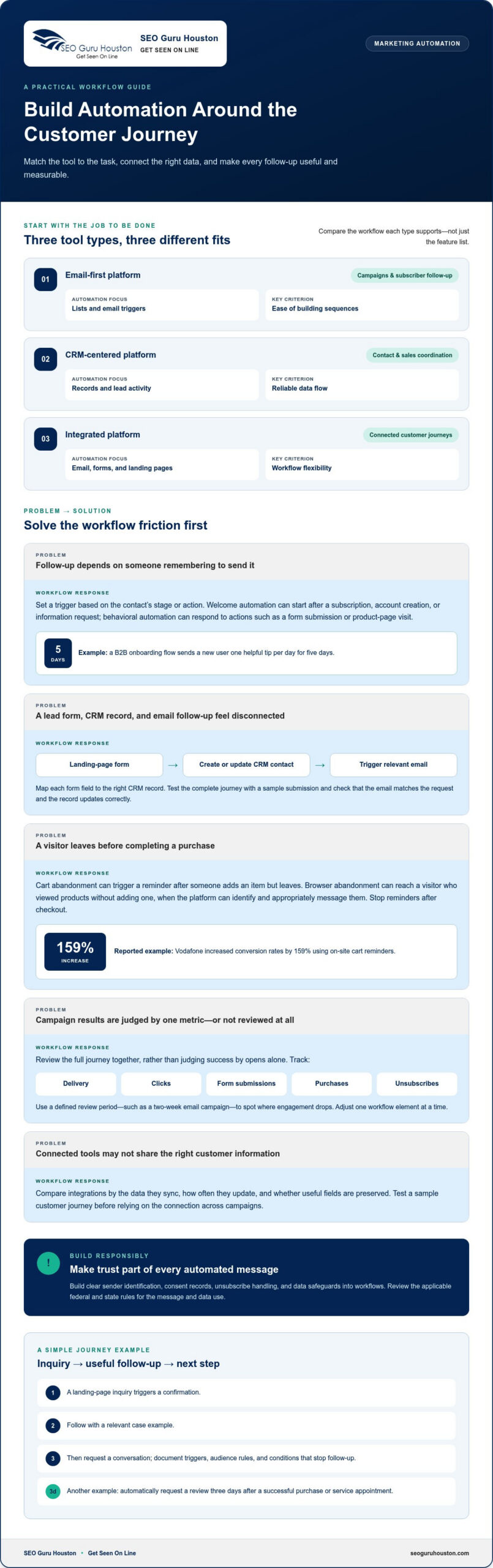
Marketing automation software uses rules and customer data to send emails, update records, and coordinate follow-up, such as welcoming a new subscriber.
Email Lifecycle and Behavioral Automation
Email lifecycle automation sends messages according to a contact’s stage, while behavioral automation responds to actions such as a form submission or product-page visit. For example, a B2B company can send a five-day onboarding flow with one practical tip each day. In the United States, requirements depend on the message and data use. Build clear sender identification, consent records, unsubscribe handling, and data safeguards into workflows, then review applicable federal and state rules.
Welcome Emails and Onboarding
Welcome automation starts when someone subscribes, creates an account, or requests information. An onboarding sequence can introduce a service, explain a useful feature, and point the reader to a relevant resource. Unlike lifecycle automation, which responds to changing customer stages, welcome emails focus on the first interaction. Set the trigger, choose a helpful next step, and stop later messages when the subscriber completes onboarding.
CRM, Email, and Landing Page Automation
A connected platform can capture a landing-page form, create or update a CRM contact, and trigger a relevant email. This links lead acquisition with follow-up, while an email-only starter mainly manages messages and subscriber lists. Map each form field to the right CRM record, then test the full journey with a sample submission. Check that the email matches the request and the contact record updates correctly.
AI-Powered Email Send-Time Optimization
Send-time optimization uses engagement signals to choose when an individual contact receives an email. Unlike a fixed schedule, it can adjust delivery timing based on past interactions. Treat it as a campaign setting to evaluate, not a replacement for useful content. Compare its results with a consistent schedule, and assess whether the platform gives your team clear control over timing and audience selection.
| Tool option | Best fit | Automation focus | Key criterion |
|---|---|---|---|
| Email-first platform | Campaigns and subscriber follow-up | Lists, email triggers | Ease of building sequences |
| CRM-centered platform | Contact and sales coordination | Records, lead activity | Reliable data flow |
| Integrated platform | Connected customer journeys | Email, forms, landing pages | Workflow flexibility |
Choose a platform that supports your current workflow, connects the customer data you need, and remains manageable for your team.
Cross-channel campaigns and customer journeys
Cross-channel campaigns coordinate messages across touchpoints, guiding a contact from an initial interaction toward a meaningful next step. Begin with the customer action you want to support, then connect the channels and measure the journey.
AI-Assisted Campaign and Workflow Building
AI-assisted builders can help draft campaign content, suggest workflow steps, or organize a customer journey. Unlike a single-channel email campaign, they can help assemble connected actions across channels. Treat suggestions as a starting point: define the audience, check each trigger, and review every message before launch. A clear goal keeps the workflow focused, whether you want a form submission or a completed purchase.
Cart and Browser Abandonment Campaigns
Cart abandonment campaigns respond when a shopper adds an item but leaves before purchasing. Browser abandonment can reach visitors who viewed products without adding them to a cart, when the platform can identify and appropriately message them. Vodafone increased conversion rates by 159% using on-site cart reminders. Build the workflow around the visitor’s action, then ensure reminders stop after checkout to avoid irrelevant follow-up.
Integrations and Campaign Management
Integrations connect campaign tools with systems that hold customer, order, or engagement data. For example, a campaign connected to a spreadsheet workflow can organize responses, while an ecommerce integration can pass purchase activity into follow-up campaigns. Compare integrations by the data they sync, how often they update, and whether they preserve useful fields. Test a customer journey before relying on the connection across campaigns.
Campaign Performance Reporting
Reporting shows whether a campaign moves people through the intended journey. Track delivery, clicks, form submissions, purchases, and unsubscribes together rather than judging success by opens alone. A two-week email campaign gives you a defined period to review activity and compare messages. Use the results to identify where engagement drops, then adjust one workflow element at a time.
Map the journey before opening the builder: identify the entry point, the next useful message, and the action that ends follow-up. For a service business, a landing-page inquiry might trigger a confirmation, followed by a relevant case example and a request to book a conversation. A customer can also receive an automatic review request three days after a successful purchase or service appointment.
Keep campaign management practical by documenting triggers, audience rules, and suppression conditions in one shared place. Test links, forms, and integration fields using a sample journey, then review the reporting after launch. If a landing page is part of the journey, campaign landing pages can give visitors a focused next step.
Choosing tools by business size and use case
Choosing marketing automation for small business starts with identifying the tasks your team needs to simplify. A business managing 10-50 contacts can use basic automation to keep records organized and follow-up consistent. With a larger contact base, segmentation, CRM connections, and reporting may matter more. List the processes that currently slow your team down, then compare platforms against the most important one.
Match features to team size and workflow
For a small team, prioritize clear contact records, dependable email sending, and automation features that are easy to maintain. Start with 3-5 audience segments, such as new subscribers, active prospects, and existing customers. This keeps campaigns relevant without creating unnecessary rules. Add features only when a real workflow calls for them, such as lead assignment or social media coordination.
Use a short evaluation process: identify the task, map its trigger, and define success. A service business, for example, might automate a response to each inquiry, then route qualified contacts for personal follow-up. Keep the first workflow simple enough for one person to review. Add complexity to meet a business need, not just because software makes it possible.
Desktop agents versus browser-based tools
Desktop agents run through software installed on a computer, while browser-based tools operate through an online platform. A desktop setup may suit tasks tied to local files or a specific workstation. Browser-based software can better support teams coordinating campaigns from different locations. Compare access, collaboration, data connections, and routine maintenance before choosing.
AI creates another decision point. McKinsey & Company reports that 39% of organizations have begun experimenting with AI agents. That signals exploration, not a requirement for every small business. If you’re comparing marketing automation for small business options, favor tools that keep your team in control of sending, audience rules, and final content review.
Evaluate plans, analytics, and long-term fit
A free plan can help you test a workflow with a small subscriber list, but compare its limits with your needs. Review contact allowances, automation features, reporting access, and available integrations. Consider how the platform handles growth so a successful test doesn’t force an immediate rebuild.
Compare the total effort over a three-to-five-year period, including setup, training, integrations, and campaign management. Analytics should show which channel brings inquiries, which messages prompt action, and where prospects disengage. Choose software that makes these decisions visible without creating unnecessary work.
Lead nurture sequences and workflow branching
A lead-nurture workflow turns a prospect’s actions into relevant follow-up. Begin with one entry trigger, such as a quote request, then define the next message and exit condition. A useful template might send a welcome email, track a response, and route engaged contacts for personal sales follow-up. The sequence should reflect the actual decision process, not simply fill an automated calendar.
Build sequences around intent
A five-email welcome sequence gives a business a practical structure to test. Each email can serve a distinct purpose: explain the offer, answer a common concern, share a relevant example, and present a next step. Use tracking to distinguish clicks from passive delivery, then adjust the message tied to the weakest action. Review workflow performance after the first 50 contacts to spot friction before expanding the audience.
Branching makes a sequence more responsive. For example, a contact who clicks a product guide can receive a detailed follow-up, while someone who doesn’t engage can receive a simpler message. Set a clear condition for each path, and add an exit rule for when a lead books a call or becomes a customer. A useful workflow is easy to understand, test, and maintain.
Connect ecommerce and omnichannel workflows
An ecommerce workflow can connect a product view, cart activity, purchase, and post-purchase support. If a shopper buys, stop abandoned-cart reminders and start relevant customer follow-up. If they browse without purchasing, make the next message relevant to the product or question. For omnichannel journeys, coordinate email with social media or sales activity so customers don’t receive conflicting prompts.
Use integrations to keep those actions aligned. A purchase record should update the contact profile, while a sales conversation should pause promotional messages when appropriate. A CRM such as HubSpot can serve as the shared reference point for lead status and activity. Map the fields and triggers before launch, then test each path with sample records.
Apply AI with clear controls
AI-powered workflow automation can help draft message variations, summarize engagement patterns, or suggest workflow steps. Unlike rule-based branching, it can assist with interpreting patterns, but your team still defines the goal and approves customer-facing content. Keep a human review step for claims, audience rules, and sensitive messages. An enterprise-style feature set may be excessive if your small team only needs reliable lead follow-up.
Set a measurable signal before adding AI. If email open rates fall below 15%, investigate the workflow, including relevance, timing, and audience fit. For contacts who haven’t opened a message in six months, consider a re-engagement path that confirms continued interest and suppresses unresponsive records. Check results against the original goal, then refine one condition or message at a time.
Small business CRM and marketing automation
A CRM connects customer records with marketing automation, giving each trigger useful context. Common mistakes include sending irrelevant messages, using outdated contact data, and building workflows without exit rules. These errors can overwhelm subscribers and leave sales teams with incomplete or duplicate records.
Think of the CRM as the hub for managing customer relationships. It stores contact details, lead status, campaign interactions, and purchase history. Automation uses that information to trigger the next action, such as assigning a new inquiry, starting a nurture sequence, or pausing promotions after a purchase.
Set up a dependable handoff between marketing and sales. Define what makes a lead ready for personal follow-up, then record that status in the CRM. Zapier’s survey of sales and marketing managers found that 37% of respondents regularly saw leads get stuck between marketing tools and the CRM or during the marketing-to-sales handoff. A shared record and clear ownership rules help teams identify where those prospects stall.
Data quality matters just as much as workflow design. A business’s database may decay by approximately 22.5% per year, so outdated addresses and old preferences can undermine targeting. Create a regular process to remove invalid records, update customer details, and suppress contacts who should not receive a campaign. Keep fields consistent across forms, CRM records, and email tools.
Connect automation to actual business outcomes. Track whether a campaign creates qualified opportunities, supports a purchase, or improves follow-up, rather than counting messages sent. Oracle reported that businesses implementing marketing automation see a 451% increase in qualified leads. Separately, 76% of companies using automation generate positive ROI within the first year. Use your own CRM analytics to identify which workflows contribute to results and which need revision.
- Trigger: A form submission, sales-status change, or purchase starts the appropriate action.
- Context: CRM fields determine the message, owner, and next step.
- Exit: A purchase, unsubscribe, or completed sales action stops irrelevant follow-up.
Keep the first connected workflow focused. For example, route a new inquiry to its owner, send a confirmation, and pause nurture messages when a sales conversation begins. Test each branch with sample records before activating the sequence. These capabilities work only when the contact data, trigger, and team responsibility align.
For businesses aligning lead generation with CRM follow-up, strengthen your inbound marketing strategy with a clear path from discovery to qualified inquiry.
SEO Guru Houston: Houston SEO Services
SEO Guru Houston helps businesses strengthen visibility and generate demand through comprehensive SEO services, PPC services, B2B marketing, and inbound marketing. These solutions can complement a marketing automation platform by attracting prospects and guiding them toward a relevant inquiry, where a clear nurture workflow can take over.
Turn to SEO Guru Houston when your campaigns are organized but the right prospects aren’t finding your business, or when your lead-generation strategy needs a stronger connection between discovery and follow-up. For example, SEO can support visibility in search, while PPC can bring targeted traffic to relevant pages. B2B and inbound marketing can align outreach and content with the audience’s buying journey.
Contact SEO Guru Houston to discuss how its SEO, PPC, and digital marketing services can support your business goals.
Turn Your Marketing System Into Your Next Growth Step
The next move isn’t adding more software. Decide what your marketing system should make easier for customers and your team, then build around that priority. A practical approach to marketing automation for small business should leave room to adapt as customer needs and sales goals change. Review workflows regularly, keep ownership clear, and connect marketing activity to the outcomes your business values.
When visibility or lead generation needs more strategic support, SEO Guru Houston offers Houston SEO Services, Houston PPC Services, and Houston B2B Marketing. These services can help connect audience reach with a clear path to inquiry, while your automation supports the follow-up.
Explore how SEO Guru Houston can support your marketing goals, and take the next step with a strategy built for forward motion.
Frequently Asked Questions
Autonomous vs guided: which is best for marketers?
Guided automation is usually the more controllable starting point: software suggests or prepares actions, while a marketer approves them. Autonomous tools can execute more steps without individual review, which suits repeatable, clearly defined tasks. For example, let a guided assistant draft campaign variations, then have a person approve the final copy and audience. Choose the level of autonomy based on the risk of an error and how closely your team needs to supervise decisions.
Do I need a technical team to set this up?
Not necessarily. A marketer can often configure standard actions through a visual interface, such as tagging a new inquiry or sending a confirmation. Technical help is more useful when connecting custom databases, cleaning inconsistent records, or troubleshooting data that fails to sync. Before setup, document the information each workflow needs and assign someone to test it. This preparation helps prevent small configuration issues from disrupting follow-up.
How do I choose the right AI marketing alternative?
Start with the task, not the AI label. If you need predictable actions, rule-based automation can send a message after a form submission without AI-generated decisions. If you need help drafting or analyzing campaign content, consider an AI-assisted tool with review controls. Compare data access, editing options, and human approval steps. Choose the simplest approach that solves the specific bottleneck, then assess whether it improves the work.
What is marketing automation and how can small businesses use it?
Marketing automation uses software rules and customer information to coordinate repeatable marketing actions. A small business could connect a consultation request to an internal task, then track whether a staff member followed up. This goes beyond sending a campaign: it links marketing activity to team responsibilities. Start with one recurring task that currently relies on memory, define who owns the next step, and check that the record shows completion.
What are the best marketing automation platforms for small businesses in 2026?
The best platform in 2026 is the one that fits your team’s core workflow, customer records, and reporting needs. There isn’t one universal choice for every business. Compare email-focused tools, CRM-centered systems, and platforms combining both. During evaluation, test a real process, such as moving an inquiry from a form to a sales task. Favor straightforward setup and useful reporting over features your team won’t use.
How much does marketing automation software cost for small businesses?
Software pricing depends on the platform’s plan structure and included capabilities. Contact volume, user access, channel coverage, integrations, and advanced analytics can all affect the amount. Compare plans with your current requirements and likely growth, and include setup and maintenance time in your decision. Focus on the workflows the subscription supports rather than choosing a tier based only on a long feature list.
Which marketing automation tools offer free plans or trials?
Some software providers offer free plans or trials, but included features and limits vary. Use an evaluation period to test a real workflow, not just browse the dashboard. Confirm that the tool can handle the contact data, handoffs, and reports you need. Note which capabilities stop working when a trial ends or a free plan reaches its limits, then decide whether those restrictions affect your daily process.
What marketing automation features should a small business prioritize?
Prioritize features that prevent missed follow-up: clear contact records, dependable triggers, workflow controls, and a way to see task completion. Add integrations when customer information lives in separate systems. Useful analytics should connect campaign activity with inquiries or sales conversations, not simply display activity totals. For example, test whether a new lead’s source and status remain visible through handoff so your team can identify gaps.

