
More traffic won’t fix a listing that fails to convert, and more orders won’t help if advertising eats the margin. To understand how to increase sales on Amazon FBA, strengthen the product page, target relevant searches, price competitively, and build buyer confidence through genuine reviews. Keep break-even ACoS in view: calculate it by dividing contribution before ads by the selling price, then multiplying by 100.
When sales stall, it’s easy to focus on ad spend, but growth often starts with the listing. Clear images, persuasive copy, relevant keywords, and a shopper-appropriate price give every campaign a stronger foundation.
This guide explains how to improve listings, attract traffic, choose keywords, assess pricing, and encourage reviews while protecting profitability. It also shows how to measure performance and make informed adjustments instead of relying on guesswork.
Key Takeaways
- Make product pages easier to find and more persuasive with clear titles, useful images, and benefit-focused copy.
- Use your Amazon Storefront and relevant external channels to bring qualified shoppers to your listings.
- Review competitor pricing and promotions while protecting your contribution margin and break-even ACoS.
- Research search terms from relevant products, then use them naturally in listings and advertising campaigns.
- Build buyer confidence with strong product quality and compliant review requests, then use feedback to improve your listing.
1. Product listing optimization
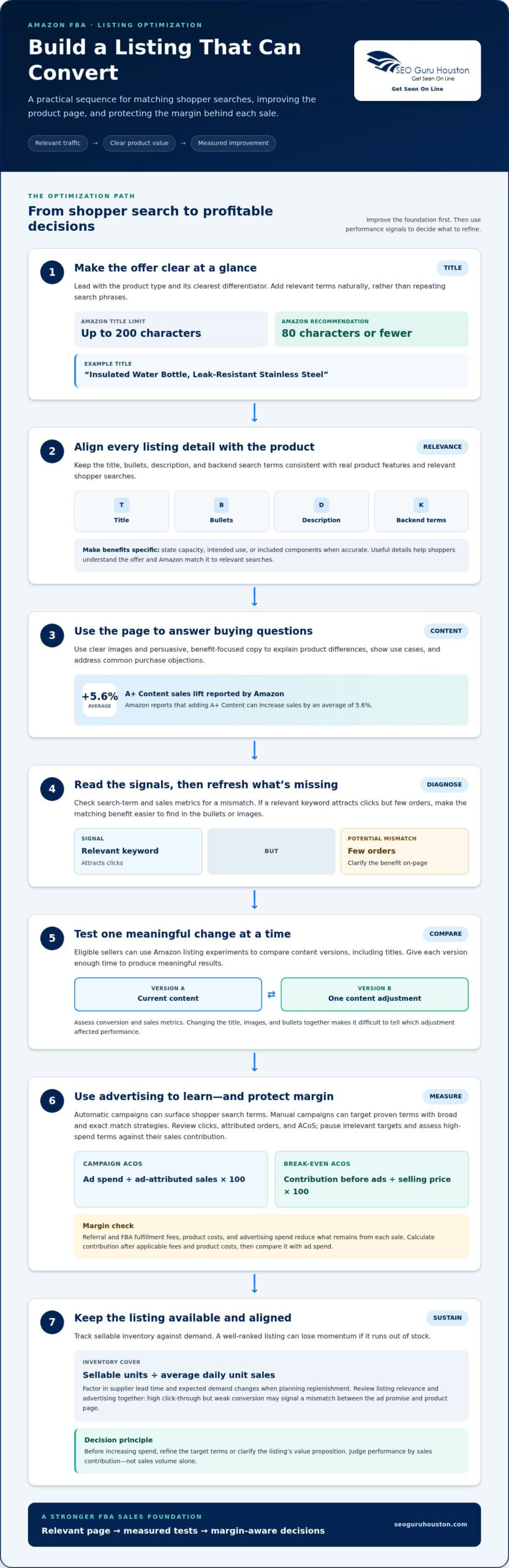
Your listing must match the shopper’s search and answer their buying questions fast. Start with the product title: Amazon allows up to 200 characters and recommends 80 characters or fewer. Lead with the product type and its clearest differentiator, then add relevant keywords naturally. A title such as “Insulated Water Bottle, Leak-Resistant Stainless Steel” is more useful than a string of repeated search terms.
To improve product ranking and organic visibility, align the title, bullets, description, and backend search terms with the product’s actual features and relevant shopper searches. Describe benefits specifically, including capacity, intended use, or included components when accurate. Relevant details help shoppers understand the offer and Amazon match the listing to appropriate searches.
Refresh listing content when search-term or sales metrics show a mismatch. For example, if a relevant keyword attracts clicks but few orders, make the corresponding benefit easier to find in the bullets or images. Amazon reports that adding A+ Content can increase sales by an average of 5.6%. Use that space to clarify product differences, explain use cases, and address common purchase objections.
Test changes rather than guessing. Eligible sellers can use Amazon listing experiments to compare content versions, including titles. Give each title version enough time to produce meaningful results before comparing them. Change one meaningful element at a time, then assess conversion and sales metrics. If you change the title, images, and bullets together, you won’t know which adjustment affected performance.
Use advertising to test relevance as well as generate traffic. Automatic campaigns can surface search terms shoppers use; manual campaigns can then target proven terms using broad and exact match strategies. Control spend by reviewing clicks, attributed orders, and ACoS, which equals ad spend divided by ad-attributed sales, multiplied by 100. Pause irrelevant targets and assess high-spend terms against their sales contribution.
Amazon referral and FBA fulfillment fees, product costs, and advertising spend all reduce the amount left from each sale. Calculate your contribution after applicable fees and product costs, then compare it with ad spend. This sets a practical margin limit for campaign decisions, rather than measuring success by sales volume alone.
Avoid lost FBA sales by tracking sellable inventory against demand. Divide sellable units by average daily unit sales to calculate inventory cover, then factor in supplier lead time and expected demand changes when planning replenishment. Even a well-ranked listing can lose momentum if it runs out of stock.
Review listing relevance and advertising together. A high click-through rate but weak conversion may signal a mismatch between the ad promise and the product page. Before increasing spend, refine the target terms or clarify the listing’s value proposition.
2. Amazon Storefront and external traffic
An Amazon Storefront gives your brand a curated destination within Amazon, beyond an individual product detail page. Use it to group related products, introduce product ranges, and guide shoppers to relevant options. For example, a kitchen brand could organize cookware by cooking task, helping visitors find a suitable product. Keep each page focused: too many choices can obscure the next step.
Build the Storefront around how customers shop, not your internal catalog structure. Create clear categories, use concise product explanations, and feature items available to buy. Then review Amazon traffic and sales metrics by product or page. If visitors reach a category but don’t continue to a product, simplify the layout or make the grouping more intuitive. This gives the Storefront a measurable role in your sales strategy.
External traffic can introduce your products to shoppers who haven’t found them through Amazon search. Social media gives brands a place to demonstrate a product in context, answer common questions, and direct interested viewers to the relevant Amazon page. The research reports that 27% of customers use social media for product discovery and 67% of consumers buy products through social platforms. Treat those figures as a reason to test relevant content, not as a promise of results for any individual brand.
Choose a specific audience and message before publishing. A home organization brand, for example, might show a storage product solving a particular household problem and link to its Amazon listing. Keep the post and destination consistent: if social content promotes a specific size or feature, make it easy to find on the Amazon page. Track referral traffic and attributed orders to identify useful visits, rather than judging performance by views alone.
Amazon’s Brand Referral Bonus averages 10% of the sales price for sales generated by directing traffic to Amazon listings. Include that program in your external-traffic planning, and assess the resulting sales alongside the campaign’s costs. Amazon DSP campaigns can also run outside the Amazon ecosystem, using audience segmentation and shopper retargeting to reach defined groups. These options can help brands expand beyond organic marketplace discovery, but campaign targeting still needs a clear audience and relevant product message.
Coordinate every traffic push with inventory. A successful social post or external campaign can send more shoppers to a listing, so align promotion timing with sellable stock and replenishment plans. After each campaign, compare the channel, promoted product, visits, and orders. Keep the content that brings qualified shoppers; revise weak messages or destinations. If social content is part of your growth plan, social media marketing can help connect campaign messaging with the customer journey.
3. Competitive pricing and promotions
A competitive price can improve conversion, but copying a competitor without checking your own economics can be costly. Compare similar products by features, pack size, and customer value, then decide where your offer fits. Amazon’s launch guidance recommends comparing competitor prices to assess positioning. Revisit the comparison when a competing listing changes its offer or your product costs shift.
Price also matters for the Featured Offer, formerly called the Buy Box. Somewhere between 80% and 90% of Amazon purchases are made through the Featured Offer. A compelling price can help your offer compete for that placement, but selection isn’t controlled by price alone. Amazon announced changes to its separate Featured Offer eligibility step beginning in July 2026; removing that step doesn’t guarantee selection.
Choose a promotion to match its purpose. A coupon can make an offer more noticeable, while a limited-time deal creates a defined buying window. Amazon Lightning Deals run for 4 to 12 hours. Amazon promotes 7-Day Deals on its Deals page for 7 days, and these deals are limited to Brand Registered businesses. Plan campaign timing around inventory and demand, so an effective promotion doesn’t outpace available stock.
For repeat purchases, Amazon suggests offering customers a 10% discount on their next purchase as one way to encourage another order. Use a discount where a follow-up purchase makes sense, such as a replenishable product. Compare resulting orders with full-price sales and watch whether shoppers return after the offer ends. Promotions should strengthen customer value, not train every buyer to wait for a lower price.
Measure each test against a clear comparison. Record the regular price, promotional dates, units sold, conversion, and contribution after costs. Compare results with a similar period without the offer, accounting for differences in inventory or traffic. If ranking or visibility rises during a discount, check whether sales remain steady afterward. This helps distinguish a short-lived promotional spike from lasting demand.
Coordinate pricing and campaigns. If a Featured Offer change, coupon, and Lightning Deal run together, it can be difficult to tell what drove results. Test one major pricing change at a time, then use the outcome to refine future promotions. Protect margin first, and scale campaigns that bring qualified orders and repeat business.
4. Amazon keyword research and long-tail keywords
Start with shoppers’ language, not assumptions about how they describe your product. Write down its core use, audience, material, and key differentiator, then combine those attributes into focused search phrases. For a stainless-steel lunch container, research terms related to meal prep, leak resistance, and office lunches. Each phrase should accurately describe the item and reflect a likely buying need.
Amazon Brand Analytics can help sellers examine shopper searches and product comparisons to identify sales opportunities. Compare search behavior with your orders and listing performance. Look for relevant queries that attract attention but don’t lead to purchases, then check whether your product or page addresses the need. Use the finding to refine positioning, add useful detail, or prioritize a better-matched keyword.
Build a competitor set from 5-10 best-selling ASINs in your category, then examine how their products are described. Note the shared terms that accurately apply to your offer, and separate them from claims or features your product doesn’t have. For example, if shoppers value compact storage, use a phrase such as “space-saving lunch container” only when it describes your product honestly.
Long-tail keywords are specific phrases that reveal a shopper’s intended use or preference. “Lunch container” describes a broad category; “stainless-steel lunch container for meal prep” narrows the search. Add relevant phrases to listing content where they read naturally. Don’t force every variation into the title. Clear copy helps shoppers understand the offer and keeps keyword use relevant to the product.
Use advertising search-term results to test whether researched phrases attract qualified shoppers. Automatic campaigns can uncover relevant queries, while broad and exact manual targeting can gather data on selected terms. Review search terms, clicks, and orders together. Move relevant converting phrases into focused targeting, and exclude irrelevant queries that spend without matching the product. This makes keyword research an ongoing part of your seller strategy, not a one-time launch task.
Revisit keywords when customer demand or your product range changes. A new size, bundle, or use case may call for different search language, while discounts can shift attention toward value-focused terms. If an influencer demonstrates a product for a particular activity, check whether shoppers search for that use case before adding it to your listing copy. Let Amazon Brand Analytics, advertising results, and product accuracy guide each update.
5. Amazon product reviews and Vine
Reviews help shoppers judge whether a product matches its claims before buying. An Amazon survey found that 54.4% of customers read at least four product reviews before making a purchase decision. That makes review quality and relevance important to conversion, especially when shoppers compare similar products. Treat feedback as evidence about the buying experience, not simply a star-rating target.
Use Amazon’s Request a Review button for each order to invite customer feedback through Amazon’s process. Keep the request neutral; don’t ask buyers for positive reviews or offer coupons, discounts, or other incentives in exchange for favorable sentiment. The FTC Consumer Reviews and Testimonials Rule took effect on October 21, 2024, and addresses fake or false reviews and incentives conditioned on a specific review sentiment.
Amazon Vine is another route for eligible products to receive feedback from Vine reviewers. One new seller enrolled 10 product units during launch, but that example isn’t a required enrollment amount or a sales forecast. Vine reviews may take time: an Amazon representative stated that they typically arrive 22 or more days after reviewers request a product. Plan your launch with that timing in mind, rather than expecting immediate reviews.
Use early feedback to improve what shoppers see and receive. If reviews repeatedly mention unclear sizing, revise the relevant listing details. If customers misunderstand an included component, clarify the description and product images. Address product quality issues at their source: a promotional campaign may bring more purchases, but it won’t fix a gap between the product and its claims.
Reliable shipping and quality products can support positive feedback. As an FBA seller, keep inventory available and ensure the product arrives as described. Monitor review themes alongside returns, conversion, and profit. Complaints about damage call for operational attention; repeated setup questions may signal missing instructions or unclear listing content.
Don’t treat review volume as the only measure of progress. Look for specific comments about fit, durability, packaging, or intended use, then decide which changes are actionable. For example, if buyers praise portability but ask about cleaning, make care information easier to find. Keep updates factual, and don’t edit claims simply to pursue a higher rating.
Build a review process into each launch: request reviews through Amazon’s tool, monitor incoming feedback, and resolve recurring product or information problems. Use Vine as one possible launch tactic, not a substitute for customer experience. To connect review insights with listing and advertising improvements, strengthen your Amazon sales strategy.
SEO Guru Houston: Houston SEO Services
SEO Guru Houston helps sellers connect Amazon listing improvements with broader visibility and traffic goals. Its Amazon Services and PPC services fit businesses looking to coordinate marketplace marketing with paid campaigns. Comprehensive SEO services and inbound marketing can support broader discovery and customer acquisition beyond an individual product page.
Turn to SEO Guru Houston when listing updates, keyword targeting, advertising, and customer acquisition need a coordinated strategy. The right approach depends on your products, audience, and marketing priorities, so start by identifying the growth challenge you want to address.
Contact SEO Guru Houston to discuss your Amazon marketing goals, or visit seoguruhouston.com.
Turn your next sales decision into a growth plan
A practical plan for how to increase sales on Amazon FBA starts by identifying the constraint that currently limits growth. Choose the business priority that matters most, assign responsibility for acting on it, and review performance before making another major change. This makes your next move deliberate and helps you learn from the outcome.
Think beyond individual listing adjustments, too. If your growth priorities include broader visibility, paid acquisition, or business-to-business demand, SEO Guru Houston offers Houston SEO Services, Houston PPC Services, and Houston B2B Marketing. These capabilities can support a wider marketing strategy alongside your Amazon efforts.
Bring your goals and current challenges into a focused conversation, then decide which next step best fits your business. Contact SEO Guru Houston today to discuss your marketing priorities. Keep moving with purpose, measure what matters, and build on each informed decision.
Frequently Asked Questions
What Is Break-Even ACoS?
Break-even ACoS is the advertising cost percentage that uses all contribution available before advertising. Calculate it by dividing contribution before ads by the selling price, then multiplying by 100. For example, if you know the amount left after product costs and selling fees, compare that contribution with the sale price. A target below break-even ACoS leaves room for other expenses and profit.
What Is TACoS?
TACoS, or total advertising cost of sales, compares ad spend with total sales, including both ad-attributed and organic sales. Calculate it by dividing total ad spend by total sales, then multiplying by 100. Use TACoS alongside ACoS: if advertising spend stays steady while total sales grow, the relationship can show whether sales beyond directly attributed ad orders are contributing.
What Is Unit Session Percentage?
Unit Session Percentage measures units ordered relative to listing sessions. Divide units ordered by sessions, then multiply by 100. It helps distinguish a traffic problem from a conversion problem: if sessions increase but the percentage falls, visitors may not find the product or offer compelling. Review search-term relevance, product options, and shopper questions before increasing traffic further.
How do I optimize Amazon FBA product listings for more sales?
A practical approach to how to increase sales on Amazon FBA is to make the listing answer buyers’ questions before they order. For a desk lamp, clarify whether the bulb is included, show its controls, and accurately explain its intended use. Check that each variation leads to the correct detail page. Review customer questions and returns for recurring misunderstandings, then update the content causing confusion.
How can sellers use coupons, deals, and promotions to increase Amazon sales?
Match each offer to a clear goal, such as introducing a new product or encouraging a trial purchase. Before activating a coupon, identify the eligible product and estimate how discounted orders affect contribution. After the offer ends, compare purchase patterns with the preceding period. If demand drops immediately, the deal may have attracted price-sensitive buyers rather than built lasting interest.
How do pricing strategies and competitor research improve Amazon sales?
Competitor research helps sellers understand how shoppers may assess an offer, but comparisons should account for meaningful differences. If you’re considering how to increase sales on Amazon FBA, compare pack size, product specifications, and included components before reacting to a lower price. Track how your own price changes relate to orders and conversion. A competitor’s temporary discount alone isn’t a reason to reduce your price.
How can Amazon sellers improve product images, titles, bullet points, and A+ Content?
Give each listing element a distinct job. Use the title to identify the item clearly, bullets to explain practical benefits, and images to show details shoppers can’t assess from text alone. A+ Content can organize comparisons or explain product use. For a kitchen tool, a comparison chart can show which model suits different cooking tasks without repeating the title.
What are the risks of using external traffic and social media to drive Amazon sales?
External traffic can attract visitors whose expectations don’t match the product page, weakening conversion and wasting campaign effort. A popular post can also drive demand beyond available inventory. Keep the social message consistent with the Amazon listing, direct each post to the relevant product, and monitor orders and stock. Don’t judge a campaign by engagement alone; assess whether it attracts likely buyers.

