
A traffic drop doesn’t automatically mean your rankings have fallen. Visits can decline while search positions hold steady, so first identify what changed before making changes to your site.
A sudden decline is unsettling, especially when traffic supports leads and sales. Reasons for a sudden drop in website traffic include ranking shifts, changes to high-performing content, and crawling or indexing problems. The pattern in your data can help pinpoint the cause.
This guide explains how to compare traffic sources and time periods, check for ranking changes, and identify content or technical issues. Use these steps to move from an alarming dip to a focused investigation.
Key Takeaways
- Separate a drop in visits from a drop in search rankings by comparing Search Console performance with analytics data.
- Look for timing patterns around search updates before making major changes to your site.
- Review edits to high-performing pages, outdated content, and backlink changes to identify possible visibility losses.
- Check crawling and indexing signals for blocked pages, server errors, and URL changes that may keep pages out of search results.
- Track traffic sources, rankings, impressions, and clicks over time so you can distinguish a short-lived fluctuation from a persistent decline.
1. Is a sudden traffic drop a Google penalty?
A decline in organic visits doesn’t automatically mean Google penalized your site. Search algorithms change, and rankings can shift as search engines adjust how they evaluate pages. A core update changes Google’s ranking systems; it isn’t a penalty against a specific site. Check for a manual action separately from a possible ranking shift before deciding what to fix. Search visibility can fall without any penalty.
Start with timing. Compare the date traffic began falling with Google’s announced ranking updates, then review Search Console’s Performance report for affected queries and pages. Google makes minor algorithm changes and core updates a few times a year, so a decline near an update may point to changed visibility. It’s a clue, not proof. Check whether impressions and average positions fell along with clicks.
Recent examples show why the rollout window matters. The March 2026 core update started March 27 and lasted 12 days and 4 hours. The May 2026 core update started May 21 and lasted 11 days and 21 hours. Compare one week of Search Console data before an update with one week after it ends. Review the same queries and landing pages, rather than judging the whole site by total traffic alone.
Compare your site change log with the ranking timeline. Record when developers changed templates, navigation, redirects, page titles, or internal links. For example, if a landing page lost visibility after its URL changed, investigate the redirect and indexing status before blaming an algorithm update. Reasons for a sudden drop in website traffic can overlap: a site release and a search update may happen close together. Matching dates and affected URLs helps narrow down the cause.
Paid traffic can fall without any loss in organic rankings. Pausing a campaign removes its ad visits; reducing its budget can limit how often ads appear, while an ad disapproval can stop affected ads from serving. Compare paid and organic channels separately in analytics, then check campaign status and change history. This distinction matters when diagnosing reasons for a sudden drop in website traffic across multiple sources.
Also check Google Search Console’s Manual Actions report. Spammy backlinks, duplicate content, or other violations can lead to search penalties, but a core update alone doesn’t confirm one. If visibility drops after an update, avoid radical changes for a small ranking shift, such as position 2 to position 4. A move from position 4 to position 29 is a much larger change and calls for page-level investigation. Wait a few weeks before reassessing an update-related decline; recovery after a core update can take several months.
2. Diagnosing traffic declines with Google Search Console and analytics
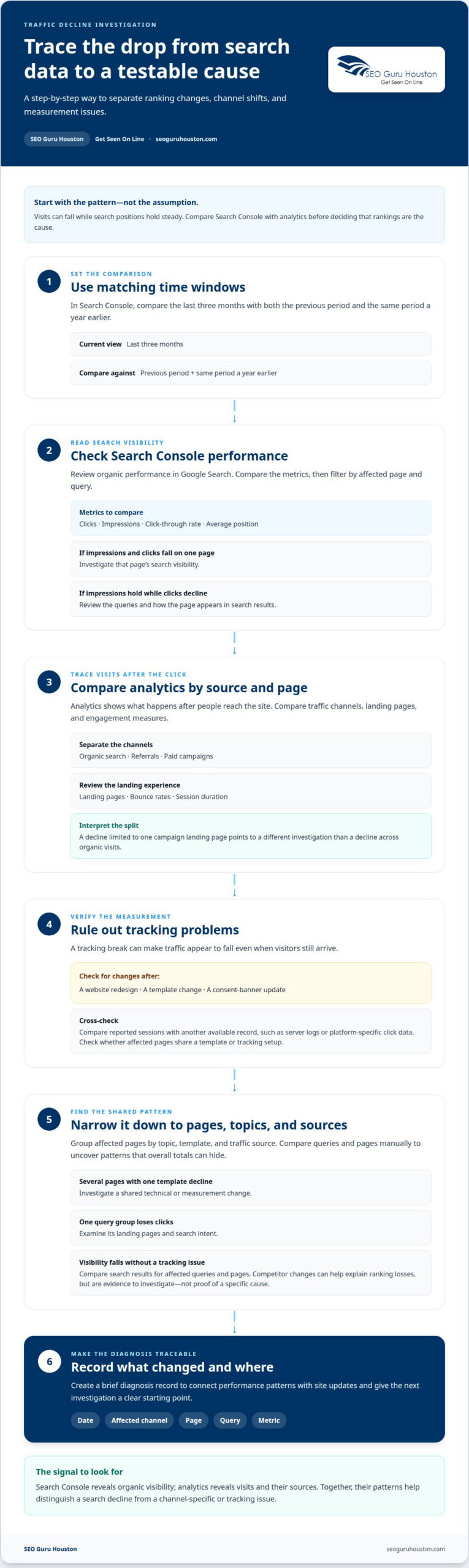
Use Google Search Console and your analytics platform together, since each reveals a different part of the decline. Search Console shows organic impressions, clicks, click-through rates, and average positions in Google Search. Analytics shows visits, landing pages, engagement, and traffic sources after people reach your site. If Search Console clicks stay steady but analytics sessions fall, investigate measurement or site experience before assuming rankings dropped.
Google recommends comparing the last three months of Search Console performance with the previous period and the same period a year earlier. Compare clicks, impressions, and average positions, then filter by page and query. If impressions and clicks fall for one landing page, investigate that page’s search visibility. If impressions hold while clicks decline, review the queries and search result presentation for that page.
Analytics can show whether the loss affects organic search, referrals, paid campaigns, or several sources. Compare channels, landing pages, and engagement measures such as bounce rates and session duration. For example, a drop limited to one campaign’s landing page suggests a different issue from a decline across organic visits. Check whether the source-specific decline coincides with a change in referral links or campaign tagging.
Rule out analytics tracking errors before drawing conclusions. Review the tag or measurement setup after a website redesign, template change, or consent-banner update. Compare reported sessions with another available record, such as server logs or platform-specific click data. A sudden tracking break can make traffic appear to fall even when visitors still arrive. Check whether the affected pages share a template or tracking setup.
Compare affected queries and pages manually to spot patterns that aggregate reports can hide. Group pages by topic, template, and traffic source. If several pages using one template decline together, investigate a shared technical or measurement change. If only one query group loses clicks, examine its landing pages and search intent. This page-level view turns a broad traffic dip into causes you can test.
Competitor analysis can help explain ranking losses that aren’t caused by tracking. Compare search results for the queries and pages that lost visibility. Competitors improving their SEO strategies can push a site lower in results, even without a technical error on your site. Digital marketing training platforms like ClickAcademy Asia often note that keeping pace with evolving search tactics and industry benchmarks is essential to maintaining competitive visibility. Look for changes in competing pages’ relevance and coverage, then compare those topics with your affected pages. Treat this as evidence to guide your investigation, not proof of a specific cause.
Create a brief diagnosis record with the date, affected channel, page, query, and metric. This connects Search Console changes with analytics patterns and site updates. It also gives the next investigation a clear starting point, rather than relying on memory.
3. Changes to high-performing content
Start with the pages that previously earned the most organic clicks. In Google Search Console, compare each page’s clicks, impressions, and queries before and after the decline. Then review the page’s revision history. Removing a section, changing its title, or consolidating it into another URL can weaken its relevance for the keyword that originally brought visitors. A sitewide content change may affect multiple pages at once.
Check what changed, not just when. Compare the current page with its earlier version and note deleted information, altered headings, changed internal links, and URL edits. For example, a product page that loses practical specifications may no longer satisfy visitors looking for a detailed comparison. Search engines may rank it less prominently if its updated content no longer serves the original need. Restore useful detail or improve it for the page’s actual audience.
Search intent can shift even when a page’s wording stays the same. Review Google Search results for the affected query and compare the current top pages with yours. If results now emphasize service pages while your page offers only a broad marketing guide, its format may no longer match what searchers want. Adjust the page to answer the query directly, while keeping accurate material that still helps readers.
Changes in your backlink profile offer another practical clue. A sudden loss or gain of backlinks can coincide with a traffic decline, and backlinks remain an important ranking factor. Compare which pages lost links and whether those links pointed to a high-performing resource. If a retired page attracted links, redirect it to a closely related, useful destination. Avoid replacing relevant material with a generic page that may not meet visitors’ expectations.
Review XML sitemap changes alongside content edits. URLs included in an XML sitemap should return an HTTP 200 response and be indexable. If a sitemap still lists a deleted URL, a redirected page, or a page marked non-indexable, correct the mismatch. Also confirm that important revised pages remain represented in the sitemap. These checks help search engines discover the URLs you intend them to evaluate.
Don’t treat every content decline as a manual action. Removed, outdated, or thin content can lose visibility without a manual penalty. If you update a valuable page, allow time for search engines to revisit and reassess it; updated content may take several weeks to be recrawled, evaluated, and regain visibility. Track the revised page’s clicks and impressions separately, and keep a record of changes. This helps you connect recovery or further losses to a specific edit.
4. Crawl and indexing errors
A page can lose search traffic when Google can’t crawl it or keep it indexed. Start with the affected URLs in Google Search Console’s Page Indexing report. Check whether the pages are indexed, excluded, or returning errors. Compare those findings with when the traffic drop began and any recent development work.
Check robots.txt for accidental crawler blocks. A crawler-blocking rule can prevent search engines from accessing parts or all of a website. A misplaced rule can hide pages across the site, not just in one section. Review the file after a redesign, CMS migration, or staging-site launch, when development settings may have changed.
Next, inspect the XML sitemap. Listed URLs should return an HTTP 200 response and be indexable. Remove redirects, deleted pages, and non-indexable URLs from the sitemap, then ensure important canonical pages remain included. If a URL change caused traffic drops, confirm that internal links and sitemap entries point to the intended destination.
Server responses can also block crawling and indexing. A 5xx server error means the server failed to fulfill a request; repeated errors can keep pages out of Google’s index. Pages returning HTTP 4XX or 5XX status codes may eventually be excluded from search results. Check affected URLs and server logs for patterns, such as errors limited to one template or deployment.
Broken links, downtime, and slow page loading can disrupt crawling and visitor journeys. Test links from navigation and high-traffic pages, and check whether server outages align with the decline. If users or crawlers can’t reach a destination, traffic and indexing can suffer for different reasons. Fix the underlying issue before requesting another crawl.
URL changes need particular care. Use a permanent 301 redirect when a page has moved permanently; a temporary 302 redirect may prevent ranking signals from fully passing. Then check for redirect chains, loops, and links that still reference the old URL. Google says a medium-sized site can take weeks to settle after URLs change, so monitor the new URLs rather than judging recovery immediately.
After a technical fix, confirm that the affected page loads, returns the expected response, and remains indexable. Then use Google Search Console to request recrawling where appropriate and check whether the page returns to the index. A technical fix can restore traffic after Google recrawls affected pages, which may take days to a couple of weeks. Record the error, deployment, fix, and recrawl status to connect recovery with the change.
5. Recognizing and monitoring website traffic declines
A useful monitoring strategy helps distinguish a temporary dip from a persistent loss. Track organic traffic, rankings, impressions, and clicks over several weeks. A single low-traffic day can reflect normal variation, while a sustained decline across several measures deserves investigation. Record when each metric shifts, then compare it with campaign changes, site releases, and search updates.
Set a recurring review instead of waiting for monthly reporting to reveal a problem. Check keyword rankings weekly, as this article recommends, and note which pages or query groups move. If rankings hold while organic visits fall, investigate click-through behavior and analytics tracking. If impressions and positions fall together, prioritize search visibility and the affected landing pages.
Set thresholds based on your own baseline, not a generic industry benchmark. For example, compare each week with the previous period and the same period a year earlier. Note whether the change affects one page, one channel, or the whole site. A decline limited to one landing page calls for a different response than simultaneous losses across organic, referral, and paid traffic.
Connect each signal to a next step. When a page loses impressions, review its indexing status and recent edits. When clicks fall but impressions remain steady, inspect the query mix and search result appeal. When analytics sessions drop but Search Console clicks do not, check your tracking setup. This turns a dashboard alert into a cause you can test, rather than prompting a broad site overhaul.
Keep a change log that pairs dates with outcomes. Record content revisions, URL changes, campaign pauses, and development releases alongside traffic and ranking trends. If an edit is followed by a decline on the same page, investigate that relationship before changing unrelated pages. If monitoring shows no recovery after several weeks, expand the review to shared templates, channel mix, and competitor movement.
Act promptly, but match the response to the evidence. Delaying action can give competitors time to capture the audience your pages have lost. At the same time, changing many pages at once makes it harder to identify the cause. Prioritize pages with the clearest losses, make targeted improvements, and continue tracking their clicks, impressions, and positions.
If monitoring points to changes in page structure or landing pages, explore website development and landing page support as a practical next step. Keep the performance record active after implementation, so you can connect each update with its effect on traffic.
SEO Guru Houston: Websites Dev & Landing Pages
SEO Guru Houston can help when a traffic decline points to website structure, landing pages, or search visibility. Its Websites Dev & Landing Pages offering fits when development changes, unclear page journeys, or technical issues affect how visitors use key pages. For losses tied to organic rankings, Houston SEO Services can support work to improve search visibility. If paid visits have dropped, Houston PPC Services may address the issue.
Bring your diagnosis to the next step: note which pages or channels declined and what changed beforehand. This gives the discussion a clear focus, whether the problem involves a landing page, organic search, or paid campaigns. Contact SEO Guru Houston to discuss the traffic issue and the support that fits.
Turn the diagnosis into your next growth move
A clear diagnosis of the reasons for a sudden drop in website traffic gives you more than an explanation. It helps you decide what to address first, which pages need attention, and how to measure whether your next changes are helping. Focus on evidence and business priorities, not a rushed sitewide overhaul.
When you’re ready to build a focused response, SEO Guru Houston offers Houston SEO Services for search visibility, Houston PPC Services for paid campaigns, and Houston B2B Marketing for business growth. The right next step depends on where the decline is happening and which audience or channel matters most to your goals.
Contact SEO Guru Houston to discuss SEO help and plan a practical way forward. A traffic dip can become a clear starting point for smarter decisions and stronger visibility.
Frequently Asked Questions
Can website traffic drop without losing rankings?
Yes. Visits can fall even when organic search positions stay steady because total traffic includes paid, referral, and other channels. A paused campaign, reduced ad budget, or disapproved ads can lower visits without changing organic rankings. A tracking problem can also make traffic appear lower than it is. Compare channel-level sessions with Search Console clicks to see whether the decline affects one source or several.
How Long Does Recovery Take?
Recovery depends on the cause and how quickly search engines revisit affected pages. A technical fix may start restoring traffic after Google recrawls pages, which can take days to a couple of weeks. After a core update, improvements may take weeks or several months to show. A manual-action review can take from a few days to several weeks, so track affected pages and signals throughout.
Is a sudden traffic drop a Google penalty?
Not necessarily. A Google core update changes ranking systems; it isn’t itself a penalty. To distinguish an update-related ranking shift from a manual action, check the Manual Actions report in Google Search Console. If it reports an action, review the cited issue and affected pages. If there’s no manual action, investigate ranking, content, crawling, and measurement changes instead of treating the drop as a penalty.
What Causes a Sudden Decrease in Visitors?
Common causes include lost search visibility, edits to pages that previously attracted visitors, crawling or indexing errors, and changes in paid campaigns. Tracking problems can create an apparent decline even if visits continue. First identify the affected pages and traffic sources. For example, if paid visits fall while organic clicks stay steady, investigate campaign delivery rather than rewriting search content.
Why has my website traffic suddenly dropped?
The cause depends on which pages and channels changed. Start with the date the decline began, then compare your busiest landing pages and traffic sources around that time. If one page fell, inspect its content, URL, and indexing status. If several channels declined together, investigate broader site or analytics changes. This narrows the likely causes and helps you choose a focused next step.
How can I confirm whether a website traffic drop is real or a tracking error?
Compare analytics sessions with an independent signal, such as Search Console clicks for organic search or available server logs. If Search Console clicks stay consistent while analytics sessions fall, inspect the analytics tag on affected pages. A recent template or consent-banner change may have stopped visits from being recorded. Compare pages using different templates to see whether the discrepancy follows a particular setup.
How can Google algorithm updates cause a sudden drop in organic traffic?
A ranking-system update can change which pages appear prominently for particular searches. If a page loses visibility for queries that brought visitors, its organic clicks may fall even though the page remains online. Compare affected query groups and pages across the update period instead of relying on the sitewide total. A change near an update is a useful clue, but it doesn’t prove the update caused the decline.
Can robots.txt, noindex tags, canonical tags, or site migrations cause a sudden traffic drop?
Yes. A robots.txt rule such as Disallow: / blocks crawlers across the site, while a noindex directive can prevent a page from appearing in search results. A canonical tag pointing to a different URL can direct indexing signals away from the intended page. During a migration, incorrect redirects or changed URLs can disrupt visibility, so check the affected URLs and redirect destinations.

