
Your competitors’ search visibility offers practical clues, not just a ranking to beat. SEO competitor analysis tools help reveal which keywords they rank for, which pages attract attention, and which backlinks support those pages. Use these insights to spot opportunities your current strategy may be missing.
It’s easy to focus only on organic rankings, but competitor analysis can also reveal signs of paid search activity and how businesses compete for attention in search results. Traffic figures from tools are estimates, so use them to identify patterns and questions to investigate, not as a precise view of another company’s analytics.
This guide explains what SEO competitor analysis includes and how to use it to find keyword gaps, high-visibility content, market insights, and organic and paid search signals. You’ll also learn how to review backlinks at the domain or page level, identify competitors when your site isn’t ranking yet, and turn findings into focused next steps.
Key Takeaways
- Use competitor backlink analysis at the domain or page level to uncover link patterns that may inform your strategy.
- Compare keyword coverage to find relevant search opportunities your site may be missing.
- Study competitors’ top-performing pages to spot content themes and formats worth exploring.
- Choose analysis tools based on the market data and digital marketing questions you need to answer.
- Read organic and paid traffic estimates as directional signals, then use them to shape a more focused search strategy.
What is SEO competitor website analysis?
SEO competitor analysis compares other sites’ search visibility, content, keywords, and backlinks. Identify relevant competitors first, then compare their pages and backlink profiles to find practical opportunities.
Assessing Competitor Backlink Profiles
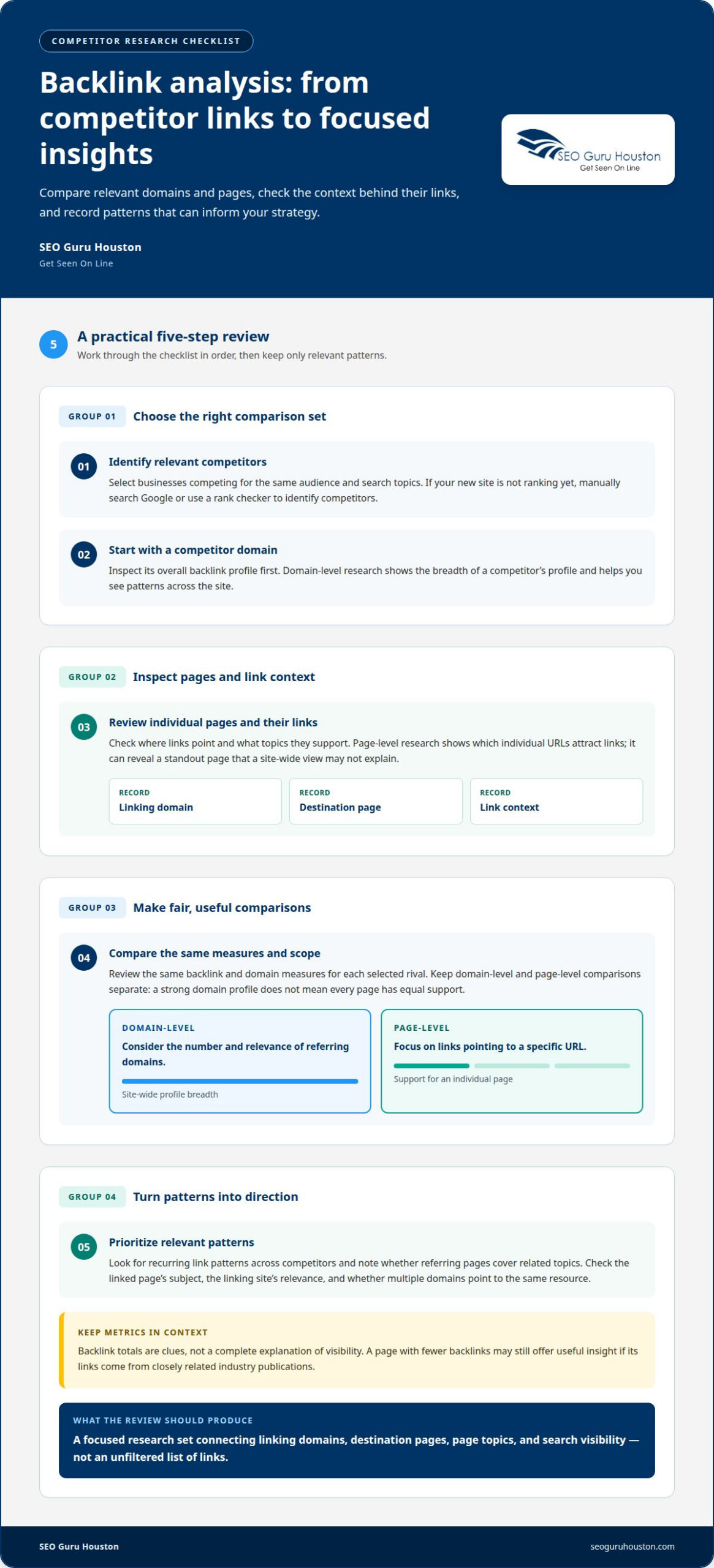
Competitor backlink research examines links pointing to a rival’s domain or a specific page. SEO competitor analysis tools organize backlink profiles so you can see which websites link to competing businesses and which pages receive those links.
Look beyond total backlink counts. Compare, for example, links to a competitor’s product page with links to its research article. Check whether referring pages cover related topics, and note linking patterns that recur across competitors. These patterns can reveal which resources attract attention in your market.
Domain-level research shows the breadth of a competitor’s backlink profile; page-level research shows which individual URLs attract links. Reviewing both helps distinguish a site-wide pattern from a single standout page. For each useful example, record the linking domain, destination page, and context. This creates a focused research set instead of an unfiltered list of links.
Comparing Backlink and Domain Metrics
Compare competitors using the same measures and scope. A domain-level review might consider the number and relevance of referring domains, while a page-level review focuses on links to a specific URL. Keep these comparisons separate: a strong domain profile doesn’t mean every page has equal support.
Semrush is one option analysts may encounter during research. Whichever platform you use, review the same fields for each competitor and interpret metrics in context. A page with fewer backlinks, for instance, may still offer useful insights if its links come from closely related industry publications.
Metrics are clues, not a complete explanation of visibility. Check the linked page’s topic, the linking site’s relevance, and whether multiple domains point to the same resource. If one competitor has links from trade associations and another has links from unrelated directories, totals alone won’t show that difference in context. Consistent comparisons make these distinctions easier to spot.
Conducting the Analysis Step by Step
If your new website isn’t ranking for target keywords, manually search Google or use a rank checker to identify competitors. For individuals developing digital skills to build websites and online income streams, platforms like EarnOnlineGuides offer practical tools and tutorials to establish a foundation. Choose relevant rivals, compare their domains and pages, and review their backlink sources. Then record patterns connecting links, page topics, and search visibility.
Use this sequence to keep the analysis practical:
- Identify businesses competing for the same audience and search topics.
- Choose a competitor domain, then inspect its overall backlink profile.
- Review individual pages to see where links point and what topics they support.
- Compare the same backlink and domain measures across each selected rival.
- Prioritize relevant patterns that can inform your own content and link strategy.
If several rivals attract links to detailed industry guides, for example, examine the subjects and audiences of those pages. This gives your next content review a concrete direction.
Keyword gap analysis
Keyword gap analysis compares the searches your site targets with the terms competitors rank for organically. SEO competitor analysis tools can reveal shared terms, missing topics, and keyword opportunities to research further.
To compare competitors’ keywords and organic rankings, use a research tool with keyword-gap reports and rank tracking. These features help identify terms competitors rank for and show where your site has limited visibility.
Finding Competitor Keyword Gaps
Start with a small group of relevant competitor domains and compare their ranking keywords with yours. A gap appears when a competitor ranks for a useful search term but your site has no relevant page or doesn’t appear prominently.
For example, a B2B software company might find competitors ranking for searches about implementation plans, integration needs, or industry-specific workflows. Review the search intent and the competing page before adding a term to your content plan. A gap is an opportunity to investigate, not an automatic instruction to publish another page.
Group findings by intent, such as researching a problem, comparing solutions, or evaluating a provider. Then decide whether an existing page can address the topic or a separate resource would work better. This helps prevent multiple pages from targeting the same keyword without a clear purpose.
Selecting Competitors by Shared Keywords
Shared keywords help distinguish true search competitors from businesses that merely sell similar products. Compare the domains appearing for your priority terms, then look for recurring overlap across searches. A company may compete with you for a particular topic without offering the same services.
For example, a manufacturer and a specialist distributor might both rank for a technical product query. Include both in your research if their pages attract the audience you want. Exclude sites that rank for an unrelated meaning or serve a different search intent, even if their business category seems similar.
Revisit your competitor set when keyword tracking shows different domains appearing for a new topic cluster. This keeps your analysis grounded in actual search results rather than market assumptions.
Keyword research can also reveal competitors’ PPC campaigns. A research tool may show a domain’s paid keywords, search ads, and available ad history. Compare these findings with organic rankings: a term targeted in both channels may indicate a campaign priority, while paid visibility alone may point to a separate advertising approach.
Use paid-search insights carefully. An ad appearing for a keyword doesn’t show how profitable the campaign is or what results it produces. Instead, record the keyword, landing page, and visible message or offer. If an ad leads to a product comparison page, for instance, note how its message differs from the company’s organic result.
Turn the findings into a practical brief: prioritize relevant gaps, assign each topic to a page, and track rankings after publication. For support translating keyword opportunities into a focused plan, explore SEO keyword strategy.
Competitor content and top-performing pages
Yes. SEO platforms can estimate competitor traffic, identify pages with organic visibility, and compare ranking content. Use these signals to choose which pages to review more closely, not as exact analytics.
Analyzing Competitor Ranking Content
Start with a competitor’s ranking page and note its topic, format, and search intent. For example, a B2B guide targeting integration questions may serve readers researching solutions, while a comparison page addresses active evaluation. Compare the page’s visible structure, headings, examples, and calls to action with the search results around it.
Then assess how the content answers the query. A competitor may explain technical requirements clearly but omit implementation steps. That gap can guide a more useful resource without copying the competitor’s wording or structure.
Content tools can help track ranking changes and identify pages gaining or losing visibility. Review the keyword, landing page, and ranking movement together. A page ranking for several related searches may cover a broader topic than its title suggests, so inspect its sections before deciding what to update.
Ad monitoring adds another useful layer. Note whether a competitor’s search ad promotes a guide, demo, or product page, then compare its message with the organic result. Together, these can show which content themes appear in both paid and organic search.
Identifying Top-Performing Pages
Use a competitor domain report to find pages associated with estimated organic traffic, ranking keywords, or visibility. Treat these as comparative clues, since they don’t reveal a competitor’s private analytics. Open a promising page and examine its format, topic depth, and internal links.
A product comparison page, for instance, may attract searches that a general service page misses. Record the page’s purpose and the stage of the audience it serves, then compare it with your own content inventory.
Technical and content SEO audits help explain differences in page performance. Review crawl accessibility, page titles, headings, and how directly the content answers its target query. If a competitor’s resource is clearly structured but uses outdated examples, an update could provide your audience with a stronger, more current answer.
ChatGPT can help organize notes or generate questions for a content review, but it doesn’t replace checking live pages and search results. Support each recommendation with specific evidence, such as a missing explanation or an unclear comparison.
Finding Content Opportunities
Turn page findings into a short list of opportunities. A competitor’s ranking article might cover product selection but skip implementation planning. That missing angle could inspire a practical checklist, decision guide, or technical explainer tailored to your audience.
Prioritize ideas by business relevance, search intent, and the quality of your existing pages. If a page already covers the topic, update it; if the intent differs, plan a separate resource.
After publication, track the page using its target query, ranking position, and organic visibility as review metrics. Revisit the competitor page when its content changes, then decide whether your examples, explanations, or structure need an update. This cycle turns competitor research into a focused content plan.
Choosing tools for market data or digital marketing analysis
Compare tools by keyword research, organic visibility, historical data, and update frequency. Competitor figures are estimates, not access to another company’s private analytics, so use them to identify patterns rather than measure exact performance.
Evaluating Data Coverage and Freshness
First, check whether a platform covers the markets, search engines, and domains relevant to your analysis. For example, a B2B company targeting US searches needs data suited to that market, not a broad overview that obscures its audience.
Review coverage of organic rankings, paid search, landing pages, and historical trends. Custom reports can help isolate a product category or region. Note the date on each report, then compare Google search results with the tool’s findings to understand what its data captures.
Historical competitor data can show how a page or keyword changes over time. Use it to spot patterns, such as a rival expanding organic coverage around a product topic. Check which historical data the platform provides and whether the same metrics are available for each period you compare.
Competitor survey data differs from search-platform data. A survey may report preferences or buying behavior, while keyword research provides estimates of search activity. Before combining survey findings with SEO metrics, check the survey’s audience, questions, and collection date.
Checking Data Update Frequency
Update frequency matters most when your decision depends on recent changes. Check how often the platform refreshes each dataset, since keyword positions, paid ads, and market estimates may update on different schedules.
For example, compare a saved report with a later one using the same domain, market, and keyword set. Record the report dates and any metric changes. This helps your team distinguish a competitor shift from a refreshed dataset.
For longer-term planning, historical views may be more useful than frequent snapshots. For a campaign review, fresher data may help identify recent changes. Match the update frequency to the decision instead of assuming every dashboard figure is current.
Assessing Feature Accuracy and Data Risks
Compare tools using the same domain, market, and keywords, then check whether their results show similar patterns. Differences may reflect data coverage, collection methods, or update timing, so don’t treat one platform’s estimate as definitive.
Competitor SEO data has limits: it can’t reveal private conversions, revenue, or campaign results. A high estimated traffic figure, for example, doesn’t prove that a page generates qualified leads. Treat metrics as directional evidence and don’t present estimates as verified business outcomes.
Before choosing a tool, test a focused workflow: examine one competitor, review its organic overview, and compare a few relevant queries with Google results. Check export options, historical views, and report labels. Choose the tool whose coverage and update schedule support the decisions your team needs to make.
Organic and paid competitor traffic analysis
Competitor traffic analysis brings organic rankings and paid search into one view. It helps show which search themes competitors target, how their ads support those themes, and where your own strategy may have opportunities.
Start with a competitor domain and review estimated organic traffic alongside its ranking keywords and landing pages. For example, a B2B company may see a rival appearing for searches about implementation, pricing, and product comparisons. Those signals help show which topics attract search visibility, but they don’t reveal the rival’s actual analytics or lead quality.
Next, review paid-search activity separately. A tool may identify a competitor’s paid keywords, ad copy, and landing pages. If an ad targets a product comparison query and leads to a dedicated comparison page, that pairing suggests a deliberate campaign structure, but doesn’t prove its conversion rate or business return.
Compare organic and paid coverage for the same search intent. A competitor appearing both organically and in an ad for a high-intent query is claiming visibility in both places. If your site appears only for an informational search, consider whether a relevant commercial page could better serve buyers evaluating solutions.
Create a simple analysis record for each target competitor: query theme, organic page, paid message, landing page, and observed changes over time. A campaign promoting an industry guide, for example, may make a different promise from an organic product page. Keeping these details together gives you a clearer view of positioning.
Traffic estimates are directional, not a substitute for private analytics. Differences between tools can reflect their data coverage, update timing, and estimation methods. Treat a sudden rise as a reason to inspect the relevant keyword or page, not as proof that a competitor gained a specific number of visitors. The same caution applies to paid activity: visible ads show market presence, not spend or results.
AI visibility adds another layer to the picture. Review whether your organization or competitors appear in AI-generated answers for relevant B2B questions, then compare the cited topics with organic search coverage. That visibility can reveal content areas worth examining, but it shouldn’t be confused with website traffic.
Use the combined findings to prioritize opportunities: improve a landing page for a valuable search intent, clarify its next step, or align paid messaging with the page’s content. A landing page built around search intent can give qualified visitors a more relevant path after they click.
SEO Guru Houston
SEO Guru Houston helps businesses turn competitor research into focused search and marketing priorities. When keyword gaps, content opportunities, or paid-search signals are difficult to translate into a clear plan, its comprehensive SEO Services, PPC Services, B2B Marketing, and Inbound Marketing strategies can support a coordinated approach.
Bring your goals and the questions your analysis raised. The next step is to discuss how those insights fit your business and where to focus your marketing efforts.
Contact SEO Guru Houston to discuss your competitor analysis goals.
Turn Competitive Signals Into Your Next Move
Competitor research is valuable when it informs a decision. Choose one business priority, then use SEO competitor analysis tools to identify evidence that can guide it. You might decide which audience to reach, which page to improve, or how organic and paid search should work together.
Keep the next step focused. A broad dashboard can produce endless observations, but a clear business question helps separate useful intelligence from noise. Connect your analysis to your team’s goals, resources, and customer journey. Then turn the strongest opportunity into a practical action and assess what you learn as the market changes.
If you’re ready to connect competitive insights with a focused marketing direction, contact SEO Guru Houston. Start a conversation about the decisions your analysis needs to support, and move forward with a sharper plan.
Frequently Asked Questions
What if I pick the wrong competitors?
Replace competitors when their search results no longer match your target audience or business goals. A large publisher, for example, may rank for an industry term but attract readers who aren’t potential buyers. Compare results for your priority topics, then focus on businesses whose pages serve a similar audience and intent. Keep separate competitor groups for distinct product lines or markets so unrelated rankings don’t distort your decisions.
What are the best SEO competitor analysis tools in 2026?
There’s no single best choice for every team; the right platform depends on your research tasks and reporting needs. Semrush is one option for competitive search analysis. Pair a specialist platform with manual Google searches to inspect actual result pages and search intent. Before adopting a tool, test whether its reports answer a real business question, such as which competing pages reach your target buyers.
How much do popular SEO competitor analysis tools cost?
Prices vary by platform and subscription plan, so compare the features and access included in each plan rather than relying on a generic estimate. Consider how many projects, reports, users, or historical views your team needs. A solo marketer tracking a few domains has different requirements from a team preparing regular client reports. Review current plan details before choosing, since prices and included features can change.
Which tools analyze competitor backlinks and referring domains?
SEO platforms with backlink analysis can report links at the domain or page level, including referring domains. Semrush is one tool to consider. To make the results useful, compare the same competitor pages and assess the relevance of linking sites, not just reported totals. Links from publications in your industry, for example, may offer more strategic insight than a larger count from unrelated sites.
What free SEO competitor analysis tools are available?
Free starting points include Google searches, a spreadsheet for recording observations, and Google Search Console for reviewing your own site’s search performance. Search results can help identify businesses appearing for the same queries, while Search Console provides information about your own property, not a competitor’s private analytics. Some SEO platforms may offer limited free access; check their current terms before relying on a specific feature.
How do you choose direct SEO competitors in a local market?
Search the service or product terms your customers use alongside the relevant location, then note which businesses appear repeatedly. Compare their audience, offering, and page purpose with yours. A nearby business isn’t automatically a search competitor if it serves a different need; a more distant business may compete for the same query. Separate local map results from standard organic listings, since they may show different competitors.

