
A desktop layout shrunk to fit a phone isn’t mobile-first. Mobile-first design for B2B sites starts with the smallest screens, prioritizes essential content and actions, then adds features as the layout scales up for tablets and desktops. The goal is a clear, usable experience on every screen, not a desktop page squeezed into a narrow column.
That matters because buyers may use a phone to research a solution, compare options, or reach out between meetings. If key information is hard to find, buttons are awkward to tap, or pages take too long to load, the experience can get in the way of a business decision.
This guide explains what mobile-first design means and how it differs from responsive design. You’ll also learn how device and network testing, navigation, page performance, and Google’s mobile-first indexing affect a B2B website, so you can see which design choices support usability and search visibility.
Key Takeaways
- Start with essential B2B content and actions on small screens, then expand the experience for larger devices.
- Test real phones and tablets across screen sizes, orientations, and network conditions to uncover usability issues.
- Make mobile navigation easy to scan and interactive controls comfortable to tap, while keeping key pathways visible on desktop.
- Optimize images, scripts, and page layouts to support faster loading and a smoother mobile experience.
- Review the mobile version of your site as part of both usability and search visibility, since Google uses it for indexing and ranking.
What is mobile first design?
Mobile-first design begins with a phone-sized experience, then expands it for tablets and desktop screens. For B2B teams, that means prioritizing essential information and user actions before adding wider layouts or extra features.
The approach matters because a buyer may first encounter a supplier on a phone, then continue research on a desktop. About 50% of B2B searches are conducted on smartphones. A mobile-first design for B2B sites makes the first interaction usable, while still leaving room for detailed product information and complex decision-making on larger screens.
Mobile-First and Responsive Approaches
Mobile-first defines the order of design decisions, responsive describes how layouts adapt to screen size, and adaptive uses selected fixed layouts. This distinction helps teams avoid treating a mobile view as a compressed desktop page. With mobile-first design, teams establish the essential content and journey first, then enhance the experience as more screen space becomes available.
Responsive layouts can adjust fluidly across device sizes, whether the design began on a phone or desktop. Adaptive design may instead use fixed layouts for widths such as 320, 480, 760, 960, 1,200, and 1,600 pixels. These approaches can overlap: a mobile-first site can also use responsive layouts. The key is to prioritize content and controls for each screen.
For example, a phone layout might place a product overview, specifications, and inquiry action in one clear column. A desktop layout can then show comparison tables or supporting details side by side. Simply stacking desktop elements may retain the content but hide the buyer’s next step.
Value for B2B Buyers and Decision-Makers
Mobile-first design helps B2B buyers find and use essential information on a small screen, which matters during early research and later vendor evaluation. A clear product summary, readable specifications, and accessible inquiry path make the experience easier to navigate without removing depth from the desktop version.
The cost of a B2B redesign depends on its scope, existing platform, content, integrations, and required layout changes; pricing is provided after a quote request. Common mistakes include shrinking desktop text, hiding key actions, and carrying every desktop element onto mobile without prioritizing. Measure results by comparing mobile traffic, form completion, qualified inquiries, and task success before and after launch, segmented by device and key landing page.
Mobile-first design prioritizes mobile users, while responsive design focuses on adapting layouts across device sizes. The goal is to prioritize the mobile experience rather than simply squeeze a desktop site onto a smaller screen. A mobile-first design process begins with smartphone and tablet basics, then adds features as more screen space becomes available.
For B2B website teams, this means adapting the presentation of content across devices rather than simply stacking desktop elements into one mobile column. The mobile-first layout should scale up intentionally, not be scaled down reactively. Starting with the mobile user experience gives teams a foundation for larger screens, where added space can support further features without losing the priorities established for mobile.
Usability testing across devices and network conditions
A design that looks sound in a browser preview can behave differently on actual devices. Test the pages buyers use across screen sizes, orientations, and network conditions.
Device-Specific User Intent
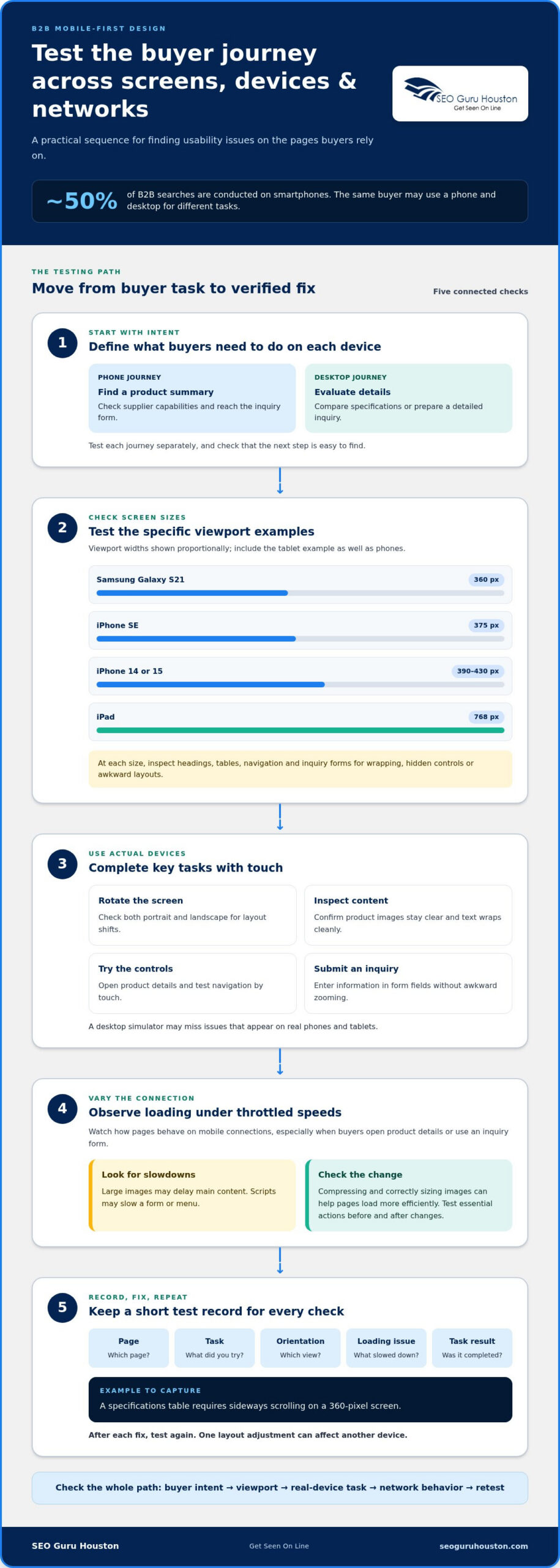
Device-specific intent means the same buyer may use a phone and desktop for different tasks. A mobile user might check a supplier’s capabilities between meetings, while a desktop user compares specifications or prepares a detailed inquiry.
Test those journeys separately, then check that each device supports the next step. For example, confirm that phone users can find a product summary and submit an inquiry, while desktop visitors can scan detailed technical information. Analytics can reveal which devices bring valuable conversions, helping you test against actual buyer behavior.
Cross-Device and Screen-Size Testing
Cross-device testing checks whether content and interactions work across different screens and hardware. It matters because a layout that fits one phone may wrap awkwardly or hide controls on another.
Use specific viewport examples: test an iPhone SE at 375 pixels, an iPhone 14 or 15 at 390-430 pixels, and a Samsung Galaxy S21 at 360 pixels. Include an iPad at 768 pixels, then rotate devices to catch layout shifts. Check headings, tables, navigation, and inquiry forms at each size.
Real-device testing reveals issues a desktop simulator may miss. Open important B2B pages on actual phones and tablets, then complete key tasks using touch. Check whether product images remain clear, text wraps cleanly, and form fields accept input without awkward zooming. Test portrait and landscape orientations, since screen space changes when users rotate a device.
Network conditions matter too. Use throttled speeds to simulate slower connections, then observe how pages load on mobile devices. Large images may delay the main content, while scripts may slow a form or menu. Compressing and correctly sizing images can help pages load more efficiently. Test essential actions, such as opening product details or submitting an inquiry, before and after making changes.
Keep a short test record for each device and connection condition. Note the page, task, screen orientation, loading issue, and whether the user completed the task. For example, record if a specifications table requires sideways scrolling on a 360-pixel screen. Re-test after each fix, because one layout adjustment can affect another device.
If testing identifies layout or interaction problems, focused website development and landing pages can help address them as part of the site experience.
Mobile-first testing can use throttled network speeds to simulate real conditions. Test mobile designs across network speeds, device orientations, screen sizes, and hardware capabilities, using real phones and tablets.
Navigation and touch-friendly controls
Mobile B2B navigation should make core pages and next actions easy to find and tap. The best mobile-first UX practices combine clear pathways, finger-friendly controls, and simplified menus without hiding essential routes on larger screens.
Touchscreen-Friendly Interfaces
A touchscreen-friendly interface supports tapping and scrolling without requiring precise pointer control. This matters when buyers need to review specifications or complete an inquiry on a phone. Make buttons distinct from nearby text links, use readable labels, and keep interactive elements visually clear. On a product page, separate actions such as “View specifications” and “Request information” so each has an obvious tap area.
Mobile Navigation
Mobile navigation organizes the most important pages into a compact, usable pathway. A collapsible menu can reduce clutter, while sticky navigation can keep a key action available as visitors scroll.
Prioritize core routes such as products, services, and contact. Don’t make buyers navigate several menu layers to reach an inquiry form. On larger screens, keep critical navigation visible instead of automatically hiding it behind a hamburger menu. Responsive design should adapt navigation to the screen, not remove useful options.
Touch Target Sizes and Spacing
Touch targets are the active areas users tap, and adequate size and spacing help prevent missed selections. Apple recommends a minimum touch target of 44 by 44 pixels; Google recommends 48 by 48 pixels.
Apply these recommendations to buttons, menu items, and form controls. Leave enough space between adjacent actions, such as “Download spec sheet” and “Contact sales,” so a tap doesn’t trigger the wrong one. Mobile form fields should have a minimum height of 40 pixels for easier interaction.
Review each high-value page by following a buyer’s route from entry to action. On a phone, check whether the menu opens clearly, the current location is understandable, and the main action remains easy to reach. A long B2B form can be split into manageable steps with progress shown, helping users understand what remains.
Dropdowns need special attention. A select menu containing more than 100 options can be difficult to scan on a phone. Typeahead or autocomplete lets users find a relevant choice by entering text. For example, a buyer selecting an industry can type its name instead of scrolling through a lengthy list.
Test the same navigation on mobile and desktop, then adjust each layout for its context. Thoughtful website development and landing pages can align menus, forms, and calls to action around the buyer’s next step.
Mobile site performance and search indexing
For mobile lead generation, keep forms focused, labels visible, and inputs easy to complete. Break complex requests into manageable steps, show progress, and make the main action clear. For example, a request form can collect contact details first, then ask for project specifics. This makes each step easier to understand on a smaller screen.
Performance affects how smoothly mobile users can reach that form. Compress and correctly size images, remove unnecessary assets, and defer scripts that aren’t needed immediately. Lazy-load non-critical content, and avoid large autoplay videos that compete with page content. These choices reduce the work needed to display the first screen, especially on slower connections.
Use Core Web Vitals to assess key parts of the mobile experience. A Largest Contentful Paint (LCP) time of 2.5 seconds or less is important for SEO ranking. The mobile Core Web Vitals checklist specifies an Interaction to Next Paint (INP) target of 200 milliseconds or less, and a Cumulative Layout Shift (CLS) target below 0.1.
Each metric points to a different issue. LCP measures how quickly the largest visible content appears, such as a product heading or hero image. INP reflects how quickly the page responds to actions, such as opening a hamburger menu. CLS tracks unexpected movement, such as a form shifting after an image loads. Stabilize image dimensions and limit script-heavy interactions to address these problems.
Google uses mobile-first indexing, so the mobile version of a site is central to how it indexes and ranks pages. Keep important text, links, metadata, and structured content available on mobile instead of hiding them in a separate version. A desktop page may display a full specification table while its mobile version collapses it. Ensure users and search engines can still access the same essential information.
Measure performance on key landing pages, not just the homepage. Compare loading and interaction behavior before and after changes, then review form completion alongside page performance. A faster page alone doesn’t prove that a lead-generation flow works. Check whether visitors can complete every field and submit successfully. Test changes on smaller screens, where cramped forms or delayed buttons can interrupt conversion.
Mobile optimization works best as an ongoing cycle: identify the slow or unstable element, make a targeted change, then retest the page. For example, if a large product image delays LCP, resize and compress that asset before changing unrelated scripts. This keeps improvements tied to measurable page behavior and the actions B2B visitors need to complete.
Mobile-first design and search rankings
Mobile-first design for B2B sites supports search visibility by making the phone experience fast, usable, and complete. Google uses mobile-first indexing, so the mobile version matters for how pages are indexed and ranked. The practical takeaway is clear: build mobile pages that preserve useful content and actions, not stripped-down copies of desktop pages.
Start with content parity. If a desktop product page includes specifications, pricing context, and internal links, make those details available on phones too. A mobile layout can present them in accordions or stacked sections, but visitors and search engines still need access. Hiding a product’s technical specifications from the mobile version, for example, can undermine buyer research and the page’s topical relevance.
Next, make each important page easy to find and understand. Use descriptive page titles, clear headings, and links that explain where they lead. A buyer searching for industrial filtration equipment should land on a page focused on that equipment, not a generic homepage. Connect related pages with contextual links, such as linking a product description to compatible applications.
Mobile usability influences what visitors can do after arriving from search. On phones, visual hierarchy should make the offer, supporting details, and next action easy to scan. Buttons need clear labels and enough space, while text must remain readable without zooming. If a buyer can’t find a request-information action beneath a long product description, search visibility may not translate into useful engagement.
Performance is part of that experience. A large hero image can delay the content visitors came to see, while heavy scripts can slow a menu or form. Compress images, load non-critical assets later, and test key pages on actual phones. Then check that the main heading, product details, and buttons appear and work as intended at different screen sizes.
Use search and behavior data together to find weak points. Compare mobile impressions, clicks, landing-page engagement, and completed inquiries for the same pages. If a page earns search visits but few visitors reach its form, review the content order, loading behavior, and mobile action path. Judge changes to buttons or page layouts by these outcomes, not appearance alone.
Mobile-first design for B2B sites isn’t a shortcut to rankings; it aligns indexable content with a usable buyer journey. Keep the mobile version complete, relevant, and easy to act on. For a site that needs stronger page structure and mobile usability, explore website development and landing pages.
SEO Guru Houston: Houston SEO Services
SEO Guru Houston can help connect mobile usability with the search and lead-generation goals behind your B2B website. Its professional SEO services address organic visibility, while comprehensive B2B marketing and inbound marketing support strategies for reaching business buyers and guiding them toward meaningful next steps.
Consider a focused review when mobile pages are difficult to find in search, attract visitors who don’t convert, or make important information hard to use. The review can align search priorities with the mobile experience, from landing-page content to inquiry paths. The right approach depends on your audience, website, and business objectives.
Contact SEO Guru Houston to discuss how mobile usability and search visibility fit your B2B marketing goals.
Turn a Better Mobile Experience Into Your Next Move
Make your next step focused: choose a B2B page that supports an important buyer decision, then align marketing and sales around what that page needs to accomplish. A mobile-first design strategy for B2B sites works best when usability, search visibility, and lead quality serve the same business goal. That shared direction helps teams prioritize improvements instead of treating design, SEO, and demand generation as separate projects.
SEO Guru Houston offers Houston SEO Services, Houston PPC Services, and Houston B2B Marketing to support businesses working toward stronger digital performance. If your team is ready to connect its website experience with its marketing priorities, contact SEO Guru Houston today.
Set a clear objective, make the buyer journey easier to act on, and keep improving with purpose. Your next opportunity can start with a more usable first visit.
Frequently Asked Questions
What is mobile-first design for B2B websites?
Mobile-first design for B2B websites starts by shaping essential buyer tasks for phones, then expands the experience for wider screens. For example, a procurement manager should be able to locate a product’s application details and share the page with colleagues without relying on a desktop. The method sets priorities around real buyer tasks, rather than simply shrinking a desktop page or removing information from the mobile version.
How should B2B websites prioritize content and navigation on mobile?
Put information that helps buyers make their next decision near the top, such as a clear product purpose, key specifications, and a relevant action. Keep secondary material available without letting it dominate the first screen. For example, a distributor’s product page can foreground compatibility and an inquiry option, with detailed documentation in clearly labeled sections. Use analytics to identify the pages and actions mobile visitors actually use.
What mobile-first website performance benchmarks should B2B sites meet?
Use these Core Web Vitals benchmarks: Largest Contentful Paint (LCP) at 2.5 seconds or less, Interaction to Next Paint (INP) at 200 milliseconds or less, and Cumulative Layout Shift (CLS) below 0.1. Assess these measures on key mobile landing pages, not just the homepage. A product page with a large visual or interactive quote form can behave differently, so investigate the page-level cause when a metric falls short.
How does mobile-first design affect B2B SEO and Google rankings?
Google uses mobile-first indexing, so it relies on a site’s mobile version for indexing and ranking. Keep valuable page content and crawlable links accessible there, including details that support a buyer’s search, such as product applications or technical documents. Mobile-friendly design can support search visibility through usability and performance, but it doesn’t replace relevant content or clear page organization. Review important landing pages on phones alongside search performance.

