
A website project doesn’t get clear just because development has started. Onboarding with a web development agency works best when you align business goals, project scope, priorities, and communication before design and development begin. That gives both sides a shared definition of what success looks like and a practical way to make decisions as the work progresses.
You already know that a strong website needs more than a polished design. It also needs the right content, functionality, and user experience for your business. The challenge is turning those priorities into specific expectations, then keeping the project moving when feedback, decisions, or materials are delayed.
This guide explains how to set project goals, define scope and milestones, and tailor expectations to your needs. You’ll also learn how to organize communication, give useful feedback, and address onboarding challenges before they disrupt progress. Start with alignment, keep everyone informed, and build toward a website that supports your business.
Key Takeaways
- Use the first meeting to connect business priorities with clear website goals, project requirements, and success measures.
- Set expectations early by defining scope, deliverables, milestones, feedback responsibilities, and how changes will be handled.
- Keep progress visible by surfacing delays quickly, assigning next steps, and making feedback deadlines clear.
- Centralize project communication and use reminders so decisions, files, and updates don’t get lost across channels.
- Align the contract and statement of work with the agreed scope, communication process, and launch responsibilities.
Initial client meetings and goal identification
Before signing, ask how the agency identifies goals, gathers requirements, organizes project communication, and collects assets. Experienced web design and development agencies such as ThinkTank Creative establish structured onboarding workflows to guide clients through these initial stages. A clear process explains who participates, which decisions come first, and how your team stays informed.
-
Hold Discovery Meetings and Gather Requirements
Bring the people who understand your business, customers, and website priorities to the discovery meeting. Ask the agency to turn the discussion into goals, required functionality, content needs, and constraints. For example, distinguish a goal such as increasing qualified inquiries from a feature such as adding a contact form. Confirm how requirements will be documented, and avoid starting design while key decisions remain unclear.
-
Collect Client Questionnaires and Assets
Complete a focused questionnaire about your audience, products or services, brand preferences, existing website, and desired outcomes. Share logos, brand guidelines, written content, and other project assets through the project’s secure sharing method. Prepare required materials at least one week before the agreed start date. Identify missing items and assign an owner to each, so asset delays don’t become hidden blockers.
- Translate goals into project priorities. Ask the agency to connect each business goal with a website requirement and a way to assess progress. If easier online product discovery is a priority, discuss navigation, page content, and the customer journey together. Separate essential launch requirements from later improvements. This makes trade-offs clear when scope, timing, or available content affects the first release.
- Set up project management and client access. Agree on one project portal or central workspace for tasks, files, decisions, and updates. Confirm who can access it, where feedback belongs, and how approvals are recorded. A shared project record helps prevent conflicting instructions across emails and meetings. Ask how a task moves from assignment to review, so responsibilities are clear before work begins.
- Build satisfaction into the working relationship. Agree on a regular meeting rhythm, named contacts, and a way to raise concerns. Ask how the agency will record decisions and communicate progress between meetings. After each discovery session, review a concise summary of goals, requirements, and open questions. Correct misunderstandings early; an agreed record gives both teams a useful reference and supports a constructive partnership.
Setting expectations and personalizing onboarding
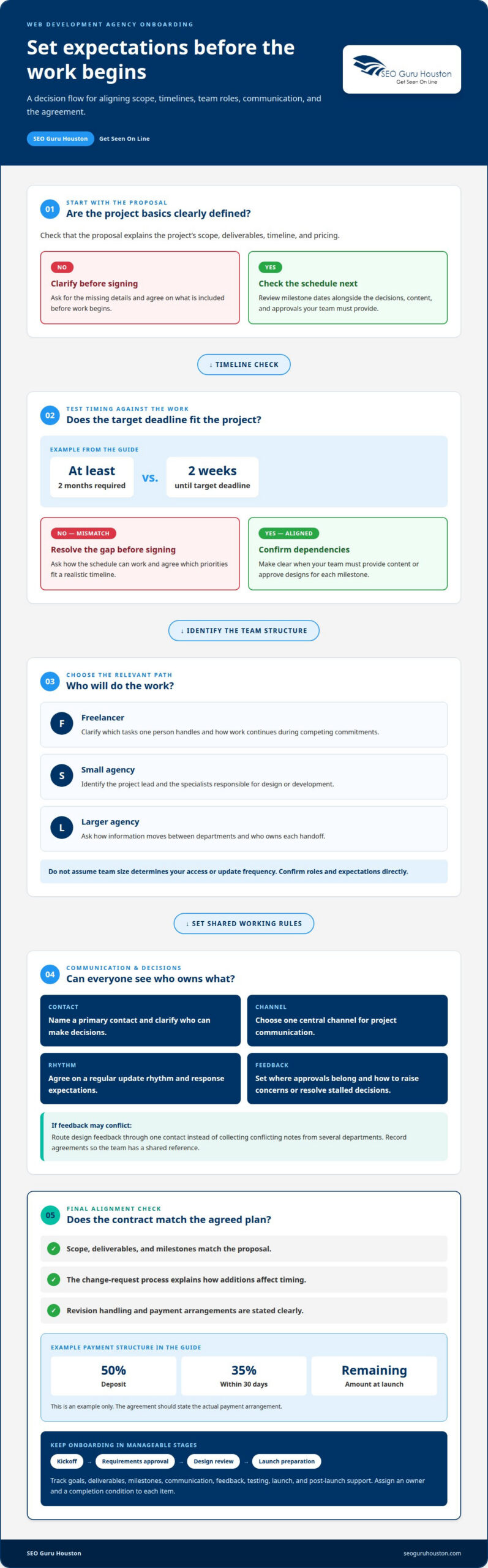
Freelancers may combine project roles, while small agencies often divide tasks across a compact team. Larger agencies may use more formal handoffs, so clarify who owns each decision and update.
-
Agree on Expectations and Communication
Choose a primary contact, a central channel, and a regular update rhythm before work begins. Define response expectations, where approvals belong, and who can make decisions. For example, route design feedback through one contact instead of collecting conflicting notes from several departments. Record these agreements so everyone knows how to raise concerns and resolve stalled decisions.
-
Set Project Expectations and Timelines
Ask for a proposal that defines project scope, deliverables, timeline, and pricing. Review dependencies alongside milestone dates, including when your team must provide content or approve designs. If a project requiring at least two months has a target deadline of only two weeks away, ask how the schedule can work. Address the mismatch before signing, and agree which priorities fit a realistic timeline.
-
Tailor Onboarding to the Agency Type
Match communication expectations to the team structure. With a freelancer, clarify which tasks one person handles and how work continues during competing commitments. At a small agency or small-business web design specialist like gomylo.com, identify the project lead and the specialists responsible for design or development. At a larger agency, ask how information moves between departments and who owns each handoff. Don’t assume team size determines access or update frequency.
-
Define Contract and Statement of Work Details
Make the contract and statement of work reflect the proposal’s scope, deliverables, milestones, and change-request process. Identify how additions affect timing and how revisions are handled. One example payment structure uses a 50% deposit, a 35% payment within 30 days, and the remaining amount at launch. The agreement should state the actual arrangement, not leave payment or scope assumptions open.
- Adapt the onboarding sequence to your team. Break information into manageable stages, such as kickoff, requirements approval, design review, and launch preparation. A checklist can track goals, deliverables, milestones, communication, feedback, testing, launch, and post-launch support. Assign an owner and completion condition to each item. For example, mark a design milestone complete only after the designated approver gives feedback. Gradual handoffs make responsibilities easier to follow.
Onboarding challenges and progress updates
Delays often begin with unanswered questions, missing feedback, or work that proves larger than expected. Track each blocker, its owner, and its effect on the next milestone.
- Log each blocker with an owner and next action. Record what is stuck, who can unblock it, and which deliverable depends on it. For example, note that homepage copy awaits approval before design review can proceed. Keep the entry in the shared project record, not only in meeting notes. This helps both teams distinguish an active task from a genuine dependency.
- Make feedback requests specific and time-bound. Ask for a decision on a defined item, such as approving a page layout or supplying missing product details. If feedback hasn’t arrived after four emails, consider the client’s circumstances and agree on a realistic next step. Don’t treat silence as approval. Record the pause and any resulting schedule change to keep expectations aligned.
- Reassess work when the actual workload differs. A project involving hundreds of pages that need individual edits requires a different review plan from a small set of landing pages. Break extensive work into batches, prioritize them, and share progress against each batch. If page count or editing effort changes, document the scope impact before proceeding on assumptions that could cause rework.
- Use progress updates to explain movement, not just activity. Each update should state what’s complete, what comes next, and which decision or asset is blocking progress. For example, “The navigation draft is ready; approval is needed before page templates proceed” is more useful than “Design is underway.” Name the responsible person and next milestone, and keep open questions visible until resolved.
- Escalate recurring delays through a clear process. Start with a direct reminder that names the outstanding item and its project impact. If the delay continues, bring the project lead and decision-maker together to choose whether to reschedule, reprioritize, or adjust scope. Record the decision in the project record. Documenting the resolution helps prevent the same issue from resurfacing in later reviews.
- Measure onboarding friction and improve the process. Track the time from initial contact to project start, as well as the percentage of clients completing onboarding steps on time. Compare project delays before and after changing the process. Review where delays cluster, such as asset delivery or approvals, then adjust instructions or reminders. These measures help distinguish a recurring process issue from a project-specific obstacle.
Automated workflows and centralized communication
Use one shared system to connect tasks, files, decisions, and reminders. A clear workflow shows who acts next and what could hold up progress.
- Map the workflow from kickoff to handoff. List each stage, its owner, and the event that starts the next task. For example, mark content review as ready once draft copy is uploaded. This makes dependencies visible instead of burying them in email. Keep the workflow focused on project actions, not notifications that add activity without moving a deliverable forward.
- Choose one central home for project communication. Use the client portal or project workspace as the record for tasks, approvals, files, and decisions. If a design comment arrives by email, transfer the decision into the relevant task. Team members can then find the current direction without searching separate inboxes or chat threads. Agree which channel handles urgent issues and which stores lasting project decisions.
- Automate reminders around clear deadlines. Set a reminder before an approval or asset deadline, and make the requested action explicit. For example, a notification can ask the reviewer to approve a homepage layout or leave specific comments. Include the task link and responsible person. Reminders work best when they point to one decision, rather than sending a vague “check in” prompt.
- Make every automated task actionable. Give each workflow item an owner, due date, status, and next step. A task marked “waiting for feedback” should identify the reviewer and specify what feedback is needed. Avoid assigning a task to an entire department without naming a decision-maker. Once the owner completes the action, update the status so the next person knows work can proceed.
- Separate notifications from project records. Use alerts to prompt action, but attach the final approval or decision to its task. For example, a chat message may notify the team that a page is ready, while the task records the approved version. This prevents a passing message from becoming the only evidence of a change. Keep project records readable, current, and easy to scan.
- Connect file handling to the workflow. Store each deliverable beside its task, using labels to distinguish drafts from approved files. A reviewer should be able to identify the latest homepage design without comparing email attachments. When a file changes, update the project record and notify the person responsible for the next review. This reduces avoidable confusion during handoffs.
- Review the workflow when a task stalls. Check whether the reminder reached the right person, the deadline was clear, and the requested action was specific. If approval is pending, follow up directly and record its effect on dependent work. Use recurring blockers to refine the workflow, such as clarifying who approves copy before design begins. Keep automation useful, not noisy.
What should a web development agency contract and statement of work include?
Use the agreement to turn the proposal into working terms. Clarify scope, payment, approvals, changes, and handoff before project work begins.
- Match the written scope to the agreed deliverables. Name the pages, functionality, integrations, and content responsibilities included in the project. For example, specify whether your team or the agency supplies product-page copy. Describe exclusions too, so a requested addition doesn’t become an assumed deliverable. Keep the statement of work consistent with the proposal and onboarding documents.
- Choose a payment model and document its terms. The agreement can define an hourly, per-project, or monthly-fee arrangement. State how the selected model applies, when invoices are issued, and which project events trigger payment. If work is divided into milestones, identify each one clearly. Avoid relying on verbal assumptions about what a payment covers or when it’s due.
- Set a change-request process for added work. Explain how either team proposes a scope change, who approves it, and how it affects timing and deliverables. For example, adding a new page type after design approval should prompt a documented review before development proceeds. This creates a clear decision point instead of letting unplanned tasks quietly expand the project.
- Define revision rounds and feedback boundaries. State which deliverables receive revisions and how the client submits consolidated feedback. For example, the agreement might include two rounds of homepage revisions. Clarify what counts as a revision versus a new direction, such as replacing an approved layout with a substantially different structure. Clear boundaries help reviewers provide focused comments and keep approvals traceable.
- Assign approval responsibilities and project contacts. Identify who can approve designs, content, and scope changes for each team. If a marketing lead approves copy while an executive approves the overall design, record those roles. Define how the agency documents approval and handles conflicting comments. A named decision-maker helps prevent work from stalling when several stakeholders review the same deliverable.
- Describe testing, launch, and handoff responsibilities. Specify which party prepares launch content, reviews the website, and coordinates the agreed handover. Include how to report issues found during testing and assign follow-up actions. For example, identify who signs off on the final page review before launch. Clear responsibilities keep important end-stage tasks from getting lost between teams.
- Review the agreement against the actual project plan. Compare the statement of work with the milestones, feedback process, and communication record. Resolve mismatches before signing, especially where an approval dependency could affect a launch date. For a clearer project starting point, align your website project goals with the work being commissioned.
SEO Guru Houston
SEO Guru Houston can help connect your website goals with a broader digital marketing strategy. Turn to the team when your project needs a clearer path from launch to visibility, qualified traffic, or business inquiries. Comprehensive SEO services, PPC services, B2B marketing, and inbound marketing solutions can support different growth priorities, depending on your audience and goals. Aligning those priorities early helps keep website decisions connected to the results your business wants to pursue. Share your objectives and discuss how SEO Guru Houston can support your digital marketing plans. Contact SEO Guru Houston.
Carry Your Website Goals Beyond Launch
Treat launch as the start of learning, not the finish line. Once people use the website, their responses can reveal which content, journeys, or calls to action deserve attention next. Set a future review point with your team, then use what you learn to shape further improvements. This keeps the site connected to changing business priorities instead of leaving it untouched after release.
A thoughtful approach to onboarding with a web development agency gives you a stronger foundation for that ongoing work. Keep the business outcome in view as you decide what to improve, and make each next step serve a clear purpose. If you’re ready to connect your website plans with broader growth goals, contact SEO Guru Houston. Move forward with focus, and keep building on what your website helps you learn.
Frequently Asked Questions
What is a Web Design Client Onboarding Process?
A web design client onboarding process is the organized transition from agreement to active project work. It establishes how the agency and client make decisions, exchange materials, and address new questions. For example, a team may document who approves homepage content before design begins. A well-defined process also clarifies what happens when project needs change, giving the working relationship a dependable structure beyond the initial meeting.
How Can Client Onboarding Contribute To Long-Term Client Satisfaction?
Good onboarding supports long-term satisfaction by clarifying responsibilities and decision paths before pressure builds. It also gives both sides a way to raise concerns while there’s time to respond constructively. After onboarding, an agency can survey clients about their experience and use feedback to improve future collaboration. Keep process feedback distinct from website performance reviews, which assess whether the finished site supports business goals.
How Do You Ensure Effective Communication During Client Onboarding?
Effective communication starts with clear messages that identify the decision needed, the person responsible, and the next action. Instead of sending “Please review the site,” request approval of a specific page or ask for particular corrections. Keep important decisions in a written project record, even when discussed during a call. This gives new team members a reliable reference and reduces the risk of acting on outdated instructions.
What are the typical steps in onboarding with a web development agency?
During onboarding with a web development agency, work commonly moves from preparation and an initial meeting to expectation-setting, design and development, review, launch, and handover. The sequence can vary with project requirements. Ask what must be complete before each stage begins. For instance, establish whether page content needs approval before design review. Clear transition points help everyone see when work is ready to advance.
What information and materials should a client prepare before onboarding?
Prepare a concise description of your audience, business priorities, products or services, and the actions you want visitors to take. Gather existing copy, approved brand references, logos, and examples of pages that reflect your preferences. Label files by purpose and identify who can answer questions about each item. Send requested materials at least one week before the agreed start date to give the team time to prepare.
How long does onboarding with a web development agency usually take?
There isn’t one standard onboarding duration for every website project. Timing depends on how quickly requirements become clear, materials are assembled, decisions are made, and stakeholders provide approvals. A focused project with ready content can move through preparation differently from one requiring extensive discovery or many internal reviews. Treat the agreed project start date as a planning milestone, and track unresolved prerequisites that could affect when active work begins.
What happens during a web development project kickoff meeting?
A kickoff meeting turns the signed project plan into a shared working approach. Participants confirm business priorities, key deliverables, decision-makers, dependencies, and how to raise changes. Use a real project example, such as deciding who supplies final product descriptions and who approves them. End with recorded owners and next actions. That record gives absent stakeholders a reliable starting point without relying on secondhand summaries.
What client responsibilities and approvals are required during a website project?
Clients generally need to provide agreed materials, answer project questions, review deliverables, and route approvals through authorized decision-makers. Duties should match the project agreement. For example, a marketing lead might approve page copy, while a business owner confirms the customer journey. Tell the team promptly if an approver changes or an item is delayed, so dependent work can be replanned rather than left stalled.

