
A video isn’t a ranking shortcut on its own. Optimizing video for search engines means making its topic clear and useful to search platforms and viewers, while improving its chances of appearing in video results. Video can also strengthen the page around it by adding relevant content and encouraging meaningful engagement.
A strong video needs more than a good upload. If its thumbnail gives viewers little idea of what to expect, or its title and description don’t match their intent, the video can be harder to discover and choose.
This guide explains how to improve video discoverability with relevant thumbnails, keyword-focused titles and descriptions, intent-led research, transcripts, and keywords that already trigger video results. Each element helps search engines interpret your content and helps viewers decide whether it meets their needs.
Key Takeaways
- Choose a clear, relevant thumbnail that sets accurate expectations and stands out in search results.
- Write descriptive video titles and descriptions that naturally use the terms your audience searches for.
- Match video topics to search intent, using keyword clues to shape content viewers are looking for.
- Place accurate captions or a transcript alongside relevant page text to make the video easier to understand and discover.
- Look for searches that already show video results to identify where video content can fit naturally.
1. Creating engaging, high-resolution thumbnails
A thumbnail is the visual promise attached to your video. Make it clear, relevant, and consistent with what viewers will actually see. For a product setup demonstration, show the product in use rather than choosing a generic image. A useful thumbnail helps people judge whether the video fits their needs before clicking.
Use an image sized 1280×720 pixels, a recommended video thumbnail size in the available platform guidance. A higher-resolution image can stay clear across different displays, while a relevant frame reinforces the topic. Keep the main subject easy to recognize, and avoid visual clutter that makes the message difficult to read at a glance.
Build the image around one clear idea. If the video explains a process, choose a frame showing the result or a meaningful step. If it answers a specific question, use a visual that reflects that question. A short phrase can add context, but it should support the image rather than repeat a long title. Keep every word accurate to the video.
Assess whether the thumbnail earns attention by comparing impressions with clicks and reviewing click-through rate in Google Search Console for the relevant page. In YouTube Analytics, review watch time and audience engagement alongside views. Search Console helps assess search visibility and page clicks, while YouTube Analytics shows how viewers respond after choosing the video.
Keep the promise honest. A dramatic image that implies a result the video never delivers may attract a click, but it creates a mismatch. Viewers who leave quickly have little reason to continue watching or explore the channel. Instead, align the thumbnail, video opening, and content around the same phrase or outcome, such as “assemble a desk” when the video demonstrates that task.
Promotion can extend a video’s reach beyond its original upload. Share it on relevant website pages, in a useful email, or through social channels where the topic fits. Each placement should explain why the video matters rather than simply repeat the same caption. For example, a product tutorial can accompany a page explaining how to set up that product.
On YouTube, watch time measures the total minutes people spend watching videos, and viewing time is a ranking factor. A strong thumbnail can attract the right viewer, but the content must deliver on its promise to hold attention. Review watch time and engagement together: clicks show initial interest, while continued viewing and interactions indicate whether the video sustains it.
2. Optimizing video titles and descriptions
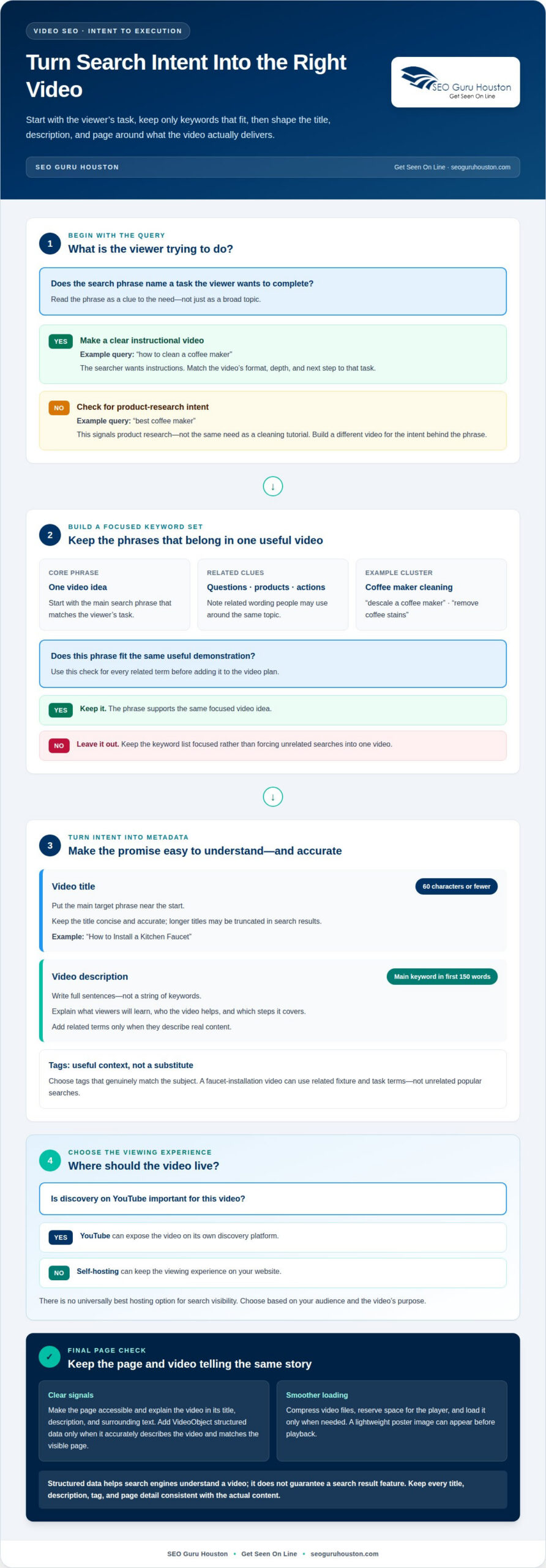
A video title and description help viewers and search platforms understand the content. Put the main target phrase near the start of a concise, accurate title. Keep titles to 60 characters or fewer, since longer titles may be truncated in search results. For example, “How to Install a Kitchen Faucet” tells viewers what the video demonstrates.
Write a description in full sentences, not a string of keywords. Explain what viewers will learn, who the video helps, and what steps it covers. Include the main keyword naturally within the first 150 words, then add related terms only where they describe real content. A faucet tutorial might mention tools, preparation, and installation steps.
Use relevant tags to help categorize the video, but don’t treat them as a substitute for a precise title and description. Research the phrases people use, then choose tags that genuinely match the subject. A video about faucet installation might use related terms for the fixture and task, not unrelated popular searches. Keep all metadata consistent with the actual video.
There isn’t one universally best hosting option for search visibility. YouTube can expose a video on its own discovery platform, while self-hosting can keep the viewing experience on your website. Choose based on your audience and the video’s purpose, then make sure the accompanying page clearly explains its subject.
To help Google index a video, make its page accessible and provide clear, relevant information in the video’s title, description, and surrounding text. Add VideoObject structured data when it accurately describes the video, and keep its details consistent with the visible page. Structured data helps search engines understand the content but doesn’t guarantee a search result feature.
Improve page speed by compressing video files, reserving space for the player, and loading the player only when needed. A lightweight poster image can appear before playback. These steps reduce unnecessary page weight and help prevent layout shifts as the player loads, supporting a smoother experience on mobile and desktop.
Common mistakes include using a vague filename as the title, leaving descriptions blank, repeating keywords unnaturally, or promising content the video doesn’t deliver. Each can create a mismatch with viewers’ expectations. Mention a service area only when the video genuinely relates to it, such as a local office tour, and keep the page details consistent.
When a video and its page need coordinated content and technical implementation, website video marketing can help align those elements with your search goals.
3. Video keyword research and search intent
A practical approach to optimizing video for search engines starts with the task a viewer wants to complete, not a broad topic. Someone searching “how to clean a coffee maker” wants clear instructions, while “best coffee maker” signals product research. Those needs call for different videos. Match the format, depth, and next step to the intent behind each phrase.
Build a focused set of relevant keywords around one video idea. Start with a core phrase, then note related questions, products, and actions people may mention. For a coffee maker cleaning video, related phrases might include “descale a coffee maker” and “remove coffee stains.” Keep the list focused: every phrase should fit the same useful demonstration.
Use YouTube search autocomplete to discover phrases people enter around a topic or brand. Type a broad subject, such as “coffee maker,” and review the suggestions. Add promising phrases to a working list, then group close variations by shared intent. Autocomplete can reveal natural wording, but the video still needs to answer the underlying question.
Search volume can help prioritize topics when reliable data is available. One example identifies “best wine under $20” at 300 searches per month. That figure illustrates a specific phrase and period, not a forecast for another keyword or market. Compare a phrase’s demand with its fit for your audience and the video you can produce.
Pay particular attention to how-to queries, as YouTube searches have increased for phrases such as “how to.” Turn a question into a practical video outline. For “how to prune a rose bush,” plan to show the tools, pruning steps, and finished plant. This structure serves the viewer’s goal instead of merely repeating the phrase.
Before settling on a topic, determine whether the wording describes a task, a comparison, or a decision. “How to choose running shoes” suggests guidance, while “running shoe comparison” calls for side-by-side differences. These phrases share a subject but require distinct content. Separate them when one video can’t fully satisfy both intentions.
Map each video idea to one primary phrase and a short cluster of related keywords. Record the intended viewer, the question answered, and the content promised. For example, a “beginner bread baking” video could focus on mixing dough and explain the relevant steps. This intent-led planning makes optimizing video for search engines more precise by tying keyword choices to useful content.
Keep the intent map close to the production plan. Before filming, check that the opening addresses the viewer’s question and each planned section supports the same task. If the outline shifts toward a different decision or comparison, consider making a separate video rather than adding loosely related material. This keeps the promise attached to the keyword clear from the opening through the conclusion.
YouTube search volume has increased for phrases such as “how to,” so consider these queries when assessing tutorial ideas. Treat the phrase as a starting point, then define the specific task the video will demonstrate and the level of detail the viewer needs. A relevant keyword cluster should clarify that promise, not broaden it until the video tries to answer several unrelated questions.
4. Adding relevant text and transcripts around videos
A thumbnail can influence whether a viewer clicks, while captions and transcripts make the video’s spoken content available as text. YouTube also uses text outside the video to index, categorize, and rank content, so the page surrounding a video matters.
Start with a short introduction explaining the video’s subject and value. For a tutorial on repotting a houseplant, describe the plant, the task, and what viewers will learn. Keep the page text specific to the demonstration. A generic paragraph about gardening provides less context than an explanation of the actual steps shown.
Add a transcript that follows the spoken content, including important steps and terminology. Search engines can read and index transcript text, helping them interpret the video’s subject. For example, a camera setup tutorial transcript can clarify model names, menu options, and actions that may be difficult to infer from images alone.
Captions help viewers as well as search engines understand the content. They let people follow dialogue when sound is unavailable or difficult to hear. Use accurate, synchronized closed captions so each line appears with the matching speech. If a speaker says “select portrait mode,” the captions shouldn’t say “select product mode.” Transcription errors can confuse viewers and misrepresent the video.
Keep the page, transcript, and video aligned. If a video demonstrates three ways to clean a keyboard, the introduction and transcript should cover those methods, not a different task. Organize longer transcripts into readable sections that follow the video’s sequence. This lets visitors scan for a step and watch the corresponding explanation.
Place the video beside text that explains its purpose. A product page could introduce a setup video with a brief overview, followed by instructions or a transcript below the player. The surrounding copy gives search engines additional context and helps visitors decide whether the video answers their question. Avoid adding unrelated text just to lengthen the page.
Review the finished page from a viewer’s perspective. Check that the transcript matches the audio, captions stay synchronized, and the introduction accurately describes the video. For a cooking demonstration, confirm that ingredient names and preparation steps are correct. These checks keep the text useful, consistent, and connected to the actual content.
For video SEO, thumbnails communicate the topic visually, while captions and transcripts make spoken information available as text. Together with relevant page copy, they help search engines interpret the video and give viewers more ways to understand its content.
5. Identifying keywords that trigger video results
Search results can reveal whether a query calls for a video response. If a phrase regularly shows video results, searchers may want a demonstration, explanation, or review. That visible format is a clue that the keyword may suit a video better than a text-only answer. A search for “how to tie a tie,” for example, naturally lends itself to a visual walkthrough.
Review results for each candidate phrase before planning production. Note whether videos appear prominently, what topics they cover, and how their titles describe the content. Then ask whether your video can answer the same need with a useful, accurate demonstration. If results show product comparisons, a general product introduction may not match the intent.
Choose keywords that describe what the video actually demonstrates and reflect how people phrase the need. An internal label such as “Model Q setup workflow” may mean little to a new viewer. “How to set up a Model Q” communicates the task more directly. Use the audience’s wording in the video topic and its supporting metadata.
Separate video-worthy queries from questions better answered another way. “What is compost?” could suit a short visual explanation, while “compost definition” may call for a concise written answer. The distinction depends on the search results and whether moving images add practical value. A video should make the answer clearer, not simply repeat text on screen.
Build a focused shortlist by grouping variations with the same intent. For a bicycle repair video, “fix a flat bike tire” and “replace a bicycle inner tube” may describe overlapping tasks. Check whether the video covers both clearly. If one phrase implies a different repair, make a separate video rather than forcing unrelated targets into one topic.
Use this quick review before committing to a keyword:
- Inspect the results: Look for video snippets and identify the subjects they address.
- Match the format: Decide whether a demonstration, comparison, or explanation best serves the query.
- Confirm the fit: Keep only phrases the planned video can answer directly.
- Use natural language: Choose wording an external viewer would recognize, not internal jargon.
Finally, connect the chosen phrase to a clear video outline. For “how to replace a showerhead,” plan to show the relevant steps rather than drifting into a broad plumbing overview. This alignment helps the title, video, and page serve one search need. A targeted website video marketing strategy can bring that planning together with the broader goals of video discovery.
SEO Guru Houston: Website Video Marketing
SEO Guru Houston offers Website Video Marketing for businesses that want video content to support search visibility and audience engagement. Use this service when you have useful video ideas but need to align them with keyword intent, relevant website content, and the search results you want to reach.
A coordinated approach connects each video’s topic with its page, supporting text, and discovery goals. This keeps videos from being disconnected from the broader search strategy. When video needs to work alongside wider organic visibility efforts, comprehensive digital marketing services can complement that focus.
Contact SEO Guru Houston to discuss how Website Video Marketing can support your goals.
Make Your Next Video a Strategic Move
Treat video visibility as an ongoing business decision, not a one-time upload. Choose a business objective, identify the audience action that supports it, and use that priority to decide which topics deserve production. A focused plan ties each new video to a purpose beyond views.
A disciplined approach to optimizing video for search engines can support a wider growth strategy. SEO Guru Houston offers SEO, PPC, and B2B marketing services, connecting video priorities with organic visibility, paid campaigns, and business-to-business goals where relevant. The right mix depends on what your company aims to accomplish, not on adding channels for their own sake.
Start with one clear priority, then let audience response inform your next decision. Ready to shape a video strategy around your business goals? Contact SEO Guru Houston to discuss the next step. Build with purpose and keep moving toward stronger search visibility.
Frequently Asked Questions
What role does video play in SEO?
Video can support SEO by making a page more useful and creating another path to discovery, though video itself isn’t typically a direct search ranking signal. For example, a software company could pair a troubleshooting page with a walkthrough, helping visitors see the fix rather than infer it from text alone. If another reputable site shares the walkthrough and links back, it may also create a backlink to the company’s website.
Why Video SEO Matters?
Video SEO matters because relevant videos can appear in video results and reach people who prefer watching a process rather than reading instructions. A home repair business, for example, can demonstrate a repair visually, while its written page supports visitors who need specifications or steps. The value comes from matching the format to the query and helping searchers decide whether the content meets their needs.
How does video SEO work?
Video SEO connects a video to a clear, indexable page and describes its subject consistently. Search engines can interpret page text, titles, captions, and transcripts, then assess their relevance to a query. For example, a camera tutorial should have a page and supporting text about the camera task, not unrelated brand copy. On YouTube, viewing time can also help the platform assess whether people keep watching.
How do I optimize video titles, descriptions, and tags for search?
Use a descriptive title that names the viewer’s task, then write a full-sentence description explaining the outcome and key steps. For a “clean a laptop keyboard” tutorial, describe the method and what the demonstration covers. Add tags for close variations, such as “keyboard cleaning” and “laptop maintenance,” rather than unrelated trending terms. Keep every metadata detail accurate and aligned with the video.
How should I optimize videos for local search?
Mention a service area only when the video genuinely relates to it, such as a local office tour or regional portfolio showcase. For instance, regional service providers like One Vision Photography | South Wales Wedding Photographer can reinforce local relevance by featuring specific venue locations in their titles, descriptions, and accompanying page copy while keeping all metadata consistent with the video.
How do I create and submit a video sitemap?
Submitting a video sitemap through Google Search Console can help search engines discover your video content.

